PAX SCREEN INFO FROM MANUAL: FYI for anybody that has the Pax Screen installed on their RAM.
PASSENGER SCREEN — IF EQUIPPED
Your vehicle may be equipped with a Passenger Screen
located above the glove compartment on the passenger
side of the vehicle. From the Passenger Screen, you
will be able to access similar features seen within the
Uconnect radio, such as media functions, Navigation,
and device management.
To begin using the Passenger Screen, push the Power
button to the left of the Passenger Screen display, or
press the Power button under the Controls tab within
the Uconnect system. The Passenger Screen can be
turned off by accessing the Control screen and pressing
the Power Off button.
You must link Bluetooth® headphones to the Passenger
Screen to begin listening to the system’s audio ð
page 226.
NOTE:
The Passenger Screen will need to be turned On each
time the vehicle is started, and the system will display
the Home screen upon boot up.
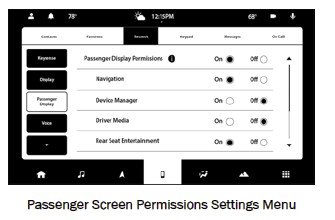
PASSENGER SCREEN PERMISSIONS
Through the Uconnect system, features within the
Passenger Screen can be activated and deactivated
through Passenger Screen Permissions. To access
Permissions, press the Vehicle button in the Menu Bar
and select the Settings tab. Then, press the Passenger
Screen Settings menu. Press the On button for the
Passenger Screen Permissions setting to activate
Permissions.
Passenger Screen Permissions Settings Menu
By default, the Passenger Screen Permissions setting is
set to “Off”, and the driver will need to give permission
for the different features.
MULTIMEDIA 223