Passenger Screen HELP

Disclaimer: Links on this page pointing to Amazon, eBay and other sites may include affiliate code. If you click them and make a purchase, we may earn a small commission.

kevvol

Junior Member
Joined
May 11, 2025
Posts
4
Reaction score
3
Location
Vriginia
Ram Year
2025
I cannot figure out how to connect anything to the passenger display. I have an HDMI cord and have tried to connect 2 different Android phones, the HDMI input will not detect a connection. I did some searching and tried disconnecting Samnsung DeX and using screen mirror and found the HDMI mode setting under Connections -> more connections on the phone... no luck. Do I really have to buy an Amazon Fire Stick? The dealer told me "connecting a phone is as simple as plugging it in"....

 

RamDiver

Senior Member
Joined
Jan 23, 2022
Posts
5,594
Reaction score
11,799
Location
Marlborough, Ontario Canada
Ram Year
2021 DS
Engine
Hemi 5.7
I cannot figure out how to connect anything to the passenger display. I have an HDMI cord and have tried to connect 2 different Android phones, the HDMI input will not detect a connection. I did some searching and tried disconnecting Samnsung DeX and using screen mirror and found the HDMI mode setting under Connections -> more connections on the phone... no luck. Do I really have to buy an Amazon Fire Stick? The dealer told me "connecting a phone is as simple as plugging it in"....


Have you checked the owner's manual?

.
 
OP
OP
K

kevvol

Junior Member
Joined
May 11, 2025
Posts
4
Reaction score
3
Location
Vriginia
Ram Year
2025
Took the truck to the dealer and they couldn't get the video playback to work either (even with cables they had "on hand"). As a last resort I bough a cable at Best Buy and it worked. Not sure what the difference is between this and what I bought on Amazon (other then being triple the price)...but it works. Hope this helps someone in the future. Gotta love the "did you check the manual" comments...always super helpful.


the furturecable 1.jpgcable 2.jpg
 

Adamcr68

Senior Member
Joined
Mar 28, 2020
Posts
817
Reaction score
1,539
Location
Lorton VA
Ram Year
2015
Engine
Hemifever 5.7
Took the truck to the dealer and they couldn't get the video playback to work either (even with cables they had "on hand"). As a last resort I bough a cable at Best Buy and it worked. Not sure what the difference is between this and what I bought on Amazon (other then being triple the price)...but it works. Hope this helps someone in the future. Gotta love the "did you check the manual" comments...always super helpful.


the furtureView attachment 567475View attachment 567476
Glad you got it figured out, but checking the owners manual is always sound advice, RamDiver has helped more members here than I could ever hope to list.
Realize you are new here, if you had said no I haven’t checked manual or didn’t have access to one he would’ve done his best to help you as he’s done for so many others.
Stick around for a while & you’ll see what I’m talking about.
 

turkeybird56

Military Vet 1976-1996 Retired US Army
Air Force Army Law Enforcement
Joined
Aug 2, 2018
Posts
25,607
Reaction score
56,240
Location
Central Texas
Ram Year
2019 Bighorn, 4 X 4, 3.21 rear, Bright Flame Red Pearl Coat, Mopar tonneau cover,Westin Bed rug
Engine
Hemi 5.7
Took the truck to the dealer and they couldn't get the video playback to work either (even with cables they had "on hand"). As a last resort I bough a cable at Best Buy and it worked. Not sure what the difference is between this and what I bought on Amazon (other then being triple the price)...but it works. Hope this helps someone in the future. Gotta love the "did you check the manual" comments...always super helpful.


the furtureView attachment 567475View attachment 567476
U would be amazed at the amount of folks come new into forum about an issue and Neva looked at/read manual and answer was right there IN Black and White. See post #7 this thread, from 2025 Manual. There seems to be a lot of different scenarios and settings that need to be enabled for the Pax screen to operate properly, WAY too much BS for me. I only have manual downloaded cause my Older kid has a 25 RAM, and sometimes he asks questions, and I have to go into research mode, LOL, since I have a lowly 2019 BH.

Cable: look same but integrity of wiring and bypass multi-directional Sometimes means something. Just like IPhone cables. Some work/some don’t U just Neva know.
 
Last edited:

RamDiver

Senior Member
Joined
Jan 23, 2022
Posts
5,594
Reaction score
11,799
Location
Marlborough, Ontario Canada
Ram Year
2021 DS
Engine
Hemi 5.7
Glad you got it figured out, but checking the owners manual is always sound advice, RamDiver has helped more members here than I could ever hope to list.
Realize you are new here, if you had said no I haven’t checked manual or didn’t have access to one he would’ve done his best to help you as he’s done for so many others.
Stick around for a while & you’ll see what I’m talking about.

Thanks for your support, Adam.

People sometimes don't want to hear certain answers, they want to learn about the secret effortless master solution. :cool:


To the OP, as you have learned, HDMI cables are not all equal or as functional as some of the others.
And, it's not about spending more money because I've used a cheapy HDMI cables successfully.

I would expect many of the lower-end cables at Best Buy would be functional.
You can look for the HDMI certification information to improve the likelihood of success, but I would be cautious about anything labelled as 'Premium' unless it's heavily discounted. :cool:

.
 

turkeybird56

Military Vet 1976-1996 Retired US Army
Air Force Army Law Enforcement
Joined
Aug 2, 2018
Posts
25,607
Reaction score
56,240
Location
Central Texas
Ram Year
2019 Bighorn, 4 X 4, 3.21 rear, Bright Flame Red Pearl Coat, Mopar tonneau cover,Westin Bed rug
Engine
Hemi 5.7
PAX SCREEN INFO FROM MANUAL: FYI for anybody that has the Pax Screen installed on their RAM.

PASSENGER SCREEN — IF EQUIPPED
Your vehicle may be equipped with a Passenger Screen
located above the glove compartment on the passenger
side of the vehicle. From the Passenger Screen, you
will be able to access similar features seen within the
Uconnect radio, such as media functions, Navigation,
and device management.
To begin using the Passenger Screen, push the Power
button to the left of the Passenger Screen display, or
press the Power button under the Controls tab within
the Uconnect system. The Passenger Screen can be
turned off by accessing the Control screen and pressing
the Power Off button.
You must link Bluetooth® headphones to the Passenger
Screen to begin listening to the system’s audio ð
page 226.
NOTE:
The Passenger Screen will need to be turned On each
time the vehicle is started, and the system will display
the Home screen upon boot up.
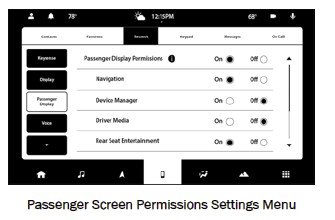
PASSENGER SCREEN PERMISSIONS
Through the Uconnect system, features within the
Passenger Screen can be activated and deactivated
through Passenger Screen Permissions. To access
Permissions, press the Vehicle button in the Menu Bar
and select the Settings tab. Then, press the Passenger
Screen Settings menu. Press the On button for the
Passenger Screen Permissions setting to activate
Permissions.
Passenger Screen Permissions Settings Menu
By default, the Passenger Screen Permissions setting is
set to “Off”, and the driver will need to give permission
for the different features.
MULTIMEDIA 223
pax screen 1.jpgpax screen 2.jpgpax screen 3.jpgpax screen 4.jpg
 
Back
Top