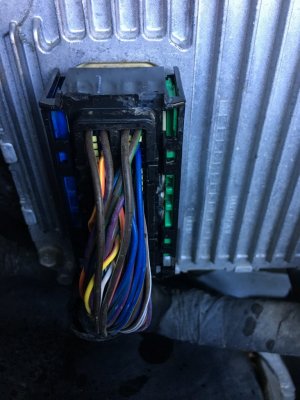
No worries, the clip isn't broken. There is a plastic bar (red if I remember correctly) on each side of the connect that mesh w/ the teeth on the release handle & slide up & down, locking the cable connector onto the pcm housing. You'll need to remove the small black OEM zip ties (use toenail clippers to snip easily w/out cutting wires). Don't replace these zip ties when finished w/ install, they're unnecessary & put tension on the connector housing. Now going off of memory here so directions may not be perfect but w/ a flashlight you'll see how the connector works. They hook on to pivot tabs & pop out of place easily which allowed the previously mentioned red lock bars to slip out of position. The result being, when you tried to release w/ the red lever, the cams that mesh had excess clearance allowing them to slip over each other which leaves the locking bars still locked in place. The fix, use a dental pick, the pointy end of a test light.... something thin & pointy to move the bars into the full release location (which is up). Use the connector that is properly releasing as a reference for proper lock tab position. Then reattach the connector body w/ lever back onto pivot points at bottom & the top will clip into place. Lever will now release connector. Do not force, when bars are properly lined up, it will release easily.... if there is resistance, you don't have the lock tabs in the right position. I know this reads a bit convoluted but using this info will make it easy to see what you need to do. Again, don't try & force or pry connector off, that's how you run into a real problem. If you have further issues, send a PM my way & I'll hook you up w/ my phone number to walk you through it. Once you fix this you'll know how to always do so..... be sure to help others out when you see them post as you have. The first impulse is to try & force it off, take your time & look at how it works, easy fix when you do.