
RA4 Retrofit issues

Disclaimer: Links on this page pointing to Amazon, eBay and other sites may include affiliate code. If you click them and make a purchase, we may earn a small commission.

AndrewM

Junior Member
Joined
Sep 14, 2020
Posts
7
Reaction score
3
Location
Usa
Ram Year
2013 Ram Express
Engine
5.7L Hemi
I have a 2013 Ram 1500 Express that i retrofitted a RA4 from a 2017 truck in to. I have also purchased and installed the more updated USB Hub (center console) with the sd card slot. Unfortunately when i select the media tab on my ra4, the only option i have is bluetooth, I cannot see the usb, aux nor the sd selections. Any help would be appreciated. I have alpha obd as well so if i need to flash anything i can.

 

Ricks Ram

Senior Member
Joined
May 1, 2015
Posts
4,411
Reaction score
3,415
Ram Year
2014
Engine
Hemi 5.7
I have a 2013 Ram 1500 Express that i retrofitted a RA4 from a 2017 truck in to. I have also purchased and installed the more updated USB Hub (center console) with the sd card slot. Unfortunately when i select the media tab on my ra4, the only option i have is bluetooth, I cannot see the usb, aux nor the sd selections. Any help would be appreciated. I have alpha obd as well so if i need to flash anything i can.
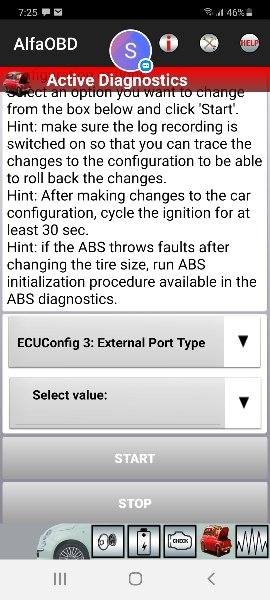
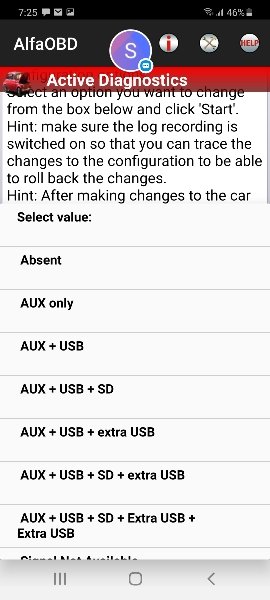
You may need to enable the codes in your BCM. The 15 and up RA4 radios will not always display the (External Port Types) unless the codes are enabled. Go into ECU Config#3 External Port Type and enable AUX,USB,SD.e46b30dfd7cdb10c858c059281442025.jpgcc21cd154834c3225d661a65c1c28b5f.jpg

Sent from my SM-G981U1 using Tapatalk
 
OP
OP
A

AndrewM

Junior Member
Joined
Sep 14, 2020
Posts
7
Reaction score
3
Location
Usa
Ram Year
2013 Ram Express
Engine
5.7L Hemi
I dont see that option under car config change- ecuconfig3

Is there anything ra4 related i need to enable as well to get that option?
 

Ricks Ram

Senior Member
Joined
May 1, 2015
Posts
4,411
Reaction score
3,415
Ram Year
2014
Engine
Hemi 5.7
I dont see that option under car config change- ecuconfig3

Is there anything ra4 related i need to enable as well to get that option?
No, you will need to enable it in the BCM so the radio can read the code from the BCM and it will show up on screen.

Sent from my SM-G981U1 using Tapatalk
 
OP
OP
A

AndrewM

Junior Member
Joined
Sep 14, 2020
Posts
7
Reaction score
3
Location
Usa
Ram Year
2013 Ram Express
Engine
5.7L Hemi
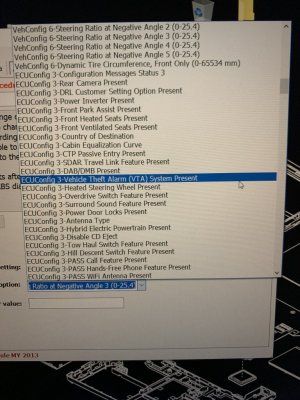
I cant find the setting in alpha obd. I went under bcm/car config change/ecuconfig3

70CC2779-8D39-444D-BC4A-5FCB8BDF8F93.jpeg
 

Ricks Ram

Senior Member
Joined
May 1, 2015
Posts
4,411
Reaction score
3,415
Ram Year
2014
Engine
Hemi 5.7
I just went in and checked under the 2013 options on my Alfa app that I keep updated and you are correct. It doesn't show up for some reason in that one but it does show up for the 2014. I also keep an extremely old version of the Alfa tool that was a really good one that didn't have many issues. I use it on most of the trucks I program. It's version 2.1.6.8. I checked and it's not on that version either. I'm not sure why it wouldn't be present for the 13 but is on the other years. I do know that the 13 and 14 RA3/RA4 radios showed all the ports automatically. The 15 and up radios needed the codes enabled. If your truck previously had the AUX and USB port they should have showed up on your screen automatically because your truck should have those options in your BCM. The SD card obviously would not. You may want to try doing a soft reset on the radio by pushing the volume and browse buttons simitaniosly until the radio restarts. It should reload the BCM configurations at that time. You may want to contact the developer and see why that feature is not available on the 13. I also noticed the navigation lockout is not available on the 13. It doesn't work when we set it anyway but it's interesting that it's not present.

Sent from my SM-G981U1 using Tapatalk
 
OP
OP
A

AndrewM

Junior Member
Joined
Sep 14, 2020
Posts
7
Reaction score
3
Location
Usa
Ram Year
2013 Ram Express
Engine
5.7L Hemi
I did a soft reset but no change. I also did not have the usb or aux option with my old media hub on the ra4. I could use the usb and it would play music from my phone when plugged in however i could not choose to switch between that and bluetooth, or aux for that matter. The media hub with sd will not play from the usb, it is just power. I will go ahead and inquire as to why it is missing for the 2013 alpha settings. Thanks for all the help.
 

Ricks Ram

Senior Member
Joined
May 1, 2015
Posts
4,411
Reaction score
3,415
Ram Year
2014
Engine
Hemi 5.7
I did a soft reset but no change. I also did not have the usb or aux option with my old media hub on the ra4. I could use the usb and it would play music from my phone when plugged in however i could not choose to switch between that and bluetooth, or aux for that matter. The media hub with sd will not play from the usb, it is just power. I will go ahead and inquire as to why it is missing for the 2013 alpha settings. Thanks for all the help.
Since you are using the windows version of the Alfa I have heard you can actually force it to connect under another year. I have the Android version so I've never tried to do it personally. You may want to post in the Alfa thread and see if anyone chimes in on using the windows version to see if you can connect under a different year. @Jimmy07 is very knowledgeable about both of the Alfa progrsms. He may be able to give some insight on it.

Sent from my SM-G981U1 using Tapatalk
 
OP
OP
A

AndrewM

Junior Member
Joined
Sep 14, 2020
Posts
7
Reaction score
3
Location
Usa
Ram Year
2013 Ram Express
Engine
5.7L Hemi
Since you are using the windows version of the Alfa I have heard you can actually force it to connect under another year. I have the Android version so I've never tried to do it personally. You may want to post in the Alfa thread and see if anyone chimes in on using the windows version to see if you can connect under a different year. @Jimmy07 is very knowledgeable about both of the Alfa progrsms. He may be able to give some insight on it.

Sent from my SM-G981U1 using Tapatalk

I just heard back from the devs over at alpha obd (just 1 hour response time is quite good imo). I was able to download a test version of the database provided to me by them. It essentially gave me access to all the settings that were missing on the 2013 model. I found the external port option changed it and after a soft reset of the radio everything was there.
For future reference to anyone with this issue the database site is https://www.alfaobd.com/alfaobd.db Just right click the page and save as "alphaobd.db". Then replace the original alpha obd database (typically C:\Program Files (x86)\AlfaOBD).--This is for the windows version however i am sure you can navigate on a similar path with android to replace your current database.--
Thanks for all the help Ricks Ram!
 

Ricks Ram

Senior Member
Joined
May 1, 2015
Posts
4,411
Reaction score
3,415
Ram Year
2014
Engine
Hemi 5.7
I just heard back from the devs over at alpha obd (just 1 hour response time is quite good imo). I was able to download a test version of the database provided to me by them. It essentially gave me access to all the settings that were missing on the 2013 model. I found the external port option changed it and after a soft reset of the radio everything was there.
For future reference to anyone with this issue the database site is https://www.alfaobd.com/alfaobd.db Just right click the page and save as "alphaobd.db". Then replace the original alpha obd database (typically C:\Program Files (x86)\AlfaOBD).--This is for the windows version however i am sure you can navigate on a similar path with android to replace your current database.--
Thanks for all the help Ricks Ram!
Glad you got it all figured out. I've enabled the port options on a few trucks including mine but none of them were a 2013 so I never noticed it wasn't present in the Alfa tool. I use the SD card a lot. It holds a ton of songs and is tucked out of the way. I just leave it on shuffle and let it play. Give it a try and you might like it. You will need to load the SD card on the Fat 32 format in order for it to work.

Sent from my SM-G981U1 using Tapatalk
 

rotwiler

Senior Member
Joined
Oct 20, 2017
Posts
1,019
Reaction score
517
Location
Washington
Ram Year
2021
Engine
5.7
Also, if you ever add on things like a oem trailer brake, you will want to download the recent version of the firmware for the radio. Then when you install(like the trailer brake) you put in the usb the stick with the firmware and it will automatically add it to the radio so you have the settings. I put a 15 ra4 in my 13, but should be same.
 
OP
OP
A

AndrewM

Junior Member
Joined
Sep 14, 2020
Posts
7
Reaction score
3
Location
Usa
Ram Year
2013 Ram Express
Engine
5.7L Hemi
Glad you got it all figured out. I've enabled the port options on a few trucks including mine but none of them were a 2013 so I never noticed it wasn't present in the Alfa tool. I use the SD card a lot. It holds a ton of songs and is tucked out of the way. I just leave it on shuffle and let it play. Give it a try and you might like it. You will need to load the SD card on the Fat 32 format in order for it to work.

Sent from my SM-G981U1 using Tapatalk
This was my main motivation to have this feature. I love bt but i always seem to end up in places with no service. Its just easier and cleaner to have the music tucked away. I have a 64gb card with fat32 i have setup. In the one day i have had it, it is a gamechanger.
 
Back
Top