
Service Manual- impossible data

Disclaimer: Links on this page pointing to Amazon, eBay and other sites may include affiliate code. If you click them and make a purchase, we may earn a small commission.

KC15842

Member
Joined
Dec 16, 2018
Posts
36
Reaction score
20
Location
So Cal
Ram Year
2018
Engine
Cummins
I purchased a Mopar Tech Authority service manual on CD back in 2018 for my 2018 RAM 2500. Well don't you know it you can no longer access the data because Internet Explorer is obsolete and we ran out of work arounds. Any ideas out there to access the data? I ran into an issue with my TPMS and can't find the system info. Thanks


Its very frustrating to buy the information only to have these mothers find another way to get more $$.

 

alpinegreenneon

Senior Member
Air Force
Joined
Mar 19, 2018
Posts
297
Reaction score
431
Location
South East Wisconsin
Ram Year
2018
Engine
3.6
I recently had the same problem but was able to get it to work. The problem is Microsoft and Edge. Copy the whole CD to it's own folder to your hard drive. I named the folder RAM FSM. Open Edge and go to the 3 dots upper right. Scroll down to More tools, then Internet Options. Internet properties screen, select Security tab select Custom level. Enable Active X controls and plugins.
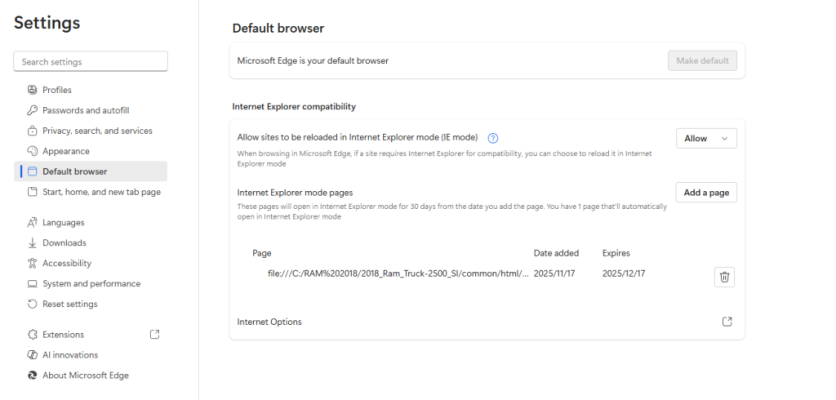
Back to the 3 dots, select Settings. Scroll down to Default Browser. Allow Internet Explorer compatibility. Where it say says Add type in:
file:///C:/RAM%20FSM/common/html/frontPage.htm
Use whatever drive letter has your RAM FSM folder. I never use Edge for anything else and made that the home page. I leave it minimized all the time. I use Firefox for my regular browsing. I changed the Edge icon to the Ram icon (ram.ico). Hope this works for you and that I didn't miss anything.
 
OP
OP
K

KC15842

Member
Joined
Dec 16, 2018
Posts
36
Reaction score
20
Location
So Cal
Ram Year
2018
Engine
Cummins
I recently had the same problem but was able to get it to work. The problem is Microsoft and Edge. Copy the whole CD to it's own folder to your hard drive. I named the folder RAM FSM. Open Edge and go to the 3 dots upper right. Scroll down to More tools, then Internet Options. Internet properties screen, select Security tab select Custom level. Enable Active X controls and plugins.
Back to the 3 dots, select Settings. Scroll down to Default Browser. Allow Internet Explorer compatibility. Where it say says Add type in:
file:///C:/RAM%20FSM/common/html/frontPage.htm
Use whatever drive letter has your RAM FSM folder. I never use Edge for anything else and made that the home page. I leave it minimized all the time. I use Firefox for my regular browsing. I changed the Edge icon to the Ram icon (ram.ico). Hope this works for you and that I didn't miss anything.
Great details for the challenged. Question, adding the file is that in the ADD PAGE?
 
OP
OP
K

KC15842

Member
Joined
Dec 16, 2018
Posts
36
Reaction score
20
Location
So Cal
Ram Year
2018
Engine
Cummins
When you select Default Browser which you find on the left side when you are in Settings, there should be two boxes under Internet Explorer compatibility:
Allow
Add a page
That's what I did. I may have mentioned as of last week I opened the FSM just fine in the IE mode. I can go through all of the same adjustments to allow IE to operate but its just not there. I appreciate the tips.
 

alpinegreenneon

Senior Member
Air Force
Joined
Mar 19, 2018
Posts
297
Reaction score
431
Location
South East Wisconsin
Ram Year
2018
Engine
3.6
There was a Microsoft update that messed it up. It probably took me more than a half hour to get it running. Perhaps try googling and the AI may help like it did for me. I think I also enabled XML somewhere.
 

jawzs2

Senior Member
Air Force
Joined
Mar 24, 2014
Posts
2,898
Reaction score
5,354
Location
South Jersey
Ram Year
2010, 2014
Engine
1500, 3500
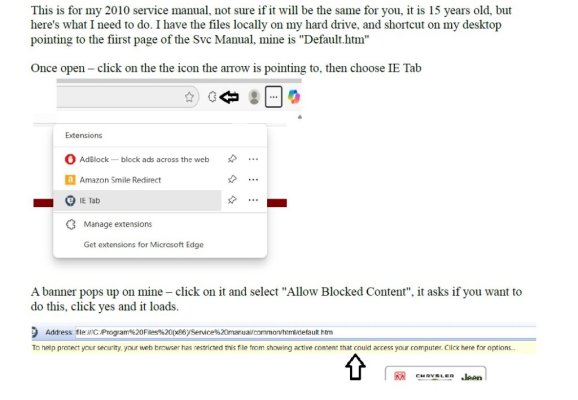
Microsoft also has an extension you can download and add that lets you open a web page in IE. It's what I use to open my 2010 FSM, only way it works anymore.

It used to be free - now it looks like you need to buy it, like Bill needs more $ - sigh
 

RamDiver

Senior Member
Joined
Jan 23, 2022
Posts
5,570
Reaction score
11,760
Location
Marlborough, Ontario Canada
Ram Year
2021 DS
Engine
Hemi 5.7
Microsoft also has an extension you can download and add that lets you open a web page in IE. It's what I use to open my 2010 FSM, only way it works anymore.

It used to be free - now it looks like you need to buy it, like Bill needs more $ - sigh

If you can identify the extension or plug-in, there's a good chance of finding it for free online. :cool:

.
 

RamDiver

Senior Member
Joined
Jan 23, 2022
Posts
5,570
Reaction score
11,760
Location
Marlborough, Ontario Canada
Ram Year
2021 DS
Engine
Hemi 5.7
Good idea - here's what I have


I avoid using Edge and most MS junk besides my modified windoze 10 laptop.
I did find this for Edge users.


Or Chrome users;


Or FireFox users;


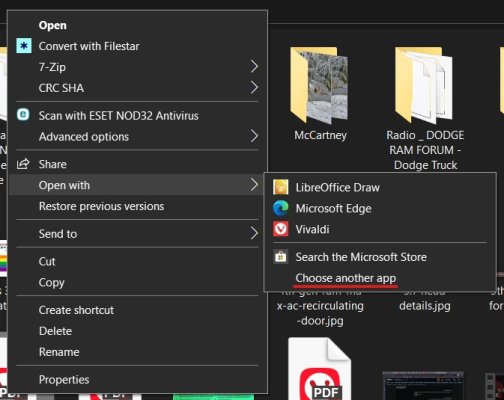
You may also download and install free versions of both 32-bit & 64-bit IE, just not from microsoft. And then right-click...

open with.jpg

.
 
Last edited:

RamDiver

Senior Member
Joined
Jan 23, 2022
Posts
5,570
Reaction score
11,760
Location
Marlborough, Ontario Canada
Ram Year
2021 DS
Engine
Hemi 5.7
Could someone save it to a pdf file and share it?

The search utility in the upper-right corner is your friend.

There are a few other pdf service manuals in this thread linked below, but Ian has linked many of them here in this post and elsewhere.


.
 
OP
OP
K

KC15842

Member
Joined
Dec 16, 2018
Posts
36
Reaction score
20
Location
So Cal
Ram Year
2018
Engine
Cummins
Microsoft also has an extension you can download and add that lets you open a web page in IE. It's what I use to open my 2010 FSM, only way it works anymore.

It used to be free - now it looks like you need to buy it, like Bill needs more $ - sigh
I tried and my son in law tried, no luck getting it to run. If you don't mind and you have the time I would appreciate the detailed steps to get it to run, Its a ******, I actually purchased the CD and now I can't open it. About a year ago I copied maybe a third of the file thinking this may happen. Dummy me never finished. Thanks
 
OP
OP
K

KC15842

Member
Joined
Dec 16, 2018
Posts
36
Reaction score
20
Location
So Cal
Ram Year
2018
Engine
Cummins
You guys are good!!! Thanks for posting possible solutions. I finally got it by coping the files to my c drive and adding the path to the IE pages. Thanks!!
 
Back
Top