
OTRATTW Lightbar switch

Disclaimer: Links on this page pointing to Amazon, eBay and other sites may include affiliate code. If you click them and make a purchase, we may earn a small commission.

Ram83

Senior Member
Joined
Nov 21, 2014
Posts
225
Reaction score
14
Location
British Columbia, Canada
Ram Year
2014 Ram Sport
Engine
5.7 Hemi

darendeath

Member
Joined
May 24, 2015
Posts
45
Reaction score
3
Ram Year
2014
Engine
V6
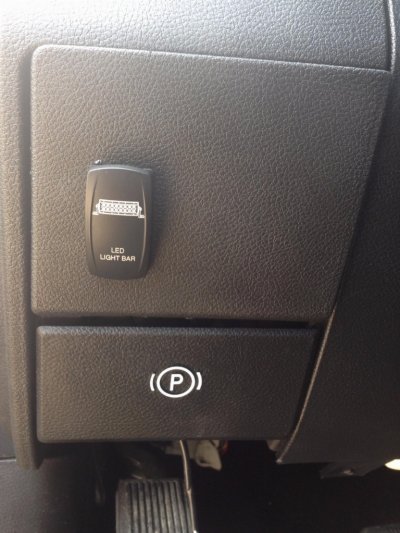
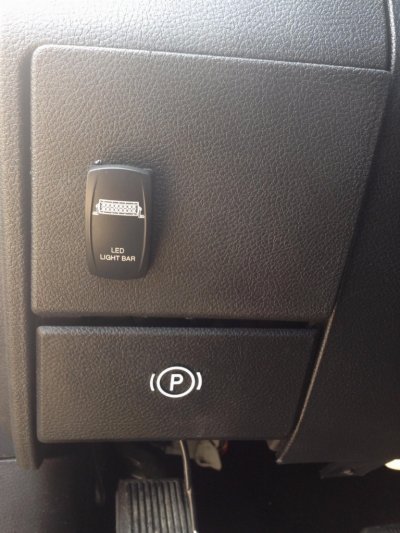
You want to package, if you want to see the words it's upper and lower led switch.
I got the white because it looks factory. You will need to add some jumper wires too.
 
OP
OP
Ram83

Ram83

Senior Member
Joined
Nov 21, 2014
Posts
225
Reaction score
14
Location
British Columbia, Canada
Ram Year
2014 Ram Sport
Engine
5.7 Hemi
You want to package, if you want to see the words it's upper and lower led switch.
I got the white because it looks factory. You will need to add some jumper wires too.

so did you just get the rocker? was wiring it easy?
 

Galion

Senior Member
Joined
Dec 13, 2014
Posts
311
Reaction score
118
Location
Edmonton, AB
Ram Year
2013
Engine
5.7 Hemi
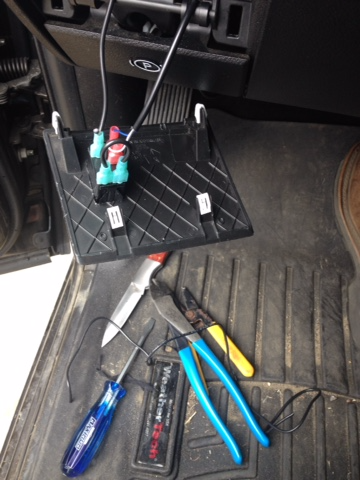
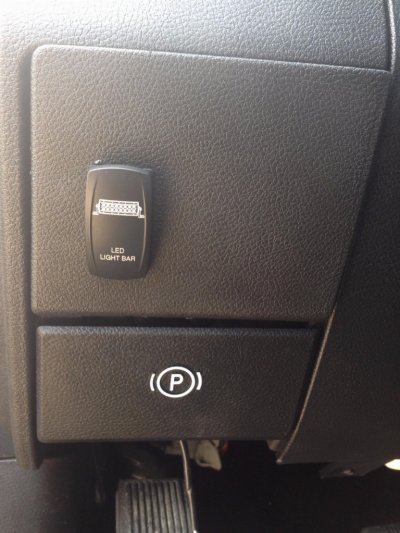
That's the same switch I have in mine:
AueeWrV.jpg
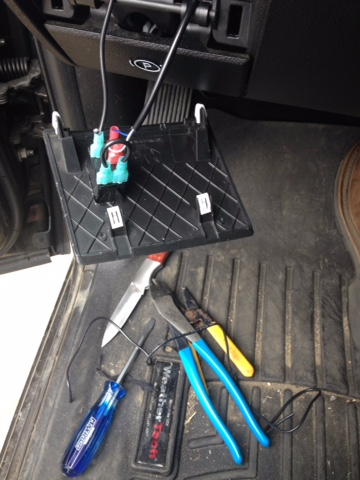
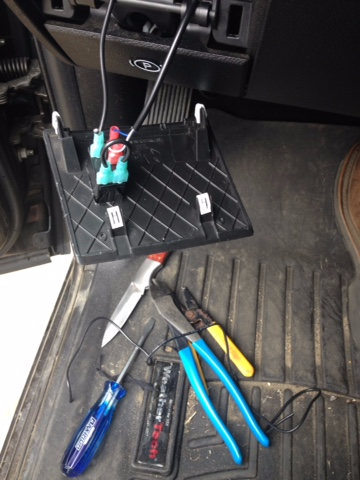
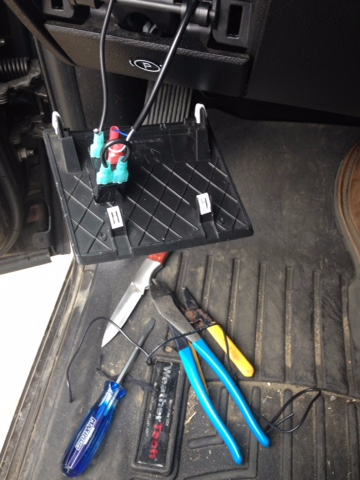
Here's how the wiring for it looks. Pretty simple, you'll have to check which one of the three wires from your lights is ground (should be black), that gets joined with the jumper you can see, the other two, you can just use trial and error to figure out which goes to which tab (the two ones with red connectors in the pic), as for the other wire (top left in the picture) that splices into the dash lights wire so the switch dims with the dash lights. The switch comes with a wiring diagram that shows which pins are which on the switch.
Mz78e6e.png
 

brandonjansen

Senior Member
Joined
Feb 14, 2013
Posts
1,701
Reaction score
1,020
Location
Abbotsford, BC, Canada
Ram Year
2012 Ram 3500 Laramie Limited
Engine
6.7 Cummins - Tuned and Deleted
You need the switch and rocker. The switch is the part that actually does all the work and controls everything. The rocker is the cover that goes over top (that actually says "LED LIGHT BAR" on it).
 

SilverStreak88

Senior Member
Joined
Jul 20, 2015
Posts
3,950
Reaction score
1,610
Location
Houston, Texas
Ram Year
2007
Engine
5.7 Eco Gasser
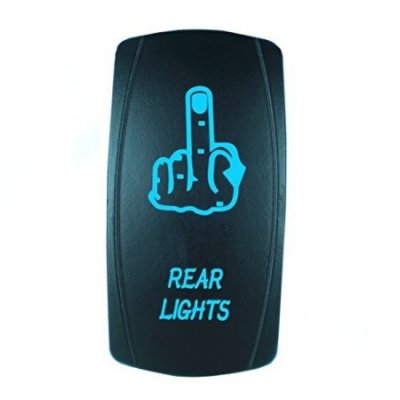
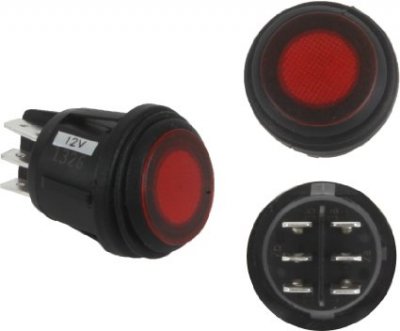
I'll be installing several switches like this soon... this is the switch I'm getting for my rear light - pretty immature, but I could care less.

41GGFCx5d5L._SY450_.jpg
 
OP
OP
Ram83

Ram83

Senior Member
Joined
Nov 21, 2014
Posts
225
Reaction score
14
Location
British Columbia, Canada
Ram Year
2014 Ram Sport
Engine
5.7 Hemi
That's the same switch I have in mine:
AueeWrV.jpg
Here's how the wiring for it looks. Pretty simple, you'll have to check which one of the three wires from your lights is ground (should be black), that gets joined with the jumper you can see, the other two, you can just use trial and error to figure out which goes to which tab (the two ones with red connectors in the pic), as for the other wire (top left in the picture) that splices into the dash lights wire so the switch dims with the dash lights. The switch comes with a wiring diagram that shows which pins are which on the switch.
Mz78e6e.png

did you have to make that jumper? do you have any closer pics plaese? what wire did you splice for dashlights...thanks man
 

SitKneelBend

Moderator
Staff member
Member Relations Specialist
Moderator Supporting Member Marine Corps
Joined
Jan 8, 2015
Posts
10,935
Reaction score
7,589
Location
St. Louis
Ram Year
2014
Engine
3.6 Pentastar
I'm doing this today with this switch.

uploadfromtaptalk1444669662915.jpg

Any help you could offer would be appreciated. I want the first position to be on, middle off and bottom auto on with high beams. I have everything wired up and working on a normal on off switch and have tested the auto on with highs successfully, I just need to know how to wire in the new switch.

Sent from my HTC One using Tapatalk
 

Mpgrimm2

Senior Member
Supporting Vendor Navy Badge
Joined
Mar 30, 2014
Posts
6,569
Reaction score
5,156
Location
SC
Ram Year
2022 Ram 1500 (5th Gen)
Engine
5.7L
I don't know if it will help you out or not (depends on what you are asking) but that looks like a DPDT switch (double pole double throw), with essentially a left double pole switch and a right double pole switch.

NO= normally open (output)
C= common (Supply voltage)
NC= normally closed (NA)
---------------------

Left .............. Right

NO1.............. NO3 (switch down)
C1 ................. C2
NO2 ............. NO4 (switch up)

Choose one side or the other, i.e. 12v on C1, AUTO on NO1, and ON on NO2.

I you need more outputs from the same switch you can jumper C1 & C2, and use the NO3 & NO4 the same way.

Sent from my LG G4 on Tapatalk.
 
Last edited:

SitKneelBend

Moderator
Staff member
Member Relations Specialist
Moderator Supporting Member Marine Corps
Joined
Jan 8, 2015
Posts
10,935
Reaction score
7,589
Location
St. Louis
Ram Year
2014
Engine
3.6 Pentastar
It does help with my guestimations. Currently I have the 3 post version of this same switch. I purchased this switch to add the auto with highs functionality. I have four wires total (the high beam tap is currently not plugged into the switch). I'm wondering if I can plug this wire in and it will work, or if I need to jumper one of the wires from the other side of the switch.

Sent from my HTC One using Tapatalk
 

BlownGP

Senior Member
Joined
Feb 10, 2013
Posts
6,141
Reaction score
1,694
Location
Houston/Baton Rouge
Ram Year
2018 RAM Harvest New Holland Blue
Engine
5.7
That's the same switch I have in mine:
AueeWrV.jpg
Here's how the wiring for it looks. Pretty simple, you'll have to check which one of the three wires from your lights is ground (should be black), that gets joined with the jumper you can see, the other two, you can just use trial and error to figure out which goes to which tab (the two ones with red connectors in the pic), as for the other wire (top left in the picture) that splices into the dash lights wire so the switch dims with the dash lights. The switch comes with a wiring diagram that shows which pins are which on the switch.
Mz78e6e.png

Why did you have to wire the jumper wire? That switch have two grounds?
 

Galion

Senior Member
Joined
Dec 13, 2014
Posts
311
Reaction score
118
Location
Edmonton, AB
Ram Year
2013
Engine
5.7 Hemi
did you have to make that jumper? do you have any closer pics plaese? what wire did you splice for dashlights...thanks man
Yes you have to make the jumper. I spliced into the wires coming from the headlight knob just above where I put my switch, if I remember right it's the orange with a grey stripe wire for dash lights (although I'll double check later tonight).
Why did you have to wire the jumper wire? That switch have two grounds?
Ya it's for the grounds, one is the ground for the switch itself, the other is the ground for the lights in the switch,
 

madrock

Senior Member
Joined
Jul 8, 2014
Posts
271
Reaction score
121
Ram Year
2012
Engine
Hemi 5.7
That's the same switch I have in mine:
AueeWrV.jpg
Here's how the wiring for it looks. Pretty simple, you'll have to check which one of the three wires from your lights is ground (should be black), that gets joined with the jumper you can see, the other two, you can just use trial and error to figure out which goes to which tab (the two ones with red connectors in the pic), as for the other wire (top left in the picture) that splices into the dash lights wire so the switch dims with the dash lights. The switch comes with a wiring diagram that shows which pins are which on the switch.
Mz78e6e.png

<thread jack> Do you know the part number for that dash cover? Mine has the hole for the brake controller and the dealership says that is the only piece they have. </thread jack>
 

Forum statistics

Threads
210,830
Posts
3,058,633
Members
170,679
Latest member
Ricky91
Back
Top