Dreaded OTA update - why me?

Disclaimer: Links on this page pointing to Amazon, eBay and other sites may include affiliate code. If you click them and make a purchase, we may earn a small commission.

Marlinmate

Junior Member
Joined
Nov 14, 2018
Posts
20
Reaction score
3
Location
22079
Ram Year
2015
Engine
Hemi 5.7
Finally saw the OTA update show up on my screen on Sunday afternoon....my ONLY option was to schedule a time within 24 hours to schedule the update. I chose 5am, Monday morning...since the car would be sitting there...not being used.

Jump in my truck at 7:30am on Monday morning and the schedule option is still showing but the radio does not work. So I put the truck in gear and head to work. While I'm driving, the update starts to happen and gets to 100% complete. The schedule option comes back on and says i need to schedule the update. Still no radio.

Hit the "Assist" button and get ahold of some gal who tells me to do the "loop" option which is to :

I spoke with customer support and was told to perform a reboot AFTER the update took place but was still showing as required with the annoying popup "schedule update" screen. My radio was not outputting any sound but would let me change inputs. Backup camera and phone bluetooth worked for calls but not much else.

"Harman Radio FOTA Concern. Customer may postpone the FOTA update up to 20 times. After this, the radio transitions to “forced update” mode, and the user is required to schedule the update. Radio functions are blocked in this mode until the update is completed. In certain cases, under this “forced update” mode, the FOTA may complete, but the popup continues to persist even over ignition cycles. If this condition occurs, the following procedure can be used to recover and clear the popups.


Important: In the recovery process the ignition must remain on and the set time must be allowed to expire prior to performing the two button reset.


Recovery Process to stop popups from recurring:


1. Choose 'schedule Update'.

2. Set time at least 2 minutes ahead of current time. (For example, if the radio currently shows 10:46 AM, set the time for 10:48 AM). This step is to ensure that “set time” is in the future, and not recently past. However, customers CANNOT set time earlier than 10 minutes past the hour. (For example, the set time cannot be anytime between 10:00 AM – 10:09 AM, 2:00 PM – 2:09 PM, 11:00 PM—11:09 PM, etc.)

3. Confirm that the time is set 2 minutes into the future and select 'Set Time'.

4. In the next screen, select 'OK' to approve the installation. Do NOT press the X. Verify the time on the screen is the correct, no digits are missing, same as the time originally selected. If this screen does not appear, re-initiate from step 1.

5. Keep the ignition on and wait for 3 minutes to allow the set time to pass (for example, if the time was set for 10:48 AM, wait until at least 10:49 AM). Ignition must remain on throughout this process.

Uconnect-Capture.png

7. The 'Schedule Update' popup will appear again after the radio resets, but do NOT perform the Set Time at this time. Instead proceed to ignition off BUS sleep cycle.

8. Perform a complete one hour BUS sleep cycle.

a. Ignition off.

b. open door

c. close door

d. lock the door

e. Wait for One Hour.

f. Make sure keys are 25 feet or more away from vehicle if a Keyless Go vehicle.


9. After the one hour BUS sleep cycle is completed, turn the Ignition On, and confirm that the software update pop up is no longer present."

Do that and it STILL doesn't work. Get back on the phone and Uconnect says to take it to Any dealer at ANY time and the dealer will fix it free of charge and the gal gives me a case number #8675309. Still no radio.

Get to the dealer on Monday afternoon and tell him my issue. He says there will be a $180 diagnostic fee. I said "no there won't". Your OTA update, locked up my radio and you want to charge me?" He says "The software isn't a Dodge Ram product"...."uconnect is an outside software supplier". Now I'm starting to see red. I then tell him that I have a case # and he says..."well that changes things". I then get him on the phone with Uconnect and they work out whatever procedure is required. Really dude..you want to charge me to look at a software issue that you forced into my truck, that is made by the company you work for? Thats like saying a Bosch 02 sensor in my Dodge Ram can't be replaced because it was made by Bosch...not Ram.

Repair guy takes my truck back and comes back 30 minutes later and says my radio is fryed! The update, fryed my radio. So a new radio has been ordered, FREE of charge, and I'll have to go back and get my radio installed and updated(hopefully).

What a fiasco. Anyone else have this BS experience?

 
  • Like
Reactions: MMM

QwikKota

Senior Member
Joined
Apr 2, 2015
Posts
1,528
Reaction score
1,112
Ram Year
2015
Engine
5.7L
That really sucks, man. Is anything working at all such as making a call via Bluetooth? Hopefully it's not a fried head unit. I would at least try disconnecting the battery for an hour.

Did you schedule the update after the first 10 minutes of the hour? Stupid but a bug in the system.

Sent from my VS987 using Tapatalk
 
OP
OP
Marlinmate

Marlinmate

Junior Member
Joined
Nov 14, 2018
Posts
20
Reaction score
3
Location
22079
Ram Year
2015
Engine
Hemi 5.7
once I schedule an update....I can use the phone via BT but that's it. No radio, satellite, or music comes out via BT.

I'll try to unhook battery tomorrow and report back
 

18harvest

Senior Member
Joined
Mar 15, 2019
Posts
595
Reaction score
292
Location
huntsville
Ram Year
2018
Engine
5.7
More than likely not fried.possible yes.the tech just doesn't have the knowledge or equipment to unlock it.i will say a radio should be it's on stand alone thing that just plays damn music.temp controls and such should be completely separate. I mean you can go with a lower trim level that has a radio that will work and a better transfer case and it's cheaper. that's ass backwards.I am missing the express I traded in more everyday.
 

QwikKota

Senior Member
Joined
Apr 2, 2015
Posts
1,528
Reaction score
1,112
Ram Year
2015
Engine
5.7L
once I schedule an update....I can use the phone via BT but that's it. No radio, satellite, or music comes out via BT.

I'll try to unhook battery tomorrow and report back

If it actually performed the update (see pic below) try the reboot process I posted.

1004191207.jpg
 
OP
OP
Marlinmate

Marlinmate

Junior Member
Joined
Nov 14, 2018
Posts
20
Reaction score
3
Location
22079
Ram Year
2015
Engine
Hemi 5.7
If it actually performed the update (see pic below) try the reboot process I posted.

1004191207.jpg

I saw that yesterday...said it was 100% complete. I did your process last night and still got nothing
 

chrisbh17

Senior Member
Joined
Oct 12, 2017
Posts
6,720
Reaction score
7,525
Ram Year
2017
Engine
Hemi 5.7
Try pulling the radio fuse (or unplug the battery) for 30 minutes or so. Then put it all back in and see if the message is still there at bootup.

I STILL cannot believe they have not completely given up on the OTA process. It is clearly more trouble than it is worth, although at this point Im guessing they prefer it because it seems like a possible revenue stream (eff up someones radio, make them pay for a new radio)
 

QwikKota

Senior Member
Joined
Apr 2, 2015
Posts
1,528
Reaction score
1,112
Ram Year
2015
Engine
5.7L
I saw that yesterday...said it was 100% complete. I did your process last night and still got nothing
Sorry to hear. I followed the instructions to a T and it worked. PM me your email and I can send the actual file.

Sent from my VS987 using Tapatalk
 

Roman217

Senior Member
Joined
Apr 13, 2018
Posts
366
Reaction score
342
Location
Metro Detroit, MI
Ram Year
2015
Engine
5.7
The dealership actually handed me a instruction sheet on how to get rid of the update dialog box.

Could have been one line, pull the radio fuse or disconnect the battery for 20 minutes. Restart the truck, after the radio boots up and pops up the update box again, turn off the truck then turn it back on again.
 

QwikKota

Senior Member
Joined
Apr 2, 2015
Posts
1,528
Reaction score
1,112
Ram Year
2015
Engine
5.7L
The dealership actually handed me a instruction sheet on how to get rid of the update dialog box.

Could have been one line, pull the radio fuse or disconnect the battery for 20 minutes. Restart the truck, after the radio boots up and pops up the update box again, turn off the truck then turn it back on again.

That did not work for me, tried it twice. There is some rigmarole with re-scheduling the update then holding two buttons for reboot. I posted the instructions.
 

Roman217

Senior Member
Joined
Apr 13, 2018
Posts
366
Reaction score
342
Location
Metro Detroit, MI
Ram Year
2015
Engine
5.7
Does holding the driver side temp up/temp down for 10ish seconds bring you to the engineering menu? Could do a factory reset from there if you don't mind losing all your settings. Could be worth a try if all else fails.

EDIT: From a Jeep Forum
1. Choose 'Schedule Update'
2. Set time 2 minutes ahead of current time (for example, if it is currently 8:43 AM, set the time for 8:45 AM)
3. Once the time is chosen, select 'Set Time'
4.Select 'OK'. Do NOT press the X.
5. Wait for 3 minutes to allow the set time to pass (for example, if the time was set for 8:45 AM, wait until at least 8:48 AM)
6. Perform two button reset (Simultaneously press and hold the circular Browse/Enter & Power/Mute buttons)
7. Wait for 'Schedule Update' pop up to be shown again, but do NOT Set Time
8. Perform a complete sleep cycle (steps below)

Ignition off
open door
close door
lock the door
Wait for 10 minutes

9. Turn the Ignition On, and the pop ups should cease.
 
OP
OP
Marlinmate

Marlinmate

Junior Member
Joined
Nov 14, 2018
Posts
20
Reaction score
3
Location
22079
Ram Year
2015
Engine
Hemi 5.7
So....I pulled into work...unhooked the positive battery cable for about 30-40 minutes. Put it back on and so far....no “schedule update”. Checked the version of the software and it was 18.xx?

guess I’m good to go now....hopefully...maybe....fingers crossed...
 

chrisbh17

Senior Member
Joined
Oct 12, 2017
Posts
6,720
Reaction score
7,525
Ram Year
2017
Engine
Hemi 5.7
So....I pulled into work...unhooked the positive battery cable for about 30-40 minutes. Put it back on and so far....no “schedule update”. Checked the version of the software and it was 18.xx?

guess I’m good to go now....hopefully...maybe....fingers crossed...

I think so....you might need to power cycle it once or twice to be sure its gone but some people have had success with the route you took.

Do you know the exact s/w version?

Does it happen to be 18.45.01?
 

QwikKota

Senior Member
Joined
Apr 2, 2015
Posts
1,528
Reaction score
1,112
Ram Year
2015
Engine
5.7L
Does holding the driver side temp up/temp down for 10ish seconds bring you to the engineering menu? Could do a factory reset from there if you don't mind losing all your settings. Could be worth a try if all else fails.

EDIT: From a Jeep Forum
1. Choose 'Schedule Update'
2. Set time 2 minutes ahead of current time (for example, if it is currently 8:43 AM, set the time for 8:45 AM)
3. Once the time is chosen, select 'Set Time'
4.Select 'OK'. Do NOT press the X.
5. Wait for 3 minutes to allow the set time to pass (for example, if the time was set for 8:45 AM, wait until at least 8:48 AM)
6. Perform two button reset (Simultaneously press and hold the circular Browse/Enter & Power/Mute buttons)
7. Wait for 'Schedule Update' pop up to be shown again, but do NOT Set Time
8. Perform a complete sleep cycle (steps below)

Ignition off
open door
close door
lock the door
Wait for 10 minutes

9. Turn the Ignition On, and the pop ups should cease.

I don't think the factory reset will fix it, that just clears settings. When I did the radio fuse pull (fixed nothing) and then the reboot procedure (fixed it) all of my settings remained. Crazy. I think the battery that allows all of this info to be retained is part of the problem not letting power pull reboot the system. Good and bad I supposed.
 

Riccochet

Senior Member
Joined
Aug 14, 2013
Posts
2,127
Reaction score
2,353
Location
Somewhere around Charlotte
Ram Year
2020 2500 Laramie Longhorn
Engine
6.4
Mine did this over this past weekend. Not a fortunate situation considering I was hours from home. I had to call Ram who walked me through that reset procedure. So far so good.
 

chrisbh17

Senior Member
Joined
Oct 12, 2017
Posts
6,720
Reaction score
7,525
Ram Year
2017
Engine
Hemi 5.7
It sure is.

Thanks.

I think this might be their final form lol

Hopefully downloadable in the very near future, for those of us that need it (or prefer our updates to actually work the first time :) )
 

Rt71668

Senior Member
Joined
Sep 20, 2018
Posts
120
Reaction score
54
Location
Long Island
Ram Year
2017
Engine
Hemi 5.7
Finally saw the OTA update show up on my screen on Sunday afternoon....my ONLY option was to schedule a time within 24 hours to schedule the update. I chose 5am, Monday morning...since the car would be sitting there...not being used.

Jump in my truck at 7:30am on Monday morning and the schedule option is still showing but the radio does not work. So I put the truck in gear and head to work. While I'm driving, the update starts to happen and gets to 100% complete. The schedule option comes back on and says i need to schedule the update. Still no radio.

Hit the "Assist" button and get ahold of some gal who tells me to do the "loop" option which is to :


Do that and it STILL doesn't work. Get back on the phone and Uconnect says to take it to Any dealer at ANY time and the dealer will fix it free of charge and the gal gives me a case number #8675309. Still no radio.

Get to the dealer on Monday afternoon and tell him my issue. He says there will be a $180 diagnostic fee. I said "no there won't". Your OTA update, locked up my radio and you want to charge me?" He says "The software isn't a Dodge Ram product"...."uconnect is an outside software supplier". Now I'm starting to see red. I then tell him that I have a case # and he says..."well that changes things". I then get him on the phone with Uconnect and they work out whatever procedure is required. Really dude..you want to charge me to look at a software issue that you forced into my truck, that is made by the company you work for? Thats like saying a Bosch 02 sensor in my Dodge Ram can't be replaced because it was made by Bosch...not Ram.

Repair guy takes my truck back and comes back 30 minutes later and says my radio is fryed! The update, fryed my radio. So a new radio has been ordered, FREE of charge, and I'll have to go back and get my radio installed and updated(hopefully).

What a fiasco. Anyone else have this BS experience?
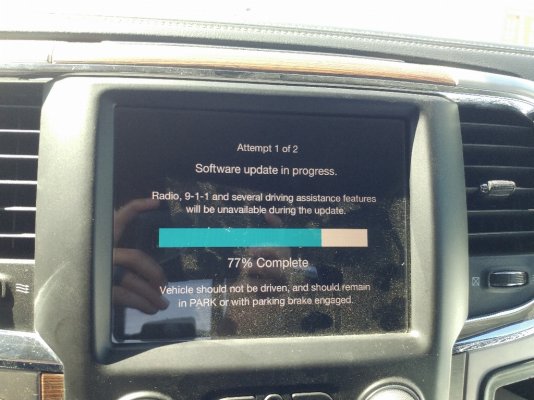
So mine popped up yesterday twice and both time I hit X to close it and I haven’t seen it since ! If it comes back I’m assuming I should try to avoid dling it at all costs ??
 

Jungle Jim

Junior Member
Joined
Apr 26, 2018
Posts
5
Reaction score
1
Location
Woodway,Tx
Ram Year
2016
Engine
Diesel 6.7
Finally saw the OTA update show up on my screen on Sunday afternoon....my ONLY option was to schedule a time within 24 hours to schedule the update. I chose 5am, Monday morning...since the car would be sitting there...not being used.

Jump in my truck at 7:30am on Monday morning and the schedule option is still showing but the radio does not work. So I put the truck in gear and head to work. While I'm driving, the update starts to happen and gets to 100% complete. The schedule option comes back on and says i need to schedule the update. Still no radio.

Hit the "Assist" button and get ahold of some gal who tells me to do the "loop" option which is to :


Do that and it STILL doesn't work. Get back on the phone and Uconnect says to take it to Any dealer at ANY time and the dealer will fix it free of charge and the gal gives me a case number #8675309. Still no radio.

Get to the dealer on Monday afternoon and tell him my issue. He says there will be a $180 diagnostic fee. I said "no there won't". Your OTA update, locked up my radio and you want to charge me?" He says "The software isn't a Dodge Ram product"...."uconnect is an outside software supplier". Now I'm starting to see red. I then tell him that I have a case # and he says..."well that changes things". I then get him on the phone with Uconnect and they work out whatever procedure is required. Really dude..you want to charge me to look at a software issue that you forced into my truck, that is made by the company you work for? Thats like saying a Bosch 02 sensor in my Dodge Ram can't be replaced because it was made by Bosch...not Ram.

Repair guy takes my truck back and comes back 30 minutes later and says my radio is fryed! The update, fryed my radio. So a new radio has been ordered, FREE of charge, and I'll have to go back and get my radio installed and updated(hopefully).

What a fiasco. Anyone else have this BS experience?
I don't believe the radio is fried. My truck did the same thing and it was a glitch with Uconnect's system and I straightened it out with their advice . Beware what that dealership may be trying to do.
 

don carsten

Junior Member
Joined
Mar 23, 2019
Posts
2
Reaction score
0
Location
San Antonio, TX
Ram Year
2017
Engine
5.7 Hemi
Had the same issue on my 2017 Ram 1500 Lone Star Edition. Downloaded update found on Mopar website to a flashdrive. Installed in truck, disconnected battery for 10 minutes and issue was fixed. Message on screen was gone and radio worked.
 

Latest posts

Forum statistics

Threads
210,869
Posts
3,059,064
Members
170,765
Latest member
Rgesse
Back
Top