Should both front USB ports in a 2022 gen 5 read a USB drive?

Disclaimer: Links on this page pointing to Amazon, eBay and other sites may include affiliate code. If you click them and make a purchase, we may earn a small commission.

raccooncollector

Junior Member
Joined
May 1, 2026
Posts
1
Reaction score
2
Location
Utah
Ram Year
2022
Engine
5.7 Hemi
I just went from a 2015 to a 2022 Gen 5. I took my little music USB sticks and stuck it in port 1 and the truck reads the files fine. If I put it in 2 the truck doesn't see it. A phone connected in 2 will operate Android auto. I tried a couple of other sticks, same result. Both ports have the little USB Trident underneath them, which indicates to me they should both read data off a stick. I couldn't find anything in the manual saying they are different types of ports.
 

Attachments

  • 20260430_152459.jpg
    20260430_152459.jpg
    81.4 KB · Views: 0

RamDiver

Senior Member
Joined
Jan 23, 2022
Posts
5,744
Reaction score
12,122
Location
Marlborough, Ontario Canada
Ram Year
2021 DS
Engine
Hemi 5.7
I just went from a 2015 to a 2022 Gen 5. I took my little music USB sticks and stuck it in port 1 and the truck reads the files fine. If I put it in 2 the truck doesn't see it. A phone connected in 2 will operate Android auto. I tried a couple of other sticks, same result. Both ports have the little USB Trident underneath them, which indicates to me they should both read data off a stick. I couldn't find anything in the manual saying they are different types of ports.

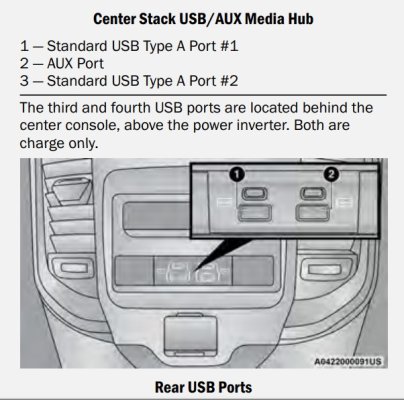
According to the owner's manual, both front ports are capable of data transfer.

USB ports 2022 OM.jpg


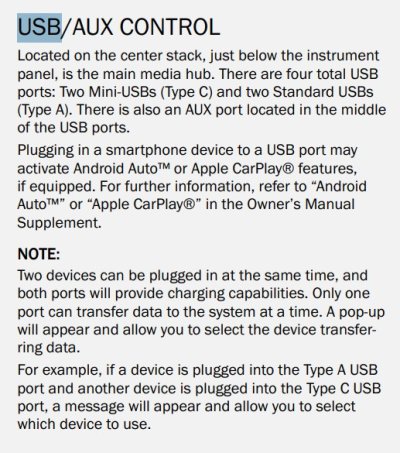
The caveat is that if two data devices are connected to the front ports, an option to select which is available for data should appear on the Uconnect radio.
Only one can transfer data at a time.


USB port control 2022 OM.jpg


And, welcome.gif to Ram Forum. :cool:

.
 

turkeybird56

Military Vet 1976-1996 Retired US Army
Air Force Army Law Enforcement
Joined
Aug 2, 2018
Posts
25,836
Reaction score
56,613
Location
Central Texas
Ram Year
2019 Bighorn, 4 X 4, 3.21 rear, Bright Flame Red Pearl Coat, Mopar tonneau cover,Westin Bed rug
Engine
Hemi 5.7
I just went from a 2015 to a 2022 Gen 5. I took my little music USB sticks and stuck it in port 1 and the truck reads the files fine. If I put it in 2 the truck doesn't see it. A phone connected in 2 will operate Android auto. I tried a couple of other sticks, same result. Both ports have the little USB Trident underneath them, which indicates to me they should both read data off a stick. I couldn't find anything in the manual saying they are different types of ports.
They should both work, if one not working, well than there is a problem somewhere. All I can say both of mine on my 2019 work.

I checked and verified: Both work. U just have to select which USB Hub to Use, if U changed config and/or got more than 1 plugged in.
 
Last edited:

Mojo88

Senior Member
Joined
Feb 4, 2024
Posts
728
Reaction score
1,889
Location
Rhode Island
Ram Year
'19 Longhorn Gen5 ORG
Engine
Hemi 5.7L non-eTorque
2019 5th Gen here. I use the #2 A port for USB music all the time. I would recommend you try a few different USB sticks before doing anything else......

I accidentally splashed a few drops of coffee into the #2 A port last year, and it quickly ruined that hub. I ended up buying a new OEM media hub and installing. Had to take out center console and dis-assemble it, not a horrible job though. The media hub itself cost $168.
 

Mpgrimm2

Senior Member
Supporting Vendor Navy Badge
Joined
Mar 30, 2014
Posts
6,583
Reaction score
5,192
Location
SC
Ram Year
2022 Ram 1500 (5th Gen)
Engine
5.7L
I just went from a 2015 to a 2022 Gen 5. I took my little music USB sticks and stuck it in port 1 and the truck reads the files fine. If I put it in 2 the truck doesn't see it. A phone connected in 2 will operate Android auto. I tried a couple of other sticks, same result. Both ports have the little USB Trident underneath them, which indicates to me they should both read data off a stick. I couldn't find anything in the manual saying they are different types of ports.
Both work on my 2022.
Your's may be defective if you don't get the option to select which port to use as @RamDiver mentioned.

I've also seen similar issues on the 4th Gen radio upgrades, where the factory didn't properly enable the BCM setting for "External Port Type" to be both active USB ports vs just one port (or not enabled at all).
 
Last edited:

Members online

Forum statistics

Threads
211,313
Posts
3,064,980
Members
171,641
Latest member
Fryekenn
Back
Top