

Updated RBZ and got a cool suprise

Disclaimer: Links on this page pointing to Amazon, eBay and other sites may include affiliate code. If you click them and make a purchase, we may earn a small commission.

Ocelot

Senior Member
Joined
Apr 18, 2012
Posts
822
Reaction score
199
Ram Year
2022
Engine
5.7 Non-Etorque
As I posted in a previous thread, I bricked my 430 RBZ during a software update. The original version was the less common 08-05-01 firmware. Different manufacturer I think. The bricking may have been because I had the lockpick connected when going to 10.00.01, but I'm not sure.

I bit the bullet and got another 430 RBZ from eBay. This one had the more common software 20.02.01 but out of date.

Anyway now for the cool surprise!

The replacement radio software needed to be updated, so I first updated to 33.01.23 and then to a new version 50.00.07 From 2013!

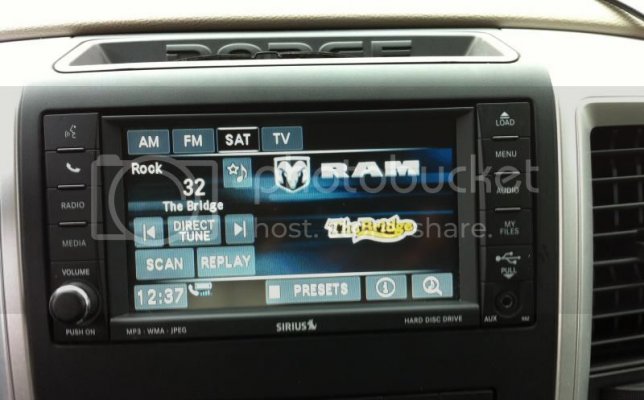
The cool thing is now I have the cool black theme instead of blue on blue!! :party36:
It also now displays a color logo for each Sirius station. The Bridge channel is shown in the picture below.

Here is a link to the firmware if anyone wants it. But I take NO responsibility if you damage your radio. There are different hardware versions. Mine was dated Oct 2010 on the unit which was newer than my old one. I would also recommend disconnecting the lockpick if you have one before updating.

The update was a bit different than others because it also asks if you want to update base files on the hard disc, I selected yes. when that was done, I said yes to update from 33.01.23 to 50.00.07

LINK to 50.00.07 iso - https://app.box.com/s/nrspftiq7dmgmegcsga0
IMG_0110.jpg
 

LB3711

Senior Member
Joined
Jan 23, 2011
Posts
18,536
Reaction score
1,812
Location
Trumbull, CT
Ram Year
2022
Engine
3.6L V6
interesting. What does the other screens look like? Looks like the Sat name shows up now too
 
OP
OP
Ocelot

Ocelot

Senior Member
Joined
Apr 18, 2012
Posts
822
Reaction score
199
Ram Year
2022
Engine
5.7 Non-Etorque
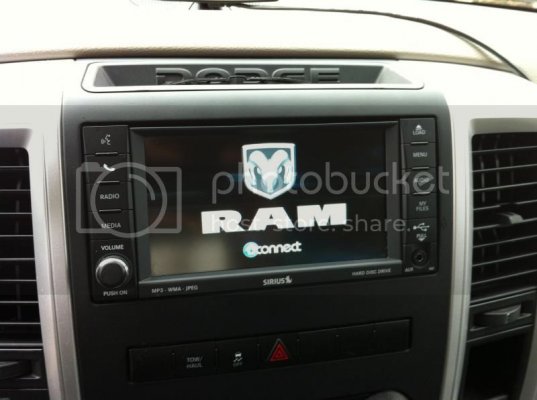
All the screens are similar. Black backround with blue and gray icons. The boot up splash screen also now has a black backround with RAM in bigger letters.

Plus I never had a favorite icon where you can mark the song or artist playing as a favorite.
 
OP
OP
Ocelot

Ocelot

Senior Member
Joined
Apr 18, 2012
Posts
822
Reaction score
199
Ram Year
2022
Engine
5.7 Non-Etorque
Here's a pic of the new boot up splash screen:
BootSplash.jpg

And here is a pic while playing a Garth Brooks song from a USB stick in the glove box. Which I love using since I can voice control songs on the USB stick.
ThumbDrive.jpg
 

LB3711

Senior Member
Joined
Jan 23, 2011
Posts
18,536
Reaction score
1,812
Location
Trumbull, CT
Ram Year
2022
Engine
3.6L V6
hmm interesting but dont know if i want to update the radio
 
OP
OP
Ocelot

Ocelot

Senior Member
Joined
Apr 18, 2012
Posts
822
Reaction score
199
Ram Year
2022
Engine
5.7 Non-Etorque
Daaamn Gina! I have the 730N, is there an update for that?

El Phono

Not sure, but technically this update was for 430N RHB. From what I've read, many of the updates work across models. But the 730 is a much higher level.

Ray
 

Cruizer

Senior Member
Joined
Sep 16, 2013
Posts
6,816
Reaction score
2,427
Location
Ohio
Ram Year
2010 Sport 4x4 QC
Engine
5.7L Hemi
Wonder if this will work with mine now. :think:
 

Musclemckeester

Senior Member
Joined
May 7, 2011
Posts
5,665
Reaction score
296
Location
Houston, TX
Ram Year
n/a
Engine
n/a
It just reads the ISO from a USB stick correct? And why do you say unplug the lockpick?

I do like that update. I'm doing it.
 

Cruizer

Senior Member
Joined
Sep 16, 2013
Posts
6,816
Reaction score
2,427
Location
Ohio
Ram Year
2010 Sport 4x4 QC
Engine
5.7L Hemi
It just reads the ISO from a USB stick correct? And why do you say unplug the lockpick?

I do like that update. I'm doing it.

Update us when you do, I want to do this too.
 
OP
OP
Ocelot

Ocelot

Senior Member
Joined
Apr 18, 2012
Posts
822
Reaction score
199
Ram Year
2022
Engine
5.7 Non-Etorque
It just reads the ISO from a USB stick correct? And why do you say unplug the lockpick?

I do like that update. I'm doing it.

You can do it with a USB stick in the front USB port, not the one in the glove box. But you can't just put the ISO file onto the USB stick. If you want to use a USB stick, you have to use a program like ISO to USB to create the files on the stick. It's kid of like burning a CDROM but uses the USB drive instead of a blank CD.

I burned the ISO to a blank CDROM. I have Nero so just double clicking the ISO file opened the burning wizard. It's not a huge file so it burned pretty quick.

I don't know that you HAVE to remove the lockpick, but my old radio bricked during an update. It wasn't this update though. It was completely different firmware. I flashed that radio previously with that same CDROM and it worked fine last spring. The only difference this time was the lockpick, so I removed it to be safe this time. I would advise it since the lockpick adds screens and things. Better safe than sorry.

These were my steps when I updated today to 50.00.07

*the key needs to be in the ON position (NOT ACC) with the truck NOT running throughout the whole process. Don't interupt!

1. turn key to on and make sure the radio is turned off with the power button.

2. Press load and insert the update CDROM. Wait for it to read.

3. A screen popped up and asked if I wanted to update the base files on the hard disk. I selected yes. it updated those files with a percent counter until it reached 100%

4. The radio rebooted and then a screen popped up asking to update the software from 33.01.23 to 50.00.07. I selected yes.

5. Progress bars came up and it took maybe 15 minutes. (wasn't keeping track of the time)

6. The radio rebooted and asked the same questions about updating base files and then the application. This time I selected no for each one.

7. It shut down and I removed the CDROM before turning on the Radio.

That's it!
 

JohnD72

Senior Member
Joined
Sep 22, 2013
Posts
776
Reaction score
413
Location
Charleston, SC
Ram Year
2012
Engine
5.7 Hemi
Judging by the new splash screen, I already have this firmware. I'll check, next time I get in the truck... or when it gets above freezing-some time next week.
 

Cruizer

Senior Member
Joined
Sep 16, 2013
Posts
6,816
Reaction score
2,427
Location
Ohio
Ram Year
2010 Sport 4x4 QC
Engine
5.7L Hemi
Think I'm going to do mine this weekend as well.
 

LB3711

Senior Member
Joined
Jan 23, 2011
Posts
18,536
Reaction score
1,812
Location
Trumbull, CT
Ram Year
2022
Engine
3.6L V6
Mine hasent been updated since I bought my truck in 2011

Sent from my Nexus 7 using Tapatalk
 

kkreit01

Senior Member
Joined
Nov 12, 2012
Posts
1,133
Reaction score
258
Location
Olathe, KS
Ram Year
2018
Engine
Hemi 5.7
Yes -- I updated both my 430Ns a few months ago. I love the new black vs. the old blue. Ram has been sending me the updates via disk. They have been working on my '11 Grand Cherokee as well. I believe the rear camera quality improved as well. There was a list of 50.x.x updates somewhere....
 
Last edited:

LB3711

Senior Member
Joined
Jan 23, 2011
Posts
18,536
Reaction score
1,812
Location
Trumbull, CT
Ram Year
2022
Engine
3.6L V6
i guess im going to have to try this. Mine is 20.something. I guess mine is way behind. Mine is the 430 without nav. I guess that wouldn't matter?
 

FALaholic

Member
Joined
Oct 7, 2013
Posts
51
Reaction score
2
Location
Greensboro, NC
Ram Year
2011
Engine
5.7 Hemi
i guess im going to have to try this. Mine is 20.something. I guess mine is way behind. Mine is the 430 without nav. I guess that wouldn't matter?

LB, I dont know if you got yours to work, but my 430 without navigation would not.

Nonetheless, many thanks to Ocelot for posting this up.
 

LB3711

Senior Member
Joined
Jan 23, 2011
Posts
18,536
Reaction score
1,812
Location
Trumbull, CT
Ram Year
2022
Engine
3.6L V6
No I havent tried and maybe I wont then. Only radio I have and dont want to mess it up.
 

Forum statistics

Threads
211,040
Posts
3,061,317
Members
171,096
Latest member
KAKA
Back
Top