
2013 Sport Backup Camera Mysteries

Disclaimer: Links on this page pointing to Amazon, eBay and other sites may include affiliate code. If you click them and make a purchase, we may earn a small commission.

Rylandram

Junior Member
Joined
Jul 17, 2026
Posts
8
Reaction score
1
Location
Oklahoma
Ram Year
2013
Engine
5.7 hemi
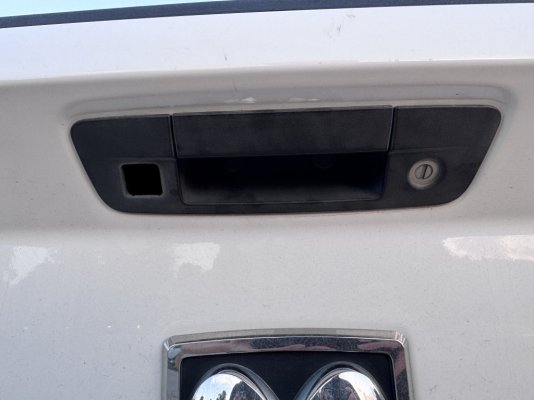
Backup Camera issues are driving me crazy! So here is the deal, I've got a 2013 1500 Sport and the backup camera started glitching out a few months ago. Now it just goes to blue screen.

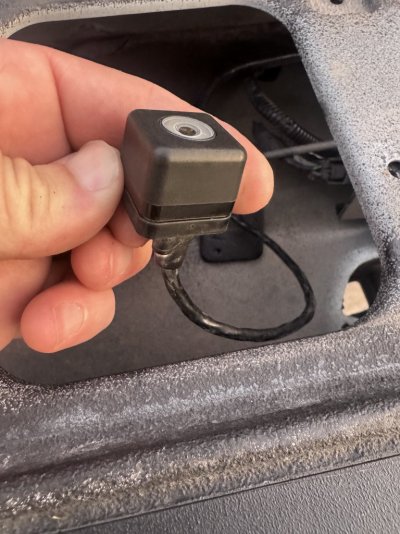
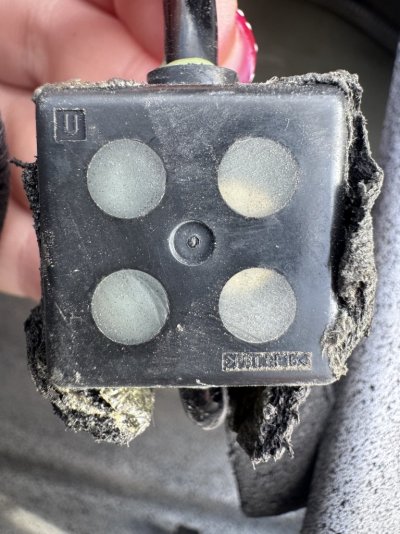
Here's the problem - the handle appears to be a MOPAR handle but the camera doesn't match any of the original cameras.

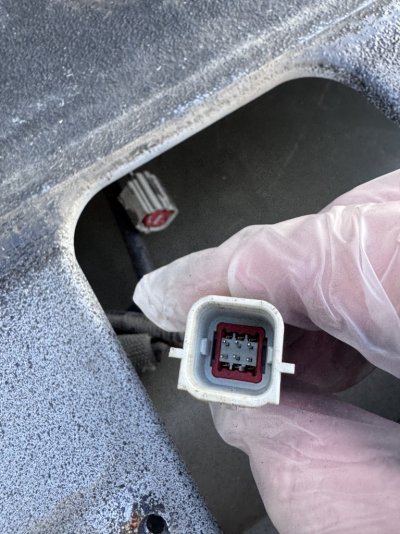
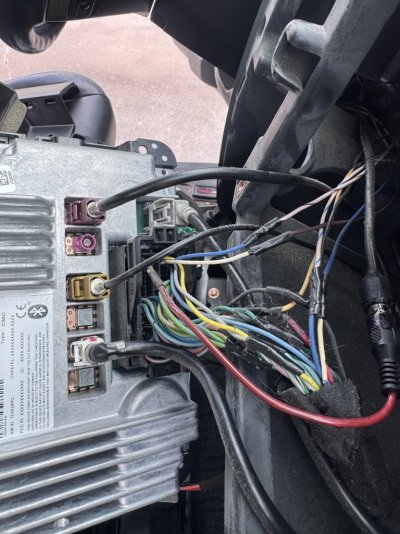
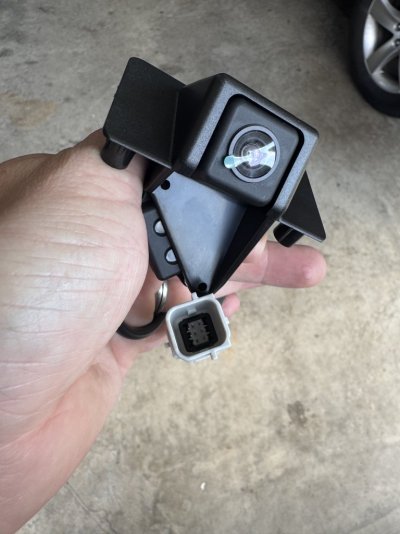
Someone installed a Nav-TV system in it and it appears this is how they got a backup camera going, but the connector for the camera is different than any camera I can find (6 pin one in my hand).

On my Factory Build Sheet is says it had the backup cam installed along with the RA4 8.4 inch radio but I'm guessing the camera went out and it got changed to this other style.

Any ideas on what to try/check? There are no markings on the camera at all.
 

Attachments

  • IMG_1414 (1).JPG
    IMG_1414 (1).JPG
    184.9 KB · Views: 0
  • IMG_1425 (1).JPG
    IMG_1425 (1).JPG
    178.9 KB · Views: 0
  • IMG_4003.JPG
    IMG_4003.JPG
    162.6 KB · Views: 0
  • IMG_4008.JPG
    IMG_4008.JPG
    95.4 KB · Views: 0
  • IMG_4039.JPG
    IMG_4039.JPG
    157.7 KB · Views: 2
  • IMG_4068.JPG
    IMG_4068.JPG
    89 KB · Views: 0

Mpgrimm2

Senior Member
Supporting Vendor Navy Badge
Joined
Mar 30, 2014
Posts
6,598
Reaction score
5,220
Location
SC
Ram Year
2022 Ram 1500 (5th Gen)
Engine
5.7L
This may help ... my Post 10 with lots of info as well as the OP *

Did you check fuse 95 yet?

... And OEM camera schematics attached.
(also see in post 10 link above)

The 8pin i550 is the bulkhead connector at the bottom of the tailgate b/w tailgate and spare tire

The 8pin i551 is inside the tailgate before the camera signal splits off for the 2 Tailgate lock wires/plug.

** I don't recognize that 6pin connector inside the tailgate or on the schematics **

.
 

Attachments

  • BACK-UP-CAMERA-SYSTEM ++.pdf
    132.1 KB · Views: 0
  • TAILGATE---LOCK-SYSTEM.pdf
    54.2 KB · Views: 2
  • CAMERA-REAR VIDEO .pdf
    24.4 KB · Views: 2
Last edited:
OP
OP
R

Rylandram

Junior Member
Joined
Jul 17, 2026
Posts
8
Reaction score
1
Location
Oklahoma
Ram Year
2013
Engine
5.7 hemi
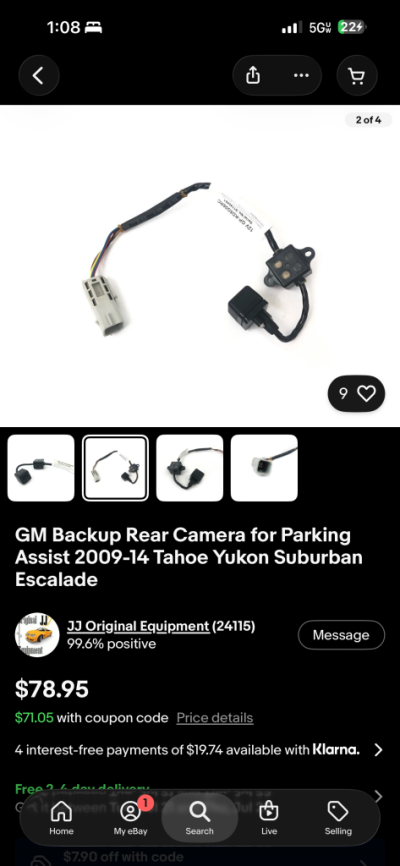
Thank you! I will check the fuse. It’s super weird because this camera size and connector look identical to gm/cadillac.
 

Attachments

  • IMG_4077.png
    IMG_4077.png
    157.4 KB · Views: 1

Mpgrimm2

Senior Member
Supporting Vendor Navy Badge
Joined
Mar 30, 2014
Posts
6,598
Reaction score
5,220
Location
SC
Ram Year
2022 Ram 1500 (5th Gen)
Engine
5.7L
That does look like what you've got.
(Got a Link to it?)

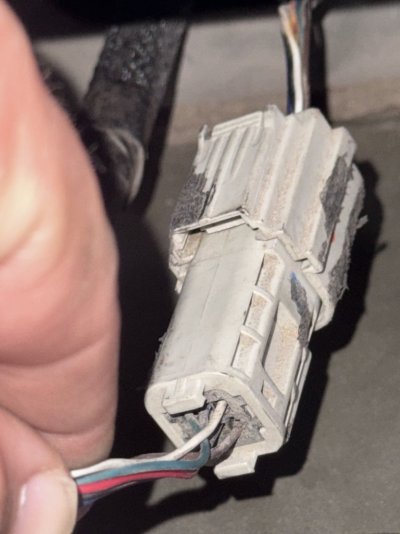
Someone may have modified the wiring harness inside the tailgate to accept a different camera/connector setup.

You'd need to see what's going on at the bottom i550 tailgate connector by the spare tire up the the camera to see where the OEM wiring changed vs the schematics.

Depending on where the changes happened (ie only inside the tailgate) it may be easy to grab a used 13-18 1500/2500 or 19-24 4th Gen classic 1500 tailgate and camera/lock harness set with a handle and camera from a local salvage yard I get up and going again.
(The blue screen means the radio is looking for the missing video signal)

Info from Post 10 link above:
- Camera Lock Jumper Harness P/N 68096415AC

- Tailgate Wire Harness P/N 68189124AB

- Original equipment (OE, Factory Order) rear view camera equipped trucks replacement camera

2013 - 2015: PN: 56038978AL (edit: up to 2017 originally w/RAx radios)

2016 - 2024 classic PN: 68644913AA supercedes 68274731AE (edit: ie used w/2018+ UAx radios)

*** newer PN works with All
(better image quality reported with the newer PN and UAx 4c radios)
 
Last edited:

Mpgrimm2

Senior Member
Supporting Vendor Navy Badge
Joined
Mar 30, 2014
Posts
6,598
Reaction score
5,220
Location
SC
Ram Year
2022 Ram 1500 (5th Gen)
Engine
5.7L
Side question/just noticed....

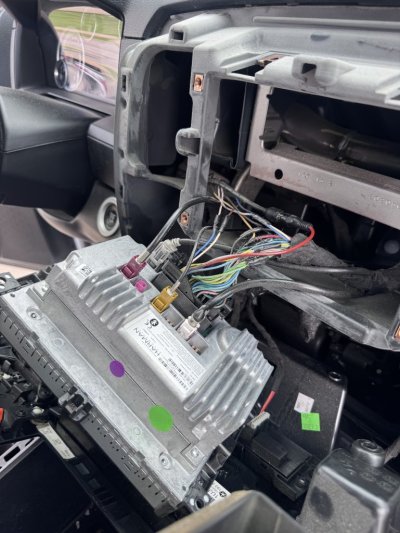
Are there new/non factory wires spliced in at the back of the radio connector?

If so which pins ?
(31,32,33 are backup camera)
 

Attachments

  • Radio C1 & TPA Depopulate Pictures v2.jpg
    Radio C1 & TPA Depopulate Pictures v2.jpg
    126.4 KB · Views: 0
  • Screenshot_20260719_115245_Drive.jpg
    Screenshot_20260719_115245_Drive.jpg
    99.3 KB · Views: 0
Last edited:

Mpgrimm2

Senior Member
Supporting Vendor Navy Badge
Joined
Mar 30, 2014
Posts
6,598
Reaction score
5,220
Location
SC
Ram Year
2022 Ram 1500 (5th Gen)
Engine
5.7L
Radio connector Pinout added to prior post above.

OEM camera wiring may likely missing (and/or modified) in multiple spots since there's an RCA pigtail added in to the OEM connector for aftermarket camera feed.

Not sure what pins the other splices are on from the picture ?? or how they grabbed power & ground for the camera??

If any of the splices were done poorly, ie just wrapped around a wire and taped up, that would be a big potential issue. (Vs soldered & heat shrink)

Please identify all non OEM spliced radio pins/signals.
(There are a few that look like they were fully cut and ReRouted to something else?)

** No one should be cutting into these factory radio harnesses when OEM to aftermarket inline adapters can be found easily enough.
 
OP
OP
R

Rylandram

Junior Member
Joined
Jul 17, 2026
Posts
8
Reaction score
1
Location
Oklahoma
Ram Year
2013
Engine
5.7 hemi
Well, tried this guy out but no luck. Same connector and box but no signal. So maybe not the camera, but instead something else. I believe 31/32 are sending power to the camera when tracing the lines but the “Nav-TV” box has to be doing something. Could be it. Idk. I’m pretty sure my oe had the wiring in the harness for camera but for some reason they added all this aftermarket stuff.
IMG_4104.jpeg
 

Attachments

  • IMG_4105.jpeg
    IMG_4105.jpeg
    149.1 KB · Views: 1

Marshall

Senior Member
Joined
Apr 17, 2013
Posts
2,281
Reaction score
3,194
Location
Sk, Canada
Ram Year
2014 sport
Engine
5.7 hemi
This will be no help to you, but I had a 2010 factory set setup and the BU camara would stop working, I found out that the wires going into the camera in the tail gate was internment. I zip tied the wire up at a sharp angle and it never dropped out again.
I never did any cck. tracing or voltage checks , so no help on that .
you changed the camara so it likely will be something else.

When someone that don't know WTH fixes stuff, then you don't know what they have done.
If you know what wires are wat at the radio and camara, if you have not yet, wire the camara up to the radio with short jumper wires right at the radio, that will eliminate any bad wire issues you may have under the truck.

After that check feeds and voltage at the radio, a scope would help.
 

Mpgrimm2

Senior Member
Supporting Vendor Navy Badge
Joined
Mar 30, 2014
Posts
6,598
Reaction score
5,220
Location
SC
Ram Year
2022 Ram 1500 (5th Gen)
Engine
5.7L
Please see the previously attached schematics. If you're not comfortable/familiar with vehicle wiring get someone to help you out. ... Radio pins 31/32 are not power, they are the analog video signal.

... And no one knows what the 6 pins are on that aftermarket/NavTV/gm camera (ie power, ground, Video Signal, video return, Video shield? & 2 other pins?)
 
OP
OP
R

Rylandram

Junior Member
Joined
Jul 17, 2026
Posts
8
Reaction score
1
Location
Oklahoma
Ram Year
2013
Engine
5.7 hemi
Update, I found an rca coupler that was connecting from 31/32 to driver side trim. Plugged in a cam and it worked.

So, this takes the Nav-TV unit out of the picture and it worked. Seeing as I tried a camera swap and it didn’t work maybe it’s the nav-tv module box that’s bad. (Granted no guarantee that the aftermarket cam I got was pinned the same)

I guess I could open up the cable at drivers side trim where they tapped power (green/red/black) into the video cable. Or maybe i can find this cable that is 6 pin gm style to video rca and see wiring diagram.

What would you do next? Nothing seems standard. Even the nav-tv install seems cobbled together without using the included harness etc.
 

Attachments

  • IMG_4118.png
    IMG_4118.png
    254.3 KB · Views: 2
  • IMG_4115.jpeg
    IMG_4115.jpeg
    92.8 KB · Views: 2
  • IMG_4113.jpeg
    IMG_4113.jpeg
    131.2 KB · Views: 2
  • IMG_4112.jpeg
    IMG_4112.jpeg
    106 KB · Views: 2

Ana1Ravager

Junior Member
Joined
May 14, 2026
Posts
13
Reaction score
9
Location
AR
Ram Year
2016
Engine
3.6
I have a horrible track record when it comes to backup cameras.

I might be wrong but I want to say to add a stock backup camera, you had to have some code from Dodge/Ram flashed onto your stock radio. It wasn’t just plug and play. There are diy things now in 2026 but maybe not when this was installed. Some dealers will flash it some won’t. Edit: I mentioned this because this is probably why you have this system. It look like it bypasses the need for the flashing.

It looks like you have the entire manual for your backup nav system.

So a few things to maybe look at:

1. Try the reprogramming section in the nav-tv manual. It’s an aftermarket system. Sometimes they get kinda wild after a few years. Maybe you unhooked the battery and it reset?

2. Use the new camera you bought, and in the programming section of your nav-tv, set to Retrofit.(Or Oem, see if either one works.) This looks like it works with aftermarket cameras.

3. Again, you have the entire manual with installation instructions. Run through them again and check all the connections. (Probably starting from the rear camera itself)
 
OP
OP
R

Rylandram

Junior Member
Joined
Jul 17, 2026
Posts
8
Reaction score
1
Location
Oklahoma
Ram Year
2013
Engine
5.7 hemi
Ya that's a good idea. The Nav-TV module is actually working as I can hold the back button for 2 seconds and it will show the backup camera, don't think that is available without it.

UPDATE - It was already set to Retrofit, tried swapping settings around with no luck. I'm thinking it HAS to be something with camera at this point, just wish it didn't use the chevy 6 pin connection as it's making things difficult.

https://navtv.com/media/products_file/2015/10/13/UCT13_Install_Manual_rB17.docx_1.pdf
 
Last edited:

Ana1Ravager

Junior Member
Joined
May 14, 2026
Posts
13
Reaction score
9
Location
AR
Ram Year
2016
Engine
3.6
You can turn the camera on manually, but it’s not turning on when you go to reverse? And it used to? Find and check whichever wire is your reverse turn on. Edit: I believe Pin 2 from Mpgrimm2’s attachments. The Lin bus one. Dark Blue, I think it says?

Sorry if I can’t read well, but did you have the backup lines and/or steering guide thing when it did work? Completely guessing but from above posts, it looks like you went from a 8-pin harness camera to a 6-pin one? That might help find which wire is the reverse one. Edit: disregard

Also, idk what camera that is. I don’t believe it’s from a junkyard 2012 Ram with maybe a different pin out. It just seems kind of insane to buy a completely different make camera and splice it instead of buying oem one.
 
Last edited:
OP
OP
R

Rylandram

Junior Member
Joined
Jul 17, 2026
Posts
8
Reaction score
1
Location
Oklahoma
Ram Year
2013
Engine
5.7 hemi
I can activate the system TRYING to engage the backup camera by holding the "back" button on the radio. But no, it doesn't work. I never had guide lines. The only way I can get an image is by plugging an external camcorder into the rca that goes to 31/32.

The harness that goes from the tailgate and alllllll the way up to the drivers side trim is weird. it's the Chevy/GM 6pin connector that ends in a normal RCA Style video connector. I don't think the pinouts of my new camera match the connector that is in there, so that might be why it doesn't load up.

I'm about ready to just get a different handle/camera and connect where I got the camcorder to work in the drivers side trim and just tap in to 12v power somewhere.
 

Attachments

  • IMG_1425 (1).JPG
    IMG_1425 (1).JPG
    178.9 KB · Views: 0

Ana1Ravager

Junior Member
Joined
May 14, 2026
Posts
13
Reaction score
9
Location
AR
Ram Year
2016
Engine
3.6
So I was going to suggest to do what this person did. https://www.tahoeyukonforum.com/threads/oem-backup-camera-wiring.87318/

If I’m reading right, he bought an aftermarket camera (I assume a simple, pos/gnd/reverse power/rca one) and hooked it to his stock Tahoe camera. It looks like he might have the same camera connector.

Seeing as how your nav-tv box works, I think this could be an option.

At the very least, I think it helps with finding the right wires
 

Ana1Ravager

Junior Member
Joined
May 14, 2026
Posts
13
Reaction score
9
Location
AR
Ram Year
2016
Engine
3.6
But before we fully rip into the wiring. I would check to make sure the dark blue, pin 3 is getting volts when you switch to reverse. (Or figure out which one, if any, are getting 12v)
 

Attachments

  • IMG_2470.png
    IMG_2470.png
    157.7 KB · Views: 0
  • IMG_2469.jpeg
    IMG_2469.jpeg
    129.1 KB · Views: 0
OP
OP
R

Rylandram

Junior Member
Joined
Jul 17, 2026
Posts
8
Reaction score
1
Location
Oklahoma
Ram Year
2013
Engine
5.7 hemi
Found 12v power on the green wire of the connector. Reverse didn’t seem to make a difference on any of the wires. Which makes sense as the nav-tv system would typically want power that is t reverse dependent to show on screen if you want.

Now if I could figure out which lines were for video etc.
 

Attachments

  • IMG_4125.jpeg
    IMG_4125.jpeg
    207.4 KB · Views: 1
  • IMG_4126.jpeg
    IMG_4126.jpeg
    131.4 KB · Views: 0

Ana1Ravager

Junior Member
Joined
May 14, 2026
Posts
13
Reaction score
9
Location
AR
Ram Year
2016
Engine
3.6
Found 12v power on the green wire of the connector. Reverse didn’t seem to make a difference on any of the wires. Which makes sense as the nav-tv system would typically want power that is t reverse dependent to show on screen if you want.

Now if I could figure out which lines were for video etc.
In your first picture with the multimeter showing 13v, you should be able to run the wires down to the splice, where you find the original wiring and correct colors to match the Ram backup camera diagram.

Other than that, I’m not too sure anymore.
 
Back
Top