
Backup camera gridlines??

Disclaimer: Links on this page pointing to Amazon, eBay and other sites may include affiliate code. If you click them and make a purchase, we may earn a small commission.

BlackGrizzly

Junior Member
Joined
Sep 14, 2018
Posts
26
Reaction score
5
Location
Florida
Ram Year
2017
Engine
5.7
I bought my truck some odd months ago and noticed i never had backup camera grids. So I installed some side mirrors with turn signals and enabled them with ALFAOBD. Worked like a charm! Ive noticed there are many camera options and grids that could be enabled. Ive tried a few of them and was able to enable the grid options in my settings, but doesnt work. I currently have the 5.0. Any help??

thank you
 

kad

Senior Member
Supporting Member
Joined
Jul 10, 2017
Posts
2,788
Reaction score
2,331
Location
Hudson Valley, NY
Ram Year
2014
Engine
5.7L HEMI
There are a few settings for the gridlines in the BCM. These are the ones from my truck, which originally had the 5" radio. (They did not change when I upgraded to the 8")

Customer Programming Switches:
Rear View Camera Dynamic Grid Lines Enabled: Not set
Rear View Camera Dynamic Grid Lines Enabled: Set

Vehicle Config Customer Settings Menu 1:
Rear view camera gridlines customer settings menu: Dynamic

-K
 
OP
OP
BlackGrizzly

BlackGrizzly

Junior Member
Joined
Sep 14, 2018
Posts
26
Reaction score
5
Location
Florida
Ram Year
2017
Engine
5.7
There are a few settings for the gridlines in the BCM. These are the ones from my truck, which originally had the 5" radio. (They did not change when I upgraded to the 8")

Customer Programming Switches:
Rear View Camera Dynamic Grid Lines Enabled: Not set
Rear View Camera Dynamic Grid Lines Enabled: Set

Vehicle Config Customer Settings Menu 1:
Rear view camera gridlines customer settings menu: Dynamic

-K

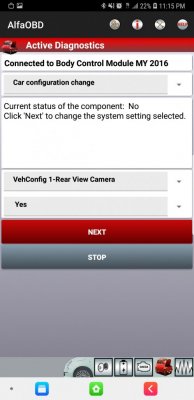
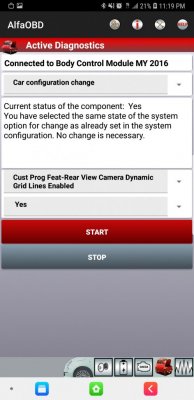
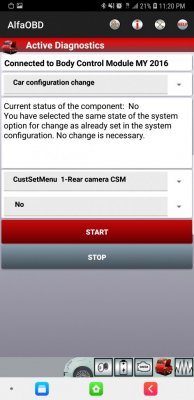
Ok, so I tried the settings you mentioned. Didn't seem to work. So I took some screenshots of everything i have currently set. Please let me know if i have anything incorrect.Screenshot_20190201-231335_AlfaOBD.jpg Screenshot_20190201-231501_AlfaOBD.jpg Screenshot_20190201-231335_AlfaOBD.jpg Screenshot_20190201-231751_AlfaOBD.jpg Screenshot_20190201-231958_AlfaOBD (1).jpg Screenshot_20190201-231958_AlfaOBD.jpg
 
OP
OP
BlackGrizzly

BlackGrizzly

Junior Member
Joined
Sep 14, 2018
Posts
26
Reaction score
5
Location
Florida
Ram Year
2017
Engine
5.7
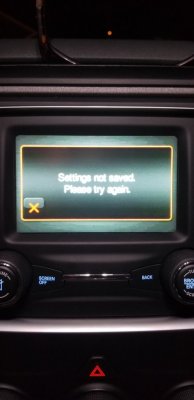
I get that error message if i try to change anything in the menu.

20190201_231109.jpg

20190201_231127.jpg

Screenshot_20190201-232052_AlfaOBD.jpg

Screenshot_20190201-232109_AlfaOBD.jpg
 

Ghost_RAM

Senior Member
Joined
Jan 10, 2018
Posts
1,367
Reaction score
1,095
Location
VA
Ram Year
2016
Engine
Hemi 5.7
I have a feeling the "settings not saved" is much like the 8.4 and the box not staying checked when there is an issue with a setting in Alfa not being set or a problem with hardware on the truck like a door module not allowing tilt in reverse from setting.

Make sure you have the following set to yes or enabled.


Rear View Camera:

Vehconfig 1 - Rear View Camera
ECUConfig 3 - Rear Camera Present
Rear Camera CSM
Rear View Camera Delay CSM (optional)
Trailer Hitch Camera
Rear View Camera Dynamic Gridlines Enabled - Or - Static Gridlines Enabled (below CSM menus)
 
  • Like
Reactions: kad

Ghost_RAM

Senior Member
Joined
Jan 10, 2018
Posts
1,367
Reaction score
1,095
Location
VA
Ram Year
2016
Engine
Hemi 5.7
Sent you a PM. For everyone else's benefit, if you're showing the gridlines as not being set even after setting them in car configuration change. Back out and go to program customer features and try to enable them in there as well.
 

Staff online

Forum statistics

Threads
210,828
Posts
3,058,563
Members
170,670
Latest member
joshhhh
Back
Top