Bad media hub?

Disclaimer: Links on this page pointing to Amazon, eBay and other sites may include affiliate code. If you click them and make a purchase, we may earn a small commission.

rjohnson7581

Member
Joined
Sep 13, 2023
Posts
66
Reaction score
47
Location
New York
Ram Year
2021
Engine
3.6
2021 Ram 1500 Classic SLT 3.6l

A few days ago when I was driving, Android Auto was working perfectly. I usually use the AAwireless device for wireless Android Auto. Today, I could not get it to load up. I thought maybe there was a connection issue so just to be safe, I uninstalled Android Auto and reinstalled it and cleared cache and data from the AAwireless app. I even unpaired my truck from my phone in the Bluetooth settings to try and get a fresh start. While setting up the AAwireless device again, I got to the point where it would load Android Auto, but it wasn't opening in the truck, only on my phone. I tried troubleshooting in the app and it asked if I could connect to Android Auto with the USB cable. I tried, nothing. I tried another cable, nothing. I then tried a third cable, nothing. I even tried my wife's phone with all 3 cables, nothing. I did some searching and found options to try to resolve the issue that didn't work. I've also found that maybe the media hub is bad. When plugging in my phone, there's power to the hub but it says it's slow charging my phone. It also asks on my phone to select the USB type (charging, file transfer, etc.). I selected the file transfer with Android Auto option, which I never had to do but it didn't work either. After a few more times unplugging and plugging in, the truck screen had a message that says my phone was an unrecognized device. If I'm getting power, even if it's slow charging, with both USB ports but Android Auto isn't working, is that almost 100% guaranteed a bad media hub? I listed below everything I tried. If there's anything I missed that I could try, feel free to let me know.

Soft Radio Reset by holding volume & tune buttons or voice command and call buttons on the wheel - neither of these options did anything
Hard reset holding driver side temp up & down or temp up, temp down & front defroster buttons - neither of these options did anything
Checked fuse - fuse is fine
Checked connections to media hub - connections are fine, even unplugged and plugged back in after a few minutes
Unpaired and re-paired phone to truck/AAwireless device - didn't make a difference
Clear cache, data, uninstall & reinstall Android Auto and AAwireless apps - didn't make a difference
 

markabby

Senior Member
Joined
Feb 16, 2020
Posts
1,132
Reaction score
1,644
Location
Monticello, Kentucky
Ram Year
2020 Limited
Engine
5.7
from what i've read it's probably the media hub, especially with the messages you've been getting.

AI is great....

"2021 Ram 1500 media hubs frequently fail, causing Apple CarPlay/Android Auto to disconnect, intermittent functionality, or "device not supported" errors, often resulting in total failure. The issue is typically resolved by replacing the USB module (part number 68272254AE). Before replacing, check for blown 20-amp fuses or try a Uconnect soft reset. "
found this reply at another web site:
" had the same issue with my 2021 1500 Limited.

Mine would sporadically just stop working, either giving me the “device not supported” issue, or just not even recognizing anything was attached. I tried multiple cables in every port, and both android and Apple phones to show it was faulty. It eventually ceased functioning entirely.

The dealer replaced the entire USB hub and that resolved the issue."
 

SitKneelBend

Moderator
Staff member
Member Relations Specialist
Moderator Supporting Member Marine Corps
Joined
Jan 8, 2015
Posts
10,953
Reaction score
7,629
Location
St. Louis
Ram Year
2014
Engine
3.6 Pentastar
2021 Ram 1500 Classic SLT 3.6l

A few days ago when I was driving, Android Auto was working perfectly. I usually use the AAwireless device for wireless Android Auto. Today, I could not get it to load up. I thought maybe there was a connection issue so just to be safe, I uninstalled Android Auto and reinstalled it and cleared cache and data from the AAwireless app. I even unpaired my truck from my phone in the Bluetooth settings to try and get a fresh start. While setting up the AAwireless device again, I got to the point where it would load Android Auto, but it wasn't opening in the truck, only on my phone. I tried troubleshooting in the app and it asked if I could connect to Android Auto with the USB cable. I tried, nothing. I tried another cable, nothing. I then tried a third cable, nothing. I even tried my wife's phone with all 3 cables, nothing. I did some searching and found options to try to resolve the issue that didn't work. I've also found that maybe the media hub is bad. When plugging in my phone, there's power to the hub but it says it's slow charging my phone. It also asks on my phone to select the USB type (charging, file transfer, etc.). I selected the file transfer with Android Auto option, which I never had to do but it didn't work either. After a few more times unplugging and plugging in, the truck screen had a message that says my phone was an unrecognized device. If I'm getting power, even if it's slow charging, with both USB ports but Android Auto isn't working, is that almost 100% guaranteed a bad media hub? I listed below everything I tried. If there's anything I missed that I could try, feel free to let me know.

Soft Radio Reset by holding volume & tune buttons or voice command and call buttons on the wheel - neither of these options did anything
Hard reset holding driver side temp up & down or temp up, temp down & front defroster buttons - neither of these options did anything
Checked fuse - fuse is fine
Checked connections to media hub - connections are fine, even unplugged and plugged back in after a few minutes
Unpaired and re-paired phone to truck/AAwireless device - didn't make a difference
Clear cache, data, uninstall & reinstall Android Auto and AAwireless apps - didn't make a difference

Has your phone received any updates recently? I know AA recently released a new version as well. Did you try a second Android device?
 
OP
OP
R

rjohnson7581

Member
Joined
Sep 13, 2023
Posts
66
Reaction score
47
Location
New York
Ram Year
2021
Engine
3.6
Has your phone received any updates recently? I know AA recently released a new version as well. Did you try a second Android device?
I tried my wife's phone as well, even with connecting by cable. Neither connected to Android Auto. I believe the last updates our phones had though were in September with a security update.
 
OP
OP
R

rjohnson7581

Member
Joined
Sep 13, 2023
Posts
66
Reaction score
47
Location
New York
Ram Year
2021
Engine
3.6
from what i've read it's probably the media hub, especially with the messages you've been getting.

AI is great....

"2021 Ram 1500 media hubs frequently fail, causing Apple CarPlay/Android Auto to disconnect, intermittent functionality, or "device not supported" errors, often resulting in total failure. The issue is typically resolved by replacing the USB module (part number 68272254AE). Before replacing, check for blown 20-amp fuses or try a Uconnect soft reset. "
found this reply at another web site:
" had the same issue with my 2021 1500 Limited.

Mine would sporadically just stop working, either giving me the “device not supported” issue, or just not even recognizing anything was attached. I tried multiple cables in every port, and both android and Apple phones to show it was faulty. It eventually ceased functioning entirely.

The dealer replaced the entire USB hub and that resolved the issue."
After everything I read, I figured as much. Was wanting to make sure before I spend the $150 on a new one. Worse case, I have a second media hub as a backup. Best case, that's the issue lol
 

SitKneelBend

Moderator
Staff member
Member Relations Specialist
Moderator Supporting Member Marine Corps
Joined
Jan 8, 2015
Posts
10,953
Reaction score
7,629
Location
St. Louis
Ram Year
2014
Engine
3.6 Pentastar
I tried my wife's phone as well, even with connecting by cable. Neither connected to Android Auto. I believe the last updates our phones had though were in September with a security update.
AA released v16 sometime last week I believe. Might be worth checking and/or clearing cache and storage on the app. Also, what version of AAWireless hardware are you using (1 or 2)?
 

markabby

Senior Member
Joined
Feb 16, 2020
Posts
1,132
Reaction score
1,644
Location
Monticello, Kentucky
Ram Year
2020 Limited
Engine
5.7
AA released v16 sometime last week I believe. Might be worth checking and/or clearing cache and storage on the app. Also, what version of AAWireless hardware are you using (1 or 2)?

my 2020 has the 12.4 radio, so i bought one of those dongle things to make it wireless. it kinda worked OK, but, it was a bit slow and it hung up some maps. However, i removed it, threw it in the glove box and went back to simply plugging my phone in again and enjoy regular Carplay. Besides, i plug the phone in anyways to keep it charged.

So, wireless for me is useless.
 
OP
OP
R

rjohnson7581

Member
Joined
Sep 13, 2023
Posts
66
Reaction score
47
Location
New York
Ram Year
2021
Engine
3.6
AA released v16 sometime last week I believe. Might be worth checking and/or clearing cache and storage on the app. Also, what version of AAWireless hardware are you using (1 or 2)?
I did all that already. Even uninstalled and reinstalled the app and Android Auto. Ended up buying a new media hub. Should be here Tuesday so we'll see if that fixes it.
 
OP
OP
R

rjohnson7581

Member
Joined
Sep 13, 2023
Posts
66
Reaction score
47
Location
New York
Ram Year
2021
Engine
3.6
my 2020 has the 12.4 radio, so i bought one of those dongle things to make it wireless. it kinda worked OK, but, it was a bit slow and it hung up some maps. However, i removed it, threw it in the glove box and went back to simply plugging my phone in again and enjoy regular Carplay. Besides, i plug the phone in anyways to keep it charged.

So, wireless for me is useless.
Some of them are very cheap but I haven't had any issues with AAwireless until now. It might just be the media hub though. I'll find out when I get the new one in a few days.
 

SitKneelBend

Moderator
Staff member
Member Relations Specialist
Moderator Supporting Member Marine Corps
Joined
Jan 8, 2015
Posts
10,953
Reaction score
7,629
Location
St. Louis
Ram Year
2014
Engine
3.6 Pentastar
I did all that already. Even uninstalled and reinstalled the app and Android Auto. Ended up buying a new media hub. Should be here Tuesday so we'll see if that fixes it.
Do you have a jump seat or center console?
 

SitKneelBend

Moderator
Staff member
Member Relations Specialist
Moderator Supporting Member Marine Corps
Joined
Jan 8, 2015
Posts
10,953
Reaction score
7,629
Location
St. Louis
Ram Year
2014
Engine
3.6 Pentastar
my 2020 has the 12.4 radio, so i bought one of those dongle things to make it wireless. it kinda worked OK, but, it was a bit slow and it hung up some maps. However, i removed it, threw it in the glove box and went back to simply plugging my phone in again and enjoy regular Carplay. Besides, i plug the phone in anyways to keep it charged.

So, wireless for me is useless.
I've gone wireless for everything as the first thing to go on all my phones is always the USB port.
 

markabby

Senior Member
Joined
Feb 16, 2020
Posts
1,132
Reaction score
1,644
Location
Monticello, Kentucky
Ram Year
2020 Limited
Engine
5.7
Some of them are very cheap but I haven't had any issues with AAwireless until now. It might just be the media hub though. I'll find out when I get the new one in a few days.

this part would short my wife out...lol. she hates anything different than what she's accustomed to; jump in and just plug her phone in and go.

"if multiple paired phones are nearby, Ottocast will usually reconnect to the last used phone.

To switch devices, disconnect CarPlay on the current phone (or turn off its Bluetooth/Wi-Fi), then connect with the other phone."
 
OP
OP
R

rjohnson7581

Member
Joined
Sep 13, 2023
Posts
66
Reaction score
47
Location
New York
Ram Year
2021
Engine
3.6
this part would short my wife out...lol. she hates anything different than what she's accustomed to; jump in and just plug her phone in and go.

"if multiple paired phones are nearby, Ottocast will usually reconnect to the last used phone.

To switch devices, disconnect CarPlay on the current phone (or turn off its Bluetooth/Wi-Fi), then connect with the other phone."
I like AAwireless because you can select which phone is default on startup even with multiple connected.
 

SitKneelBend

Moderator
Staff member
Member Relations Specialist
Moderator Supporting Member Marine Corps
Joined
Jan 8, 2015
Posts
10,953
Reaction score
7,629
Location
St. Louis
Ram Year
2014
Engine
3.6 Pentastar
I have the jump seat
So something to check is to plug in your phone and see if you can get data by putting your phone in the lid and raise the back of the jumpseat. The wire harness wears at the hinge (passenger side) and causes inputs to jump, power to stop, and or data to fail. I replaced mine for this reason (but it was that way for years before replacement).

PXL_20250803_164324324.jpgPXL_20250803_163803171.jpg
 
OP
OP
R

rjohnson7581

Member
Joined
Sep 13, 2023
Posts
66
Reaction score
47
Location
New York
Ram Year
2021
Engine
3.6
So something to check is to plug in your phone and see if you can get data by putting your phone in the lid and raise the back of the jumpseat. The wire harness wears at the hinge (passenger side) and causes inputs to jump, power to stop, and or data to fail. I replaced mine for this reason (but it was that way for years before replacement).

View attachment 579155View attachment 579156
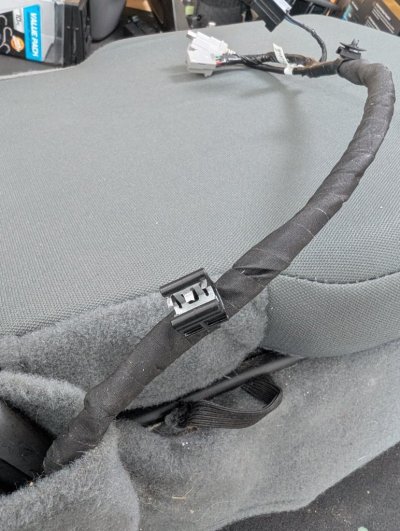
I checked mine out tonight and the only wires coming down on the passenger side come from inside the center console down underneath the center seat. There's wires also that look like this that come down on the driver side but don't appear to be near the hinge at all. I never lift the seat up either so not sure if it's worn somehow or where. I checked it all out from the driver seat up into the center console and didn't see any issues. Checked the fuses for everything to be sure and they're still intact. I read to try a soft or hard reset on the radio but I don't think I can even do that with mine. I've tried every option I found to reset it and nothing worked for that either. Only thing I can do is reset the basic stuff from the settings.
 
OP
OP
R

rjohnson7581

Member
Joined
Sep 13, 2023
Posts
66
Reaction score
47
Location
New York
Ram Year
2021
Engine
3.6
UPDATE: After plugging and unplugging the new media hub several times, it's now connecting to Android Auto again. Unsure what the cause of it not working the first time was but all I've done was unplug and plugged it back in 8 or 9 times and my phone connected right to Android Auto.


Finally after receiving the new media hub, I connected it then connected my phone via USB. It does the same thing. My phone says it's slow charging, uConnect display says my device isn't recognized and Android Auto starts up on my phone only and continuously attempts to connect to my truck with no luck. Any next steps if anyone knows would be nice to try. As of right now, I'm planning on checking out the wiring to see if there's any damage but from what I can see without disconnecting it all, there's no visible damage yet.
 
Last edited:

SitKneelBend

Moderator
Staff member
Member Relations Specialist
Moderator Supporting Member Marine Corps
Joined
Jan 8, 2015
Posts
10,953
Reaction score
7,629
Location
St. Louis
Ram Year
2014
Engine
3.6 Pentastar
I checked mine out tonight and the only wires coming down on the passenger side come from inside the center console down underneath the center seat. There's wires also that look like this that come down on the driver side but don't appear to be near the hinge at all. I never lift the seat up either so not sure if it's worn somehow or where. I checked it all out from the driver seat up into the center console and didn't see any issues. Checked the fuses for everything to be sure and they're still intact. I read to try a soft or hard reset on the radio but I don't think I can even do that with mine. I've tried every option I found to reset it and nothing worked for that either. Only thing I can do is reset the basic stuff from the settings.
Do you do the test I suggest (moving the seatback up)?
 
Back
Top