
Looking for Guidance on Adding Aux Switches – 2020 Ram 1500 Classic Warlock

Disclaimer: Links on this page pointing to Amazon, eBay and other sites may include affiliate code. If you click them and make a purchase, we may earn a small commission.

xxbryantd

Junior Member
Joined
Sep 5, 2025
Posts
4
Reaction score
0
Location
Portland
Ram Year
2020
Engine
3.6
Hey everyone, I’m new to the forum and looking for some help.


I’ve got a 2020 Ram 1500 Classic Warlock and I want to add auxiliary switches to run some accessories. I’ve seen posts about the Mopar outfitter/aux switch kits, but I’m not sure which parts I should be looking for or what’s actually compatible with my truck.


A couple of questions I’m hoping to get cleared up:


  • What’s the right kit or part number for my model year?
  • Do I also need the jumper wires or a special harness I’ve seen mentioned?
  • Is there an OEM option that keeps the dash looking stock, or should I be looking at aftermarket alternatives?
  • Any programming (dealer or AlfaOBD) required to get the switches working?

If anyone’s done this on a 2019–2020 Classic, I’d love to hear what worked for you and where you sourced your parts. Trying to keep it clean and OEM-looking if possible.


Thanks in advance!
 

18CrewDually

Senior Member
Joined
Nov 17, 2019
Posts
2,421
Reaction score
3,418
Location
U.S.- New Jersey
Ram Year
2018
Engine
Cummins 6.7 H.O.
What kind and how many accessories? Also, does your truck have the 3 button Homelink usually used for garage doors?
The reason I ask is because I bought 2 remote fob receivers from Amazon and trained the Homelink buttons to control the FOB receivers. I use the buttons to turn on and off my aux fuel tank transfer pump.
 
OP
OP
X

xxbryantd

Junior Member
Joined
Sep 5, 2025
Posts
4
Reaction score
0
Location
Portland
Ram Year
2020
Engine
3.6
What kind and how many accessories? Also, does your truck have the 3 button Homelink usually used for garage doors?
The reason I ask is because I bought 2 remote fob receivers from Amazon and trained the Homelink buttons to control the FOB receivers. I use the buttons to turn on and off my aux fuel tank transfer pump.
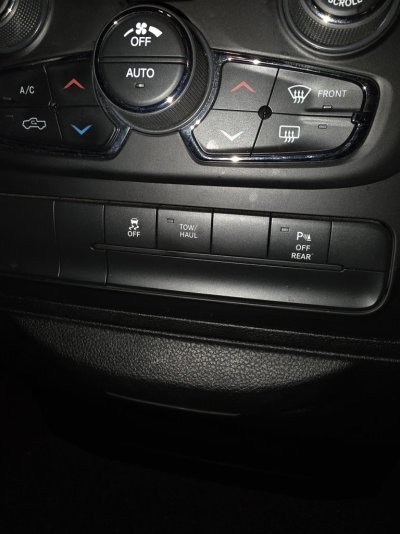
3-4 switches to power light bar, pod lights and bed lights. Unsure on 4th currently. Wasn't sure if i could fit somthing here that was more oem
 

Attachments

  • 20250905_190859.jpg
    20250905_190859.jpg
    150.9 KB · Views: 4
  • 20250905_190849.jpg
    20250905_190849.jpg
    122.9 KB · Views: 4

xtryfun

Junior Member
Joined
Aug 25, 2025
Posts
10
Reaction score
6
Location
US
Ram Year
2014
Engine
Hemi
Hey everyone, I’m new to the forum and looking for some help.


I’ve got a 2020 Ram 1500 Classic Warlock and I want to add auxiliary switches to run some accessories. I’ve seen posts about the Mopar outfitter/aux switch kits, but I’m not sure which parts I should be looking for or what’s actually compatible with my truck.


A couple of questions I’m hoping to get cleared up:


  • What’s the right kit or part number for my model year?
  • Do I also need the jumper wires or a special harness I’ve seen mentioned?
  • Is there an OEM option that keeps the dash looking stock, or should I be looking at aftermarket alternatives?
  • Any programming (dealer or AlfaOBD) required to get the switches working?

If anyone’s done this on a 2019–2020 Classic, I’d love to hear what worked for you and where you sourced your parts. Trying to keep it clean and OEM-looking if possible.


Thanks in advance!
Welcome to the forum! For your 2020 Ram 1500 Classic Warlock, the cleanest way to get OEM-style aux switches is definitely through the Mopar Off-Road/Auxiliary Switch Kit. For your truck, the kit part number is usually 82215082AB for the 4-switch panel, though double-check with your dealer—they’ll confirm compatibility with the Classic vs. the newer Ram 1500s.
You’ll also need the harness/jumper wires (often included in the full kit, sometimes sold separately as part #82214982AB) to actually get the switches powered and connected to the fuse box. The panel installs in the dash where the blank inserts are, so it keeps that OEM clean look.
Programming-wise, the truck usually doesn’t need dealer programming for the switches themselves—they’re hard-wired to switched 12V circuits. If you want them to trigger certain factory modules (rare), then something like AlfaOBD might be useful, but for powering lights, compressors, etc., it’s plug-and-play.
If you go aftermarket, there are a few brands that make dash-mounted panels that look OEM, but I’d stick with Mopar if you want the clean Warlock look.
 
OP
OP
X

xxbryantd

Junior Member
Joined
Sep 5, 2025
Posts
4
Reaction score
0
Location
Portland
Ram Year
2020
Engine
3.6
Mopar Off-Road/Auxiliary Switch Kit
Welcome to the forum! For your 2020 Ram 1500 Classic Warlock, the cleanest way to get OEM-style aux switches is definitely through the Mopar Off-Road/Auxiliary Switch Kit. For your truck, the kit part number is usually 82215082AB for the 4-switch panel, though double-check with your dealer—they’ll confirm compatibility with the Classic vs. the newer Ram 1500s.
You’ll also need the harness/jumper wires (often included in the full kit, sometimes sold separately as part #82214982AB) to actually get the switches powered and connected to the fuse box. The panel installs in the dash where the blank inserts are, so it keeps that OEM clean look.
Programming-wise, the truck usually doesn’t need dealer programming for the switches themselves—they’re hard-wired to switched 12V circuits. If you want them to trigger certain factory modules (rare), then something like AlfaOBD might be useful, but for powering lights, compressors, etc., it’s plug-and-play.
If you go aftermarket, there are a few brands that make dash-mounted panels that look OEM, but I’d stick with Mopar if you want the clean Warlock look.
Where is the best place to buy the kit or parts separately? Im having issues trying to locate.
 

hunterdan

Senior Member
Joined
May 7, 2018
Posts
1,207
Reaction score
1,602
Location
SE PA
Ram Year
2019 classic
Engine
5.7 Hemi
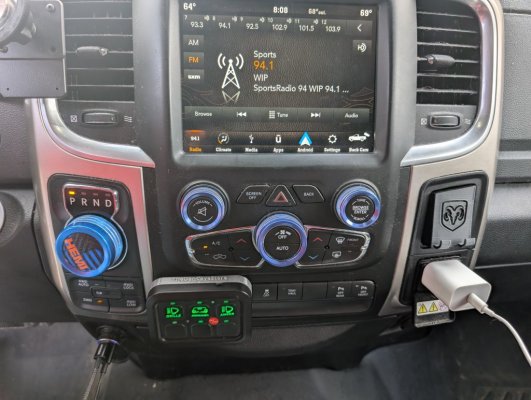
I'm running a knock off auxbeam and I designed and 3d printed a bracket that replaces the trailer brake controller blank with the 6 button switch. Wires run through the bracket and are all hidden up under the dash and behind the radio. You have to pull the radio bezel off, remove the button panel and remove the trailer brake controller blank then bolt it all back together, then you can pass the wire through the blank opening, then connect to the switch panel and install it from the front side. It should snap right in. 1000008318.jpg
 
Back
Top