
Falconflail
Junior Member
Hey all,
I'm not sure to post this here or the alfaobd thread. I tried searching but couldn't get anywhere. I have a 2020 Power Wagon with the 12.1" UConnect 4c, and i used alfaobd and got everything i needed done except the off road pages. From what i can tell, i was told to enable all that needs enabled and then cycle the key for the 5 minutes
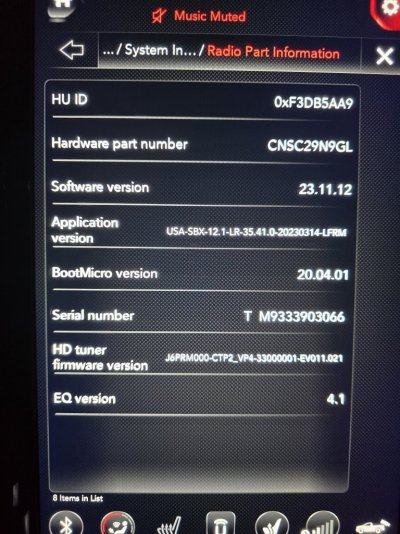
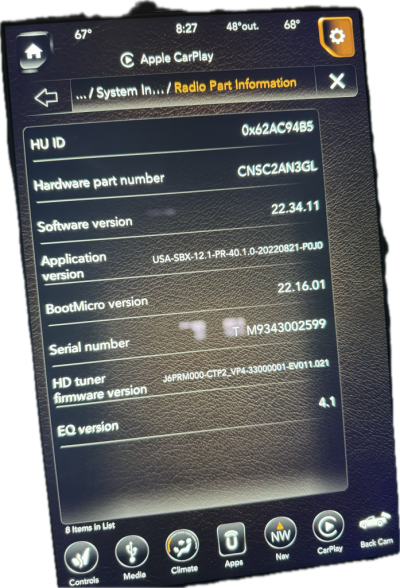
(also told with the door open) an nothing. i was also told to factory reset the uconnect and they would show up. However, nothing i do resets it. I tried pushing and holding the power and tuner knobs for 30 seconds, top right, voice recognition and phone, nothing works to reset it. the website was a joke too, saying everything was up to date. i was wondering if i could get any help on that issue. i see in the other threads that the app version is up to 40.xx or something. Attached is my dealer menu with the app version. Any help would be greatly appreciated.
I'm not sure to post this here or the alfaobd thread. I tried searching but couldn't get anywhere. I have a 2020 Power Wagon with the 12.1" UConnect 4c, and i used alfaobd and got everything i needed done except the off road pages. From what i can tell, i was told to enable all that needs enabled and then cycle the key for the 5 minutes
(also told with the door open) an nothing. i was also told to factory reset the uconnect and they would show up. However, nothing i do resets it. I tried pushing and holding the power and tuner knobs for 30 seconds, top right, voice recognition and phone, nothing works to reset it. the website was a joke too, saying everything was up to date. i was wondering if i could get any help on that issue. i see in the other threads that the app version is up to 40.xx or something. Attached is my dealer menu with the app version. Any help would be greatly appreciated.