
What is a good ODB2/CAN Scan tool

Disclaimer: Links on this page pointing to Amazon, eBay and other sites may include affiliate code. If you click them and make a purchase, we may earn a small commission.

RamPhil

Junior Member
Joined
Apr 22, 2017
Posts
8
Reaction score
5
Location
Arcola, IL
Ram Year
2003
Engine
5.7 Hemi
I've used my android phone with torque and no issues. Also, since I have a bluetooth laptop, I've used ScanXL with no issues too.

Just sprung for a Launch M-Diag Lite. Bluetooth w/Android (perhaps apple also). I think I have $71 in it for device plus Chrysler package. Real time data, freeze frame, bled brakes and some low level maintanence and troubleshooting functions such as purge vapors test. Will also do some higher level functions such as reset BMS, TPMS and others for additional $$.

Instructions on use are practically non-existent, but I'm slowly getting a few things figured out.

 

BadRam14

Member
Joined
Dec 1, 2014
Posts
81
Reaction score
12
Location
Gilbert, AZ
Ram Year
2014
Engine
Hemi 5.7
How powerful do want this scanner to be? Just a code reader or a full-fledged scan tool with live-data, module activation, CAN support, etc?
I have a CarMD reader that I was given as a Christmas gift which reads generic codes well but nothing more.
I also have an Auto Enginuity PC-based scan tool that is much more powerful and, yes, much more expensive.

How do you like your autoenginuity scan tool. From the looks of it you buy the scan tool for $250 and then the enhanced program for Chrylser or whatever other manufacturer you want for another $229 or so. Is that how you did it?
 

carzrepairz

Junior Member
Joined
Oct 28, 2024
Posts
3
Reaction score
1
Location
Seattle
Ram Year
2023
Engine
6.7 Hemi V8
I know this is an old thread but a scanner that I think everyone should look into is this laptop. It works great and works amazing without ever having issues with it. I use it on my cars and Ram and on my friends cars too. I had an Autel and diesel laptops scanner beforehand and they broke within months while this one I had for 4 years with no issues. The only thing I can complain about is that I have to plug it in after around 8 hours of use. Other than that, it's the best scanner you can get. https://dieselscanners.com/products/diesel-diagnostic-laptop-scanner-tuner-truck-repair
 

jawzs2

Senior Member
Air Force
Joined
Mar 24, 2014
Posts
2,926
Reaction score
5,470
Location
South Jersey
Ram Year
2010, 2014
Engine
1500, 3500
I can't believe nobody has mentioned OBDLink MX+ bluetooth scanner and AlphaOBD software! Very powerful!!

Well, this tread as started over 10 years ago, and the most recent post before the last two was in 2017.

Pretty sure AlfaOBD has been mentioned once or twice on here,

There's almost 15,000 posts in this thread alone


dchapma1957

Senior Member
Joined
Sep 16, 2024
Posts
166
Reaction score
286
Location
Lakeland Highlands, FL, USA
Ram Year
2011
Engine
Hemi 5.7
Well, this tread as started over 10 years ago, and the most recent post before the last two was in 2017.

Pretty sure AlfaOBD has been mentioned once or twice on here,

There's almost 15,000 posts in this thread alone

Duh. Leave it to me to comment before thoroughly reading a topic. Sorry.
 

DILLIGAF

Senior Member
Canadian Forces
Joined
May 28, 2016
Posts
5,789
Reaction score
12,412
Location
Canada
Ram Year
2012
Engine
5.7
The 3 must haves for a Ram

HP Tuners
Alpha ODB
KINGBOLEN K7 or similar
 
Last edited:

Hagar1

Senior Member
Joined
Aug 9, 2023
Posts
1,150
Reaction score
2,417
Location
Ontario Canada
Ram Year
2012 Ram 1500
Engine
Hemi 5.7
I am looking to get a scan tool. Any recommendations?
I would like to also read ABS and SRS codes.
And any Chrysler specific codes.

Thanks,

Dan
I'm using an Ancel FX 4000. It works ok and does most of what I want. Works on my Ram 1500 and on my Grand Caravan.
It was though, a bit of a hassle to get the updates to work properly because the manufacturer like a lot of other is more interested in selling than they are in fixing the problems that the create.
I also have a Launch CRP123 .......... it works but limited to only a few functions.
 

MegaHertz

Member
Joined
Dec 24, 2023
Posts
81
Reaction score
66
Location
NE
Ram Year
2016
Engine
Hemi 5.7
Blue Driver is a good beginner DIY OBDII scanner. Read/clear codes, emissions readiness, freeze frame data for CELs, and keeps history of all your prior scans. It's a bluetooth dongle and has a mobile app that will explain codes and suggest repairs, including links to parts (usually Amazon; I just copy the part number and then go to rockauto). It's less than $100. I keep it my glovebox for emergency/on-the-road diagnosis purposes.

For more indepth diagnosis, I use an Innova 5610 Bi-directional scan tool. In addition to all the above, it has live data and a bunch of tests, commands, and relearn capabilities. I've used it to release the electronic parking brake on my VW when I do brake flushes, and help diagnose a bad/stuck vapor canister valve on my wife's Jeep Liberty. It doesn't do all functions for every vehicle, but it will do a lot for most--at least for DIY garage use. I got it on sale for $250--which is about as much as I want to spend on a scan tool given my level of competency.
 
Last edited:

Hemi395

Senior Member
Joined
Mar 18, 2013
Posts
9,507
Reaction score
17,683
Location
Cape Cod MA
Ram Year
2013
Engine
5.7 Hemi
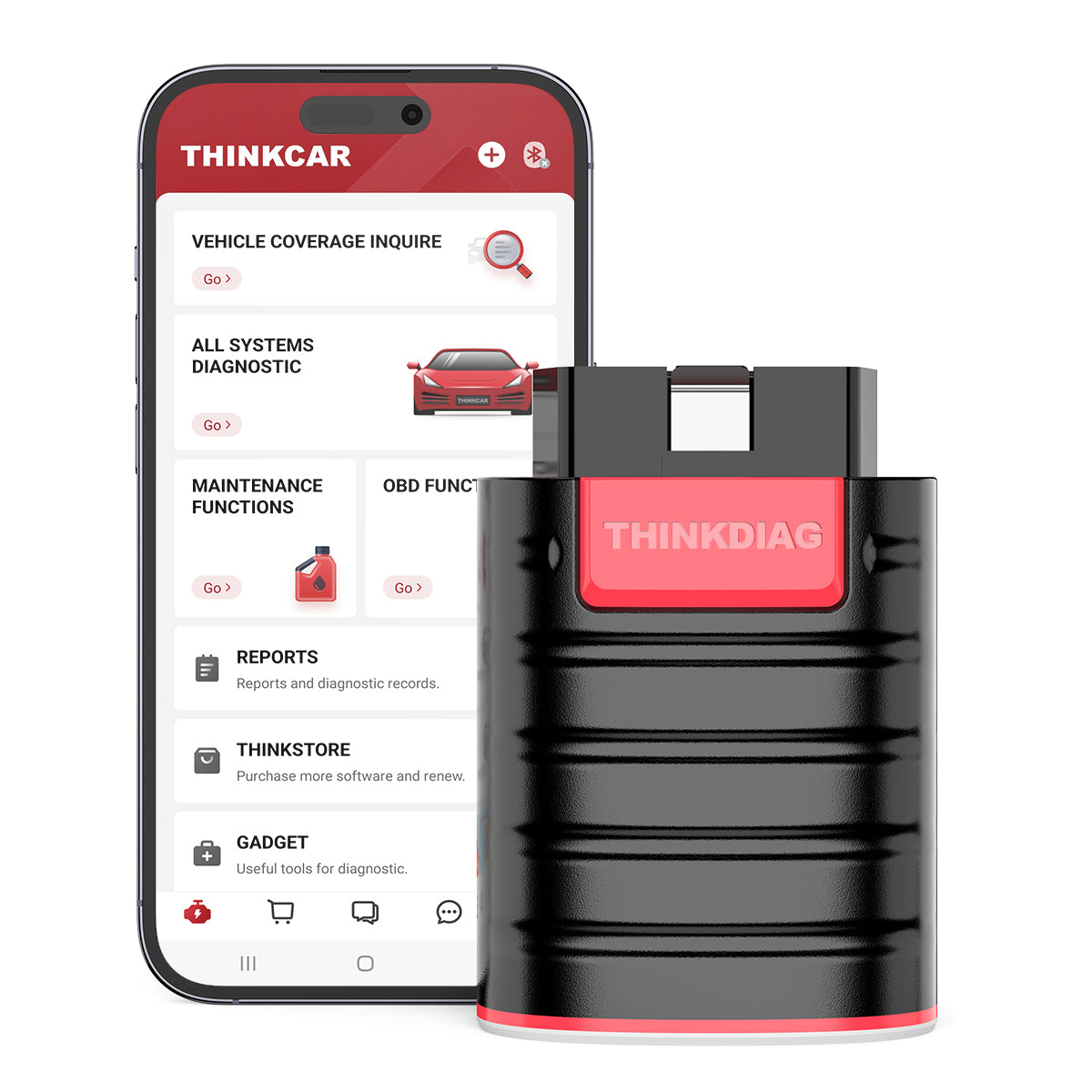
Best bang for the buck full function scantool I've found is the Thinkdiag. It uses your phone as the screen and it talks to a OBD2 dongle similar to the tablet style scantools.


Bi directional controls, logging abilities, can talk to all modules, program keys, etc. The only thing it doesn't do well is graph but for $120 you can't go wrong, I just keep it in the glove box in case I need it. Subscribe to the software you use only or get the whole suite.
 

Runaround

Senior Member
Joined
Jan 11, 2019
Posts
501
Reaction score
180
Location
Silsbee
Ram Year
2007
Engine
Hemi 5.7
I can't believe nobody has mentioned OBDLink MX+ bluetooth scanner and AlphaOBD software! Very powerful!!
Can you explain a little about the AlohaOBD software? What is that? Is it just an app or what?
I’ve been looking recently at the OVD MX+ and I’m trying to learn all I can to make sure I’m buying something I can use without paying for lots of other things.
 

Chukbacca

Member
Joined
Apr 7, 2024
Posts
75
Reaction score
98
Location
Orange County CA
Ram Year
2015
Engine
3.6
Can you explain a little about the AlohaOBD software? What is that? Is it just an app or what?
I’ve been looking recently at the OVD MX+ and I’m trying to learn all I can to make sure I’m buying something I can use without paying for lots of other things.
AlphaOBD and appcarFCA are both apps that work with the OBD reader. I highly recommend OBDlink MX+ for your reader
I have AppcarFCA-it is PC based only and requires a license for each vehicle, I have not found a shortcoming; most prefer AlphaOBD as one license covers many vehicles
My app and reader have allowed me to program fobs on my truck and grand caravan, previous GC, and my sister’s GC…definitely worth it!
 

jawzs2

Senior Member
Air Force
Joined
Mar 24, 2014
Posts
2,926
Reaction score
5,470
Location
South Jersey
Ram Year
2010, 2014
Engine
1500, 3500
Can you explain a little about the AlohaOBD software? What is that? Is it just an app or what?
I’ve been looking recently at the OVD MX+ and I’m trying to learn all I can to make sure I’m buying something I can use without paying for lots of other things.

Everything you ever wanted to know about AlfaOBD, and a ton of stuff you probably won't care about. is in this thread, but it is well worth it, still the same link as posted above.


MegaHertz

Member
Joined
Dec 24, 2023
Posts
81
Reaction score
66
Location
NE
Ram Year
2016
Engine
Hemi 5.7
Blue Driver is a good beginner DIY OBDII scanner. Read/clear codes, emissions readiness, freeze frame data for CELs, and keeps history of all your prior scans. It's a bluetooth dongle and has a mobile app that will explain codes and suggest repairs, including links to parts (usually Amazon; I just copy the part number and then go to rockauto). It's less than $100. I keep it my glovebox for emergency/on-the-road diagnosis purposes.

For more indepth diagnosis, I use an Innova 5610 Bi-directional scan tool. In addition to all the above, it has live data and a bunch of tests, commands, and relearn capabilities. I've used it to release the electronic parking brake on my VW when I do brake flushes, and help diagnose a bad/stuck vapor canister valve on my wife's Jeep Liberty. It doesn't do all functions for every vehicle, but it will do a lot for most--at least for DIY garage use. I got it on sale for $250--which is about as much as I want to spend on a scan tool given my level of competency.
I forgot to mention that neither of the OBDII scanners I referenced require subscriptions, which is a big plus. Still receive updates though. More expensive scan tools will usually require annual subscriptions after a 1-3 year trial period.
 
Last edited:

Runaround

Senior Member
Joined
Jan 11, 2019
Posts
501
Reaction score
180
Location
Silsbee
Ram Year
2007
Engine
Hemi 5.7
Everything you ever wanted to know about AlfaOBD, and a ton of stuff you probably won't care about. is in this thread, but it is well worth it, still the same link as posted above.

Thanks for the link. I will look into it.
I have read that the MX+ will work with the iOS operating system but not the Alpha OBD, which is only available on Android and Windows.
 

04fxdwgi

Senior Member
Joined
May 19, 2023
Posts
1,825
Reaction score
3,851
Location
Coastal NE North Carolina
Ram Year
2016 1500 Sport
Engine
5.7 Hemi
Thanks for the link. I will look into it.
I have read that the MX+ will work with the iOS operating system but not the Alpha OBD, which is only available on Android and Windows.
AlfaOBD is a Windows only program, that is correct

The MX+ works with iOS, Android and Windows. The MX doesn't do iOS.
I use my MX+ with a Win 10 laptop with AlfaOBD, and Android table and an Android phone with other software apps like Torque Pro.
 

Jeepwalker

Senior Member
Joined
Sep 8, 2017
Posts
4,287
Reaction score
5,487
Location
WI
Ram Year
2012 Reg Cab, 4x4
Engine
5.7 Hemi
My brother recently bought a TopDon scan tool ...the $360 variety ...from Temu. It has the 5" or 6"-ish LCD, works on just about every vehicle. I haven't gone through it a whole lot, but it seems to do just about everything my S-O scanner does. His model does NOT have much for bi-directional controls (they have a step-up model that does). But it can program fobs, brake bleeds, reset things. Decent graphing. Does a lot. Its a great DIY scan tool and esp for the $$.

If it was me I would bone up for the $500-close to 600-ish Topdon version with bi-directional control just because. Even though, I have to say, I hardly ever use bi-directional on my own vehicles. But when you need it, it's real nice. Most general DIY guys don't need that though. Yeah, like I say, his does just about as much as my 8 y-o snappy does, for a fraction of the price. And comes with a few yrs of free updates (Snap-on is like a grand for a stand-alone update ..less if you do it every yr).

Obviously Snap on has some capabilities that no other scanners really have (like database access, and the ability to 'talk' to cars all the way back to 1981!). But sometimes S-O scanner frustratingly lack the ability to a few things on certain vehicles which much cheaper scanner can, and that can be frustrating. But these days, with the internet as a powerful search tool, most DIY owners who just want to maintain their cars and need more than the real cheap scan tools, can get by with something like that. And harness the power of the internet on your computer/phone to supplement the scan tool. It's not going to have the comprehensive features of AlfaOBD...but if you don't need those ...and have multiple makes of vehicles you work on, that's a good solution. If I was looking to buy a general all-around new scan tool for home DIY, and wanted a hand-held tool, I'd get one of those TopDon scanners, whatever flavor suits your needs. For me, personally I'd schootch a bit toward the higher end.

MX+ is also a neat tool. Has the advantage of being very affordable, pocket size, and use the phone in your pocket! If you don't mind the phone/tablet/computer thing, and don't want to spend much...then the MX Plus is probably a great way to go.

Nobody wants to spend much on a scanner till they get one that doesn't meet their needs....then suddenly a few hundred bucks more makes more sense than it did before. LOL
 
Last edited:
Back
Top