2020 Ram 1500 Bighorn: Switch console USB from battery to ignition

Disclaimer: Links on this page pointing to Amazon, eBay and other sites may include affiliate code. If you click them and make a purchase, we may earn a small commission.

paulnas

Junior Member
Joined
Oct 21, 2025
Posts
10
Reaction score
16
Location
VA
Ram Year
2020
Engine
V6
I have a 2020 1500 Bighorn. GREAT TRUCK! I want to switch the console located media USBs from running off the battery to only being active when the ignition is on (running or acc mode). I have read many variants on how to do this. The prevalent theory is to move the F43 fuse from the A mode to the B mode causing the fuse only to be active when the ignitions in on.

In doing some research, that fuse also is for the Port Diagnostics and the ModCD. The truck doesn't have CD so I am not concerned about that. I am concerned that switching the Port Diagnostics from always on (battery) to only on when ignition is on will cause issues/problems.

In chatting with the Mopar group, their advice was to rewire the USBs. That seems a bit extreme to me.

Has anyone done this or have advice/recommendation on how to switch the USB from battery to ignition.

Thanks for your help,

Paul
 
OP
OP
P

paulnas

Junior Member
Joined
Oct 21, 2025
Posts
10
Reaction score
16
Location
VA
Ram Year
2020
Engine
V6
Clive,
Do you know which fuse to move?
Paul
 

DanAR

Senior Member
Joined
Sep 21, 2023
Posts
728
Reaction score
1,393
Location
Arkansas
Ram Year
2023
Engine
5.7 hemi
I would like to know also. I have a CD player plugged into that USB in the front of the console that I would like to be sure shuts off.
 
OP
OP
P

paulnas

Junior Member
Joined
Oct 21, 2025
Posts
10
Reaction score
16
Location
VA
Ram Year
2020
Engine
V6
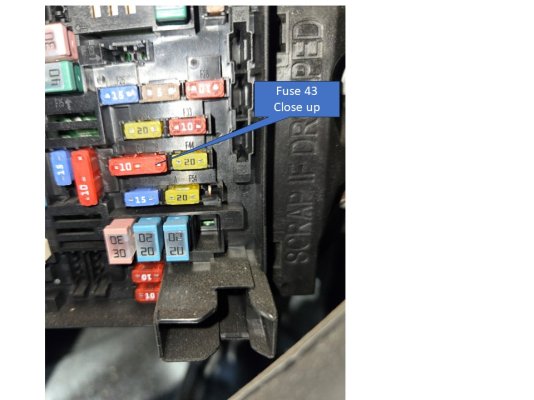
I have looked in the fuse box and confirmed that fuse F43 powers the USB ports. I cannot see how to move the fuse. It is a 3 prong fuse and can only fit right-side up or upside down. Attached are some pictures of the fuse and fuse area. Not sure what I am doing wrong
 

Attachments

  • Box 1.jpg
    Box 1.jpg
    87.1 KB · Views: 9
  • Box 2.jpg
    Box 2.jpg
    113.1 KB · Views: 6
  • Box 3.jpg
    Box 3.jpg
    106.6 KB · Views: 6

diymirage

Banned
Joined
Jan 24, 2024
Posts
1,898
Reaction score
2,862
Location
Michigan
Ram Year
2017
Engine
5.7
Wow, I have never, ever seen a 3 prong fuse

That 'should' not be there
There should be a regular 2 prong 10 amp fuse in there, I'm assuming the center lug is hot, and depending on which way you put it in, the rest of the circuit is 'keyed on' or 'always on'


It looks like the same goes for spot 54 (which means I was wrong when I said there was only one like that)

At any rate, take the 3 prong out there and replace it with a regular one and you should be able to switch it between 'keyed' and 'hot'
 

PaleFlyer

Senior Member
Joined
Jan 1, 2022
Posts
552
Reaction score
377
Location
Charlotte NC
Ram Year
2018
Engine
Hemi 5.7
I have a 2020 1500 Bighorn. GREAT TRUCK! I want to switch the console located media USBs from running off the battery to only being active when the ignition is on (running or acc mode). I have read many variants on how to do this. The prevalent theory is to move the F43 fuse from the A mode to the B mode causing the fuse only to be active when the ignitions in on.

In doing some research, that fuse also is for the Port Diagnostics and the ModCD. The truck doesn't have CD so I am not concerned about that. I am concerned that switching the Port Diagnostics from always on (battery) to only on when ignition is on will cause issues/problems.

In chatting with the Mopar group, their advice was to rewire the USBs. That seems a bit extreme to me.

Has anyone done this or have advice/recommendation on how to switch the USB from battery to ignition.

Thanks for your help,

Paul
My recollection is F34(43?) is the only fuse that can "swap", but in my '18 rebel, that seemed to ONLY affect the other rear 12v socket.
My AAWireless still had to be set to standby/auto start-stop (their names) to prevent my phone trying to connect anytime I was within WiFi range of the dongle, regardless.

I had tried moving the fuse a while back, but moved it back to battery when I was having some battery issues (parasitic drain), and installed a 12v solar panel so the truck would at least let me open the door and not alarm when I plug in the jumper pack.
 
OP
OP
P

paulnas

Junior Member
Joined
Oct 21, 2025
Posts
10
Reaction score
16
Location
VA
Ram Year
2020
Engine
V6
Thank you all for your input, advice, and council. I get a regular 10A fuse and try that. More to come........
Paul
 

Abel Components

Junior Member
Joined
Sep 28, 2021
Posts
12
Reaction score
33
Location
State of Jefferson
Ram Year
2008
Engine
5.7 Hemi
The 3 prong fuse is called a Micro3 fuse, power comes into the center prong and then goes out to 2 different circuits. There are so many electronics on modern vehicles and so many circuits to protect, so they're using Micro3 fuses to kill 2 birds with 1 stone (protect 2 circuits with 1 fuse). I would not discard any 3 prong fuses.

Looking at your pictures and the 2020 owners manual, the only driver selectable fuse I see is F54 (just below and to the right, yellow 20 amp). It's for one of the power outlets on the dash and you can choose whether to have it in the IGN or BATT position.
 
OP
OP
P

paulnas

Junior Member
Joined
Oct 21, 2025
Posts
10
Reaction score
16
Location
VA
Ram Year
2020
Engine
V6
Abel, Clive, Paleflyer,

Thanks for your reply. I am at the point where I am about to surrender!!!! I bought some micro 2prong 10A fuses. I tried them in slot 1&2 and 2&3. Both times there was no power to the USBs. Then I took a three prong and removed the middle prong to connect the 1&3 slots. Again. no power. (See below)

It appears to me that there is something I am drastically missing. If, as you indicate, the slot 2 is the hot slot and 1 & 3 are the receiving slots I would think that 1&2 or 2&3 would power the USB. ALAS that is not the case. It seems that the only way to power the USBs is to have a 3 prong 10A in the slot and live with on-all-the-time USBs.

In the manual, F54B is listed as the "Power Outlet Center Seat". Could it be that F54 controls battery vs ignition sourcing of power to the USBs and 12V outlets?

Any other thoughts would be appreciated.

Again, thanks to all for your responses and helpingBox 4.jpg me unravel this mystery,

Paul
 

turkeybird56

Military Vet 1976-1996 Retired US Army
Air Force Army Law Enforcement
Joined
Aug 2, 2018
Posts
25,825
Reaction score
56,604
Location
Central Texas
Ram Year
2019 Bighorn, 4 X 4, 3.21 rear, Bright Flame Red Pearl Coat, Mopar tonneau cover,Westin Bed rug
Engine
Hemi 5.7
The 3 prong fuse is called a Micro3 fuse, power comes into the center prong and then goes out to 2 different circuits. There are so many electronics on modern vehicles and so many circuits to protect, so they're using Micro3 fuses to kill 2 birds with 1 stone (protect 2 circuits with 1 fuse). I would not discard any 3 prong fuses.

Looking at your pictures and the 2020 owners manual, the only driver selectable fuse I see is F54 (just below and to the right, yellow 20 amp). It's for one of the power outlets on the dash and you can choose whether to have it in the IGN or BATT position.
^^^ THIS ^^^ Same on MY 19 ref batt/acc for dash 12V.

ADDED: For those that DO NOT know, the pictures of the fuse box the OP is displaying is the Interior Fuse Box (power distro box) under the steering wheel inside, not the "Fuse Box" under the hood.
 
Last edited:

turkeybird56

Military Vet 1976-1996 Retired US Army
Air Force Army Law Enforcement
Joined
Aug 2, 2018
Posts
25,825
Reaction score
56,604
Location
Central Texas
Ram Year
2019 Bighorn, 4 X 4, 3.21 rear, Bright Flame Red Pearl Coat, Mopar tonneau cover,Westin Bed rug
Engine
Hemi 5.7
Abel, Clive, Paleflyer,

Thanks for your reply. I am at the point where I am about to surrender!!!! I bought some micro 2prong 10A fuses. I tried them in slot 1&2 and 2&3. Both times there was no power to the USBs. Then I took a three prong and removed the middle prong to connect the 1&3 slots. Again. no power. (See below)

It appears to me that there is something I am drastically missing. If, as you indicate, the slot 2 is the hot slot and 1 & 3 are the receiving slots I would think that 1&2 or 2&3 would power the USB. ALAS that is not the case. It seems that the only way to power the USBs is to have a 3 prong 10A in the slot and live with on-all-the-time USBs.

In the manual, F54B is listed as the "Power Outlet Center Seat". Could it be that F54 controls battery vs ignition sourcing of power to the USBs and 12V outlets?

Any other thoughts would be appreciated.

Again, thanks to all for your responses and helpingView attachment 575038 me unravel this mystery,

Paul
What post #13 said!!!

On my 2019, the (2) USB's in the lower center console. They power off when you shut down the truck and close the door. Than after like 45 seconds, THEY power back on for (1) hour, than again totally power down till you restart truck.

I even timed the delay off, at night, after shutting off, I timed and saw them power up, Went back out to truck after say 58 minutes and watched, and indeed at 1 hour, of course depends exactly when that sequence was started, the (2) USB's powered down.

That was one of the BCM updates that was done. My truck did not do that on an original BCM configuration, but when the dealership "updated" my BCM for software updates needed, that procedure was programmed in, which I was not happy about. Talked to SA, and he said it was changed to say charge like a phone for an hour after shutdown, something "FCA" changed. He thought it was stupid also, but there was nothing the dealership could do once that was downloaded into the BCM, there was no way to go back to some type of previous programming to remove that "feature".

WHY I currently have an outstanding TSB they want to do ref BCM and I will not allow them access to the OBD to do. Seems every time they get in there and update software, they f-ubar something else.

All IMHO and personal experience only.

ADDED: I have a plain jane UCONN 4 radio, no 911/or other BS so I do not receive any OTA's.
 
Last edited:

British Bulldog

Senior Member
Joined
Sep 14, 2016
Posts
2,278
Reaction score
1,305
Location
Jacksonville NC
Ram Year
2025
Engine
SST HO
I am not at home now at my vehicle, away for a few days, but I recall it tells you in the manual which fuse to swap and the reason why?
Sorry but I think everyone else has answered this already!

Regards,

Clive.
 

Abel Components

Junior Member
Joined
Sep 28, 2021
Posts
12
Reaction score
33
Location
State of Jefferson
Ram Year
2008
Engine
5.7 Hemi
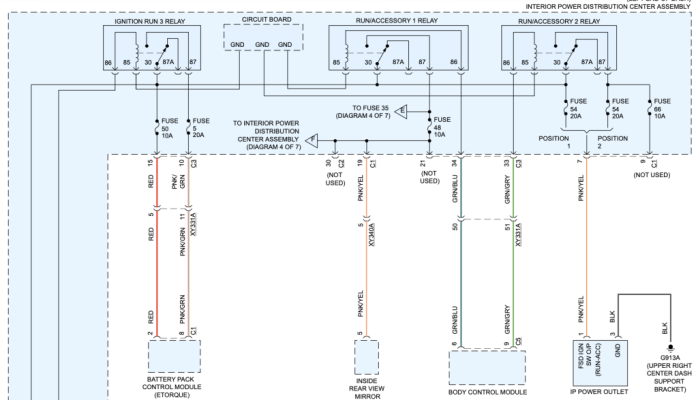
In this diagram you can see that fuse #F54 is selectable with positions 1 or 2 and only provides power to the instrument panel power outlet.

Screenshot 2025-11-01 at 9.33.41 PM.png

In this next diagram you can see that fuse #F43 is not selectable and provides power to "Data Link Connector 1", "Media Port" and "Rear Console Port".

Screenshot 2025-11-01 at 9.36.42 PM.png

The two circuits are not tied together in any way, except that they receive power from the same battery. Main power to the interior fuse box comes from two 80 amp fuses in the engine bay fuse box (N3 & N4).

At this point your only option is to interrupt the power to the circuit you're trying to control with a relay that is triggered with an ignition switch signal (custom wiring).
 
OP
OP
P

paulnas

Junior Member
Joined
Oct 21, 2025
Posts
10
Reaction score
16
Location
VA
Ram Year
2020
Engine
V6
To ALL:

Thanks so much for helping me understand this. Each of you have provided great advice and counsel. I only wish that RAM would listen to those of us that care enough to dive deep into this issue.

Thanks again......
Paul
 

barf

Junior Member
Joined
Feb 18, 2025
Posts
18
Reaction score
14
Location
Connecticut
Ram Year
2025
Engine
3.6
What is the trick to get the cover off? I removed the 2 screws on the bottom and gave it a good yank.
The screws almost completely chewed through the plastic cover from being overtightened. I have a 2025 bought new with absolutely no problems. Great truck!
 
Last edited:
Back
Top