AlfaOBD

Disclaimer: Links on this page pointing to Amazon, eBay and other sites may include affiliate code. If you click them and make a purchase, we may earn a small commission.

FXCLM5

Senior Member
Joined
Mar 10, 2015
Posts
764
Reaction score
483
Ram Year
2017 Laramie CC
Engine
ED 3.0 V6
I wouldnt be that nervous, there were some aftermarket things that could change tpms, almost like the obdgenie for drl.

Also I have seen in my local craiglist some guy wanted to change your tpms for like $50 bucks - for all ram vehicles.
 

SixFOURhemiHD

Ghost Rider
Joined
Jul 31, 2018
Posts
175
Reaction score
105
Location
Alabama
Ram Year
2018
Engine
6.4L 392 Hemi
I wouldnt be that nervous, there were some aftermarket things that could change tpms, almost like the obdgenie for drl.

Also I have seen in my local craiglist some guy wanted to change your tpms for like $50 bucks - for all ram vehicles.

Will do.

Also I got the brake controller working with settings. I’ll post the settings for it when I have a chance. I didn’t see it in the list of known working features.
 
OP
OP
Ghost_RAM

Ghost_RAM

Senior Member
Joined
Jan 10, 2018
Posts
1,367
Reaction score
1,099
Location
VA
Ram Year
2016
Engine
Hemi 5.7
I believe it was just cargo Can present and I put yes.
It was towards the top of the list


Sent from my iPhone using Tapatalk

CHMSL Camera “yes” confirmed working on UAS and RA4. Adding to the list. Thanks PNUTLT1

3d1616541283685b0502ad21de9433e6.jpg

Also noticed CHMSL Line CSM at the bottom of the list, so far I’ve seen no difference.


Sent from my iPhone using Tapatalk
 

mjf6175

Senior Member
Joined
Nov 13, 2017
Posts
436
Reaction score
377
Location
NJ
Ram Year
2017
Engine
cummins
I am going to the dealer and getting my code tomorrow. Sadly tpms is a lot more involved than other settings. If you get yours first and get your tpms set up please post back all of the settings you had to change.

I'm a big nervous messing with it because the rfh has to be reset after changing the settings.

I changed the TPMS settings for my 2017 2500 last year but I used a tool called an AUTEL. I pasted below the procedure that was used. Some of it may pertain to the Alpha program. Hope it helps:

Step 1: Go into the BCM (body control module). Go to "miscellaneous functions". Go to "update pressure thresholds". Set pressure to desired settings.

Step 2: Go into the RFH (radio frequency hub). Go to "miscellaneous functions". Perform "RFH replace" and follow prompts. You will need the PIN number for the truck. When following the prompts (when asked for desired pressure setting) set new pressure levels. You do not need to replace anything - just perform the function to set new levels.

Most people are successful in getting the ir trucks PIN when going to the PARTS DEPT. Be prepared for instances of getting push back from some dealers, they treat the PIN as being owned by them and/or FCA.
 

jcarden10

Senior Member
Joined
Feb 17, 2016
Posts
205
Reaction score
90
Location
Raleigh, NC
Ram Year
2014 Big Horn
Engine
Hemi 5.7
Got my OBDlink today and using Windows version. Activated tow mirrors. Now trying to add the gridlines for my rearview camera, but getting an error. Rear View Camera Gridlines CSM, options are absent, static, dynamic, static+dynamic. Currently set to absent. I'm getting an error "failed. service not supported in active diagnostic session". Anybody have any ideas?

upload_2018-8-16_19-39-38.png
 

jcarden10

Senior Member
Joined
Feb 17, 2016
Posts
205
Reaction score
90
Location
Raleigh, NC
Ram Year
2014 Big Horn
Engine
Hemi 5.7
Also, in case no one has noticed the pattern, all of the settings are in the exact same order as in the status ID log.
 
OP
OP
Ghost_RAM

Ghost_RAM

Senior Member
Joined
Jan 10, 2018
Posts
1,367
Reaction score
1,099
Location
VA
Ram Year
2016
Engine
Hemi 5.7
@jcarden10 I’ve seen procedure failures before but not what you’ve shown. Was the camera gridlines the only option you had selected during the session?


Sent from my iPhone using Tapatalk
 

jcarden10

Senior Member
Joined
Feb 17, 2016
Posts
205
Reaction score
90
Location
Raleigh, NC
Ram Year
2014 Big Horn
Engine
Hemi 5.7
@jcarden10 I’ve seen procedure failures before but not what you’ve shown. Was the camera gridlines the only option you had selected during the session?


Sent from my iPhone using Tapatalk

I did a key cycle after setting Tow Mirrors to Present then tried to activate one of the Park Assist settings CSMs that was also set to Absent. It also had the same active session failure. After the Park Assist failed I tried the Rear View Camera Gridlines CSM and it also failed. I did not cycle the key between the failures.


Sent from my iPhone using Tapatalk
 
OP
OP
Ghost_RAM

Ghost_RAM

Senior Member
Joined
Jan 10, 2018
Posts
1,367
Reaction score
1,099
Location
VA
Ram Year
2016
Engine
Hemi 5.7
Have you tried backing out and disconnecting then closing out of the app completely? I know on the android version those two have been selected and set. Maybe it’s a bug in the windows side.


Sent from my iPhone using Tapatalk
 

Chach

Member
Joined
May 29, 2018
Posts
50
Reaction score
60
Location
CA
Ram Year
2017
Engine
Cummins 6.7
I'm getting an error "failed. service not supported in active diagnostic session". Anybody have any ideas?

This happened to me when enabled the bed lights (also using the windows version) . I just tried again and it worked. Can't remember if I disconnected first. Just try it again, it's probably a minor bug in the app
 

mjf6175

Senior Member
Joined
Nov 13, 2017
Posts
436
Reaction score
377
Location
NJ
Ram Year
2017
Engine
cummins
I did a key cycle after setting Tow Mirrors to Present then tried to activate one of the Park Assist settings CSMs that was also set to Absent. It also had the same active session failure. After the Park Assist failed I tried the Rear View Camera Gridlines CSM and it also failed. I did not cycle the key between the failures.


Sent from my iPhone using Tapatalk

JC.....here are the settings I used:

Under PROGRAM CUSTOM FEATURES:
-Go to near the bottom of the list.. You will see settings as follows:
1) Sound Horn on Remote Start
2) Auto Relock
3) STATIC GRIDLINES ENABLED: SET
4) DYNAMIC GRIDLINES ENABLED: SET
5) Sound Horn.....
Customer Programming Switches:
6) Rear View Camera Dynamic Grid Lines Enabled: NOT SET
Lin Module Customer Programmable Features:
7) Rear View Camera Static Grid Lines Enabled: NOT SET
8) Rear View Camera Dynamic Grid Lines Enabled: SET

Of the above, "SET" numbers #3, #4 and #8 and leave 6 and 7 NOT SET

Under CAR CONFIGURATION CHANGE:
- Look For:
1) Rear Camera Customer Settings Menu: SET
2) Rear View Camera Delay Customer SETTINGS Menu: SET

"SET" #1 and #2. These two settings are next to each other in the list when you find them


Now having said all of that I vaguely recall that 2014 or 2015 and earlier Rams do NOT have dynamic gridlines. Check on that first and on my scratchy memory regarding that.
 

jcarden10

Senior Member
Joined
Feb 17, 2016
Posts
205
Reaction score
90
Location
Raleigh, NC
Ram Year
2014 Big Horn
Engine
Hemi 5.7
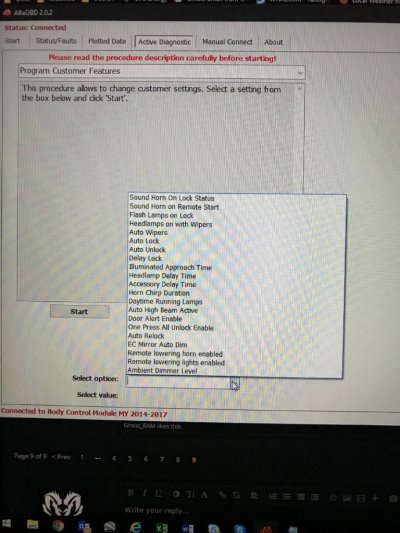
These are the options I see under Program Customer Options
45d356a85ba96b5e9925fb2c2773ba9e.jpg


Sent from my iPhone using Tapatalk
 

SixFOURhemiHD

Ghost Rider
Joined
Jul 31, 2018
Posts
175
Reaction score
105
Location
Alabama
Ram Year
2018
Engine
6.4L 392 Hemi
So weird thing I noticed. Horn is not sounding on the second press of the lock button, even though that’s what it’s set for. Any chance that AlphaOBD is the culprit? I only changed the items for DRL, LED bed lights, and trailer brake control. Thoughts?
 

kad

Senior Member
Supporting Member
Joined
Jul 10, 2017
Posts
2,788
Reaction score
2,331
Location
Hudson Valley, NY
Ram Year
2014
Engine
5.7L HEMI
J
Now having said all of that I vaguely recall that 2014 or 2015 and earlier Rams do NOT have dynamic gridlines. Check on that first and on my scratchy memory regarding that.

If by "dynamic gridlines" you mean the lines on the rear camera view that curve as you turn the wheel to show you where you are aimed, my '14 with the 5" radio has them.

-K
 
OP
OP
Ghost_RAM

Ghost_RAM

Senior Member
Joined
Jan 10, 2018
Posts
1,367
Reaction score
1,099
Location
VA
Ram Year
2016
Engine
Hemi 5.7
@jcarden10 Just covering bases here but from what I understand, dynamic gridlines are determined by the camera and if connections were made properly. If you don't have the proper camera installed then dynamic gridlines may not be possible.

Post by Mpgrimm2
https://www.ramforum.com/posts/1545104/

Also, from your screenshot we definitely have different settings in Alfa. I guess this is determined by the year model and how the program reads data from from the BCM.


Screenshot of Program Customer Features. If all settings in BCM have been enabled then the program customer features simply enables/disables/sets illumination times of the current settings which can also be accomplished with the 8.4 settings menu. Unless it is something like Auto Wipers. If you enable that one you will loose your intermittent wipers unless you have rain sense feature.
.com%2F20180807%2Fc433c1bc66e9920eee38a809e3e2f9aa.png

@SixFOURhemiHD See above image. If you have not made changes to the settings in the car configuration change, check inside customer program features to see if they are enabled and in what configuration.

My config:
__________________________
Tested device: Body Control Module MY 2016
___________________
2018/07/14 15:39:20.909
VIN: 1C6RR7FT9GS268784
ECU Part Number: 68245054AC


Hardware number: 68245054AC
Hardware Supplier Identification: Continental
Software Logical Block Supplier Identification: Continental
Active Diagnostic Status Of ECU: Running in Application mode
Gateway: Yes
Plant/Service Mode Parameters: Shipping Status: Customer Mode

Vehicle Configuration Programmed Status: Yes
Last Programmed Status: Manufacturing

Customer Programming Features:
Unlock all doors on 1st press: Set
Sound Horn on Lock: Set
Flash Lamps on Lock: Set
Headlamps on with Wipers: Set
Auto Lock: Set
Auto Unlock: Set
Door Alert Enable: Not set
Auto Wipers: Not set
Illuminated Approach Time: 60 sec
Headlamp Delay Time: 60 sec
Accessory Delay Time: 300 sec
Ambient Dimmer Level: 1.00 %
Daytime Running Lamps: Set
EC Mirror Auto Dim: Set
PE Unlock All Doors or Approach Door: Not set
Accessory Delay Active: Not set
Remote lowering horn enabled: Not set
Remote lowering lights enabled: Not set
Sound Horn on Remote Start: Set
Auto Relock: Set
Static Gridlines Enabled: Set
Dynamic Gridlines Enabled: Set

Sound Horn On Lock Status: Chirp on 2nd press
Customer Programming Switches:
Rear View Camera Dynamic Grid Lines Enabled: Not set
LIN Module Customer Programmable Features:
Rear View Camera Static Grid Lines Enabled: Not set
Rear View Camera Dynamic Grid Lines Enabled: Set

You can go into the Alfa folder attached to my sig and open my 16' BCM config in the "shared bcm configurations" folder to compare to yous it will give you a general idea of settings to change. It is easiest to search for key words using ctrl f, this will open a dialog box in the upper right of your screen. Search camera, horn or whatever it is you're looking for and it will highlight all settings with those key words.

 
Last edited:

SixFOURhemiHD

Ghost Rider
Joined
Jul 31, 2018
Posts
175
Reaction score
105
Location
Alabama
Ram Year
2018
Engine
6.4L 392 Hemi
@jcarden10 Just covering bases here but from what I understand, dynamic gridlines are determined by the camera and if connections were made properly. If you don't have the proper camera installed then dynamic gridlines may not be possible.

Post by Mpgrimm2
https://www.ramforum.com/posts/1545104/

Also, from your screenshot we definitely have different settings in Alfa. I guess this is determined by the year model and how the program reads data from from the BCM.


Screenshot of Program Customer Features. If all settings in BCM have been enabled then the program customer features simply enables/disables/sets illumination times of the current settings which can also be accomplished with the 8.4 settings menu. Unless it is something like Auto Wipers. If you enable that one you will loose your intermittent wipers unless you have rain sense feature.
.com%2F20180807%2Fc433c1bc66e9920eee38a809e3e2f9aa.png

@SixFOURhemiHD See above image. If you have not made changes to the settings in the car configuration change, check inside customer program features to see if they are enabled and in what configuration.

My config:
__________________________
Tested device: Body Control Module MY 2016
___________________
2018/07/14 15:39:20.909
VIN: 1C6RR7FT9GS268784
ECU Part Number: 68245054AC


Hardware number: 68245054AC
Hardware Supplier Identification: Continental
Software Logical Block Supplier Identification: Continental
Active Diagnostic Status Of ECU: Running in Application mode
Gateway: Yes
Plant/Service Mode Parameters: Shipping Status: Customer Mode

Vehicle Configuration Programmed Status: Yes
Last Programmed Status: Manufacturing

Customer Programming Features:
Unlock all doors on 1st press: Set
Sound Horn on Lock: Set
Flash Lamps on Lock: Set
Headlamps on with Wipers: Set
Auto Lock: Set
Auto Unlock: Set
Door Alert Enable: Not set
Auto Wipers: Not set
Illuminated Approach Time: 60 sec
Headlamp Delay Time: 60 sec
Accessory Delay Time: 300 sec
Ambient Dimmer Level: 1.00 %
Daytime Running Lamps: Set
EC Mirror Auto Dim: Set
PE Unlock All Doors or Approach Door: Not set
Accessory Delay Active: Not set
Remote lowering horn enabled: Not set
Remote lowering lights enabled: Not set
Sound Horn on Remote Start: Set
Auto Relock: Set
Static Gridlines Enabled: Set
Dynamic Gridlines Enabled: Set

Sound Horn On Lock Status: Chirp on 2nd press
Customer Programming Switches:
Rear View Camera Dynamic Grid Lines Enabled: Not set
LIN Module Customer Programmable Features:
Rear View Camera Static Grid Lines Enabled: Not set
Rear View Camera Dynamic Grid Lines Enabled: Set

You can go into the Alfa folder attached to my sig and open my 16' BCM config in the "shared bcm configurations" folder to compare to yous it will give you a general idea of settings to change. It is easiest to search for key words using ctrl f, this will open a dialog box in the upper right of your screen. Search camera, horn or whatever it is you're looking for and it will highlight all settings with those key words.


Well everything looks right in mine. Might have to ask the dealer when I go in for remote start.

If the dealer flashes my truck, will it reset the changes I have made already?
 
OP
OP
Ghost_RAM

Ghost_RAM

Senior Member
Joined
Jan 10, 2018
Posts
1,367
Reaction score
1,099
Location
VA
Ram Year
2016
Engine
Hemi 5.7
Well everything looks right in mine. Might have to ask the dealer when I go in for remote start.

If the dealer flashes my truck, will it reset the changes I have made already?
Yes it will, just finished doing mine as well. It was advised to me to return the truck the stock configuration before going in, so I did.

Hope you have better success with your dealer than I did with mine. Bunch of unhelpful morons working up here. Can't wait till the day I am finished with everything. I going to drive it up there and point at it saying see...it can be done!
 

jcarden10

Senior Member
Joined
Feb 17, 2016
Posts
205
Reaction score
90
Location
Raleigh, NC
Ram Year
2014 Big Horn
Engine
Hemi 5.7
I went through every rear camera and rear camera gridlines setting I could find in Alfa (there weren’t as many as some others have, maybe 3-5) and enabled them all, let it sit over night, and this morning the active and static gridlines settings were in my radio settings. Checked the active setting in the radio and it worked! I’m thinking the original CSM setting I asked about with the “static+dynamic” option is what did the trick.


Sent from my iPhone using Tapatalk
 
OP
OP
Ghost_RAM

Ghost_RAM

Senior Member
Joined
Jan 10, 2018
Posts
1,367
Reaction score
1,099
Location
VA
Ram Year
2016
Engine
Hemi 5.7
I went through every rear camera and rear camera gridlines setting I could find in Alfa (there weren’t as many as some others have, maybe 3-5) and enabled them all, let it sit over night, and this morning the active and static gridlines settings were in my radio settings. Checked the active setting in the radio and it worked! I’m thinking the original CSM setting I asked about with the “static+dynamic” option is what did the trick.


Sent from my iPhone using Tapatalk

Some settings take longer than others. Some on my 16’ may take much longer and a few cycles more than a 14’.


Sent from my iPhone using Tapatalk
 

G-Ride990

Administrator
Staff member
Administrator Moderator Supporting Member
Joined
Jul 17, 2017
Posts
2,962
Reaction score
4,704
Location
Chandler, AZ
Ram Year
2022
Engine
5.7 No E-torque
Couldn't agree more with dealerships being no help! I went to get my code yesterday and they wouldn't give it to me. I stopped at one I have never been to before because they are on my way home. I will try my usual spot after work today or tomorrow morning.

My start up screen still hasn't come back yet. You mentioned there being two places to change special vehicle? The only one I changed was under body computer>MY2016>car configuration change>special package.

Where is the second setting at? Is it called something different?
 
Back
Top