
AlfaOBD

Disclaimer: Links on this page pointing to Amazon, eBay and other sites may include affiliate code. If you click them and make a purchase, we may earn a small commission.

OP
OP
Ghost_RAM

Ghost_RAM

Senior Member
Joined
Jan 10, 2018
Posts
1,367
Reaction score
1,099
Location
VA
Ram Year
2016
Engine
Hemi 5.7
OK, this is probably in the stupid question dept... but here goes. I bought the app tonight, was able to connect with my tablet and MX. I was able to upload my BCM info to google drive and look it over - pretty cool.

But, I'm not sure how to actually make a change to a setting - ie the "Select yes" part. I looked back at the beginning of the thread, the linked google doc, also looked at the AlfaODB Help, but I am not finding it for some reason.
Start here and see if it helps.

https://www.ramforum.com/posts/1791846/
 

78Staff

US Navy Veteran
Joined
Aug 3, 2018
Posts
976
Reaction score
554
Location
NE Florida
Ram Year
2016
Engine
5.7L Hemi
OK, making progress. more kiddie level queries :).

So I set each DRL component individually (actually, two of them were already set, so I only updated 3, waiting a few min in between each one:


Car configuration change: DRL Lamp Location: ' NONE ' -> '3 '
Car configuration change: Daytime running lights CSM: ' NO ' -> '1 '
Car configuration change: DRL customer setting enable/disable: ' NO ' -> '1 '

I then re-checked the component to see if the option was set, which they all were in the application.

Then I ran another BCM upload to Drive, but some of the options are showing as not set, ie:

DRL Lamp Location: None
DRL customer setting enable/disable: Not set

And this other line I found:
Daytime running lights customer settings menu: Not set

SO, are the not set entries in the BCM upload just indicative that I need to wait longer (as I don't have the option in my 8.4 settings menu, nor do I actually have DRL lights working as of yet.

Or do I need to go in and re-set the options again?
 
OP
OP
Ghost_RAM

Ghost_RAM

Senior Member
Joined
Jan 10, 2018
Posts
1,367
Reaction score
1,099
Location
VA
Ram Year
2016
Engine
Hemi 5.7
It means they're not actually set. DRL lamp location needs to be signal, high, low...ect. DRL customer setting needs to be enabled and the daytime csm needs to be set. All are under the body control module.
 

78Staff

US Navy Veteran
Joined
Aug 3, 2018
Posts
976
Reaction score
554
Location
NE Florida
Ram Year
2016
Engine
5.7L Hemi
It means they're not actually set. DRL lamp location needs to be signal, high, low...ect. DRL customer setting needs to be enabled and the daytime csm needs to be set. All are under the body control module.

hmm OK I will go set them again...
 
OP
OP
Ghost_RAM

Ghost_RAM

Senior Member
Joined
Jan 10, 2018
Posts
1,367
Reaction score
1,099
Location
VA
Ram Year
2016
Engine
Hemi 5.7
hmm OK I will go set them again...
If you choose a setting and it says next it will show you in the top box the current setting. After clicking next.

Sorry for the edit
 

78Staff

US Navy Veteran
Joined
Aug 3, 2018
Posts
976
Reaction score
554
Location
NE Florida
Ram Year
2016
Engine
5.7L Hemi
If you choose a setting and it says next it will show you in the top box the current setting. After clicking next.

Sorry for the edit

OK so I double checked each setting in the android app everything appears set correctly:

Ktg4X2Em.png

dsAw5ENm.png

dhsL2Snm.png

8gdg1hfm.png

sik9WFmm.png


So I'm not sure what issue is. Same as before, after confirming these in the app, I run the export and upload to Drive and several still show different than app showed, same as before.

DRL Configuration: Optional DRL
DRL Lamp Location: None
DRL Dropout Enable: Set
DRL customer setting enable/disable: Not set
Daytime running lights customer settings menu: Not set


I'm using MY2016 for my 2016 Big Horn... should I use the 2013-2017 listed one instead possibly?
 
Last edited:
OP
OP
Ghost_RAM

Ghost_RAM

Senior Member
Joined
Jan 10, 2018
Posts
1,367
Reaction score
1,099
Location
VA
Ram Year
2016
Engine
Hemi 5.7
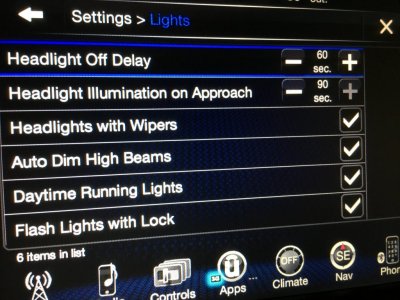
@78Staff When you look on the 8.4 after letting the truck sleep (4 to 5 minutes with the ignition off and key out) in settings/lights/daytime running lights. Does it show DRL (daytime running lights).

Also, they will only work in drive, neutral and reverse. Not in park or with the park break on.
 

78Staff

US Navy Veteran
Joined
Aug 3, 2018
Posts
976
Reaction score
554
Location
NE Florida
Ram Year
2016
Engine
5.7L Hemi
Weird I just got Blocked message from RamForum, couldn't post or PM for a few min...

Not showing in menu, letting sleep now will go back out an check. Also parking brake was on, didn't realize that will pull it and check.. back in a sec.
 

78Staff

US Navy Veteran
Joined
Aug 3, 2018
Posts
976
Reaction score
554
Location
NE Florida
Ram Year
2016
Engine
5.7L Hemi
SUCCESS! lol I think it was the key out of ignition sleep that I was missing, I had been leaving key in. Once I let it sleep for 10 without key, option shows up in 8.4 and DRL's are working! Now I just have to decide if I like the turn signal DRL's or change to another bulb option.

Next will be Auto Dim Mirror once it arrives, then maybe Trailer Brakes, Bed Lights, Lions, Tigers, oh my!

Many Thanks @Ghost_RAM for the late night support!!! :banana-mario:
 

78Staff

US Navy Veteran
Joined
Aug 3, 2018
Posts
976
Reaction score
554
Location
NE Florida
Ram Year
2016
Engine
5.7L Hemi
I contacted the Dev to see if something is up. Maybe I’m missing an additional step or something. I’ll update as soon as I can.

I got the Android version. It is a lot of scrolling, but you learn where things are pretty quick.


Sent from my iPhone using Tapatalk


@JOHRY I tries this as well and same as you it just doesn't "take". Hopefully the dev can shed some light on this one...
 

FXCLM5

Senior Member
Joined
Mar 10, 2015
Posts
764
Reaction score
483
Ram Year
2017 Laramie CC
Engine
ED 3.0 V6
SUCCESS! lol I think it was the key out of ignition sleep that I was missing, I had been leaving key in. Once I let it sleep for 10 without key, option shows up in 8.4 and DRL's are working! Now I just have to decide if I like the turn signal DRL's or change to another bulb option.

Next will be Auto Dim Mirror once it arrives, then maybe Trailer Brakes, Bed Lights, Lions, Tigers, oh my!

Many Thanks @Ghost_RAM for the late night support!!! :banana-mario:
lol i told you guys in this thread 1 of the plausible reasons is the key needs to be away from the truck in order for the ecu to correctly sleep.

we should sticky it in the 1st post if it could ever become editable.
 

cory733

Member
Joined
Aug 18, 2018
Posts
42
Reaction score
14
Location
New York
Ram Year
2015 Big Horn Quad Cab
Engine
Hemi 5.7
SUCCESS! lol I think it was the key out of ignition sleep that I was missing, I had been leaving key in. Once I let it sleep for 10 without key, option shows up in 8.4 and DRL's are working! Now I just have to decide if I like the turn signal DRL's or change to another bulb option.

Next will be Auto Dim Mirror once it arrives, then maybe Trailer Brakes, Bed Lights, Lions, Tigers, oh my!

Many Thanks @Ghost_RAM for the late night support!!! :banana-mario:

What does the bed light option actually do? I'm planning to add bed lights but was just going to connect them to the cargo light circuit
 
OP
OP
Ghost_RAM

Ghost_RAM

Senior Member
Joined
Jan 10, 2018
Posts
1,367
Reaction score
1,099
Location
VA
Ram Year
2016
Engine
Hemi 5.7
What does the bed light option actually do? I'm planning to add bed lights but was just going to connect them to the cargo light circuit
If using the factory harness/light kit, it enables it in the BCM. Otherwise, they will not come on when using the cab cargo switch.
 

justinkyleo

Member
Joined
Jun 9, 2017
Posts
30
Reaction score
26
Location
Waynesville, NC
Ram Year
2016
Engine
Cummins 6.7
On the issue of changes not showing...
I uploaded my stock bcm configuration to drive as well. I noticed that the changes made were showing when displayed within the app. If I attempted to upload that configuration to drive under a new file name, the file was identical my stock bcm. In other words my app won't save my changes to a file even though they are active, work properly, and display within the app. Anyone else experience this?
 
OP
OP
Ghost_RAM

Ghost_RAM

Senior Member
Joined
Jan 10, 2018
Posts
1,367
Reaction score
1,099
Location
VA
Ram Year
2016
Engine
Hemi 5.7
I can test later but I have not see that problem. I was confused when first looking at the config because I wasn't scrolling far enough down the list. It saves each session in order. After so many sessions, the list grows quite long.
 

justinkyleo

Member
Joined
Jun 9, 2017
Posts
30
Reaction score
26
Location
Waynesville, NC
Ram Year
2016
Engine
Cummins 6.7
Completely my fault then. I didn't know the log was a running list of all session. Just uploaded the newest log, started comparing from the bottom up, and everything is logging properly here. Thanks for clarification.
 

jcarden10

Senior Member
Joined
Feb 17, 2016
Posts
205
Reaction score
90
Location
Raleigh, NC
Ram Year
2014 Big Horn
Engine
Hemi 5.7
Assuming the Window version acts the same as Android, I’ve noticed that if you don’t clear the log before running a new log, the output actually has both logs in the output (or more depending how many times you’ve run it). So the output at the top would be the old output, then if you scroll to the end of the first log a second log should start. Basically, when you create the log, it doesn’t overwrite the old versions, it adds to them.


Sent from my iPhone using Tapatalk
 
Back
Top