
Buckeye2019
Senior Member
2018 2500 I have the tailgate camera.. can I keep that and have the cargo camera? If so how would it be done


Disclaimer: Links on this page pointing to Amazon, eBay and other sites may include affiliate code. If you click them and make a purchase, we may earn a small commission.
Yes, there are 3 camera inputs on the radio, would need to be flashed for the backup camera then pin in the cargo camera.

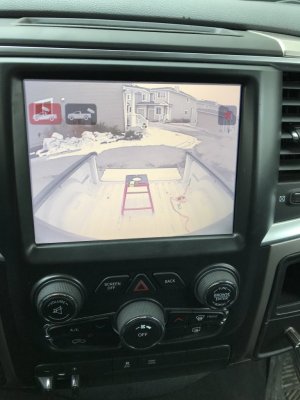
If you have the 8.4” screen they are both on the screen and you select which camera you want. If you put it in reverse it will be the backup camera, if you want the cargo camera you can turn it on at any time, it times out after few minutes or you click the X and turn it offhow do you switch between the two? normally from the factory if you have both one is in the screen and the other is in the mirror.

Does the cargo camera come standard or was it an add on set up?If you have the 8.4” screen they are both on the screen and you select which camera you want. If you put it in reverse it will be the backup camera, if you want the cargo camera you can turn it on at any time, it times out after few minutes or you click the X and turn it off
View attachment 119787
its an option for the heavy duty trucksDoes the cargo camera come standard or was it an add on set up?

What year is your truck?It was the infotainment cargo camera kit .
I excluded the genie so saved me like 200 bucks .
I used the AE tool to turn on the feature .
I have the cargo camera button showing on the screen and comes up as option to turn on when the truck is placed in Reverse
Camera should be in this week will the c4T harness .
I get the blue screen when I push the button as There is no camera connected yet .
When I get the CHMSL with camera installed and working I will post the vehicle config option I turned on .
I will also enable the led CHMSL to present.
Just didn’t do that yet as still using the original CHMSL light and was not sure if it would throw a code as the current would be higher probably with the stock light .


BCM= Body Control Module.
Layman's explanation: Stores your vehicle configuration (ie sales codes) that enable features on your truck to work. Can be accessed/changed using OBDII port via a dealer scan tool or to varying degrees aftermarket scan tools/serial interface devices.
AutoEngenuity makes one such tool with an chysler interface ($600) some of us have tried for various mods/installs. It can change some settings safely but we have have found out the hard way that it can screw up (corrupt) other settings in the BCM in addition to the ones you want to change ... And then can't fix without going to the dealer to reset back to factory config. Sometimes it can be really bad, ie change left hand drive truck to right hand drive (screws up the ABS). We have had one or two reports of people not being able to get their BCM reset by the dealer and had to get a new one ($$$). We don't recommend using it because of the risks.
Unfortunately it sounds like your dealer sent the truck to a local shop for an aftermarket setup.HELP.....dealer installed Cargo Light with a switch on the dash.....I have a 2018 2500 and due to the software dealer said they could only install a cargo camera the was controlled by the switch not the 8.4 display....help is there a software or hardware update that can allow the 8.4 display to choose the cargo camera...I can only use the camera in reverse with the switch ON...can not check the cargo bed while driving down the road to be sure cargo has not shifted....was the the only way to get a cargo camera on a Larime 2500 ????