Dashcam Power

Disclaimer: Links on this page pointing to Amazon, eBay and other sites may include affiliate code. If you click them and make a purchase, we may earn a small commission.

RamBigHorn

Junior Member
Joined
Feb 15, 2019
Posts
12
Reaction score
10
Location
Etobicoke Canada
Ram Year
2019
Engine
Hemi 5.7
For those that have a dashcam in their Trucks, how are you providing power to it? Using the 12V plug on the dashboard will show the cables, making it look like crap. Would the USB ports in the center console power a Dashcam?
 

DILLIGAF

Senior Member
Canadian Forces
Joined
May 28, 2016
Posts
5,730
Reaction score
12,210
Location
Canada
Ram Year
2012
Engine
5.7
They sell kits on Amazon that hard wire them in
 

adrianp89

Senior Member
Joined
Sep 3, 2015
Posts
3,176
Reaction score
1,276
Location
Tampa Bay, FL
Ram Year
2019
Engine
Hemi 5.7
Use the hardwire kit, then I grabbed 12v constant and ground from radio module, and 12v acc for cig lighter at top of dash. Wires router through headliner, down A-pillar, and under dash to center stack.
 

sierraangler

Junior Member
Joined
Dec 23, 2018
Posts
13
Reaction score
10
Location
Montebello, CA
Ram Year
2019 Limited
Engine
Hemi 5.7 eTorque
I ran power from the fuse box under the steering wheel. Remove 2 small bolts on the cover under the steering wheel. There are 4 press in clips one in each corner holding the cover. Pull on one corner until it pops out then then go to the next corner. There are some cables attached to the bottom of the cover so you can't remove it completely but you can move it out of the way to so you can reach the fuses. There are small numbers on the frame next to each of the fuses. The users guide has a table for what each fuse is for matching with the number. I used a fuse tap that came with the dash cam wiring kit. My kit came with a variety of fuse tap sizes so I could choose the one that fit. If your kit doesn't have the fuse tap (micro fuse size) then you will have to get it separately. You remove one of the fuses and insert it in the tap along with a second fuse that came with the kit. You then insert the tap into the fuse that you removed. I removed a number 5 fuse in the upper right hand corner of the fuse box. This only gets power in the ignition position. There are other fuses that have constant power if that's what you want. I attached the ground cable to one of the bolts holding the dash to a metal part on the upper left side. You can run your power cable from under the dash to the drivers door frame and run it under the trim up to the wind shield then to the rear view mirror. You can press the cable under the headliner to hold it in place and keep it hidden. This set up works well to keep the power cable in place and hidden.

If your going to use the USB port for power, use a cable that only transfers power and not data. I tried using a data cable and my dash cam kept thinking it was connecting to a computer and would cycle on and off trying to connect.

 

TerraNewf

Senior Member
Supporting Member
Joined
Mar 14, 2015
Posts
1,446
Reaction score
519
Location
NL, Canada
Ram Year
2019
Engine
5.7 Hemi
I ran power from the fuse box under the steering wheel. Remove 2 small bolts on the cover under the steering wheel. There are 4 press in clips one in each corner holding the cover. Pull on one corner until it pops out then then go to the next corner. There are some cables attached to the bottom of the cover so you can't remove it completely but you can move it out of the way to so you can reach the fuses. There are small numbers on the frame next to each of the fuses. The users guide has a table for what each fuse is for matching with the number. I used a fuse tap that came with the dash cam wiring kit. My kit came with a variety of fuse tap sizes so I could choose the one that fit. If your kit doesn't have the fuse tap (micro fuse size) then you will have to get it separately. You remove one of the fuses and insert it in the tap along with a second fuse that came with the kit. You then insert the tap into the fuse that you removed. I removed a number 5 fuse in the upper right hand corner of the fuse box. This only gets power in the ignition position. There are other fuses that have constant power if that's what you want. I attached the ground cable to one of the bolts holding the dash to a metal part on the upper left side. You can run your power cable from under the dash to the drivers door frame and run it under the trim up to the wind shield then to the rear view mirror. You can press the cable under the headliner to hold it in place and keep it hidden. This set up works well to keep the power cable in place and hidden.

If your going to use the USB port for power, use a cable that only transfers power and not data. I tried using a data cable and my dash cam kept thinking it was connecting to a computer and would cycle on and off trying to connect.



Good write up, exactly what I was looking for
 

KnurledNut

SemperFi
Joined
Oct 7, 2018
Posts
564
Reaction score
976
Location
Sonova Beach
Ram Year
2017
Engine
Hemi 5.7
My cam included a little body panel tool. The cable is long enough to run above along the headliner, down the door frame, behind the glovebox, then tucked in the console.

or...

You can hardwire it into the upper console.
 

LOOSEWHEEL

Junior Member
Joined
Jun 1, 2015
Posts
6
Reaction score
3
Ram Year
2015
Engine
Cummins 6.7
Overhead console. There is constant and key on 12V power. Cleanest way to do it. I have my cam on 24/7 but have dual batteries.
 
OP
OP
RamBigHorn

RamBigHorn

Junior Member
Joined
Feb 15, 2019
Posts
12
Reaction score
10
Location
Etobicoke Canada
Ram Year
2019
Engine
Hemi 5.7
I ended up running the power cable that came with the camera behind the headline to the passenger door, down the door and over to the center console. From there I used a 12V to USB converter cable which I plugged into a USB to Wall Plug and then plugged that into the 115V outlet. Works perfectly.
 

John Jensen

Senior Member
Joined
Mar 27, 2016
Posts
1,582
Reaction score
1,770
Location
San Diego County
Ram Year
2016
Engine
Ecodiesel
Dash cams are either 12v powered or 5v powered. I purposely bought a 12v powered cam so I could hard wire into the harness at the rear view mirror. Makes for no wiring to hide. Have to say getting the mirror plastic off to access the harness is a chore. So much so I did not put it back on.
 

michael harpe

U.S. Army 2001-2014
Joined
May 19, 2019
Posts
768
Reaction score
677
Location
quitman, ga
Ram Year
2018 Power Wagon
Engine
6.4 hemi
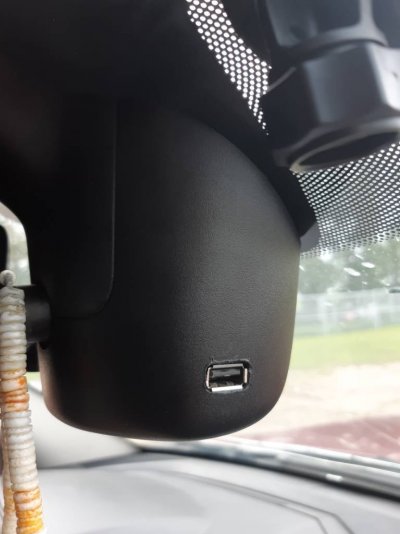
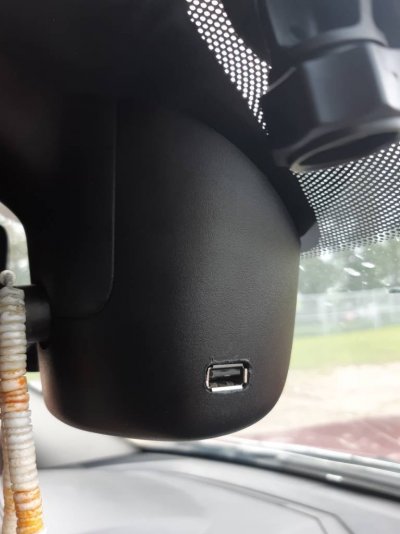
I just wired in a USB port to the mirrior. Nice and Clean and easy to add more accessories when needed. 63c0be282269fbdef0d0ebc9f37ade53.jpg1f4ee8e96b4627e1448901238febe22b.jpg

Don’t suppose you took pics for a write up? I’m totally doing this now but if you don’t mind what color wires am I looking for? I have an 18 power wagon. Also where did you order the USB port?


Sent from my iPhone using Tapatalk
 

Brandon-w

Senior Member
Joined
Jan 2, 2019
Posts
3,647
Reaction score
6,104
Location
Yukon
Ram Year
2015 Ram 1500
Engine
6.4
I got the USB port off of ebay along with a mini 12v-5v buck converter. I don't have any pics of the install. I'll see if I can get some pictures here after work. Maybe I'll do a little write up.
 

michael harpe

U.S. Army 2001-2014
Joined
May 19, 2019
Posts
768
Reaction score
677
Location
quitman, ga
Ram Year
2018 Power Wagon
Engine
6.4 hemi
I got the USB port off of ebay along with a mini 12v-5v buck converter. I don't have any pics of the install. I'll see if I can get some pictures here after work. Maybe I'll do a little write up.

I can guarantee a write up would be loved


Sent from my iPhone using Tapatalk
 

Brandon-w

Senior Member
Joined
Jan 2, 2019
Posts
3,647
Reaction score
6,104
Location
Yukon
Ram Year
2015 Ram 1500
Engine
6.4
Hey guys. So a few of you wanted a write up on how I did the usb plug in the mirrior. It's quick and short with few pictures but it's straightforward enough I think.

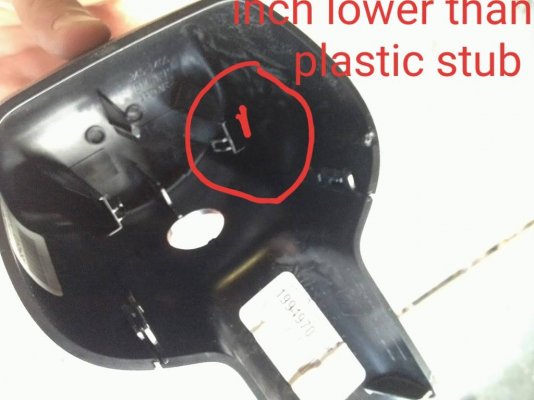
First off the mirror is a royal pita the get the plastic off. Search on Google or forum how to do this. Second I don't have any links but get an ebay usb plug and a 12v to 5v buck converter. Disassemble the mirrior plastics and unplug the plug that's in the mirrior. Then find the pink and yellow wire, this is the 12v key on power wire. You'll wire in the Imput power from your buck converter to this. Next find the black wire on the plug and wire the negative Imput of your converter to it. Find where you want to mount the USB plug I'll circle where I reccomend and mount it. I used hot glue to hold it in place it's easy but strong and no one sees that part. Once this is done wire in power and ground from your buck converter to the usb plug, use ur multimeter to dial the voltage to 5v once you're there put it back together and you're done. If you want constant power from this wire into either the dark blue light green wire or the light green/ dark blue wire. Double check which one has power with the key off. Done two trucks like this and they were both different constant power on.
Hope this is useful to you guys. c8fe879385c5a558f252c6778725ffed.jpgc63cfc150ab60ada970fe8366b66faf8.jpg
 

Brandon-w

Senior Member
Joined
Jan 2, 2019
Posts
3,647
Reaction score
6,104
Location
Yukon
Ram Year
2015 Ram 1500
Engine
6.4
Sorry pic had writing cut off. MoU t about 1/4 inch below the plastic nub on the inside doesn't need to be excact could be lower but no higher. d5fa116026913fc7959a543fc604c8b3.jpg
 

michael harpe

U.S. Army 2001-2014
Joined
May 19, 2019
Posts
768
Reaction score
677
Location
quitman, ga
Ram Year
2018 Power Wagon
Engine
6.4 hemi
Didn’t expect a write up so fast. Thank you so much Brandon :)


Sent from my iPhone using Tapatalk
 

LarryA

Senior Member
Joined
Jun 1, 2017
Posts
361
Reaction score
428
Location
Seattle
Ram Year
2017
Engine
Hemi 5.7
I originally ran my dash camera out to the fuse box via the clutch plate. Super easy to tuck all wires into the headliner and down the A-pillar. Even though I did not cut the fuse box i did not like the extra wire under the hood so I switched to a OBD power connector. Camera goes into parking mode when the truck is off, and switches to normal recording when I power on my truck. Either way super easy to run the wires, nothing to cut or splice. Camera shuts off after 12 hours or if the voltage drops, so no battery issues.
 
Back
Top