


DIY: 2013-2016 (some 17-18) RearView Mirror Upgrade & Harness install

Disclaimer: Links on this page pointing to Amazon, eBay and other sites may include affiliate code. If you click them and make a purchase, we may earn a small commission.

ORM-D

Junior Member
Joined
Jul 24, 2025
Posts
4
Reaction score
1
Location
South Carolina
Ram Year
2018 Ram 1500 Express
Engine
5.7 Hemi
Let us know how it goes.... Looks like most mirror/harness parts will be compatible from 2017-24 classic 1500's even as PNs are updated.

I'm not familiar with that mirror PN (68293658AA), but it appears to have Auto Dim, w/o mics, (no Smartbeam/Auto high beam, no SoS/Assist buttons) based on pictures I've found online. Can't tell which connector style it has to match up to a harness (need 10 pin, which I think it has).

We'll do. Yes no mics, Smartbeam or SoS/Assist just autodim.
 

crookedmosquito

Junior Member
Joined
Mar 15, 2022
Posts
21
Reaction score
6
Location
Pickerington, Ohio
Ram Year
2014
Engine
5.7
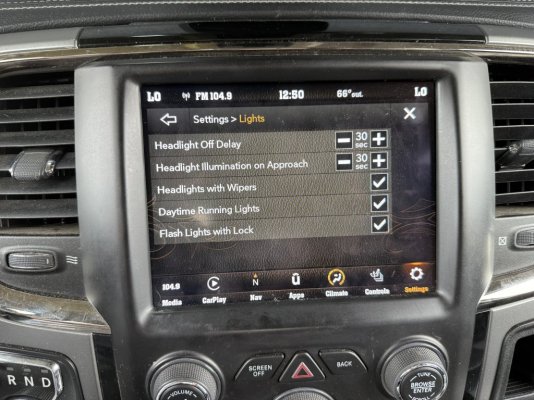
I have installed the proper harness, mirror and have an 8.4 radio. However, I am not seeing the soft button in the truck radio menu. Here is what I currently have as options under Settings->Lights.

# AlfaODB Settings #
Vehicle Configuration 1: Auto High Beam
Select “yes”
Vehicle Configuration 3: Interior EC Mirror Present
Select“yes”
LIN & Misc: Smart Beam Present (AHBM)
Select “yes"
2014 CBC I/O & Features: Auto High Beam Module Location
Select “ECC_AHBM"
Customer Service Menus: Auto High Beam CSM
Select “yes”

3A1CD0BA-E92F-498E-906E-7DEBB04256DD.jpeg

Going to try and disconnect the battery for like 5 min and the connect it back up.
 

crookedmosquito

Junior Member
Joined
Mar 15, 2022
Posts
21
Reaction score
6
Location
Pickerington, Ohio
Ram Year
2014
Engine
5.7
I have installed the proper harness, mirror and have an 8.4 radio. However, I am not seeing the soft button in the truck radio menu. Here is what I currently have as options under Settings->Lights.

# AlfaODB Settings #
Vehicle Configuration 1: Auto High Beam
Select “yes”
Vehicle Configuration 3: Interior EC Mirror Present
Select“yes”
LIN & Misc: Smart Beam Present (AHBM)
Select “yes"
2014 CBC I/O & Features: Auto High Beam Module Location
Select “ECC_AHBM"
Customer Service Menus: Auto High Beam CSM
Select “yes”

View attachment 570762

Going to try and disconnect the battery for like 5 min and the connect it back up.
I am now getting the option after disconnecting the battery, but I don't see it on my dash display when i enable/disable it. Like shown in Post #10, guess I will see if it works tonight.
 
OP
OP
Mpgrimm2

Mpgrimm2

Senior Member
Supporting Vendor Navy Badge
Joined
Mar 30, 2014
Posts
6,584
Reaction score
5,195
Location
SC
Ram Year
2022 Ram 1500 (5th Gen)
Engine
5.7L
I am now getting the option after disconnecting the battery, but I don't see it on my dash display when i enable/disable it. Like shown in Post #10, guess I will see if it works tonight.
You have a Panasonic 4c UAx radio...

(Battery disconnect or pulling the 20A inline radio fuse near the brake booster or Pass firewall ... With these changes is required (Fuse pull recommended) and can speed up the radio/BCM reset for changes, especially with a UAQ/UAS radio (think 15-30mins or longer ... Up to 48hrs).

* Radio is not reset until SXM button displays again and/or Backup Cam works if installed)

.
 

Attachments

  • Radio Fuse a Locations.jpeg
    Radio Fuse a Locations.jpeg
    77.8 KB · Views: 3

crookedmosquito

Junior Member
Joined
Mar 15, 2022
Posts
21
Reaction score
6
Location
Pickerington, Ohio
Ram Year
2014
Engine
5.7
You have a Panasonic 4c UAx radio...

(Battery disconnect or pulling the 20A inline radio fuse near the brake booster or Pass firewall ... With these changes is required (Fuse pull recommended) and can speed up the radio/BCM reset for changes, especially with a UAQ/UAS radio (think 15-30mins or longer ... Up to 48hrs).

* Radio is not reset until SXM button displays again and/or Backup Cam works if installed)

.
Battery disconnect did the trick. My deck is actually out of a 2021 ram. Wanted to have the ability to do CarPlay and android auto
 

GoatLocker

Member
Joined
Oct 13, 2015
Posts
71
Reaction score
19
Ram Year
2014
Engine
Cummins 6.7
If you have BuCam displayed on the mirror ... It's the wrong mirror harness/connector and the new Auto High beam mirror doesn't have a BuCam display... & 2013-15 8.4 radios Will only display one video input BuCam or Cargo (default if installed) requiring either SW v17.11.x or a 16+ 8.4 radio to display both.
Is SW v17.11.x specifically required, or do newer versions retain dual input capability? I have v18.45.01.
 
OP
OP
Mpgrimm2

Mpgrimm2

Senior Member
Supporting Vendor Navy Badge
Joined
Mar 30, 2014
Posts
6,584
Reaction score
5,195
Location
SC
Ram Year
2022 Ram 1500 (5th Gen)
Engine
5.7L
Is SW v17.11.x specifically required, or do newer versions retain dual input capability? I have v18.45.01.
What year truck?
What year and model radio?
Which cameras installed from factory and where do they display?
What SW version currently on radio?
 

GoatLocker

Member
Joined
Oct 13, 2015
Posts
71
Reaction score
19
Ram Year
2014
Engine
Cummins 6.7
What year truck?
What year and model radio?
Which cameras installed from factory and where do they display?
What SW version currently on radio?
I know my post is slightly OT for this thread, but info on the dual video input with newer SW versions is what I'm looking for. My Ram is a 2014 with RA3, cargo camera and auto dim mirror with display, mics and assist/911 buttons. It's the standard setup with the backup cam in the RV mirror and the cargo cam on the RA3. RA3 SW is 18.45.01. The radio was swapped by the dealer a few years back when they bricked it during service. According to the info display the HU Part Number is 68224531AM. Mirror PN is 68185380AA.

I have 2 goals. One is to get the backup cam on the RA3, thus the question on SW version for dual inputs.

Second, my current mirror is badly de-silvered. Since my model of mirror is ridiculously expensive, I'm looking at other options. Either repair or a lower end mirror without the camera display. I would probably keep my mirror housing and harness, just swapping out the mirror itself. Sending it off for repair is also a possibility I'm investigating.
 
OP
OP
Mpgrimm2

Mpgrimm2

Senior Member
Supporting Vendor Navy Badge
Joined
Mar 30, 2014
Posts
6,584
Reaction score
5,195
Location
SC
Ram Year
2022 Ram 1500 (5th Gen)
Engine
5.7L
I know my post is slightly OT for this thread, but info on the dual video input with newer SW versions is what I'm looking for. My Ram is a 2014 with RA3, cargo camera and auto dim mirror with display, mics and assist/911 buttons. It's the standard setup with the backup cam in the RV mirror and the cargo cam on the RA3. RA3 SW is 18.45.01. The radio was swapped by the dealer a few years back when they bricked it during service. According to the info display the HU Part Number is 68224531AM. Mirror PN is 68185380AA.

I have 2 goals. One is to get the backup cam on the RA3, thus the question on SW version for dual inputs.

Second, my current mirror is badly de-silvered. Since my model of mirror is ridiculously expensive, I'm looking at other options. Either repair or a lower end mirror without the camera display. I would probably keep my mirror housing and harness, just swapping out the mirror itself. Sending it off for repair is also a possibility I'm investigating.

If you want both cameras to display on the radio, you need a 2016+ 8.4 radio (2014 on v18.x won't do it. Can't roll back either), backup cam reroute harness (message me to get one made) and to move the existing cargo cam video signal to 24,25,26.

You can replace the rearview mirror with a different 13-16 mirror (w/mics) with Autodim and add Auto High beam sensor depending on the model at the same time. A different OEM 13-16 mirror harness will be needed for any mirror w/o display.

See - DIY: 2013-2018 RearView Mirror Upgrade & Harness install

Otherwise your option is to disable the cargo cam with AlfaObd and then do a BuCam reroute to the radio (no cargo cam)

.
 
Back
Top