
WhuGmiT
Junior Member
Fellow Ram truck owners -
I am the proud new owner of a 4th Gen, 2017 Ram 1500, 5.7L V8, Crew Cab, 4WD, Laramie truck. Woohoo!
Spent the last couple of days trying to familiarize myself with the many systems, features, bells & whistles this vehicle has to offer. My next "newest" vehicle is a very basic 2005 Ford Ranger with about 300k miles on it, so there is a lot for me to learn!
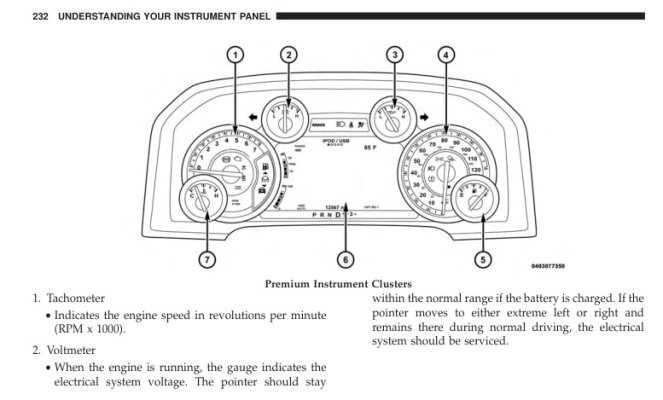
I have a question regarding the brightness of of the instrument cluster (in dash, just forward of the steering wheel; not the 8.4" LCD panel in the center of the dash).
Here is an illustration of the instrument cluster from the truck user manual:
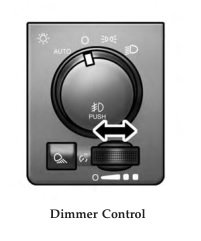
I would like to dim the instrument cluster a bit from what it is now during daytime running (with headlights and running lights OFF). But the horizontal dimmer knob to the left of the steering column does not affect the brightness when the headlights are off. The dimmer knob functions as expected when the headlights/running lights are on.
I talked with the Mopar guys and consulted the user manual. Both seem to indicate that the brightness of the instrument cluster should be adjustable when headlights & running lights are off. Local dealership service advisors & techs shrugged their shoulders - they seem to have no clue. No help there.
My wife's 2013 Honda Civic has settings for instrument panel brightness for both day (headlights off), and night (headlights on). I would expect this fancy 2017 Ram to have the same.
Would any of you kind folks with a 2016 - 2018 truck please do a quick test for me?
--- -
Fire up the engine on your truck
Turn headlights/running-lights OFF
Rotate the horizontal dimmer knob that is to the left of the steering column
Please let me know if the brightness of the instrument cluster in the dash just forward of the steering wheel changes.
--- -
That's it!
Much appreciated all.
I am the proud new owner of a 4th Gen, 2017 Ram 1500, 5.7L V8, Crew Cab, 4WD, Laramie truck. Woohoo!
Spent the last couple of days trying to familiarize myself with the many systems, features, bells & whistles this vehicle has to offer. My next "newest" vehicle is a very basic 2005 Ford Ranger with about 300k miles on it, so there is a lot for me to learn!
I have a question regarding the brightness of of the instrument cluster (in dash, just forward of the steering wheel; not the 8.4" LCD panel in the center of the dash).
Here is an illustration of the instrument cluster from the truck user manual:
I would like to dim the instrument cluster a bit from what it is now during daytime running (with headlights and running lights OFF). But the horizontal dimmer knob to the left of the steering column does not affect the brightness when the headlights are off. The dimmer knob functions as expected when the headlights/running lights are on.
I talked with the Mopar guys and consulted the user manual. Both seem to indicate that the brightness of the instrument cluster should be adjustable when headlights & running lights are off. Local dealership service advisors & techs shrugged their shoulders - they seem to have no clue. No help there.
My wife's 2013 Honda Civic has settings for instrument panel brightness for both day (headlights off), and night (headlights on). I would expect this fancy 2017 Ram to have the same.
Would any of you kind folks with a 2016 - 2018 truck please do a quick test for me?
--- -
Fire up the engine on your truck
Turn headlights/running-lights OFF
Rotate the horizontal dimmer knob that is to the left of the steering column
Please let me know if the brightness of the instrument cluster in the dash just forward of the steering wheel changes.
--- -
That's it!
Much appreciated all.