
Lost XM radio after front camera install

Disclaimer: Links on this page pointing to Amazon, eBay and other sites may include affiliate code. If you click them and make a purchase, we may earn a small commission.

HTXRamExp

Senior Member
Joined
Mar 27, 2018
Posts
329
Reaction score
280
Location
Houston, TX
Ram Year
2019
Engine
Hemi 5.7
I installed a front camera in my 2019 Ram 1500 Express Classic w/ the 4C UAS radio.

I purchased the camera, harness, and jailbreak module from Customtronix. I finished the install fairly late last night so after confirming that the front camera worked, I buttoned everything back up.

Today when I got in my truck, I realized that I no longer had my XM radio soft button, only AM/FM.

I pulled everything apart and double checked the connections at the back of the radio. I have the main harness black connector as well as grey, pink, yellow, white, and purple connectors. They were all in securely as far as I can tell.

I even unplugged the Customtronix harness and plugged back into the OEM harness and still did not have XM radio.

Which colored connection is for the XM radio? I suppose working in that tight space I may have disconnected the other end of the XM wire deeper under the dash?

Thanks in advance for any info!
 

Mpgrimm2

Senior Member
Supporting Vendor Navy Badge
Joined
Mar 30, 2014
Posts
6,572
Reaction score
5,168
Location
SC
Ram Year
2022 Ram 1500 (5th Gen)
Engine
5.7L
Mustard colored connector is SXM antenna...

Does the backup camera work in reverse?

Is there actually a sxm button still on the menu screen?

These Panasonic UAx Radios take a long time to reset properly and read the changes being sent them by the BCM (or in this case the Customtronix module).

You may need to pull the inline fuse next to the brake booster to reset the radio and wait 3 or 4 key cycles for it to find everything it's being told to look for. The radio is usually reset once it has the sxm menu button and backup camera working.

If that doesn't work, disconnect the battery for a minute or two and reconnect. We have seen some changes take 24-48 hours to register on the radios.

M² Mods.
 
OP
OP
HTXRamExp

HTXRamExp

Senior Member
Joined
Mar 27, 2018
Posts
329
Reaction score
280
Location
Houston, TX
Ram Year
2019
Engine
Hemi 5.7
Mustard colored connector is SXM antenna...

Does the backup camera work in reverse?

Is there actually a sxm button still on the menu screen?

These Panasonic UAx Radios take a long time to reset properly and read the changes being sent them by the BCM (or in this case the Customtronix module).

You may need to pull the inline fuse next to the brake booster to reset the radio and wait 3 or 4 key cycles for it to find everything it's being told to look for. The radio is usually reset once it has the sxm menu button and backup camera working.

If that doesn't work, disconnect the battery for a minute or two and reconnect. We have seen some changes take 24-48 hours to register on the radios.

M² Mods.
Thanks! I sort of guessed/figured out it was the mustard colored one from looking online. Traced it back to behind the passenger side glove box. I think I would have really had to pull something fierce on the cable to break any other connections given how it's routed. Likely would have snagged on a turn before applying any force back to the sxm hardware. Hopefully I haven't botched the radio side connector.

The backup camera does come on when shifted into reverse. I can also cycle through the front/cargo/backup cameras via the back button on the radio (enabled by the jailbreak module), and I also enabled the cargo cam via the jailbreak module and that soft button appears on the screen when I select the backup camera soft button.

There is no sxm soft button on the menu screen only am/fm.

The install instructions with the Customtronix hardware has you reset the radio 2x via their membrane buttons that plug into the jail breaker (just rebooted the radio/cycled power it looked like?).

I went ahead and disconnected the neg terminal on the battery and depressed the brake pedal for a few seconds. Letting the truck sit for a few and will connect everything back up and see whats going on after a few key cycles.

If that doesn't work, may have to tuck tail and head to the dealer and see what they say.
 

Mpgrimm2

Senior Member
Supporting Vendor Navy Badge
Joined
Mar 30, 2014
Posts
6,572
Reaction score
5,168
Location
SC
Ram Year
2022 Ram 1500 (5th Gen)
Engine
5.7L
The dealer will likely be no help whatsoever and will want to remove any non factory items to start (& charge you for it).

If the battery reset doesn't work, have you tried contacting Magnus @customtronix to see if he has any suggestions.

M² Mods.
 
OP
OP
HTXRamExp

HTXRamExp

Senior Member
Joined
Mar 27, 2018
Posts
329
Reaction score
280
Location
Houston, TX
Ram Year
2019
Engine
Hemi 5.7
The dealer will likely be no help whatsoever and will want to remove any non factory items to start (& charge you for it).

If the battery reset doesn't work, have you tried contacting Magnus @customtronix to see if he has any suggestions.

M² Mods.

No luck on the battery disconnect.

I've sent Magnus an email already, but it was late in the day. Probably won't hear back until Monday.

Everything else on the radio seemingly works. I can even connect to Apple Carplay and play Sirius via the app.

Though my uConnect app on my phone hasn't been able to connect to the truck. Last update was before the camera install. I can still locate and lock my truck via the app but the mileage/tire pressure/oil life hasn't updated.


Sent from my iPhone using Tapatalk
 

Mpgrimm2

Senior Member
Supporting Vendor Navy Badge
Joined
Mar 30, 2014
Posts
6,572
Reaction score
5,168
Location
SC
Ram Year
2022 Ram 1500 (5th Gen)
Engine
5.7L
You're the first person on the forum that has used their new Jailbreak module so keep us updated.

I'm curious what happens when you disconnect the module from the truck and reset the radio/battery pull. I would hope everything would come back.

M² Mods.
 
OP
OP
HTXRamExp

HTXRamExp

Senior Member
Joined
Mar 27, 2018
Posts
329
Reaction score
280
Location
Houston, TX
Ram Year
2019
Engine
Hemi 5.7
You're the first person on the forum that has used their new Jailbreak module so keep us updated.

I'm curious what happens when you disconnect the module from the truck and reset the radio/battery pull. I would hope everything would come back.

M² Mods.


I'm in the process now of pulling everything out and hooking everything back up to factory configuration.

When I pulled the module out, I discovered a couple of the dip switches were set incorrectly. That may be where I messed up.

If everything comes back to 100% OEM. I may try and re-install with the correct dip switch configuration.

If not, I may take it to the dealer and see if they can get the radio back to 100% stock.

Also how hot do these radios/screens get? After messing around with it in my driveway, the screen was very warm to the touch.

Edit: per email conversation with customtronix prior to purchase:
0e46688620565fd3a548221f256796a2.jpg


Sent from my iPhone using Tapatalk
 
Last edited:
OP
OP
HTXRamExp

HTXRamExp

Senior Member
Joined
Mar 27, 2018
Posts
329
Reaction score
280
Location
Houston, TX
Ram Year
2019
Engine
Hemi 5.7
Connected everything back up to OEM configuration.

Went through the resets in the radio settings, not sure if needed, but thought id give it a try.

Reset the radio via pulling the inline fuse.

Cycled the key a couple times.

63333dcccda612e7eebfafea37d671d6.jpg

Seems everything is back as it should. Just need to get my sxm turned back on.


Sent from my iPhone using Tapatalk
 

Mpgrimm2

Senior Member
Supporting Vendor Navy Badge
Joined
Mar 30, 2014
Posts
6,572
Reaction score
5,168
Location
SC
Ram Year
2022 Ram 1500 (5th Gen)
Engine
5.7L
Now to try the new module again with the correct dip switch settings.

PS: post some pictures of it and the connections, I'm curious what it looks like with it's harness and wouldn't mind seeing a video of it in action is you're able.

M² Mods.
 
OP
OP
HTXRamExp

HTXRamExp

Senior Member
Joined
Mar 27, 2018
Posts
329
Reaction score
280
Location
Houston, TX
Ram Year
2019
Engine
Hemi 5.7
Now to try the new module again with the correct dip switch settings.

PS: post some pictures of it and the connections, I'm curious what it looks like with it's harness and wouldn't mind seeing a video of it in action is you're able.

M² Mods.

Ill try to get them tomorrow when I re-install.


Sent from my iPhone using Tapatalk
 
OP
OP
HTXRamExp

HTXRamExp

Senior Member
Joined
Mar 27, 2018
Posts
329
Reaction score
280
Location
Houston, TX
Ram Year
2019
Engine
Hemi 5.7
Below are some installation pictures

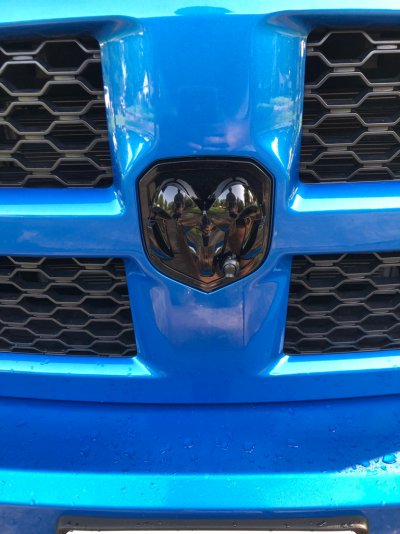
Emblem with camera. There's a set screw to adjust the view.
92cc83fc54367221ea879b4cbf9517f5.jpg

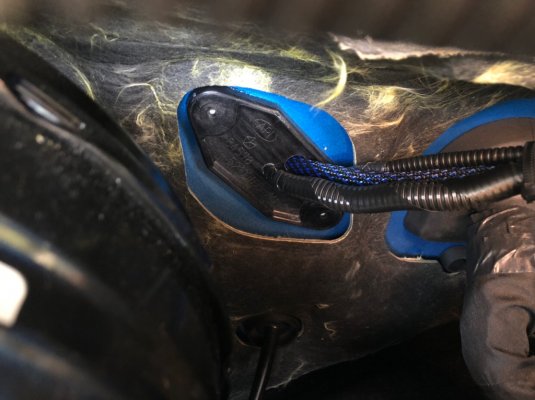
Where the video and power cables enter the cab. The dealer used this location to run the wires for the Amp Research Power steps so I did as well.
31ae57e23fffbbcc4973c286dee8653d.jpg

The power and video cables run into the cab, up to the headunit space.
676ef1536f677c9e3e8b2da1f8d7a987.jpg

The harness is rather large, but looks to be about the same as any other jump harness I've seen from Tailgate Camera, Infotainment, etc...
0cbcd0572c94272ebf149877a09878da.jpg

Luckily there is a lot of room behind the headunit and everything can be tucked back in with a little finesse.
1d9984086f78aa5ceb2647647dc39749.jpg

With everything re-installed with the correct dip switch settings, everything appears to be working properly.

I have it set for the front camera to come on when first shifted into Drive. The camera will remain on until ~7mph is exceeded and will revert back to the radio.

(It can also be set up that the camera will automatically come on anytime the vehicle is below 7mph. I chose not to enable this, as with Houston traffic I feel that would get annoying.)

I can also manually select the front camera by pressing the back button below the headunit for ~2sec. Pressing and holding it again will cycle to the next input. This can be repeated for all 4 inputs and will cycle back to the radio screen at the end.

1-Front Camera input
2-Empty Camera (still waiting to hear back on the cargo cam harness from Deereguy)
3-HDMI input
4-Backup Camera

How is it best to upload/link video content?


Sent from my iPhone using Tapatalk
 

Mpgrimm2

Senior Member
Supporting Vendor Navy Badge
Joined
Mar 30, 2014
Posts
6,572
Reaction score
5,168
Location
SC
Ram Year
2022 Ram 1500 (5th Gen)
Engine
5.7L
Thanks for the pictures and info.
I can add a front camera to mine as a "cargo" cam input but will never be able to get it to turn on automatically at/below 7mph like yours will do. (I used the original SW Jailbreak on my 13 ram and liked the feature. Might have to give their enigma hw jailbreak a shot).

Upload to YouTube and post a link here

M² Mods.
 
Last edited:
OP
OP
HTXRamExp

HTXRamExp

Senior Member
Joined
Mar 27, 2018
Posts
329
Reaction score
280
Location
Houston, TX
Ram Year
2019
Engine
Hemi 5.7
I read the threads where members were using the cargo cam pins for a front camera. Not a bad solution, but I'd really like to add a cargo camera in the future.

The Customtronix Enzo is the only jailbreak for the UAS radio I've found that would allow front, cargo, and backup cameras and also didn't require a manual switch to be run into the cab from behind the headunit.

So far I'm pretty pleased with it.

I'll try to work on getting a video uploaded to YouTube but in the meantime you can check out this video from Customtronix running through the operation of the Enzo in another vehicle.


Sent from my iPhone using Tapatalk
 

Mpgrimm2

Senior Member
Supporting Vendor Navy Badge
Joined
Mar 30, 2014
Posts
6,572
Reaction score
5,168
Location
SC
Ram Year
2022 Ram 1500 (5th Gen)
Engine
5.7L
@HTXRamExp
Did you get/install the membrane channel switch assy? If so where?

M² Mods.
 
OP
OP
HTXRamExp

HTXRamExp

Senior Member
Joined
Mar 27, 2018
Posts
329
Reaction score
280
Location
Houston, TX
Ram Year
2019
Engine
Hemi 5.7
No I left it out. You can use the membrane switch to toggle through the inputs, but you can also use the "back" button below the headunit. Holding the back button for ~2 sec will bring up the front camera. Releasing and holding another 2 will bring up the next input. Repeat for inputs 3 and 4.

I like not having anything aftermarket added to the truck to operate the front camera.

There's a decent but of wire with the membrane switch so you'd have some options. I have the jump seat instead of the center console, which I think would give you more options to tastefully mount the switch.

If I were to use the switch I might mount it on/in the lower cubby below the HVAC controls.

2640a31c68f77025987f23ac611f1e9a.jpg


Sent from my iPhone using Tapatalk
 

Members online

Forum statistics

Threads
211,040
Posts
3,061,310
Members
171,095
Latest member
noraa73
Back
Top