

RamDiver
Senior Member
- Joined
- Jan 23, 2022
- Posts
- 5,639
- Reaction score
- 11,883
- Location
- Marlborough, Ontario Canada
- Ram Year
- 2021 DS
- Engine
- Hemi 5.7
I've tried in the past to take it down to almost thumb nail size and lowered the resolution to almost nothing, and still have not been able to post. Not sure why.
I'm confident we can sort this out if you are interested.

File size, format and resolution are all parameters that are restricted to predefined limits; otherwise, site administrators/owners would lose control of the required server capacity and resources.
If you are posting pictures using a PC, the 'Insert Image' window displays the compatible image types above the Open & Cancel buttons on the lower right corner.

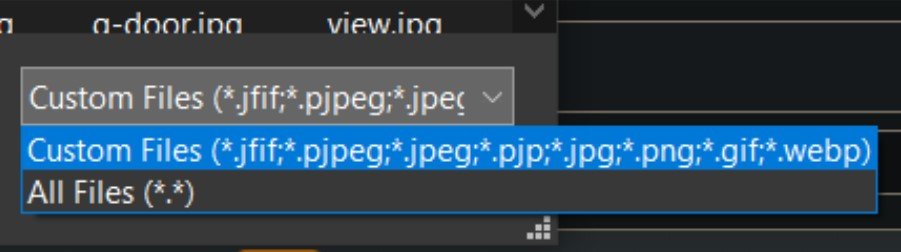
The Open and Cancel buttons are hidden under the pulldown window show above.
* is a windoze wildcard, meaning any characters. The file extension types are represented by the letters on the right side of the dot. *.jpg or *.jpeg could be a file named 'Anything.jpg' or 'Anything.jpeg'.
In the above picture, we can see 8 different file formats that are suitable.
Apple or Android phone cameras are often configured by default to use the HEIC format to reduce file size (anything.heic). This format would not be suitable for uploading to Ram Forum, but there are easy methods to convert these file types to jpg or other appropriate file types.
I had my android phone configured for heic, until it became too laborious to constantly convert the files to jpg. Plus, the RAM & bandwidth available on phones these days make using HEIC format unnecessary.
If your phone isn't ancient, more than 15 years old, configuring the camera to save files as jpg files shouldn't cause any grief.
The following link explains the use of several different picture formats. Skimming the page will provide a good basic understanding, or it presents lots of great details, for anyone interested.
Section 7 on BMP files seems to contain a few typos leading to a bit of misdirection, but otherwise, the article looks very well presented.

16 Common Image Formats (+ When to Use Them)
Ever wondered when to use a JPG or a BMP? Or maybe how to open an HEIC file. Wonder no more, with our guide to image file formats, explained simply.
 shotkit.com
And, if none of these items solves the mystery, we can explore other possibilities.
.