Wiring issue, transfer case and back up camera

Disclaimer: Links on this page pointing to Amazon, eBay and other sites may include affiliate code. If you click them and make a purchase, we may earn a small commission.

Chandlerdoom

Junior Member
Joined
Oct 29, 2017
Posts
19
Reaction score
5
Location
St. Louis
Ram Year
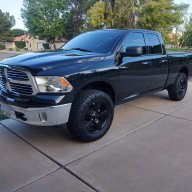
2017
Engine
6.7
I am trying to track down two separate issues I have and seeing if anyone has access to wiring circuits.

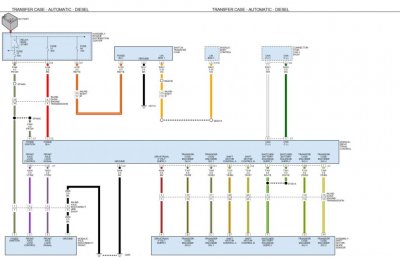
first and most important issue is 4wd isn’t working, I turn the dial and nothing happens. Does not light up so it’s not getting power, measured at the plug and I have power. So I’m 99% sure it’s just a faulty switch (which sucks because it’s probably only been used 3 times lol). But instead of just buying buying parts hoping for the best I would like to know the pin out on the transfer case module below the glove box just to I can verify that as well.

second issue I have is my back up camera does not have the lines anymore but the camera works fine. Says it lost communication in the fault and to check wiring but I’m not even sure where to start on that one because I figured the lines would go hand in hand with the camera wiring but I’m guessing it has some sort of input from the steering to get the line movement.

Truck is a 17 3500 6.7 electronic transfer case

thanks, also if anyone has a spare transfer case switch dial (2wd/4wd/4lo/neutral) let me know
 
OP
OP
Chandlerdoom

Chandlerdoom

Junior Member
Joined
Oct 29, 2017
Posts
19
Reaction score
5
Location
St. Louis
Ram Year
2017
Engine
6.7
Bump, bought a new switch with no luck. Anyone have a wiring diagram of the transfer case control module, I’d like to test that to see if that’s where my issue is before I purchase a new one
 
OP
OP
Chandlerdoom

Chandlerdoom

Junior Member
Joined
Oct 29, 2017
Posts
19
Reaction score
5
Location
St. Louis
Ram Year
2017
Engine
6.7
So I had another thread but only one reply, probably in the wrong section because it was under audio.

2017 ram 6.7 4wd electronic transfercase.

Code says lost communication with transfercase switch bank module

I found out the other day that my 4wd was not working, switch did nothing and did not light up at night. So I did some basic trouble shooting and settled on the actual switch itself being bad since I am getting 9v at the plug itself going into the transfercase switch dial. Bought a new switch but zero luck.

So moving down the line I settled on the module, seeing that the module was updated to AB from the AA I figured that this has to be it, zero luck again.

Now I’m at a loss, I reverted my Alfa obd changed from the remote start I added just to make sure it wasn’t something I changed. I also checked some of the options to make sure the settings were correct, 99% sure all it set right.

I need help with how I can trouble shoot this issue further.

I also have a U0264, lost communication with camera module.

Camera works, but no lines.
 
OP
OP
Chandlerdoom

Chandlerdoom

Junior Member
Joined
Oct 29, 2017
Posts
19
Reaction score
5
Location
St. Louis
Ram Year
2017
Engine
6.7
Ive been doing some thinking to get this figured out. I should probably test the switch that's on the transferase itself, just not sure how I could test it. Still confuses me how I could have power at the transfer case selector on the dash but it doesn't light up, does it receive a "system check" that says everything is okay before it can light up and start working
 

G-Ride990

Administrator
Staff member
Administrator Moderator Supporting Member
Joined
Jul 17, 2017
Posts
2,962
Reaction score
4,704
Location
Chandler, AZ
Ram Year
2022
Engine
5.7 No E-torque
Wish I could help, hanging out to see if you get it figured out though. Good luck!

Did you make a backup with Alfa before you made any changes? Notepad++ makes it really easy to compare before and after if you did.
 
OP
OP
Chandlerdoom

Chandlerdoom

Junior Member
Joined
Oct 29, 2017
Posts
19
Reaction score
5
Location
St. Louis
Ram Year
2017
Engine
6.7
Wish I could help, hanging out to see if you get it figured out though. Good luck!

Did you make a backup with Alfa before you made any changes? Notepad++ makes it really easy to compare before and after if you did.

Appreciate it, hopefully someone comes along

I started using alfa when it was early on so the backup wasn't really a thing besides take a note what changes you made. I went over everything today on alfa just to make sure and feel confident that I reverted everything just in case it was causing these issues. Only stuff I changed was to get remote start on my truck, which was only a handful of items.


Would be great if I could compare to another truck to maybe find the cause. If anyone feels so inclined...

Could you pull the plug from behind the transfer case switch on the dash, I measured 9v (red/black wires)

If you unplug the transfer case switch (on the transfer case itself) does it make the dash board switch inoperable (not even light up, turning the dial does nothing)

If transfer case unplugged, does it give you a u112c code?
 

Tach_tech

Senior Member
Joined
Jun 1, 2014
Posts
3,320
Reaction score
3,595
Ram Year
2017
Engine
5.7L HEMI
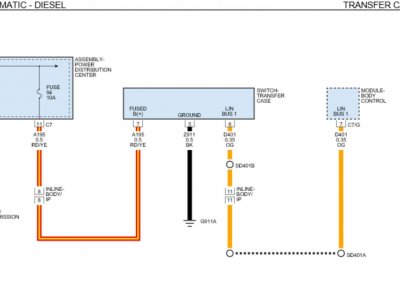
The connector to the switch bank is a 3 pin connector. You have a fused b+, Lin bus, and a ground.

So with key in the run position you should have 12V on fused b+ Brown/red wire, minimum voltage is 9v. Lin bus wire should be around 9v orange wire. Ground wire should just have good continuity to a chassis ground, less than 3 ohms.
 

MADDOG

Living in a Firepit
Staff member
Administrator Moderator Community Manager Supporting Member Air Force
Joined
Dec 26, 2011
Posts
15,180
Reaction score
11,435
Location
Arizona
Ram Year
2024
Engine
6.4L HEMI
Threads merged & moved.
 
OP
OP
Chandlerdoom

Chandlerdoom

Junior Member
Joined
Oct 29, 2017
Posts
19
Reaction score
5
Location
St. Louis
Ram Year
2017
Engine
6.7
Threads merged & moved.

Sorry about the duplicate, any way I could actually have this moved over to the tech where I had it. I feel like that’s the appropriate place instead of audio
 

MADDOG

Living in a Firepit
Staff member
Administrator Moderator Community Manager Supporting Member Air Force
Joined
Dec 26, 2011
Posts
15,180
Reaction score
11,435
Location
Arizona
Ram Year
2024
Engine
6.4L HEMI
The Tech Info area is where you will find technical write ups on installs and how to's.
 
OP
OP
Chandlerdoom

Chandlerdoom

Junior Member
Joined
Oct 29, 2017
Posts
19
Reaction score
5
Location
St. Louis
Ram Year
2017
Engine
6.7
The Tech Info area is where you will find technical write ups on installs and how to's.

Ah, I guess I thought it was the right place because of the pinned thread at the top. Just figured that was where I should have posted instead. No worries

DA49AD9B-08C6-4077-8520-F00230C05467.png
 
OP
OP
Chandlerdoom

Chandlerdoom

Junior Member
Joined
Oct 29, 2017
Posts
19
Reaction score
5
Location
St. Louis
Ram Year
2017
Engine
6.7
The connector to the switch bank is a 3 pin connector. You have a fused b+, Lin bus, and a ground.

So with key in the run position you should have 12V on fused b+ Brown/red wire, minimum voltage is 9v. Lin bus wire should be around 9v orange wire. Ground wire should just have good continuity to a chassis ground, less than 3 ohms.


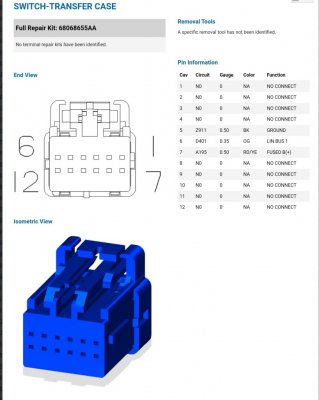
So at the transfercase switch on the dash I have a 12 pin connector with 3 wires, Orange black and red/yellow tracer. I get roughly 9v on orange, black had good continuity, red/yellow is nothing. I checked red/yellow for voltage and to see if it was grounded out.

If I should be receiving 12v on the red/yellow should I check continuity on that as well? Not sure where it actually goes since the transfer case control module by the passenger footwell doesn’t have any matching wires
 
OP
OP
Chandlerdoom

Chandlerdoom

Junior Member
Joined
Oct 29, 2017
Posts
19
Reaction score
5
Location
St. Louis
Ram Year
2017
Engine
6.7
Asked a buddy from work since he has the same truck, he's getting voltage on the red/yellow wire. So now I get to find out where that power starts

Tested all the fuses that make sense. Tested all of the minis. checked for power in the fuses that make sense.

Im guessing I need to figured out where it comes into the cab to see if I can isolate it on either the inside or outside at the bcm (or however it comes into the cab)
 
Last edited:
OP
OP
Chandlerdoom

Chandlerdoom

Junior Member
Joined
Oct 29, 2017
Posts
19
Reaction score
5
Location
St. Louis
Ram Year
2017
Engine
6.7
Progress continues, hopefully my trouble shooting (and help from other members) helps someone in need one day.

So I used mopar connection repair kit website that lists all the plugs with pin outs (exactly what I needed) I went to the "switch transfer case" plug, made sure it was the same comparing colors. What I was concerned with is the red/yellow which is fused B(+) circuit A195. So that circuit number helped me so I could reference it in other areas to make sure I was on the right path. Next I went to the #94 fuse to make sure it was the same circuit, it was and already checked the fuse and power at the fuse so that was checked off the list.

The next part was isolating parts the wire so I could narrow down my search. First I started with continuity from the fuse to the switch plug, just to make absolute sure that was my issue. No continuity, so now I needed to find if it had a connection anywhere. So i spent a while going through all the connectors to try and find the same circuit number, this took a while because I don't really know what some of these connectors are. Finally I found a "inline body ip 3" connector that contained my circuit number, listed the same color wire and fused B+.

Lesson learned that just because a connector looks the same and has a wire in the spot your looking for that's almost the right color, don't assume that its the correct one and verify a couple of the wires just to make sure you are in the right place. This connector was located on the passenger side, disconnected the connector so I could isolate each side. First I tested continuity from the inline connector to the switch plug, all good. Second I tested for voltage on the other side of the connector (coming from the battery) and zero voltage. Tested other pin outs that should have voltage just to verify that all it correct.

So I feel like I've narrowed down my search to the wire from the inline connector to the PDC, which is great but could have been a better location. This wire goes from passenger foot well, underneath both seats to driver footwell, through the firewall, and to the PDC. Thats a long ways and a lot in the way just to get to the wire.

I am still going to test for continuity from the inline connector to the PDC just to make sure that I'm on the right track, just have to wait until later when my wife returns to have a second set of hands.

But if it is that wire I have a dilemma, do I just run a new wire from PDC to the inline connector and be done with it. Or do I cut the wire at the driver side foot well so I can isolate it even further and try to actually find where the problem is.

I would like to know what is actually causing the issue, I've seen bad wires from a guy on youtube while trouble shooting something in similar fashion on a 4th gen ram. His issue was right at the PDC where the wires get bundled up
 
OP
OP
Chandlerdoom

Chandlerdoom

Junior Member
Joined
Oct 29, 2017
Posts
19
Reaction score
5
Location
St. Louis
Ram Year
2017
Engine
6.7
What an adventure.

The more I thought about it the more I wanted to find where the issue actually was in case it was happening to more wires. So ran to the store and bought some jumpers, wire, connectors, and cable tracker (figured why not, anything that helps), beer, and got to work.

So I started off with a continuity test from the inline connector to the PDC, nothing. Set up the cable tracker, followed it to the driver side and was excited that it wasn't underneath the seats. Kept following it hoping it would catch the problem using my new tool, followed it all the way to the PDC at the fuse. So I decided to pull the connector off underneath the PDC and continuity test from that connector instead of from the top where the fuse is, Still nothing. Decided to stick my lead from the underside of the plug where the wire comes in, just to make sure.

Found out that the underside of the connectors had some corrosion and that wire ended up breaking right at the connector, still in place. Finally found my issue. So tested continuity again at my new found break and finally I had it. Wired up a temp fuse straight to the battery to see if it would work and the lights turned on, and 4wd activated! awesome

So now I get the pleasure of using that mopar connection repair kit site to actually order something and fix my connectors, by the looks of it I have corrosion on a couple of wires. Not sure if I can buy something to spray on that would help break that stuff down and clean up the connections.

Now to track down my lost connection with camera module issue and get back my back up camera lines, maybe it will even be a similar issue.


I hope this information helps someone at some point, instead of just throwing money at it until it starts to work.
 

RedSRT4Me

Senior Member
Joined
Oct 28, 2015
Posts
2,818
Reaction score
2,282
Location
Scottsdale, Az
Ram Year
2015 CC Sport
Engine
5.7

Gixxer750

Senior Member
Joined
Jan 10, 2020
Posts
368
Reaction score
144
Location
N. Idaho
Ram Year
2015_2017
Engine
Hemi 5.7
Can you disconnect at the motor under the truck that is at the transfer case. Have a partner shift the gearing?
I'd do it with the tires up and idle speed spinning, since it suggests you be in motion, why not.
See if the voltage measurements from the switch are the same at the shift motor
 
Back
Top