
2018 Panasonic Computer/Display Media Problems

Disclaimer: Links on this page pointing to Amazon, eBay and other sites may include affiliate code. If you click them and make a purchase, we may earn a small commission.

Lamarsh

Senior Member
Joined
Mar 12, 2015
Posts
230
Reaction score
119
Location
Detroit
Ram Year
2020 1500 Rebel
Engine
5.7L Hemi
I have a 2018 Ram 1500 Big Horn, with the 8" Panasonic computer screen unit. Aside from having an impressively crisp and bright picture, I have generally found this thing is nothing but trouble.

May main issue with it, and I'm hoping to hear some input as to how to fix this, is the fact that when my iPhone 8 is connected to bluetooth, I cannot simply press the microphone button on my iPhone to speak into it and dictate a text message when I'm stopped at a red light. If I want that to work, apparently I have to disconnect blue tooth, or go through the truck's voice text process (that button on the steering wheel), which totally sucks since it asks you a million questions and is a very slow process to simply dictate a stupid text message at a red light.

A related problem is the fact that, when connected to bluetooth and the computer system is not on "bluetooth media," but is on something like SXM radio, if you are navigating using an iPhone app such as Waze or Google maps, you cannot hear the audio on your phone unless you either turn off bluetooth or switch to the truck's bluetooth media mode, in which case you cannot listen to satellite radio. How silly?

Any ways around this? So far, dealerships and UConnect customer service have told me varying things ranging from telling me it is a compatibility problem to saying that is just how it's designed, as a safety mechanism. Very frustrating.

 

stimpy433

Senior Member
Joined
Mar 10, 2016
Posts
3,583
Reaction score
3,170
Location
IOWA
Ram Year
2014
Engine
3.6
I have a 2018 Ram 1500 Big Horn, with the 8" Panasonic computer screen unit. Aside from having an impressively crisp and bright picture, I have generally found this thing is nothing but trouble.

May main issue with it, and I'm hoping to hear some input as to how to fix this, is the fact that when my iPhone 8 is connected to bluetooth, I cannot simply press the microphone button on my iPhone to speak into it and dictate a text message when I'm stopped at a red light. If I want that to work, apparently I have to disconnect blue tooth, or go through the truck's voice text process (that button on the steering wheel), which totally sucks since it asks you a million questions and is a very slow process to simply dictate a stupid text message at a red light.

A related problem is the fact that, when connected to bluetooth and the computer system is not on "bluetooth media," but is on something like SXM radio, if you are navigating using an iPhone app such as Waze or Google maps, you cannot hear the audio on your phone unless you either turn off bluetooth or switch to the truck's bluetooth media mode, in which case you cannot listen to satellite radio. How silly?

Any ways around this? So far, dealerships and UConnect customer service have told me varying things ranging from telling me it is a compatibility problem to saying that is just how it's designed, as a safety mechanism. Very frustrating.

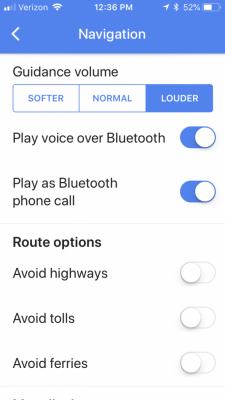
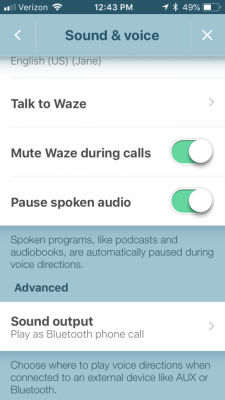
For google maps you need to make sure the following are selected in the settings under navigation.

FA411CCC-0583-4F82-92A8-A1448E7C1425.png
 

stimpy433

Senior Member
Joined
Mar 10, 2016
Posts
3,583
Reaction score
3,170
Location
IOWA
Ram Year
2014
Engine
3.6
For texting I use the SIRI function and it works great for me....
 

Brent L

Senior Member
Joined
Dec 31, 2017
Posts
175
Reaction score
180
Location
NC
Ram Year
2018
Engine
5.7
Push the voice button on the steering wheel and hold it about 1-second. That will allow you to use Siri voice and not the built-in junk.


Sent from my iPhone using Tapatalk
 

droopie85gt

Senior Member
Joined
Feb 7, 2018
Posts
129
Reaction score
104
Location
Cordova, TN
Ram Year
2018
Engine
Hemi 5.7
ON my 2017, I found you can skip most of the bs audio menu by hitting the phone button. Say I hit phone button and say text wife mobile: then it asks me to say my text. When I am done, I hit the phone button and say send. This skips the entire do you want to send, cancel or edit this message. say blah blah blah...it makes the voice text much more usable for me!
 
OP
OP
Lamarsh

Lamarsh

Senior Member
Joined
Mar 12, 2015
Posts
230
Reaction score
119
Location
Detroit
Ram Year
2020 1500 Rebel
Engine
5.7L Hemi
Thanks guys. I will try these suggestions out. I appreciate the help. Sounds like I might just need to get used to the thing on my steering wheel, and change some app settings.
 

adrianp89

Senior Member
Joined
Sep 3, 2015
Posts
3,176
Reaction score
1,276
Location
Tampa Bay, FL
Ram Year
2019
Engine
Hemi 5.7
Also you do not need to hit the microphone button on your phone or steering wheel. If you phone is out of your pocket you can just say Hey Siri and go from there. On my '13, Siri automatically takes over the radio.
 

troutspinner

Senior Member
Joined
Sep 9, 2014
Posts
1,256
Reaction score
435
Location
Gilbertsville, Pa
Ram Year
2019 Big Horn Crew Cab
Engine
5.7 Hemi
Just an FYI, iOS 12 that will be released this fall will now give iPhone users the ability to run 3rd party mapping programs like Google Maps and Waze on screen....finally!
 

TomT

Senior Member
Joined
Jul 1, 2015
Posts
1,277
Reaction score
560
Location
SoCal/OC
Ram Year
2015
Engine
Hemi 5.7
Also you do not need to hit the microphone button on your phone or steering wheel. If you phone is out of your pocket you can just say Hey Siri and go from there. On my '13, Siri automatically takes over the radio.

You have to specifically enable this on your phone.
 

TomT

Senior Member
Joined
Jul 1, 2015
Posts
1,277
Reaction score
560
Location
SoCal/OC
Ram Year
2015
Engine
Hemi 5.7
Yes, the “Hey Siri” thing is an option. They ask you during initial setup.
 
Back
Top