Additional UAQ/UAS Update Files 28.3/30.24/34.2

Disclaimer: Links on this page pointing to Amazon, eBay and other sites may include affiliate code. If you click them and make a purchase, we may earn a small commission.

SitKneelBend

Moderator
Staff member
Member Relations Specialist
Moderator Supporting Member Marine Corps
Joined
Jan 8, 2015
Posts
10,985
Reaction score
7,677
Location
St. Louis
Ram Year
2014
Engine
3.6 Pentastar

GordDavey

Senior Member
Joined
Jan 2, 2019
Posts
233
Reaction score
139
Location
Toronto, Ontario
Ram Year
2015
Engine
Hemi 5.7
Another small update. I pushed the ICQ to 39.6. I also switched it back to dual zone ATC it took about 18 hours for the dual sliders to come back and both work properly. Music thru Bluetooth sounds a little nicer to me. All else appears to work just fine too.
 

GordDavey

Senior Member
Joined
Jan 2, 2019
Posts
233
Reaction score
139
Location
Toronto, Ontario
Ram Year
2015
Engine
Hemi 5.7
Yeah, I had someone with inside access try and get the file for me, but on multiple Canadian VINs (no matter what) it spits out a UAQ file which didn't work for anyone that has tried.
That’s too bad. I have the VIN from the radio donor truck but hitting Uconnect online to get either software or map updates just says there are none available.
 

Undrta2d

Junior Member
Joined
Dec 1, 2025
Posts
9
Reaction score
13
Location
Ohio
Ram Year
2019
Engine
6.4 Hemi
Were you able to upgrade your firmware? I'm in the same boat - 2019 2500 8.4 UC4 non-nav and my dealer pages look exactly like yours. I read all 18 pages here (as well as MANY other forum posts) and haven't found a definitive answer. I'm assuming I could upgrade to 18, then 22, then 28 and finally to 40, but REALLY don't want to brick my radio. TIA
 

GordDavey

Senior Member
Joined
Jan 2, 2019
Posts
233
Reaction score
139
Location
Toronto, Ontario
Ram Year
2015
Engine
Hemi 5.7
I was able to upgrade my UCQ, each step except version 40. The best available that works with my UCQ is 39.6, the only oddity is the volume in carplay going to 0 and not being able to change to anything higher. Had to switch media to BlueTooth and I could then adjust the volume higher that 0 and go back to carplay. The version 40 docs say they fixed an issue with the volume. But so far there is no v40 firmware available in the downloads.
 

Mpgrimm2

Senior Member
Supporting Vendor Navy Badge
Joined
Mar 30, 2014
Posts
6,578
Reaction score
5,183
Location
SC
Ram Year
2022 Ram 1500 (5th Gen)
Engine
5.7L
I was able to upgrade my UCQ, each step except version 40. The best available that works with my UCQ is 39.6, the only oddity is the volume in carplay going to 0 and not being able to change to anything higher. Had to switch media to BlueTooth and I could then adjust the volume higher that 0 and go back to carplay. The version 40 docs say they fixed an issue with the volume. But so far there is no v40 firmware available in the downloads.
Give the 4c radio time to reconfigure itself to the truck...

Radio is not reset until SXM button displays again and/or Backup Cam works if installed (typically 30 mins up to 48hrs. 2-3 engine run cycles may help)

.
 

GordDavey

Senior Member
Joined
Jan 2, 2019
Posts
233
Reaction score
139
Location
Toronto, Ontario
Ram Year
2015
Engine
Hemi 5.7
Mpgrimm2, it’s had a couple of months since I did the upgrade to 39.6, it fixed all bugs I had remaining except this odd Volume stuck on 0 issue. So I will check back every so often in hopes of the latest release getting uploaded. I quickly figured out a workaround for the issue, so I’m fine until (and if) a ver 40 shows up. I wish I could get the maps updated, but I have no luck going thru the Uconnect site to try to get them.
 

Mpgrimm2

Senior Member
Supporting Vendor Navy Badge
Joined
Mar 30, 2014
Posts
6,578
Reaction score
5,183
Location
SC
Ram Year
2022 Ram 1500 (5th Gen)
Engine
5.7L
What's the workaround?
 

SitKneelBend

Moderator
Staff member
Member Relations Specialist
Moderator Supporting Member Marine Corps
Joined
Jan 8, 2015
Posts
10,985
Reaction score
7,677
Location
St. Louis
Ram Year
2014
Engine
3.6 Pentastar
Mpgrimm2, it’s had a couple of months since I did the upgrade to 39.6, it fixed all bugs I had remaining except this odd Volume stuck on 0 issue. So I will check back every so often in hopes of the latest release getting uploaded. I quickly figured out a workaround for the issue, so I’m fine until (and if) a ver 40 shows up. I wish I could get the maps updated, but I have no luck going thru the Uconnect site to try to get them.
What you describe is normal. v40.1 is not available for Canadian trucks. The volume stuck at zero can be modified if the system is talking to you (Nav prompt or reading a text). If you send yourself a long text then have CarPlay read it to you you can have time to adjust your volume to the appropriate level.
 

SitKneelBend

Moderator
Staff member
Member Relations Specialist
Moderator Supporting Member Marine Corps
Joined
Jan 8, 2015
Posts
10,985
Reaction score
7,677
Location
St. Louis
Ram Year
2014
Engine
3.6 Pentastar
Were you able to upgrade your firmware? I'm in the same boat - 2019 2500 8.4 UC4 non-nav and my dealer pages look exactly like yours. I read all 18 pages here (as well as MANY other forum posts) and haven't found a definitive answer. I'm assuming I could upgrade to 18, then 22, then 28 and finally to 40, but REALLY don't want to brick my radio. TIA
What version are you currently on?
 

GordDavey

Senior Member
Joined
Jan 2, 2019
Posts
233
Reaction score
139
Location
Toronto, Ontario
Ram Year
2015
Engine
Hemi 5.7
Mpgrimm2. With 39.6 if you mute the volume and turn the truck off. Then later you start the truck the volume is stuck at 0. I go to Media select Bluetooth, then I change the volume and go back to CarPlay. That’s my work around. Switch to something not CarPlay then adjust and switch back. Works for me.
 

Undrta2d

Junior Member
Joined
Dec 1, 2025
Posts
9
Reaction score
13
Location
Ohio
Ram Year
2019
Engine
6.4 Hemi
What version are you currently on?
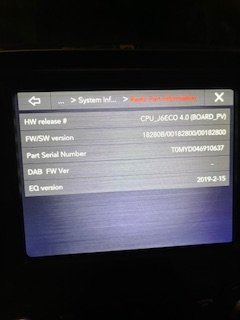
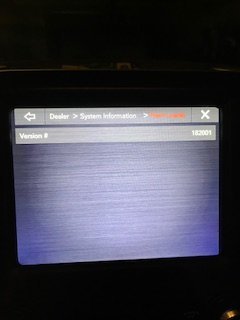
That's a great question. I'll edit this with some pics of my dealer pages. I "think" I'm on 18.2, but I might be on 11? Standby for pics...

edit: added pics.
edit 2: wow, those are potato quality. I'll get better ones up
 

Attachments

  • IMG_3002.jpg
    IMG_3002.jpg
    10.1 KB · Views: 6
  • IMG_3003.jpg
    IMG_3003.jpg
    10.8 KB · Views: 6
  • IMG_3004.jpg
    IMG_3004.jpg
    9.6 KB · Views: 6
Last edited:

SitKneelBend

Moderator
Staff member
Member Relations Specialist
Moderator Supporting Member Marine Corps
Joined
Jan 8, 2015
Posts
10,985
Reaction score
7,677
Location
St. Louis
Ram Year
2014
Engine
3.6 Pentastar
That's a great question. I'll edit this with some pics of my dealer pages. I "think" I'm on 18.2, but I might be on 11? Standby for pics...

edit: added pics.
edit 2: wow, those are potato quality. I'll get better ones up
Looking for "Application Version"
 

Undrta2d

Junior Member
Joined
Dec 1, 2025
Posts
9
Reaction score
13
Location
Ohio
Ram Year
2019
Engine
6.4 Hemi
Looking for "Application Version"
That page/line item doesn't exist on my 19. What I posted above is all of my options in it's dealer pages. Trust me, I've read easily 50+ pages of posts regarding these updates (here and 5 other forum sites), and aside from GalaxyUser's post, I haven't seen anyones pages look like mine. It looks like he deleted those. Maybe because mine is the first year of the 5th gen, they used programming from the 4th gens? I haven't gone that deep
 

Kamine

Junior Member
Joined
Jan 2, 2024
Posts
9
Reaction score
14
Location
Fort Wayne, IN
Ram Year
2014
Engine
5.7
Posted in the main UAQ swap thread, figured I'd post here too:
Been experimenting with lesser known UAQ radios to confirm if they work in 4th gens... Got a good price on a 2023 Jeep Cherokee UAQ, part number 68472624AC.

This unit was manufactured past the cutoff for the 40.1 software update to be applicable. Radio says the software is not compatible. Does anyone know what software version the newer KL UAQ's use, and what the latest version is?


Quote Quote

Report •••
 

js12278

Senior Member
Joined
Sep 28, 2018
Posts
161
Reaction score
222
Location
Central Illinois
Ram Year
2018
Engine
5.7 Hemi
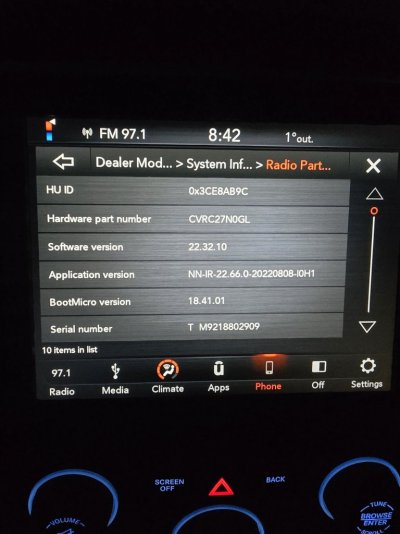
I’d like to try and update software files in my 18 1500
Any help is appreciated
 

Attachments

  • IMG_5571.jpeg
    IMG_5571.jpeg
    152.1 KB · Views: 5

SitKneelBend

Moderator
Staff member
Member Relations Specialist
Moderator Supporting Member Marine Corps
Joined
Jan 8, 2015
Posts
10,985
Reaction score
7,677
Location
St. Louis
Ram Year
2014
Engine
3.6 Pentastar
I’d like to try and update software files in my 18 1500
Any help is appreciated
What year is your truck and is it NAV or Non-NAV? PM me your gmail address and I'll send you a link to download. Your current version is 22.66 and while I believe the TSB says you can go from v22.64+ versions straight to 40.1, I recommend taking the intermediate step of flashing v28.3 first, then v 40.1.
 

js12278

Senior Member
Joined
Sep 28, 2018
Posts
161
Reaction score
222
Location
Central Illinois
Ram Year
2018
Engine
5.7 Hemi
What year is your truck and is it NAV or Non-NAV? PM me your gmail address and I'll send you a link to download. Your current version is 22.66 and while I believe the TSB says you can go from v22.64+ versions straight to 40.1, I recommend taking the intermediate step of flashing v28.3 first, then v 40.1.
2018 non-Nav, message sent thanks!
 

thepinesquirrel

Junior Member
Joined
Jan 20, 2026
Posts
2
Reaction score
2
Location
wisconsin
Ram Year
2019 classic
Engine
hemi 5.7
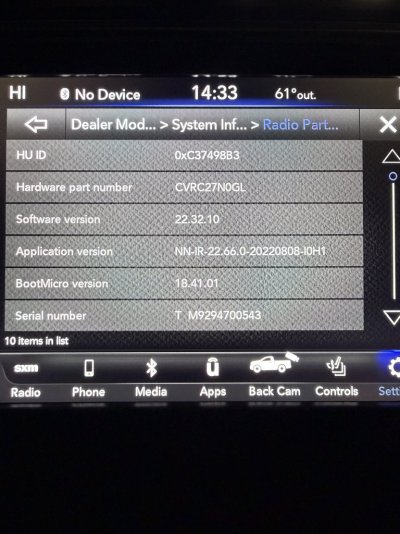
Curious if someone can help out, ive looked back into the thread and just want to get the most up to date info. I have a 2017 ram 2500 that came with the older 8.4" uconnect. So I bought a used 2019 8.4" UAQ. I keep getting a communications error when trying to use AA with my s25. I did add the newer harness and hub. Looked up the software and I have the 22.64. Wanting to see if i can obtain the newest software update as well as the newest maps updates. Any help would be appreciated. Attached are the current software and error message
I'm having almost the exact same error, non nav part number 68331635AI I will include pictures of my radio but I'm desperately looking for a fix if anyone has any suggestions. Thank you in advance!
 

Attachments

  • IMG_20260120_061711.jpg
    IMG_20260120_061711.jpg
    99.3 KB · Views: 6
Last edited:
Back
Top