Climate Popup

Disclaimer: Links on this page pointing to Amazon, eBay and other sites may include affiliate code. If you click them and make a purchase, we may earn a small commission.

lospinoj

Junior Member
Joined
Jan 7, 2024
Posts
4
Reaction score
8
Location
Cary, NC
Ram Year
2024
Engine
Hemi 5.7
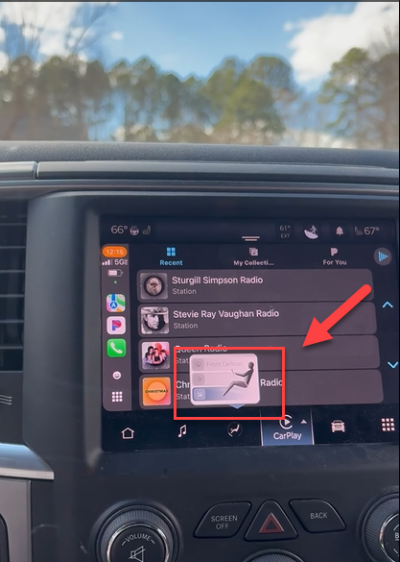
From delivery day in July 24, keep getting this popup. Dealer said to try a soft then a hard reset, no joy. At first I was thinking it was a wonky touch screen (delaminated digitizer) but there doesn't seem to be a way to get that window to popup by touching the screen. What I have noticed that if I turn climate off, it goes away.

Dealership diagnostics was unhelpful, I have a case open with Uconnect support and provided them with a video, so far they have been unhelpful.

Anyone else run into this issue and have a fix?

1741637744634.png
 

SitKneelBend

Moderator
Staff member
Member Relations Specialist
Moderator Supporting Member Marine Corps
Joined
Jan 8, 2015
Posts
10,931
Reaction score
7,584
Location
St. Louis
Ram Year
2014
Engine
3.6 Pentastar
From delivery day in July 24, keep getting this popup. Dealer said to try a soft then a hard reset, no joy. At first I was thinking it was a wonky touch screen (delaminated digitizer) but there doesn't seem to be a way to get that window to popup by touching the screen. What I have noticed that if I turn climate off, it goes away.

Dealership diagnostics was unhelpful, I have a case open with Uconnect support and provided them with a video, so far they have been unhelpful.

Anyone else run into this issue and have a fix?


View attachment 562500
Did you buy used? That looks like a Uconnect 5 in a truck that only had UConnect 4c from the factory (unless I missed that they started putting 5 in the Classics)...The popup is for your climate controls. On the Uconnect 5 that popup is used to adjust the vent location without navigating to the menu. If I remember right it will show up when you call for HVAC with a hard button, the 3 gray/blue areas are touchable and allow you to select defrost (top line), dash (middle line) and floor (bottom line).
 
Last edited:
OP
OP
L

lospinoj

Junior Member
Joined
Jan 7, 2024
Posts
4
Reaction score
8
Location
Cary, NC
Ram Year
2024
Engine
Hemi 5.7
This is a 2024 1500 Classic Warlock with Uconnect 5, 8.4" touch screen. The odd thing with this is that you can't make that specific window popup by touching the screen or any of the traditional buttons. The only way to make it go away is to turn off the auto climate control. My best guess is that when you have auto climate turned on, whenever it activates the ac or heat the software pops this window up, which is a silly thing to do and is a distraction. Earlier on I thought it might be a delamination issue with the touch screen, "ghost touches", but tossed that theory when I realized there is no "touch" that presents that window. Dealership has been no help, they can't fix anything on the unit unless it shows and error code in their diagnostics. RAM customer care has been entirely useless because like most big companies they are not able to see things they have not been programed to see which makes it near impossible to get a new issue acknowledged.
 

Bigskyroadglide

Moderator
Staff member
Member Relations Specialist
Moderator Supporting Member
Joined
Nov 9, 2016
Posts
2,742
Reaction score
5,841
Location
Montana, officially RETIRED
Ram Year
2014
Engine
Hemi 5.7, supercharged
My 2024 1500 classic warlock does the same thing.

If you take it off auto climate, it goes away.

If you run auto climate like I do, I just ignore it. Mines done it from day 1.

If a setting needs to be changed, I have not found it
 
Back
Top