
Manump95
Member
Hi everyone,
I’m working on a 2011 Ram 1500 4x4 (5.7L Hemi). Factory-wise, my truck came equipped with the Part-Time / Fixed transfer case (NV243 / BW44-45) with a 3-position dash switch (2WD, 4HI, 4LO).
During a drivetrain project, I installed an On-Demand / Auto 4WD transfer case (NV246 / BW44-44) along with its matching front driveshaft from a donor 2011 Ram 1500.
Mechanically, the transfer case and driveshaft are mounted in place, but I want to make sure I do the electrical and software setup correctly so the system functions properly without throwing 4WD Service lights or burning out modules.
My questions for the forum:
1. Wiring & Connectors: Since my original harness has a different connector/pinout than the Auto 4WD shift actuator, what is the best way to repin/adapt the harness? Do I need to swap in the donor truck’s wiring harness segment for the transfer case actuator?
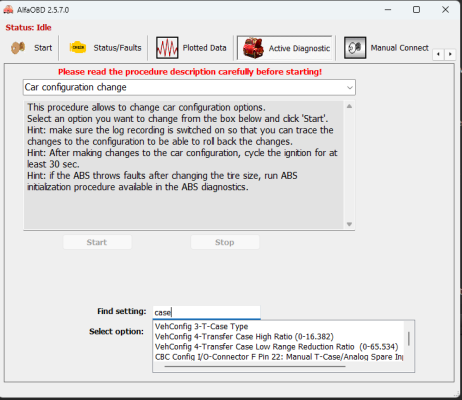
2. Dash Switch & BCM Configuration: If I install the 4-position dash switch (2WD, 4WD AUTO, 4WD LOCK, 4WD LOW), can I enable the Auto 4WD feature in the TIPM/BCM using AlfaOBD (by changing the Transfer Case Type in vehicle configuration)?
3. Sensors / Modules: Are there additional speed sensors or an external Transfer Case Control Module (TCCM) required that my factory Part-Time truck might be missing?
Any advice, wiring pinouts, or AlfaOBD steps from anyone who has successfully done this swap would be greatly appreciated!
Thanks in advance!
I’m working on a 2011 Ram 1500 4x4 (5.7L Hemi). Factory-wise, my truck came equipped with the Part-Time / Fixed transfer case (NV243 / BW44-45) with a 3-position dash switch (2WD, 4HI, 4LO).
During a drivetrain project, I installed an On-Demand / Auto 4WD transfer case (NV246 / BW44-44) along with its matching front driveshaft from a donor 2011 Ram 1500.
Mechanically, the transfer case and driveshaft are mounted in place, but I want to make sure I do the electrical and software setup correctly so the system functions properly without throwing 4WD Service lights or burning out modules.
My questions for the forum:
1. Wiring & Connectors: Since my original harness has a different connector/pinout than the Auto 4WD shift actuator, what is the best way to repin/adapt the harness? Do I need to swap in the donor truck’s wiring harness segment for the transfer case actuator?
2. Dash Switch & BCM Configuration: If I install the 4-position dash switch (2WD, 4WD AUTO, 4WD LOCK, 4WD LOW), can I enable the Auto 4WD feature in the TIPM/BCM using AlfaOBD (by changing the Transfer Case Type in vehicle configuration)?
3. Sensors / Modules: Are there additional speed sensors or an external Transfer Case Control Module (TCCM) required that my factory Part-Time truck might be missing?
Any advice, wiring pinouts, or AlfaOBD steps from anyone who has successfully done this swap would be greatly appreciated!
Thanks in advance!