

You are using an out of date browser. It may not display this or other websites correctly.
You should upgrade or use an alternative browser.
You should upgrade or use an alternative browser.
Installing OEM backup cam
- Thread starter cptwing
- Start date
Disclaimer: Links on this page pointing to Amazon, eBay and other sites may include affiliate code. If you click them and make a purchase, we may earn a small commission.



- Joined
- Mar 30, 2014
- Posts
- 6,570
- Reaction score
- 5,165
- Location
- SC
- Ram Year
- 2022 Ram 1500 (5th Gen)
- Engine
- 5.7L
Are you 100% positive about the purple wire being in pin 28?
If so, hmm...
- If you have good enough access and some patience, you can take the connector apart to depopulate pin 28.
Generally, there will be some sort of TPA lock (terminal pin assurance) on the front that will need release or removed, then a small screw driver inserted to release the pin's lock to pull the pin out the back (I haven't messed with this connector before but other have).
- 109% sure? Really sure? Cut the the wire off and use a scotch lock to splice it over to org/db wire at pin 45.
(Leave a 2" lead off the cut pin just in case and heat shrink or take it up)
Soldering is the preferred method as mentioned.
Edit: post 10 may have a link to some pictures of people doing the depopulating.
Edit 2: Nickster did it. Start at this post for pictures and possibly pm him (but he hasn't posted in a year) ...
http://www.ramforum.com/showthread.php?p=979047
@ Ktstull , if your gonna repair this yourself , disconnect the BCM C-5 remove the tape / wrap around the wire bundle to help flex it down for better access then as mpg suggested either depopulate the purple wire from the improper socket #28 or cut off a few inches so it can be attached to the OR/DB Wire in the proper socket #45 ( preferably via a good solder splice covered by quality heatshrink originally supplied in the kit )
I just can't imagine why a dealership tech would just BLINDLY STAB the purple wire in some anonymous empty #28 location when the instructions clearly state what to do with the purple wire ?
The techs obviously read the instructions ( for the most part) because everything else worked .
I depopulated both and then spliced the orange to the purple because I had a lot of extra purple wire. Taped it all and put it all back!
@wjrob
Are you just trying to get the connector disconnected from the BCM or are you trying to depopulate the pin 45 wire from the connector??
I haven't done this actual version of the camera kit so I can't really explain how to depopulate the pin totally.
Pm ktstull and see if he has some suggestions or can give you a phone call.
If you are awake between 9-11am EST, pm me your phone number and I will give you a call to explain what i can.
PS:
We could really use someone to take pictures of how to depopulate the BCM C5/E connector to get pin 45 org/db wire out.
Up All Night Sleep All Day via my LG G4 on Tapatalk
Last edited:
Hemi395
Senior Member
- Joined
- Mar 18, 2013
- Posts
- 9,505
- Reaction score
- 17,670
- Location
- Cape Cod MA
- Ram Year
- 2013
- Engine
- 5.7 Hemi
Oh man I just did this two days ago I wish I took pics...
There's two little release tabs on one side of the connector that you need a small flat screwdriver to release. Once released, the part of the connector that houses the pins (there's two pieces to this, one black one grey) in it will slide out the side. Really wish I had taken pics....
There's two little release tabs on one side of the connector that you need a small flat screwdriver to release. Once released, the part of the connector that houses the pins (there's two pieces to this, one black one grey) in it will slide out the side. Really wish I had taken pics....

wjbigrob
Member
clarification
Already have the C5 off of bcm now according to instructions the "snap" cover of C5 slides off somehow to provide access to to wires for depopulation.
@wjrob
Are you just trying to get the connector disconnected from the BCM or are you trying to depopulate the pin 45 wire from the connector??
I haven't done this actual version of the camera kit so I can't really explain how to depopulate the pin totally.
Pm ktstull and see if he has some suggestions or can give you a phone call.
If you are awake between 9-11am EST, pm me your phone number and I will give you a call to explain what i can.
PS:
We could really use someone to take pictures of how to depopulate the BCM C5/E connector to get pin 45 org/db wire out.
Up All Night Sleep All Day via my LG G4 on Tapatalk
Already have the C5 off of bcm now according to instructions the "snap" cover of C5 slides off somehow to provide access to to wires for depopulation.
Ktstull
Senior Member
- Joined
- Mar 16, 2016
- Posts
- 122
- Reaction score
- 49
- Ram Year
- 2013
- Engine
- HEMI 5.7
Already have the C5 off of bcm now according to instructions the "snap" cover of C5 slides off somehow to provide access to to wires for depopulation.
Yup, like HEMI said, I took a small flathead screw driver and on the outside of the connector, (when you're looking at the side where both plugs slide out), there are two little keeper tabs, use the screw driver to disengage them and then if you look on the opposite side of the plug there are two little square holes where you can push the plugs out. Hope this helps!
Sent from my iPhone using Tapatalk
wjbigrob
Member
Oh man I just did this two days ago I wish I took pics...
There's two little release tabs on one side of the connector that you need a small flat screwdriver to release. Once released, the part of the connector that houses the pins (there's two pieces to this, one black one grey) in it will slide out the side. Really wish I had taken pics....
Okay this bhelps I think. I saw the tabs and was trying to figure out how in the world to release both of them at the same time to slide everything out. So it sounds like I can slide them out one at a time? Do I need to slide both out for the install? For clarification I only see one tab on each side....?
Hemi395
Senior Member
- Joined
- Mar 18, 2013
- Posts
- 9,505
- Reaction score
- 17,670
- Location
- Cape Cod MA
- Ram Year
- 2013
- Engine
- 5.7 Hemi
You can't slide each part of the connector completely out individually because of the wires (at least I couldn't) but you can get one out enough to clear the release tab so you can get the other side released. So yes you do need to get both sides out in order to splice into the wire on pin 45. Hope this makes sense....Okay this bhelps I think. I saw the tabs and was trying to figure out how in the world to release both of them at the same time to slide everything out. So it sounds like I can slide them out one at a time? Do I need to slide both out for the install? For clarification I only see one tab on each side....?
Ktstull
Senior Member
- Joined
- Mar 16, 2016
- Posts
- 122
- Reaction score
- 49
- Ram Year
- 2013
- Engine
- HEMI 5.7
Okay this bhelps I think. I saw the tabs and was trying to figure out how in the world to release both of them at the same time to slide everything out. So it sounds like I can slide them out one at a time? Do I need to slide both out for the install? For clarification I only see one tab on each side....?
I did one at a time. I also had to take both of mine out because the dealer messed up the install. @RLK and @MPGrimm funny right? Lol
Sent from my iPhone using Tapatalk
wjbigrob
Member
I did one at a time. I also had to take both of mine out because the dealer messed up the install. @RLK and @MPGrimm funny right? Lol
Sent from my iPhone using Tapatalk
Thank you. I will go try that very shortly!!!!!!
- Joined
- Mar 30, 2014
- Posts
- 6,570
- Reaction score
- 5,165
- Location
- SC
- Ram Year
- 2022 Ram 1500 (5th Gen)
- Engine
- 5.7L
Pictures!Thank you. I will go try that very shortly!!!!!!
We need pictures!!
PS: it's not the same connector, but the concept should be the same as the i550 tailgate connector as I documented at post 10 (post 587 actually) ...
http://www.ramforum.com/showthread.php?p=1212614
Up All Night Sleep All Day via my LG G4 on Tapatalk
Last edited:

R.L.K.
Senior Member
- Joined
- Dec 1, 2013
- Posts
- 12,803
- Reaction score
- 12,508
- Location
- Bristol , Tn.
- Ram Year
- 2014 4X4 QC Express 6 speed auto 355 differentials
- Engine
- 5.7 Hemi
Yes please post in progress , step by step pictures of the BCM C-5 CONNECTOR while depopulation
- Joined
- Mar 30, 2014
- Posts
- 6,570
- Reaction score
- 5,165
- Location
- SC
- Ram Year
- 2022 Ram 1500 (5th Gen)
- Engine
- 5.7L
Jeopardy theme song plays ...
https://youtu.be/73tGe3JE5IU
Up All Night Sleep All Day via my LG G4 on Tapatalk
https://youtu.be/73tGe3JE5IU
Up All Night Sleep All Day via my LG G4 on Tapatalk
Last edited:
- Joined
- Mar 30, 2014
- Posts
- 6,570
- Reaction score
- 5,165
- Location
- SC
- Ram Year
- 2022 Ram 1500 (5th Gen)
- Engine
- 5.7L

Hemi395
Senior Member
- Joined
- Mar 18, 2013
- Posts
- 9,505
- Reaction score
- 17,670
- Location
- Cape Cod MA
- Ram Year
- 2013
- Engine
- 5.7 Hemi
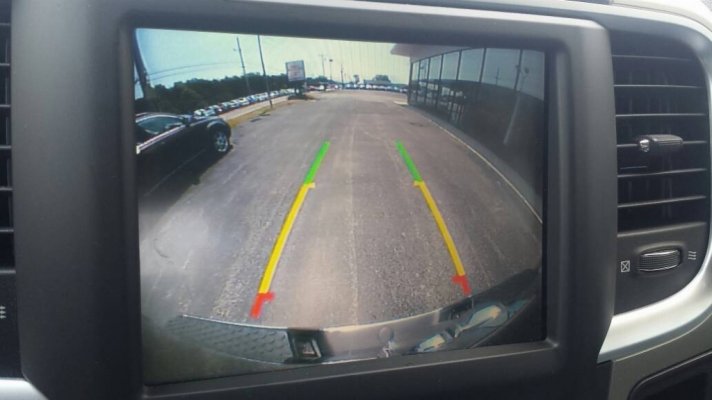
It works perfectly!!! I've wanted this in my truck since I bought it. I actually asked the dealer to put it in about 6 months after I bought the truck and they gave me some line about having to upgrade to the 8.4an. Then they came out with this kit and I decided to give it a shot.
Thanks Mpgrimm2 and RLK for all your help!!!
Last edited:
wjbigrob
Member
It works!!!!!!!!!!!!!!!
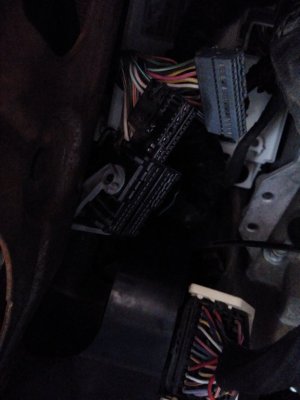
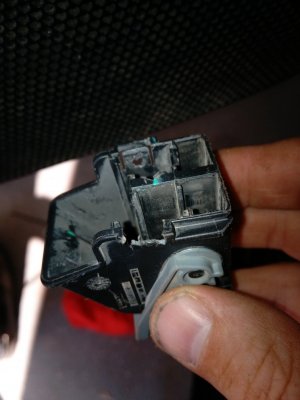
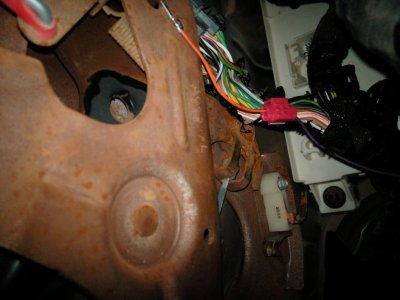
It works!!!!. WOW. Thank you all for your help it has been quite a little project. Special Thanks to all of you. Below are pictures of the C5 connector cover coming off. It is not pleasant. As you can tell in one of the pics I destroyed the little clip retainer. With how hard they were to come out I am not worried about them coming out on their own. I also cheated and hope to not pay for it in the long run and used spice clips. I was done!!!! anyway. Once the cover came off I just used a dissection pin and put a little pressure on the lead and it popped right out. (was not difficult at all).
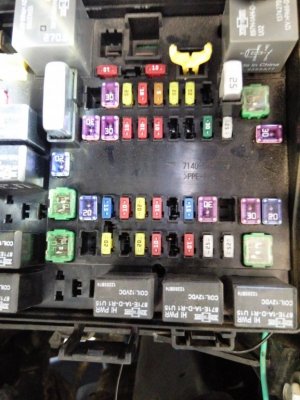
So when I was all said and done And fired everything up guess what I got>???!?!?!? THE BLUE SCREEN OF DEATH. I was not happy AND was freakin out. so I was double checking everything and when I went to the PDC under hood and light tested the the Postive wire I had nothing!!!!!!!!!!!! Not cool. I thought maybe it was the splice clip. but when I tested above splice still no juice. So then I seconded guessed which wire I connected too. For all intents and proposed I was confident that I had chosen the correct wire. So then I began to touble shoot why there was not power to that wire. and guess what I found????
NO FUSE!!!!!!!!!!!!! [/COLOR]No where in any of the reading that I have read do I remember any talk on making sure your RAM had a fuse in the 95 slot for rear cam and prk assist. Holy cow guys I thought I was going to lose it when it didn't fire up like it was supposed to. That usely doesn't happen to me. But I am glad that I figured out the fuse situation.
In addition to this forum I also used this youtube video which was nice to reference: https://youtu.be/f9GqM7Irvv4
It works!!!!. WOW. Thank you all for your help it has been quite a little project. Special Thanks to all of you. Below are pictures of the C5 connector cover coming off. It is not pleasant. As you can tell in one of the pics I destroyed the little clip retainer. With how hard they were to come out I am not worried about them coming out on their own. I also cheated and hope to not pay for it in the long run and used spice clips. I was done!!!! anyway. Once the cover came off I just used a dissection pin and put a little pressure on the lead and it popped right out. (was not difficult at all).
So when I was all said and done And fired everything up guess what I got>???!?!?!? THE BLUE SCREEN OF DEATH. I was not happy AND was freakin out. so I was double checking everything and when I went to the PDC under hood and light tested the the Postive wire I had nothing!!!!!!!!!!!! Not cool. I thought maybe it was the splice clip. but when I tested above splice still no juice. So then I seconded guessed which wire I connected too. For all intents and proposed I was confident that I had chosen the correct wire. So then I began to touble shoot why there was not power to that wire. and guess what I found????
NO FUSE!!!!!!!!!!!!! [/COLOR]No where in any of the reading that I have read do I remember any talk on making sure your RAM had a fuse in the 95 slot for rear cam and prk assist. Holy cow guys I thought I was going to lose it when it didn't fire up like it was supposed to. That usely doesn't happen to me. But I am glad that I figured out the fuse situation.
In addition to this forum I also used this youtube video which was nice to reference: https://youtu.be/f9GqM7Irvv4
Attachments


wjbigrob
Member


wjbigrob
Member

R.L.K.
Senior Member
- Joined
- Dec 1, 2013
- Posts
- 12,803
- Reaction score
- 12,508
- Location
- Bristol , Tn.
- Ram Year
- 2014 4X4 QC Express 6 speed auto 355 differentials
- Engine
- 5.7 Hemi
Awesome , glad it worked for ya !
- Joined
- Mar 30, 2014
- Posts
- 6,570
- Reaction score
- 5,165
- Location
- SC
- Ram Year
- 2022 Ram 1500 (5th Gen)
- Engine
- 5.7L
@wjbigrob,
Glad you got it up and running and thanks for taking pictures.
What is up with all that rust (oxidation) under the dash?
Looking at that picture of the connector shroud/lock, it looks like there is a part number on the side in the picture... But I can't read it! *?&#
Up All Night Sleep All Day via my LG G4 on Tapatalk
Glad you got it up and running and thanks for taking pictures.
What is up with all that rust (oxidation) under the dash?
Looking at that picture of the connector shroud/lock, it looks like there is a part number on the side in the picture... But I can't read it! *?&#
Up All Night Sleep All Day via my LG G4 on Tapatalk
Last edited:
69mach1
Senior Member
- Joined
- Apr 11, 2016
- Posts
- 169
- Reaction score
- 28
- Ram Year
- 2013
- Engine
- Cummings 6.7
Radio Rear camera input descriptions?
Hi guys,
First post for me here.
Can anybody tell me what exactly the three C1 connections are on the back of the radio for the rear camera?
C31= camera signal =?
C32= camera return =?
C33= camera shield =?
Generally there are 3 connections to a camera
1= positive +video (center RCA connector)
2= Negative -video, ground (outside of RCA connector)
3= +12 volts that power the camera (usually from a reverse light for power)
so in this case is?
c31 = camera signal +12V camera power?
c32 = camera return +video?
c33 = camera shield -video?
or ???
I'm trying a slightly different route and going with a $20 backup camera. I can make my own harness if need be. I have already had the dealer turn on the backup camera option ($65 to activate this option) I have the blue screen when is reverse which tells me I just need to get video to the radio.
I hope I can make this work and give an alternative solution for you guys
Thanks for your efforts, time and opinions
Jon
Poway, Ca
2013 6.7 6spd auto 2500 CC LB 4x4 ST 5.0 radio
Hi guys,
First post for me here.
Can anybody tell me what exactly the three C1 connections are on the back of the radio for the rear camera?
C31= camera signal =?
C32= camera return =?
C33= camera shield =?
Generally there are 3 connections to a camera
1= positive +video (center RCA connector)
2= Negative -video, ground (outside of RCA connector)
3= +12 volts that power the camera (usually from a reverse light for power)
so in this case is?
c31 = camera signal +12V camera power?
c32 = camera return +video?
c33 = camera shield -video?
or ???
I'm trying a slightly different route and going with a $20 backup camera. I can make my own harness if need be. I have already had the dealer turn on the backup camera option ($65 to activate this option) I have the blue screen when is reverse which tells me I just need to get video to the radio.
I hope I can make this work and give an alternative solution for you guys
Thanks for your efforts, time and opinions
Jon
Poway, Ca
2013 6.7 6spd auto 2500 CC LB 4x4 ST 5.0 radio
Similar threads
- Replies
- 2
- Views
- 200

- Replies
- 13
- Views
- 729

- Replies
- 4
- Views
- 344


Members online
- jws123
- Fink
- Nick@GotExhaust
- Rado
- WildcatHemi
- 2014RAMHERAWAY
- Smokeybear01
- Oldcuss
- Dean2
- djarrett
- Runaround
- MarshRam
- KalboKalbs
- Tylerc91
- justpat
- BfromSD
- Loudram
- Rayzr
- RamDiver
- caulk04
- vadman51
- Buddy
- cdarwin22
- Mohd7717
- Napabandit
- WiSH2oo0
- craigsez
- shannonmcb
- Wilard
- 1999 White C5 Coupe
- crackerjack1957
- Mlarv5
- DILLIGAF
- Indynick
- 1978Z1R
- THoff04B
- dcsmith30
- Wild one
- kt4hx
- rzr6-4
- BoBoway4
- Drew0327
- Hammer22801
- British Bulldog
- Mags88
- mdc1990zr1
- Mojo88
- oldmud14
- tangocash001
- TRK_GANG74
Total: 4,543 (members: 59, guests: 4,484)
Robots: 1,614
Robots: 1,614