
iPhone incoming call notif on 12” screen

Disclaimer: Links on this page pointing to Amazon, eBay and other sites may include affiliate code. If you click them and make a purchase, we may earn a small commission.

UPSman

Member
Joined
Jun 16, 2021
Posts
59
Reaction score
71
Location
West Virginia
Ram Year
2026
Engine
Hurricane SO
I’m still trying to figure out this new 12” screen, but I have either overlooked or can’t find where to allow/disable incoming calls and texts to pop up on the screen while using Pandora (CarPlay) or Sirius. It’s apparently off now, but I’d like to enable it because a lot of times my phone is in my pocket and I’d rather see the incoming without having to dig in my pocket for the phone.

Thanks.

2026 12” screen
iPhone 14
 

turkeybird56

Military Vet 1976-1996 Retired US Army
Air Force Army Law Enforcement
Joined
Aug 2, 2018
Posts
25,807
Reaction score
56,564
Location
Central Texas
Ram Year
2019 Bighorn, 4 X 4, 3.21 rear, Bright Flame Red Pearl Coat, Mopar tonneau cover,Westin Bed rug
Engine
Hemi 5.7
Your Avatar shows 2021. Would help to know what truck you have now, model, trim level, engine, what phone you are using.

If a 2026, you have U Conn 5 which is totally redesigned from my U Conn 4 with an 8.4 screen, you may have to download the multimedia instructions for U Conn 5. The incoming calls were run through Sirius, not sure on the new U Conn 5 models.
This may require someone with the newer U Conn 5 to CHIME IN.
 

British Bulldog

Senior Member
Joined
Sep 14, 2016
Posts
2,277
Reaction score
1,304
Location
Jacksonville NC
Ram Year
2025
Engine
SST HO
The phone messages are displayed in the screen in front of you, it should show notifications there, not the main screen……. CarPlay takes over from everything when you enable including the Ram “phone application” Or that’s how it is in mine!
Hope this helps. And yes, settings in u connect.
 

turkeybird56

Military Vet 1976-1996 Retired US Army
Air Force Army Law Enforcement
Joined
Aug 2, 2018
Posts
25,807
Reaction score
56,564
Location
Central Texas
Ram Year
2019 Bighorn, 4 X 4, 3.21 rear, Bright Flame Red Pearl Coat, Mopar tonneau cover,Westin Bed rug
Engine
Hemi 5.7
The phone messages are displayed in the screen in front of you, it should show notifications there, not the main screen……. CarPlay takes over from everything when you enable including the Ram “phone application” Or that’s how it is in mine!
Hope this helps. And yes, settings in u connect.
Bulldog, U definitely need to chime in. On my 2019, all my Carplay stuff to include phone, messages, maps etc all displayed on 8.4 screen. I would bet there is a setting for displaying on the 12" screen, as it does display split screens, but I have nothing here to help with a U Conn 5 system, and I do not want to download the U Conn 5 info and lose my mind reading all dat stuff, hee hee, since I do not have the system.
 

turkeybird56

Military Vet 1976-1996 Retired US Army
Air Force Army Law Enforcement
Joined
Aug 2, 2018
Posts
25,807
Reaction score
56,564
Location
Central Texas
Ram Year
2019 Bighorn, 4 X 4, 3.21 rear, Bright Flame Red Pearl Coat, Mopar tonneau cover,Westin Bed rug
Engine
Hemi 5.7
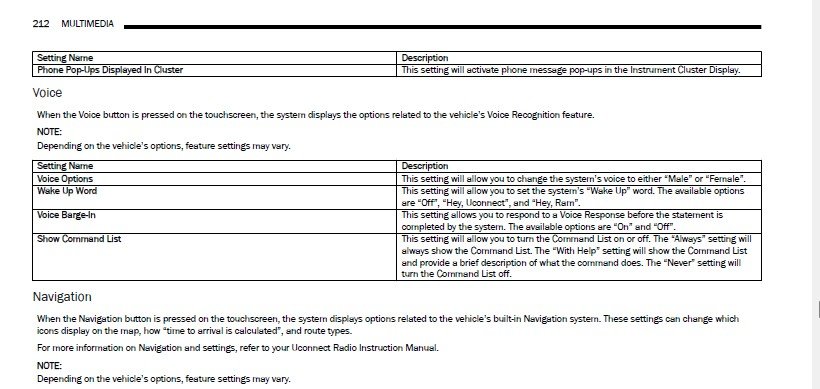
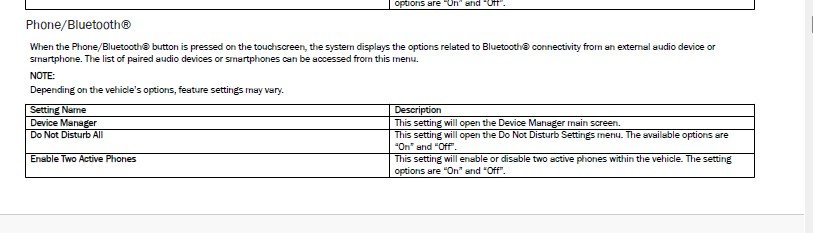
OP, out of 2025 Manual, which I have since my older kid has a 2025 Biggyhorn. You would have to download the addendum U Conn manual, this is just out of the operator's manual: Note, says in manual to enable:

BT 1.jpgBT 2.jpg
 

turkeybird56

Military Vet 1976-1996 Retired US Army
Air Force Army Law Enforcement
Joined
Aug 2, 2018
Posts
25,807
Reaction score
56,564
Location
Central Texas
Ram Year
2019 Bighorn, 4 X 4, 3.21 rear, Bright Flame Red Pearl Coat, Mopar tonneau cover,Westin Bed rug
Engine
Hemi 5.7
Back
Top