
AlfaOBD

Disclaimer: Links on this page pointing to Amazon, eBay and other sites may include affiliate code. If you click them and make a purchase, we may earn a small commission.

WWW1

Junior Member
Joined
Jun 20, 2025
Posts
2
Reaction score
0
Location
IN
Ram Year
2024
Engine
6.7 Cummins
I have a '24 3500 tradesman. I swapped out the front power heated and cooled memory seats from a Laramie. I changed CSWM(HSM) from deactivated to active MSM from deactivated to active and Heated seats present from deactivated to active in JSCAN. The passenger seat worked ok but the drives did not work the first day. Next day i bought AlfaOBD and loaded it on my tablet. Went to the truck and started to hook it up when i turned the truck on the rear camera and 2 other icons showed up on the radio then the 2 other icons disappeared. I only got a quick glance at them and they looked to say something like heated and cooled. after that the drivers seat would move. I finished hooking up AlfaOBD to the truck and changing all the seat info that Jimmy07 had posted in a different forum. after a few days no soft buttons on the radio but i can turn on the heaters and cooling fans with Alfa. Just trying to figure out how to get the soft buttons to come back on the radio and stay on. Any help would be greatly appreciated!
 
Last edited:

Ramster2015

Junior Member
Joined
May 10, 2021
Posts
16
Reaction score
4
Location
NY
Ram Year
2015
Engine
5.7
I have been searching but no luck as of yet. I have the auxiliary panel from 4th gen electronics. When I first installed it I had the base cluster and had the options for programing them on the dash. But I upgraded to the 7inch cluster and lost the options. I have tried turning it off and back on but no change. Anyone have any ideas or know of a thread that discuses this?
 

SitKneelBend

Moderator
Staff member
Member Relations Specialist
Moderator Supporting Member Marine Corps
Joined
Jan 8, 2015
Posts
10,952
Reaction score
7,629
Location
St. Louis
Ram Year
2014
Engine
3.6 Pentastar
I have been searching but no luck as of yet. I have the auxiliary panel from 4th gen electronics. When I first installed it I had the base cluster and had the options for programing them on the dash. But I upgraded to the 7inch cluster and lost the options. I have tried turning it off and back on but no change. Anyone have any ideas or know of a thread that discuses this?
Are the options in the radio too? What radio do you have?
 

dodj

Junior Member
Joined
Nov 12, 2018
Posts
2
Reaction score
4
Location
Canada
Ram Year
2007, 2018
Engine
6.7 Cummins
About to make the change from a traditional code reader to alpha obd and bt dongle. Is the security bypass cable required if you only intend to read information? I'm not interested in changing parameters at this point. Just live data.
 

SitKneelBend

Moderator
Staff member
Member Relations Specialist
Moderator Supporting Member Marine Corps
Joined
Jan 8, 2015
Posts
10,952
Reaction score
7,629
Location
St. Louis
Ram Year
2014
Engine
3.6 Pentastar
About to make the change from a traditional code reader to alpha obd and bt dongle. Is the security bypass cable required if you only intend to read information? I'm not interested in changing parameters at this point. Just live data.
I don't believe so. I just read all modules on my Wife's 2022 Pacifica without the bypass installed.
 

04fxdwgi

Senior Member
Joined
May 19, 2023
Posts
1,739
Reaction score
3,647
Location
Coastal NE North Carolina
Ram Year
2016 1500 Sport
Engine
5.7 Hemi
About to make the change from a traditional code reader to alpha obd and bt dongle. Is the security bypass cable required if you only intend to read information? I'm not interested in changing parameters at this point. Just live data.
If you are only scanning for codes and not changing any parameters, you don't need the AlfaOBD program. Alfa is specifically designed to manipulate the programming and run numerous test sequences on Mopar vehicles.

There are a ton of code reader / reset apps out there. The OBDLink MX+ comes with a great app for that and TorquePro seems to be a favorite that can be had super cheap for android..
 
Last edited:

ToxicFire

Senior Member
Joined
Jan 19, 2020
Posts
297
Reaction score
231
Location
Canada
Ram Year
2014
Engine
5.7
hey anyone own a 21+ challenger with alfa i have a few questions if you can pm me that be great!
 

dodj

Junior Member
Joined
Nov 12, 2018
Posts
2
Reaction score
4
Location
Canada
Ram Year
2007, 2018
Engine
6.7 Cummins
If you are only scanning for codes and not changing any parameters, you don't need the AlfaOBD program. Alfa is specifically designed to manipulate the programming and run numerous test sequences on Mopar vehicles.

There are a ton of code reader / reset apps out there. The OBDLink MX+ comes with a great app for that and TorquePro seems to be a favorite that can be had super cheap for android..
I have a regular code reader but was interested in live data graphing. Alpha was referenced the most for this purpose so I thought it was the better option?

Wow. On here since 2018 and only 2 posts.... guess I spend more time on the cummins forum. I'll have to hand around a little more.....
 

Matchrocket

Junior Member
Joined
Aug 1, 2025
Posts
13
Reaction score
18
Location
Mountains of Idaho
Ram Year
2017
Engine
6.7 HO
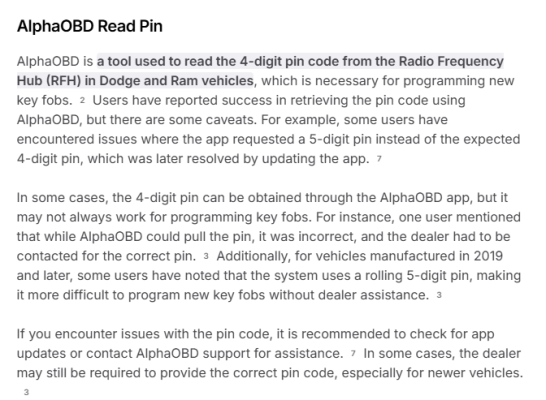
New to AlphaODB. Digging around in the options, and I found a PIN in the RF_HUB. Is this is the PIN needed to program KEY FOB's??

Connect to Radio Frequency HUB
Scroll down to Read PIN
Start
Get PIN #.

AI Summary on this command gave me this. Assuming I DON'T need to hassle the dealer for a PIN?

My Truck is 17'

1754142293164.png
 

RamDiver

Senior Member
Joined
Jan 23, 2022
Posts
5,639
Reaction score
11,878
Location
Marlborough, Ontario Canada
Ram Year
2021 DS
Engine
Hemi 5.7
New to AlphaODB. Digging around in the options, and I found a PIN in the RF_HUB. Is this is the PIN needed to program KEY FOB's??

Connect to Radio Frequency HUB
Scroll down to Read PIN
Start
Get PIN #.

AI Summary on this command gave me this. Assuming I DON'T need to hassle the dealer for a PIN?

My Truck is 17'


Yes, this is the PIN required to create FOBs.

Just an FYI, on some of the more recent vehicles, I've read that they have a 5-digit PIN.

Also, I've heard talk of a 5-digit rolling code for some newer vehicles, but this is second-hand information that I've read without supporting evidence, such as any specifics of programming FOBs.

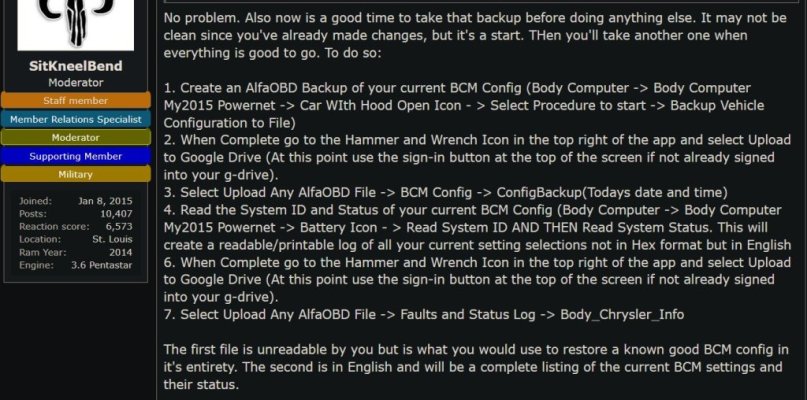
Be sure to read up on backing up your current OE BCM configuration before making any tweaks.


And, welcome.gif to Ram Forum. :cool:

.
 

PA Ram

Senior Member
Joined
Jan 1, 2023
Posts
484
Reaction score
761
Location
Quakertown, PA
Ram Year
2017
Engine
Hemi 5.7
New to AlphaODB. Digging around in the options, and I found a PIN in the RF_HUB. Is this is the PIN needed to program KEY FOB's??

Connect to Radio Frequency HUB
Scroll down to Read PIN
Start
Get PIN #.

AI Summary on this command gave me this. Assuming I DON'T need to hassle the dealer for a PIN?

My Truck is 17'

View attachment 570740
Yes the pin is for programming new Fobs.
 

Matchrocket

Junior Member
Joined
Aug 1, 2025
Posts
13
Reaction score
18
Location
Mountains of Idaho
Ram Year
2017
Engine
6.7 HO
Yes, this is the PIN required to create FOBs.

Just an FYI, on some of the more recent vehicles, I've read that they have a 5-digit PIN.

Also, I've heard talk of a 5-digit rolling code for some newer vehicles, but this is second-hand information that I've read without supporting evidence, such as any specifics of programming FOBs.

Be sure to read up on backing up your current OE BCM configuration before making any tweaks.


And, View attachment 570751 to Ram Forum. :cool:

.
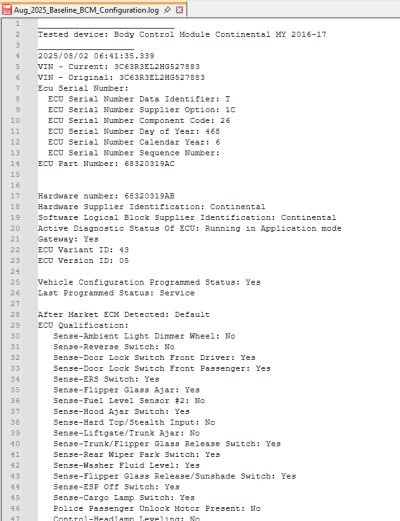
First thing I did was download the Configuration log and did a Configbackup then pushed to the cloud :)
 

Matchrocket

Junior Member
Joined
Aug 1, 2025
Posts
13
Reaction score
18
Location
Mountains of Idaho
Ram Year
2017
Engine
6.7 HO

RamDiver

Senior Member
Joined
Jan 23, 2022
Posts
5,639
Reaction score
11,878
Location
Marlborough, Ontario Canada
Ram Year
2021 DS
Engine
Hemi 5.7
Thanks.

Assuming #4 results in this file? (Snapshot)

You're most welcome.

That would be it, good work.
You're already ahead of many new users. :cool:

Also, it would be prudent to limit the number of changes you make during each session.
Create a new backup and a readable BCM config record after every change session.

I keep a written log file with the current settings and notes on the results of failed tweaks.

Several of the tweaks don't function, such as Global Windows Up.
Some of the tweaks have unexpected results like killing the electronic power steering (EPS), so I wouldn't plan any big tweak sessions before a family road trip. :cool:

Sometimes, when I just want to get something new set before heading out, I pack my PC and OBD interface with me so if something silly happens, I can undo that last tweak. :cool:

.
 

Matchrocket

Junior Member
Joined
Aug 1, 2025
Posts
13
Reaction score
18
Location
Mountains of Idaho
Ram Year
2017
Engine
6.7 HO

Matchrocket

Junior Member
Joined
Aug 1, 2025
Posts
13
Reaction score
18
Location
Mountains of Idaho
Ram Year
2017
Engine
6.7 HO
I found a bug possibly when creating human readable Body Control Module config and status reports after changes are made. I created an initial HEX and text system/status file when I first installed the application. Since then, and after making a few changes to the truck, each subsequent creation of the file would have the EXACT same time stamp of the original I first created and the changes I made would not be represented. This is when the file would be viewed on my phone or pushed to the cloud (Google Drive).

I deleted all the files using the Manage ODB files icon in the app, and created a new text system/status file and got the same result. I would up having to clear the applications cache and stored data in Android for me to get an updated / correct system status file with a correct time/date stamp, and that reflected recent changes.

Anyone else seen this before before?
 

SitKneelBend

Moderator
Staff member
Member Relations Specialist
Moderator Supporting Member Marine Corps
Joined
Jan 8, 2015
Posts
10,952
Reaction score
7,629
Location
St. Louis
Ram Year
2014
Engine
3.6 Pentastar
I found a bug possibly when creating human readable Body Control Module config and status reports after changes are made. I created an initial HEX and text system/status file when I first installed the application. Since then, and after making a few changes to the truck, each subsequent creation of the file would have the EXACT same time stamp of the original I first created and the changes I made would not be represented. This is when the file would be viewed on my phone or pushed to the cloud (Google Drive).

I deleted all the files using the Manage ODB files icon in the app, and created a new text system/status file and got the same result. I would up having to clear the applications cache and stored data in Android for me to get an updated / correct system status file with a correct time/date stamp, and that reflected recent changes.

Anyone else seen this before before?
It's a rolling log so it grows longer with each additional read appended to the tail end. Did you keep scrolling?
 

Matchrocket

Junior Member
Joined
Aug 1, 2025
Posts
13
Reaction score
18
Location
Mountains of Idaho
Ram Year
2017
Engine
6.7 HO
I was using file comparison tools to check deltas, came up no deltas every time, and file sizes are exactly the same each time. If it's supposed to be rolling, then that is also not happening correctly. I don't see an option to turn that on/off in the app.
 

SitKneelBend

Moderator
Staff member
Member Relations Specialist
Moderator Supporting Member Marine Corps
Joined
Jan 8, 2015
Posts
10,952
Reaction score
7,629
Location
St. Louis
Ram Year
2014
Engine
3.6 Pentastar
I was using file comparison tools to check deltas, came up no deltas every time, and file sizes are exactly the same each time. If it's supposed to be rolling, then that is also not happening correctly. I don't see an option to turn that on/off in the app.
Maybe a permissions issue? Couldn't write to the same file after initial creation?
 
Back
Top