AlfaOBD

Disclaimer: Links on this page pointing to Amazon, eBay and other sites may include affiliate code. If you click them and make a purchase, we may earn a small commission.
mjf6175

Senior Member
Joined
Nov 13, 2017
Posts
436
Reaction score
377
Location
NJ
Ram Year
2017
Engine
cummins
Just the mirrors. I did not even change out the door modules or add the switch.

If I understand all the posts about enabling the "Tilt in Reverse" feature, mirrors with the "chrome" backing" are capable of this. Has anyone been able to do so with mirrors that are NOT chrome backed? My outside mirrors are HEATED/ POWER FOLDING/ PUDDLE LAMPS/ AUTO DIMMING. As far as I can tell the Tilt in Reverse feature is the only thing missing from them. But sounds like since it is not chrome covered its missing electrical connections?

 

Ricks Ram

Senior Member
Joined
May 1, 2015
Posts
4,411
Reaction score
3,415
Ram Year
2014
Engine
Hemi 5.7
If I understand all the posts about enabling the "Tilt in Reverse" feature, mirrors with the "chrome" backing" are capable of this. Has anyone been able to do so with mirrors that are NOT chrome backed? My outside mirrors are HEATED/ POWER FOLDING/ PUDDLE LAMPS/ AUTO DIMMING. As far as I can tell the Tilt in Reverse feature is the only thing missing from them. But sounds like since it is not chrome covered its missing electrical connections?
No unfortunately in order for the Tilt in Reverse function to work you have to have memory mirrors. The mirrors with the Chrome backing are primarily from Laramies which have memory and that's why we know they will work. Another way to make a quick check is to remove your door panel and if you're white mirror plug only has only 4 wires than it is definitely not a memory mirror.

Sent from my SCH-I545 using Tapatalk
 

mjf6175

Senior Member
Joined
Nov 13, 2017
Posts
436
Reaction score
377
Location
NJ
Ram Year
2017
Engine
cummins
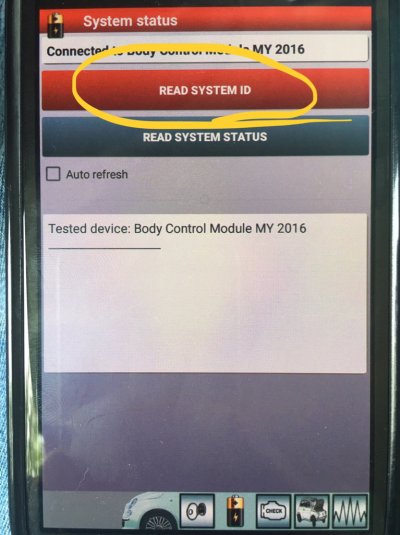
Hey...need help. Want to check log for changes that I made I screwed up one of them today. Log is suppose to be available under "READ SYSTEM ID". Can anyone tell me how to get to this?

 

kad

Senior Member
Supporting Member
Joined
Jul 10, 2017
Posts
2,788
Reaction score
2,331
Location
Hudson Valley, NY
Ram Year
2014
Engine
5.7L HEMI
Can I get someone with their AlphaOBD and truck nearby to verify a possible bug for me? Preferably on a truck with factory LED tails. In the Body Control Module functions, can you try the Left Reverse Light and Right Reverse Light functions? Only the Right one is working for me. The left bulb itself works when the truck is put in reverse, it's not out. It's just the test function in the app that not working. I'm using the current full Android version and the recommended Bluetooth MX dongle.

-K
 

kad

Senior Member
Supporting Member
Joined
Jul 10, 2017
Posts
2,788
Reaction score
2,331
Location
Hudson Valley, NY
Ram Year
2014
Engine
5.7L HEMI
Hey...need help. Want to check log for changes that I made I screwed up one of them today. Log is suppose to be available under "READ SYSTEM ID". Can anyone tell me how to get to this?

Assuming you're using the Android version, it's under the Tools menu. You can view the log or upload it to a google drive account. It's MUCH easier to read if you upload it to google drive as a text file.

-K
 

mjf6175

Senior Member
Joined
Nov 13, 2017
Posts
436
Reaction score
377
Location
NJ
Ram Year
2017
Engine
cummins
Kad....thanks...but when I go to tools there is no READ SYSTEM ID. I have View Faults and Status LOG on top, is that it? I need to see what changes I made today since the problem happened today doing a change.
 
OP
OP
Ghost_RAM

Ghost_RAM

Senior Member
Joined
Jan 10, 2018
Posts
1,367
Reaction score
1,099
Location
VA
Ram Year
2016
Engine
Hemi 5.7
I believe Kad is referring to the first post.

Uploading System ID (BCM) Information: Thank you Mpgrimm2

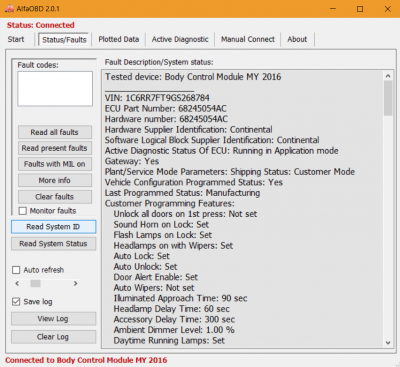
To upload your System ID information (BCM) go to the "Tools" icon in the upper right corner. From there select "Upload to Google Drive", it will ask you to link to Google Drive. Link your Google Drive to Alfa. Select "Upload to Google Drive" and "Upload Faults and Status Log". Then select "Body_Chrysler_Info". Name the file to upload whatever you wish. Done! Now you can go to your Google Drive and read the system info a little easier.
 
OP
OP
Ghost_RAM

Ghost_RAM

Senior Member
Joined
Jan 10, 2018
Posts
1,367
Reaction score
1,099
Location
VA
Ram Year
2016
Engine
Hemi 5.7
On Windows version:

Screenshot (10).png
 
Last edited:
OP
OP
Ghost_RAM

Ghost_RAM

Senior Member
Joined
Jan 10, 2018
Posts
1,367
Reaction score
1,099
Location
VA
Ram Year
2016
Engine
Hemi 5.7
Otherwise if you are on your android device and want to scroll through the list then connect to the BCM and click on the little battery icon at the bottom. It will start to populate underneath.

On Android version:

26154bf79352bf1bbfa4fdaa1ab13f69.jpg


Sent from my iPhone using Tapatalk
 
OP
OP
Ghost_RAM

Ghost_RAM

Senior Member
Joined
Jan 10, 2018
Posts
1,367
Reaction score
1,099
Location
VA
Ram Year
2016
Engine
Hemi 5.7
Sorry for the edits. I know it can get confusing.

When checking for what might have changed, the results are populated from the first time of connection to the most recent. Top to bottom. It is much easier to view if create a Google Drive account if you don't currently have one. Then you can search for key words of whatever the issue is you're having. Clicking "ctrl F" on you keyboard simultaneously will bring up a search box. Type in your keyword and hit enter. This will bring up all instances of that word. As you scroll through you can see what was set and not set. Hopefully any of this made sense.
 

mjf6175

Senior Member
Joined
Nov 13, 2017
Posts
436
Reaction score
377
Location
NJ
Ram Year
2017
Engine
cummins
Ghost....is there a way to see changes I made by DATE? In other words see just changes made today some how. Everything was fine till today. I am going through the whole list now but reference to when any changes were made....THANKS...
 
OP
OP
Ghost_RAM

Ghost_RAM

Senior Member
Joined
Jan 10, 2018
Posts
1,367
Reaction score
1,099
Location
VA
Ram Year
2016
Engine
Hemi 5.7
Ghost....is there a way to see changes I made by DATE? In other words see just changes made today some how. Everything was fine till today. I am going through the whole list now but reference to when any changes were made....THANKS...
Sure, little involved but not too bad. Using the search box on the downloaded config, type in the date in the format you see at the top. If it comes up with a result in the box (should be just one) then hit enter. It will take you to that date.


2018/8/25
 
OP
OP
Ghost_RAM

Ghost_RAM

Senior Member
Joined
Jan 10, 2018
Posts
1,367
Reaction score
1,099
Location
VA
Ram Year
2016
Engine
Hemi 5.7
Can I get someone with their AlphaOBD and truck nearby to verify a possible bug for me? Preferably on a truck with factory LED tails. In the Body Control Module functions, can you try the Left Reverse Light and Right Reverse Light functions? Only the Right one is working for me. The left bulb itself works when the truck is put in reverse, it's not out. It's just the test function in the app that not working. I'm using the current full Android version and the recommended Bluetooth MX dongle.

-K
I do not have factory LEDs but I do know what you're referring to. It is a bug in the app I think. I have ran across that myself when attempting the same with similar functions.

 

kad

Senior Member
Supporting Member
Joined
Jul 10, 2017
Posts
2,788
Reaction score
2,331
Location
Hudson Valley, NY
Ram Year
2014
Engine
5.7L HEMI
I do not have factory LEDs but I do know what you're referring to. It is a bug in the app I think. I have ran across that myself when attempting the same with similar functions.

Ok, that's comforting to hear, that is, that's probably not just me. I submitted a bug report with a debug log of using both the left and right functions. Hopefully that will be enough for the author to find/fix it.

-K
 

sawz

Senior Member
Joined
Oct 25, 2015
Posts
223
Reaction score
124
Location
Centreville, VA
Ram Year
2015 Ram 1500 QC
Engine
Hemi 5.7
Is it possible to turn of ECO mode with AlfaOBD?

 
OP
OP
Ghost_RAM

Ghost_RAM

Senior Member
Joined
Jan 10, 2018
Posts
1,367
Reaction score
1,099
Location
VA
Ram Year
2016
Engine
Hemi 5.7
Is it possible to turn of ECO mode with AlfaOBD?

Been waiting for this one. I’m not sure but probably so. I know you can turn off the ECO light but you can also do that on the screen. I assume you’re actually referring to disabling MDS?


Sent from my iPhone using Tapatalk
 

Jkieffer

Senior Member
Joined
Jun 1, 2017
Posts
319
Reaction score
128
Ram Year
2017
Engine
Hemi
Been waiting for this one. I’m not sure but probably so. I know you can turn off the ECO light but you can also do that on the screen. I assume you’re actually referring to disabling MDS?


Sent from my iPhone using Tapatalk

BIf


Sent from my iPhone using Tapatalk
 

Jkieffer

Senior Member
Joined
Jun 1, 2017
Posts
319
Reaction score
128
Ram Year
2017
Engine
Hemi
I just added non power fold to mirrors what settings would I need to change for puddle lights and turn signal activation.


Sent from my iPhone using Tapatalk
 
OP
OP
Ghost_RAM

Ghost_RAM

Senior Member
Joined
Jan 10, 2018
Posts
1,367
Reaction score
1,099
Location
VA
Ram Year
2016
Engine
Hemi 5.7
First post. Should be just...

Puddle Lamp Present
Select “yes”

Mirror Turn Signal Present
Select “yes”

Haven’t tried this but it stands to reason.


Sent from my iPhone using Tapatalk
 
Back
Top