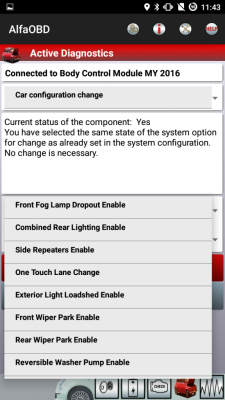
AlfaOBD

Disclaimer: Links on this page pointing to Amazon, eBay and other sites may include affiliate code. If you click them and make a purchase, we may earn a small commission.

W4ZWA

Senior Member
Joined
Aug 23, 2018
Posts
187
Reaction score
220
Location
Central NC
Ram Year
2020 Classic
Engine
5.7L
I have a 14 ram, with the aux switches. The first one is already used, I don’t remember by what. Also looking in the BCM configuration file for my truck shows auxiliary switches csm: switch 2-5 option. Don’t know if their are more options


Sent from my iPad using Tapatalk
I have the option for 1-4 or 2-5 HOWEVER if I go to PTO switch settings or something along the times of that I can choose the option for 5 auxiliary switches.

Sent from my SM-G955U using Tapatalk
 

prohunter

Junior Member
Joined
Jan 20, 2015
Posts
27
Reaction score
6
Location
Largo, FL
Ram Year
2016
Engine
5.7 Hemi
Here I thought these settings were only for testing the installed features.
I can't seem to find that option anywhere except in the window module I just did the fog drop out

Sent from my SM-G955U using Tapatalk
 
OP
OP
Ghost_RAM

Ghost_RAM

Senior Member
Joined
Jan 10, 2018
Posts
1,367
Reaction score
1,099
Location
VA
Ram Year
2016
Engine
Hemi 5.7
I can't seem to find that option anywhere except in the window module I just did the fog drop out

Sent from my SM-G955U using Tapatalk
That's interesting. We both have the same year. Fog dropout and Global up/down are both located in my BCM.
 

prohunter

Junior Member
Joined
Jan 20, 2015
Posts
27
Reaction score
6
Location
Largo, FL
Ram Year
2016
Engine
5.7 Hemi
That's interesting. We both have the same year. Fog dropout and Global up/down are both located in my BCM.
You happen to have a picture of what's close to I've skimmed the whole thing but maybe I'm just blind....

Sent from my SM-G955U using Tapatalk
 

kad

Senior Member
Supporting Member
Joined
Jul 10, 2017
Posts
2,788
Reaction score
2,331
Location
Hudson Valley, NY
Ram Year
2014
Engine
5.7L HEMI

kad

Senior Member
Supporting Member
Joined
Jul 10, 2017
Posts
2,788
Reaction score
2,331
Location
Hudson Valley, NY
Ram Year
2014
Engine
5.7L HEMI
Ok I finally got my truck back from the body shop and I’m now I’m going to reset some settings for the things that have bugged me from the start. Ive downloaded the BCM configurations and I have a couple of questions though.

1. DRL self explanatory with directions in earlier posts, in BCM configurations under exterior lighting calibrations it shows left/right side DRL voltage Target 7.4 volts, does anyone know if this applies to the high/low beam as set in the DRL lamp location? Was going to use high beam as DRL as I’ve got HID’s in low beam. Really not a fan of turn signal or Fog lights as DRL

I see you have a '14. Do you have the factory projector headlights or the quads? So far we haven't been able to get the high beam setting to work as DRLs on '14 trucks with the factory projectors. Only the low beams, turns and fogs have worked. The high beam setting has only worked for those with quads and those who originally had quads and switched to projectors.

I believe the voltage setting does apply to the low or high beams as DRLs, as they run at reduced voltage when in DRL mode.

-K
 
OP
OP
Ghost_RAM

Ghost_RAM

Senior Member
Joined
Jan 10, 2018
Posts
1,367
Reaction score
1,099
Location
VA
Ram Year
2016
Engine
Hemi 5.7
I was able to do the fog lights the global down windows is what I can't find the only place I can find it is in the door modules and it won't load from there

Sent from my SM-G955U using Tapatalk

I edited my post to include a link to a few posts above yours.


Sent from my iPhone using Tapatalk
 

78Staff

US Navy Veteran
Joined
Aug 3, 2018
Posts
976
Reaction score
554
Location
NE Florida
Ram Year
2016
Engine
5.7L Hemi
I bought the panel from a mopar parts site (can't recall which one off the top of my head). The wiring was from 4th gen. Switches 1 and 2 work just not 3-5

Sent from my SM-G955U using Tapatalk


KustomBlack Gunz ran into the same, had to get a replacement... He discusses it in his video around the 27 min mark. I've also got one on order so hoping 4th Gen has it sorted out :).


Followup


And a few further followups worth watching...


W4ZWA

Senior Member
Joined
Aug 23, 2018
Posts
187
Reaction score
220
Location
Central NC
Ram Year
2020 Classic
Engine
5.7L
KustomBlack Gunz ran into the same, had to get a replacement... He discusses it in his video around the 27 min mark. I've also got one on order so hoping 4th Gen has it sorted out :).


Followup


And a few further followups worth watching...

I did not order the switch from him. However I contacted him, he said I might have to order a switch with the extra options to make it work. I might abandoned the project, sell off the wiring which works fine and right off the $70 I've already spend on the 1st panel.

Sent from my SM-G955U using Tapatalk
 

Ricks Ram

Senior Member
Joined
May 1, 2015
Posts
4,411
Reaction score
3,415
Ram Year
2014
Engine
Hemi 5.7
Maybe I’m wrong and got bad info. I’ll know soon enough though lol. I’m gonna rent AE.
Be careful with the AE tool. I have one and it has changed codes in my truck on it's own that I couldn't put back. Had to take my truck to the dealer to have it reflashed. The problem is you don't know what it changed because the AE tool does it on it's own and doesn't show all if the codes for some reason. An example is say you turn on your alarm like I did which worked but the tool somehow disabled the CV2 overhead console code so my homelink stopped working. I couldn't put it back because the AE tool doesn't even show that code. Several people have cooked there trucks with the AE and had to take a trip to the dealer to get a reflash. Word of advise be careful and don't go poking around to much in areas that haven't been tested.

Sent from my SM-G960U using Tapatalk
 

busterbrown

Senior Member
Joined
Jan 28, 2018
Posts
165
Reaction score
98
Location
Detroit, MI
Ram Year
2017 Ram 2500 Megacab Laramie
Engine
Hemi 6.4
I recently learned of this OB2 app and found this thread. I haven't read through all 160 pages but there are three things that I want to do with my 2017 Ram 2500 Laramie.

1. I upgraded from stock non-towing heated, folding, turn signal, memory puddle light mirrors to flip up towing mirrors with the same options. I purchased these aftermarket mirrors from 1aauto. The orientation when flipped up is off 90 degrees. I did see there is an correction option in AlfaOBD. Is there an orientation sensor required in each mirror for this to be activated by the app? Or is it just as simple as turning on the setting?

2. Can DRL's be activated for the front LED turn signals? I have the projector housing. Again, is it as simple as turning on the setting?

3. TPMS warning thresholds. Since I run my tire pressure lower than the factory set thresholds, does this app allow for changes?

 

61N150W

Senior Member
Joined
Jul 19, 2017
Posts
246
Reaction score
145
Location
Anchorage, AK
Ram Year
2014
Engine
5.7
I recently learned of this OB2 app and found this thread. I haven't read through all 160 pages but there are three things that I want to do with my 2017 Ram 2500 Laramie.

1. I upgraded from stock non-towing heated, folding, turn signal, memory puddle light mirrors to flip up towing mirrors with the same options. I purchased these aftermarket mirrors from 1aauto. The orientation when flipped up is off 90 degrees. I did see there is an correction option in AlfaOBD. Is there an orientation sensor required in each mirror for this to be activated by the app? Or is it just as simple as turning on the setting?

2. Can DRL's be activated for the front LED turn signals? I have the projector housing. Again, is it as simple as turning on the setting?

3. TPMS warning thresholds. Since I run my tire pressure lower than the factory set thresholds, does this app allow for changes?
Yep, there's a lot of info here. But if you read the very first post, you'll find a Google Drive document with all known working changes. All 3 of your questions are answered in there.

Sent from my SM-G955U using Tapatalk
 

kad

Senior Member
Supporting Member
Joined
Jul 10, 2017
Posts
2,788
Reaction score
2,331
Location
Hudson Valley, NY
Ram Year
2014
Engine
5.7L HEMI
I recently learned of this OB2 app and found this thread. I haven't read through all 160 pages but there are three things that I want to do with my 2017 Ram 2500 Laramie.

1. I upgraded from stock non-towing heated, folding, turn signal, memory puddle light mirrors to flip up towing mirrors with the same options. I purchased these aftermarket mirrors from 1aauto. The orientation when flipped up is off 90 degrees. I did see there is an correction option in AlfaOBD. Is there an orientation sensor required in each mirror for this to be activated by the app? Or is it just as simple as turning on the setting?

I have the same Trail Ridge mirrors from 1A and yes, they have the sensor built in already. Activating the option via AlphaODB fixed the orientation issue for me.

2. Can DRL's be activated for the front LED turn signals? I have the projector housing. Again, is it as simple as turning on the setting?

It's a couple of settings, but yes. Nothing else needed. The settings are in the Google Drive docs listed in the first post.

3. TPMS warning thresholds. Since I run my tire pressure lower than the factory set thresholds, does this app allow for changes?


It does, but it's a multi step procedure rather than just a simple setting change. Details are in the Google Drive docs listed in the first post.

-K
 

Wolfpup

Member
Joined
Sep 19, 2018
Posts
89
Reaction score
39
Location
Shirley, NY
Ram Year
2014
Engine
Hemi 5.7
Will the AlfaOBD correct this:

I'm missing the "turn by turn" feature in the 7" evic and I can't find the option to turn it on. The evic is an upgraded one from my 3.5" one. I have a 2014 express 1500, upgraded the radio to a 8.4an (bezel and all). the truck had the 3.5 evic earlier in the day and the turn by turn was working in the 3.5, and when I swapped out to the 7" it isn't there, but it displays the name of the street, and distance, just no picture showing the road or arrow to turn. This is what I get:IMG_5842.jpg
 
Last edited:
Back
Top