AlfaOBD

Disclaimer: Links on this page pointing to Amazon, eBay and other sites may include affiliate code. If you click them and make a purchase, we may earn a small commission.

Jkieffer

Senior Member
Joined
Jun 1, 2017
Posts
319
Reaction score
128
Ram Year
2017
Engine
Hemi
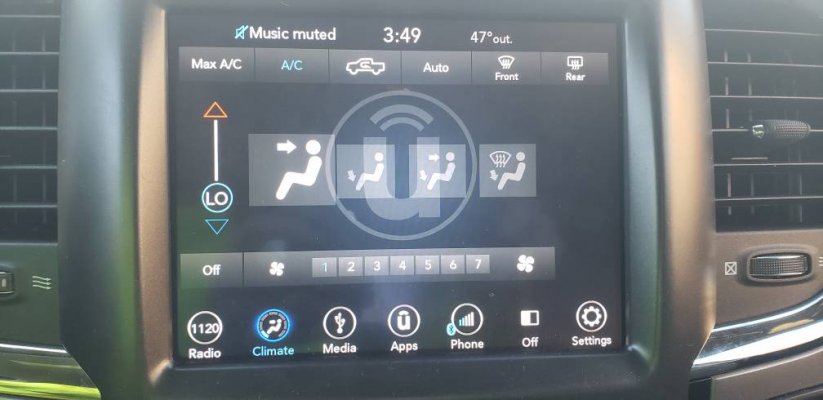
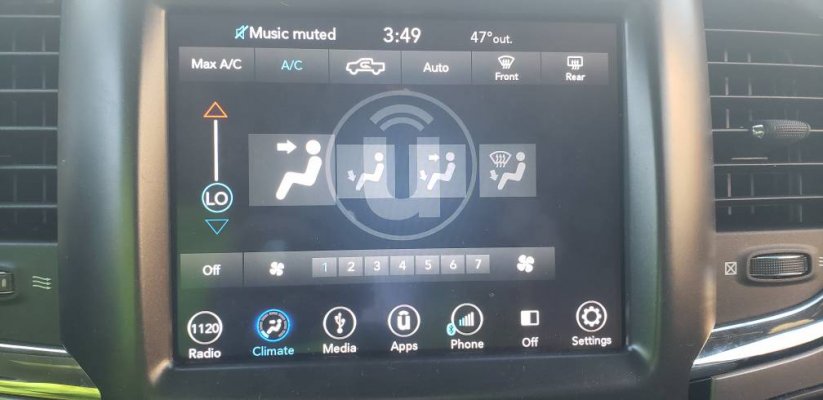
Update on the ATC mod. I drove the truck this morning and left the mode on floor. Went to a couple places so the truck got shut off for 15-30 mins several times. On the way to the last stop I tried the dash vents from floor. No problem. Floor to split. No problem. Split to Floor/Defrost. No problem. Full defrost. No problem. Then the moment I was dreading, defrost to dash. Took a little longer but it worked! I then went back and forth between dash and defrost several times and it worked flawlessly. Auto mode works perfectly also. So at this point I was pretty happy. Went into my last stop, came out 15 mins later, started the truck. Went to dash, no problem. Dash to defrost, like @Ghost_RAM said it can take 20 seconds, and 20 seconds later it went to defrost. After that it was much quicker. I went back out to the truck this afternoon and tried it again, dash to defrost and back. Same thing took 20 seconds or so the first time then worked much quicker. So it looks like it just needed some time to fully accept the settings.

Only thing I noticed is when I use the physical temp up/down buttons the temp changes on both sides of the 8.4 (like a dual zone with sync on), can anyone else with this setup tell me if this is correct?
This is what mine looks like 36bb1338078a639be13a8ac4451b22ae.jpg5b55c00f73825fab0357bd143ab76468.jpg

Sent from my SM-N960U using Tapatalk
 

Hemi395

Senior Member
Joined
Mar 18, 2013
Posts
9,505
Reaction score
17,671
Location
Cape Cod MA
Ram Year
2013
Engine
5.7 Hemi
Congrats, glad it’s working for you. As you said, the more it’s used it’s a little quicker but for whatever reason the first or second time mine takes a little while.

If I move my temp one push at a time it shows only the driver. If I move it more than one setting like from 70 to 72 the passenger side will pop up as well. It will only display the current temp in the upper left corner showing current setting.


Sent from my iPhone using Tapatalk
Ok so that just must be the way it works. I probably wasn't waiting long enough when I first did the ATC for it to change. Thanks for checking that out for me.

Yeah that's exactly what mine does, shows the temp on the driver's side if I do one degree but more than that it's show's both. Thanks for checking that as well.
 
Last edited:

Hemi395

Senior Member
Joined
Mar 18, 2013
Posts
9,505
Reaction score
17,671
Location
Cape Cod MA
Ram Year
2013
Engine
5.7 Hemi
This is what mine looks like 36bb1338078a639be13a8ac4451b22ae.jpg5b55c00f73825fab0357bd143ab76468.jpg

Sent from my SM-N960U using Tapatalk
Yeah I have the original version of the RA3 so mine looks different than that but thanks for checking.

Thanks for the tip of waiting overnight as well.
 

Jkieffer

Senior Member
Joined
Jun 1, 2017
Posts
319
Reaction score
128
Ram Year
2017
Engine
Hemi
Mine originally had both driver and passenger temp bars but eventually disappeared. It might take more time. If I remember correctly I had to go back and set to multi ATC then back to single zone.

Sent from my SM-N960U using Tapatalk
 

chrisbh17

Senior Member
Joined
Oct 12, 2017
Posts
6,720
Reaction score
7,525
Ram Year
2017
Engine
Hemi 5.7
Slight tangent - using AlfaOBD to actually data log :)

WTF parameter should I graph to see engine RPM? The engine RPM choice just shows 0 the whole time.

Thanks.
 

Hemi395

Senior Member
Joined
Mar 18, 2013
Posts
9,505
Reaction score
17,671
Location
Cape Cod MA
Ram Year
2013
Engine
5.7 Hemi
Mine originally had both driver and passenger temp bars but eventually disappeared. It might take more time. If I remember correctly I had to go back and set to multi ATC then back to single zone.

Sent from my SM-N960U using Tapatalk
Sorry I should've clarified that better, I don't actually have 2 temp bars. It just shows the temp at the top of the screen on both sides while I'm changing the temp using the buttons. Then the passenger side disappears and it just shows the temp on the driver's side like it should...
 

Jkieffer

Senior Member
Joined
Jun 1, 2017
Posts
319
Reaction score
128
Ram Year
2017
Engine
Hemi
Ok.

Sent from my SM-N960U using Tapatalk

 

Fisher99

Junior Member
Joined
Nov 16, 2018
Posts
24
Reaction score
3
Location
NE Oregon
Ram Year
2013
Engine
Cummins 6.7
Hello. New to this forum and need some assistance. Just purchased AlfaOBD and am trying to use it to activate the DRL's on my 2013 Ram Laramie Limited. I have done the following:

FROM "CAR CONFIGURATION CHANGE":
- Selected "DRL Configuration".
- Selected "OPTIONAL DRL" (also tried "CANADA DRL")
- Hit "START" and "NEXT" and got message saying that the change had been made.
- Selected "DRL LAMP LOCATION".
- Selected "TURN SIGNAL DRL" (also tried "FOG LIGHT DRL")
- Hit "START" and "NEXT" and got message saying that the change had been made.
- Selected "DRL DROPOUT".
- Selected "ENABLED".
- Hit "START" and "NEXT" and got message saying that the change had been made.

FROM "PROGRAM CUSTOMER FEATURES".
- Selected "DAYTIME RUNNING LAMPS".
- Selected "ENABLED"
- Hit "START" and "NEXT" and got message saying that the change had been made.

If I go back to the "Body Module" and do a "System Status" it shows the following:

- DRL Configuration: Optional DRL
- DRL Lamp Location: Turn Signal DRL
- DRL Dropout Enable: Set

However, I still don't seem to have DRL's enabled. At first I thought that maybe the DRL's aren't on if the vehicle is running but in PARK, so I activated the parking brake, left the truck in DRIVE, and got out and looked, but still no DRL's.

Any thoughts/suggestions would be appreciated. Thanks!
 

Ricks Ram

Senior Member
Joined
May 1, 2015
Posts
4,411
Reaction score
3,415
Ram Year
2014
Engine
Hemi 5.7
Hello. New to this forum and need some assistance. Just purchased AlfaOBD and am trying to use it to activate the DRL's on my 2013 Ram Laramie Limited. I have done the following:

FROM "CAR CONFIGURATION CHANGE":
- Selected "DRL Configuration".
- Selected "OPTIONAL DRL" (also tried "CANADA DRL")
- Hit "START" and "NEXT" and got message saying that the change had been made.
- Selected "DRL LAMP LOCATION".
- Selected "TURN SIGNAL DRL" (also tried "FOG LIGHT DRL")
- Hit "START" and "NEXT" and got message saying that the change had been made.
- Selected "DRL DROPOUT".
- Selected "ENABLED".
- Hit "START" and "NEXT" and got message saying that the change had been made.

FROM "PROGRAM CUSTOMER FEATURES".
- Selected "DAYTIME RUNNING LAMPS".
- Selected "ENABLED"
- Hit "START" and "NEXT" and got message saying that the change had been made.

If I go back to the "Body Module" and do a "System Status" it shows the following:

- DRL Configuration: Optional DRL
- DRL Lamp Location: Turn Signal DRL
- DRL Dropout Enable: Set

However, I still don't seem to have DRL's enabled. At first I thought that maybe the DRL's aren't on if the vehicle is running but in PARK, so I activated the parking brake, left the truck in DRIVE, and got out and looked, but still no DRL's.

Any thoughts/suggestions would be appreciated. Thanks!
Did you go into your settings menue on your radio under (lights) and see if the code is there?

Sent from my SM-G960U using Tapatalk
 

78Staff

US Navy Veteran
Joined
Aug 3, 2018
Posts
976
Reaction score
554
Location
NE Florida
Ram Year
2016
Engine
5.7L Hemi
Since you have a limited we'll assume you have the 8.4" Uconnect... did you enable the setting for CSM, and can you see DRL as an option in settings screen?
 

Ricks Ram

Senior Member
Joined
May 1, 2015
Posts
4,411
Reaction score
3,415
Ram Year
2014
Engine
Hemi 5.7
Also the vehicle has to be in a forward gear with the parking brake OFF in order for the DRL's to function.

Sent from my SM-G960U using Tapatalk
 

78Staff

US Navy Veteran
Joined
Aug 3, 2018
Posts
976
Reaction score
554
Location
NE Florida
Ram Year
2016
Engine
5.7L Hemi
Yep good catch, parking brake must be OFF.

Also did you let the truck sleep after the changes, removing key, etc...
 

Fisher99

Junior Member
Joined
Nov 16, 2018
Posts
24
Reaction score
3
Location
NE Oregon
Ram Year
2013
Engine
Cummins 6.7
Yes. There is no setting to activate the DRL's in my "Lights" setting on my 8.4an.

Someone elsewhere mentioned that I might be missing a setting. Something called setting "daytime running lights CSM" to "YES", but I've scrolled through all of the options under "CAR CONFIGURATION CHANGE" multiple times and I'm not finding that setting.
 

Fisher99

Junior Member
Joined
Nov 16, 2018
Posts
24
Reaction score
3
Location
NE Oregon
Ram Year
2013
Engine
Cummins 6.7
Parking brake off and in gear? Hmmm... Might have to run down the road in front of it to check... Or wait for my wife to come home to assist.

Yes, I have let the car sit with ignition off for an hour or so.
 

Ricks Ram

Senior Member
Joined
May 1, 2015
Posts
4,411
Reaction score
3,415
Ram Year
2014
Engine
Hemi 5.7
Yes. There is no setting to activate the DRL's in my "Lights" setting on my 8.4an.

Someone elsewhere mentioned that I might be missing a setting. Something called setting "daytime running lights CSM" to "YES", but I've scrolled through all of the options under "CAR CONFIGURATION CHANGE" multiple times and I'm not finding that setting.
Are you still connected to the truck? The CSM settings will not show up unless you are connected. Completely back out of the App and reconnect to your truck. It's about 3/4s of the way down.

Sent from my SM-G960U using Tapatalk
 

Fisher99

Junior Member
Joined
Nov 16, 2018
Posts
24
Reaction score
3
Location
NE Oregon
Ram Year
2013
Engine
Cummins 6.7
Since you have a limited we'll assume you have the 8.4" Uconnect... did you enable the setting for CSM, and can you see DRL as an option in settings screen?

Yes, 8.4an. Where do I find the CSM setting? I have been all through the CAR CONFIGURATION CHANGE screen and cannot find this setting.
 

Fisher99

Junior Member
Joined
Nov 16, 2018
Posts
24
Reaction score
3
Location
NE Oregon
Ram Year
2013
Engine
Cummins 6.7
Are you still connected to the truck? The CSM settings will not show up unless you are connected. Completely back out of the App and reconnect to your truck. It's about 3/4s of the way down.

Sent from my SM-G960U using Tapatalk

No, I'm not currently connected. I will re-connect and give this a shot. Thanks.
 

Ricks Ram

Senior Member
Joined
May 1, 2015
Posts
4,411
Reaction score
3,415
Ram Year
2014
Engine
Hemi 5.7
No, I'm not currently connected. I will re-connect and give this a shot. Thanks.
That is definitely your issue. Reconnect to the truck and scroll down in your car configuration log until you get to daytime running lights CSM and activate it. This will bring the customer settings menu up on your radio screen so you can turn the daytime running lights on and off.

Sent from my SM-G960U using Tapatalk
 

Fisher99

Junior Member
Joined
Nov 16, 2018
Posts
24
Reaction score
3
Location
NE Oregon
Ram Year
2013
Engine
Cummins 6.7
Well, I don't think I'm blind, but I re-connected to the OBD on the truck, re-connected to the BODY CONTROL module, went to "CAR CONFIGURATION CHANGE", and scrolled through the entire list again and I'm not seeing that option. Just for "fun" can you tell me what settings are on either side of this setting? Wondering if mine is missing that setting for some reason.

I don't need to be changing my COUNTRY CODE to Canada, do I?
 

Members online

Forum statistics

Threads
211,007
Posts
3,060,930
Members
171,053
Latest member
jhicks1983
Back
Top