New to AlfaOBD

Disclaimer: Links on this page pointing to Amazon, eBay and other sites may include affiliate code. If you click them and make a purchase, we may earn a small commission.

Hagar1

Senior Member
Joined
Aug 9, 2023
Posts
1,112
Reaction score
2,307
Location
Ontario Canada
Ram Year
2012 Ram 1500
Engine
Hemi 5.7
So, I got the program and tomorrow, Oct 8, the interface cable is supposed to be delivered. Going to take a thermos of coffee, my laptop and see how much I can learn in the afternoon.
Going to be fun, I'm sure.
I'm working on the theory that old dogs can learn new tricks.

Special thanks to Ramdiver for his help and advice!
 

RamDiver

Senior Member
Joined
Jan 23, 2022
Posts
5,639
Reaction score
11,878
Location
Marlborough, Ontario Canada
Ram Year
2021 DS
Engine
Hemi 5.7
So, I got the program and tomorrow, Oct 8, the interface cable is supposed to be delivered. Going to take a thermos of coffee, my laptop and see how much I can learn in the afternoon.
Going to be fun, I'm sure.
I'm working on the theory that old dogs can learn new tricks.

Special thanks to Ramdiver for his help and advice!

You're most welcome.

I'm confident that you will be teaching us all new tricks soon. :cool:

I'm sure you're familiar with the best practice of saving your BCM baseline configuration before tweaking.

There's also a long form text version available from the Status tab. I'll post those details next time I'm online with my PC.

Another basic tip I don't see too often is,
when beginning a new session, connect the interface (OBDLink SX) between the OBD2 port and the PC first and establish the connection before launching AlfaOBD. :cool:

.
 
Last edited:
Joined
May 22, 2025
Posts
69
Reaction score
72
Location
Central Ohio
Ram Year
2020 Classic
Engine
5.7
I'm still learning on mine. the software is a bit clunky but it does appear to have a ton of capability! I need to get off my butt and finish unlocking the remote start. Winter is coming! haha. Need to ground the pin on the connector under the dash and set the right settings for the hood latch stuff.
 
OP
OP
H

Hagar1

Senior Member
Joined
Aug 9, 2023
Posts
1,112
Reaction score
2,307
Location
Ontario Canada
Ram Year
2012 Ram 1500
Engine
Hemi 5.7
You're most welcome.

I'm confident that you will be teaching us all new tricks soon. :cool:

I'm sure you're familiar with the best practice of saving your BCM baseline configuration before tweaking.

There's also a long form text version available from the Status tab. I'll post those details next time I'm online with my PC.

Another basic tip I don't see too often is,
when beginning a new session, connect the interface (OBDLink SX) between the OBD2 port and the PC first and establish the connection before launching AlfaOBD. :cool:

.
Ha! Ha! Just like a Rigid battery for a cordless drill, plug it in before you put the battery on.:)

I'll probably have a lot more questions than answers but We'll see how it goes.
 

04fxdwgi

Senior Member
Joined
May 19, 2023
Posts
1,739
Reaction score
3,647
Location
Coastal NE North Carolina
Ram Year
2016 1500 Sport
Engine
5.7 Hemi
Yeah, I have the OEM ECM that was in the truck sitting in the garage. I used a $60 used ECM from Ebay for the ECM to be unlocked for the tuner.

Just in case......
 
Last edited:

2Kings920

Junior Member
Joined
Apr 10, 2013
Posts
7
Reaction score
1
Location
South MS
Ram Year
2013
Engine
Hemi 5.7
Hey guys, thanks for all the great info provided on here! I'm new to alfaobd as well & I'm using the Windows version but I'm struggling on how to use "the best practice of saving your BCM baseline configuration before tweaking." I've searched threads on here, YouTube, & alfaobd site but can't find anything on how it's done. Can someone point me in the right direction? Thanks!
 

RamDiver

Senior Member
Joined
Jan 23, 2022
Posts
5,639
Reaction score
11,878
Location
Marlborough, Ontario Canada
Ram Year
2021 DS
Engine
Hemi 5.7
Hey guys, thanks for all the great info provided on here! I'm new to alfaobd as well & I'm using the Windows version but I'm struggling on how to use "the best practice of saving your BCM baseline configuration before tweaking." I've searched threads on here, YouTube, & alfaobd site but can't find anything on how it's done. Can someone point me in the right direction? Thanks!

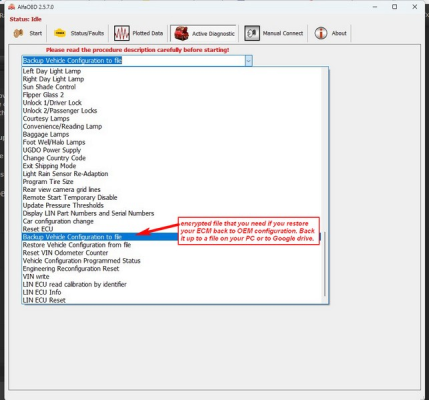
AlfaOBD/My 20xx/Body Computer/backup current settings

The backup current settings is very close to car configuration changes.

Also, the English version of the backup is available on the Status tab/read system ID, IIRC.

That's off the top of my head. The AlfaOBD screenshots are here somewhere. I'm not at home and don't have time to find them ATM. :cool:

.
 
Last edited:

04fxdwgi

Senior Member
Joined
May 19, 2023
Posts
1,739
Reaction score
3,647
Location
Coastal NE North Carolina
Ram Year
2016 1500 Sport
Engine
5.7 Hemi
Suggest to do both of these before you change anything:

1. To "back up" the encrypted configuration file that can be restored back to OEM configuration (like the dealer does), use this selection:

1761467798701.png

2. To download the BCM configuration in a readable format and save it like a PDF so you can search it, use this option:

PS: I save this multiple times (under different file names) while / after doing changes so I can ref and compare if something goes south.

1761467891687.png

Hope this clears it up for ya.
 
Back
Top