
Spotify audio Auto-playing.

Disclaimer: Links on this page pointing to Amazon, eBay and other sites may include affiliate code. If you click them and make a purchase, we may earn a small commission.

El_Dude

Senior Member
Joined
Nov 11, 2020
Posts
222
Reaction score
216
Location
Spring, TX
Ram Year
2019 Classic SLT
Engine
5.7
I’ve asked in the iPhone subreddit and have looked at the Spotify community but can’t find an working solution. I’m not sure if it’s a Spotify, iPhone, or the Ram’s Bluetooth issue to be honest. Maybe someone here can shed some light or has been through this.

Say I’m listening to Spotify with my iPhone over Bluetooth in my truck one day. The next morning I will use the iPhone Maps app to get somewhere. When the Maps app finishes a sentence in the spoken directions Spotify will automatically start playing the last thing I was listening to. On my phone Spotify isn’t even open. If I swipe up from the very bottom to see all apps open Spotify isn’t there. If I swipe down to see the control center, when Spotify starts playing, I can pause it. But as soon as Maps stop speaking, another direction, Spotify starts playing again. Super annoying

autoplay is already turned off in the Spotify app, and in the Ram’s radio settings.

iPhone 13 Pro max
Ram stereo is the small-screen basic Bluetooth stereo that comes in the SLT

 

mtnrider

Senior Member
Joined
Sep 25, 2014
Posts
3,538
Reaction score
4,298
Location
Georgia
Ram Year
2016
Engine
6.7 Cummins
I F'ing HATE the way Spotify takes over your phone, I have very similar issues with it on android. Drives me crazy.... It's a Spotify issue (they want to call it a "feature"). There is no way to stop Spotify from auto starting on a bluetooth connection. Even if I launch another audio source on the phone and switch to bluetooth on the radio Spotify auto launches and takes over. I have to physically stop it every time.
I've tried all the "tricks" posted online to stop it but no luck

I'd ditch Spotify but the whole family uses it so it's hard for me to get away from it.

.
 
OP
OP
El_Dude

El_Dude

Senior Member
Joined
Nov 11, 2020
Posts
222
Reaction score
216
Location
Spring, TX
Ram Year
2019 Classic SLT
Engine
5.7
My fam is on Spotify too and I've built up my lists and all that crap. ughh i wish there was a way to stop that
 

ninettefriedly

Junior Member
Joined
Jun 17, 2022
Posts
5
Reaction score
3
Location
USA Buffalo
I feel your frustration with that Spotify auto-playing issue. It's like having a DJ you didn't ask for, right? I've heard some folks had similar problems, and it might be a glitch between your iPhone and the Ram's Bluetooth system. Maybe try disconnecting and reconnecting the Bluetooth connection? Sometimes that does the trick. Did you know there's a way to give your music a boost on Spotify? If you're into music production, you can buy plays to get a head start. Check out streamingfamous.com if you're curious.
 
Last edited:

18CrewDually

Senior Member
Joined
Nov 17, 2019
Posts
2,421
Reaction score
3,414
Location
U.S.- New Jersey
Ram Year
2018
Engine
Cummins 6.7 H.O.
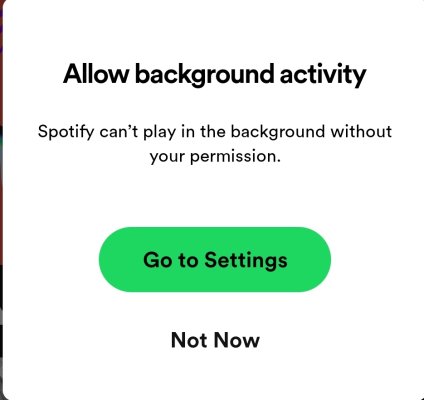
How about going to settings and turn Off this permission?

Screenshot_20240104_093534_Spotify.jpg


After reading the other posts I was thinking to myself I didn't have that problem. So I opened the app and this message popped up asking me to allow. Coincidence?
 

mtnrider

Senior Member
Joined
Sep 25, 2014
Posts
3,538
Reaction score
4,298
Location
Georgia
Ram Year
2016
Engine
6.7 Cummins
How about going to settings and turn Off this permission?

View attachment 534684


After reading the other posts I was thinking to myself I didn't have that problem. So I opened the app and this message popped up asking me to allow. Coincidence?

Unfortunately that will Not fix the issue of it auto launching. It's a "feature" that Spotify is forcing on us....


.
 

18CrewDually

Senior Member
Joined
Nov 17, 2019
Posts
2,421
Reaction score
3,414
Location
U.S.- New Jersey
Ram Year
2018
Engine
Cummins 6.7 H.O.
Unfortunately that will Not fix the issue of it auto launching. It's a "feature" that Spotify is forcing on us....


.

Weird mine is upto date and doesn't do as described. I'm on Android platform though.
 

mtnrider

Senior Member
Joined
Sep 25, 2014
Posts
3,538
Reaction score
4,298
Location
Georgia
Ram Year
2016
Engine
6.7 Cummins
Weird mine is upto date and doesn't do as described. I'm on Android platform though.

I'm on android.... While I don't have the exact problem the OP has it does auto start Spotify every time I select bluetooth whether I want it to or not. For instance, if I want to listen to another app via bluetooth from the phone I am constantly fighting with Spotify taking over. Very frustrating..

This isn't an issue with just ram, it's across the board on all bluetooth devices. You can search through Spotify forums and people are complaining about this everywhere. Of course there are people that "like" this feature as well.

./
 
OP
OP
El_Dude

El_Dude

Senior Member
Joined
Nov 11, 2020
Posts
222
Reaction score
216
Location
Spring, TX
Ram Year
2019 Classic SLT
Engine
5.7
yes thats the exact problem i'm having. its super annoying. ughh
 

kawaiiitakko

Junior Member
Joined
Jul 1, 2025
Posts
27
Reaction score
10
Location
United States
Ram Year
2020
Engine
5.7L HEMI V8
I’ve asked in the iPhone subreddit and have looked at the Spotify community but can’t find an working solution. I’m not sure if it’s a Spotify, iPhone, or the Ram’s Bluetooth issue to be honest. Maybe someone here can shed some light or has been through this.

Say I’m listening to Spotify with my iPhone over Bluetooth in my truck one day. The next morning I will use the iPhone Maps app to get somewhere. When the Maps app finishes a sentence in the spoken directions Spotify will automatically start playing the last thing I was listening to. On my phone Spotify isn’t even open. If I swipe up from the very bottom to see all apps open Spotify isn’t there. If I swipe down to see the control center, when Spotify starts playing, I can pause it. But as soon as Maps stop speaking, another direction, Spotify starts playing again. Super annoying

Autoplay is already turned off in the Spotify app, in the Ram’s radio settings, and I’ve also found https://spotimody.com/ really helpful for managing playback and playlists more smoothly.

iPhone 13 Pro max
Ram stereo is the small-screen basic Bluetooth stereo that comes in the SLT

This happens because iOS automatically resumes the last audio over Bluetooth after apps like Maps pause playback, even if Spotify isn’t open. To stop it, try force-closing Spotify before using Maps, turning off Handoff (Settings > General > AirPlay & Handoff), reconnecting your Ram Bluetooth, or using Do Not Disturb While Driving. This behavior is controlled by iOS, so there’s no perfect fix unless Apple or Spotify changes how media resumes after interruptions.
 

crackerjack1957

Senior Member
Joined
Sep 26, 2015
Posts
2,364
Reaction score
3,256
Ram Year
2014 Sport 1500 CC 4x4
Engine
Hemi 5.7...65RFE...4.56
iOS pretty much locks you out from any changes.
Android still gives you ways around for those that are tech savvy
 

WildcatHemi

Senior Member
Joined
Dec 6, 2017
Posts
141
Reaction score
125
Location
Kingwood, Texas
Ram Year
2016
Engine
5.7 Hemi
i disconnected my phone from the truck because of this. so annoying. i just use the plug inside the console to connect to the radio.
 

markabby

Senior Member
Joined
Feb 16, 2020
Posts
1,130
Reaction score
1,640
Location
Monticello, Kentucky
Ram Year
2020 Limited
Engine
5.7
i just recently installed Spotify on my iphone 16+. I only wanted songs by Promptgenix. I tried downloading them to play but Spotify adds other songs to my list. ugh.

I don't have the issues on my Carplay the others have, but, I'm not crazy using Spotify. Maybe i'm just used to Pandora.

I should add i also did the Ios 26 update on my phone too. Kinda changed my Carplay screen around, but, i'm getting used to it.
 

mands0807

Senior Member
Joined
May 22, 2024
Posts
148
Reaction score
226
Location
South Tampa Bay Area
Ram Year
2018 Sport
Engine
5.7
I don't use Spotify, but if I have my uConnect audio set to bluetooth, youtube music will start playing automatically, but not if on usb, where it normally stays. If I plug my phone in for Android Auto, not an issue either.
 

mtofell

Senior Member
Joined
Mar 18, 2014
Posts
3,053
Reaction score
3,080
Ram Year
2014
Engine
Hemi 6.4
I have pretty much the same data point as @mands0807 - Android w/Youtube Music. It has a mind of its own and usually starts playing no matter if the app is open or not. It doesn't always do it which I find odd. Overall, it's random and often annoying.
 

mands0807

Senior Member
Joined
May 22, 2024
Posts
148
Reaction score
226
Location
South Tampa Bay Area
Ram Year
2018 Sport
Engine
5.7
I have pretty much the same data point as @mands0807 - Android w/Youtube Music. It has a mind of its own and usually starts playing no matter if the app is open or not. It doesn't always do it which I find odd. Overall, it's random and often annoying.
I have the 8.4 screen on a 2018 that supports Android Auto/Apple Carplay. The only time my music starts automatically is when I do not plug my phone into the usb, and I have the media screen set to bluetooth. Otherwise, I have no issue. I don't use spotify, and pay for Youtube Premium...$26.xx/mo for the family plan, no ads, can close screen while listening to music, and can keep a thumbnail screen playing on my phone for videos while using other apps
 

G-Ride990

Administrator
Staff member
Administrator Moderator Supporting Member
Joined
Jul 17, 2017
Posts
2,962
Reaction score
4,704
Location
Chandler, AZ
Ram Year
2022
Engine
5.7 No E-torque
There is an option with Android auto on an Android phone you can disable that says something like, "allow external device to start playback."

Once I turned that off, I never had this issue again.

Hopefully you have something like that for iphone that you can disable.

Edit** just realized this is a two year old thread. Oops.
 

mands0807

Senior Member
Joined
May 22, 2024
Posts
148
Reaction score
226
Location
South Tampa Bay Area
Ram Year
2018 Sport
Engine
5.7
There is an option with Android auto on an Android phone you can disable that says something like, "allow external device to start playback."

Once I turned that off, I never had this issue again.

Hopefully you have something like that for iphone that you can disable.

Edit** just realized this is a two year old thread. Oops.
But was revived two days ago...
 
Back
Top