JimmyJam26
Junior Member
This has probable been asked before but will this run on a Amazon Fire Tablet?


Disclaimer: Links on this page pointing to Amazon, eBay and other sites may include affiliate code. If you click them and make a purchase, we may earn a small commission.
This has probable been asked before but will this run on a Amazon Fire Tablet?
What version of AlfaOBD? Back around page 179 there were reports of crashing with newer Android but it was apparently addressed in version 2.1.6.4. I run an old Android 4.4 tablet and a Win10 PC with out issues so far.Late to the game here, I'm sure this has been solved somewhere but search yielded no results. Need help...
ObdLink MX
Bluetooth connection
2014 Ram 1500 5.7
Android 9+
Can connect to ObdMink MX, but can't connect to truck, always times out.
Trying to adjust my TPMS thresholds
Also was never asked for a PIN (?)
help?
Mine is working fine. Try disconnecting the dongle and force closing out of the app. Then reconnect everything.
LED settings are in body computer/car configuration change/CBC Features
CBC Features Configuration:
LED Reverse Lamps Present: Not set
LED Stop Lamps Present: Not set
LED Rear Turn Lamps Present: Not set
LED Tail Lamps Present: Not set
LED Rear Fog Lamps Present: Not set
LED License Lamps Present: Set
LED Front Turn Lamps Present: Not set
LED Front Fog Lamps Present: Not set
LED Dedicated DRL Present: Not set
LED Low Beam Lamps Present: Not set
LED High Beam Lamps Present: Not set
LED Front Park/Marker Lamps Present: Not set
This is all I set but I also used canbus compatible bulbs.
CBC Features Configuration:
LED License Lamps Present: Set
Bringing this over from a different section...
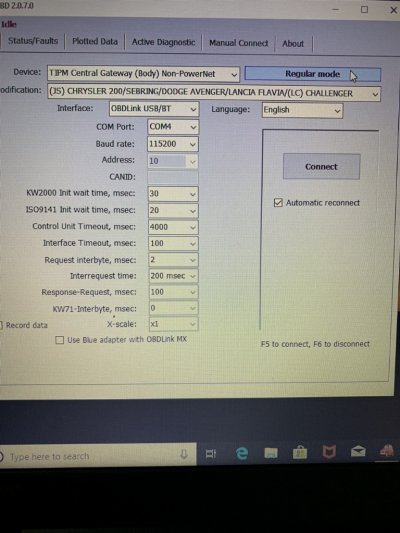
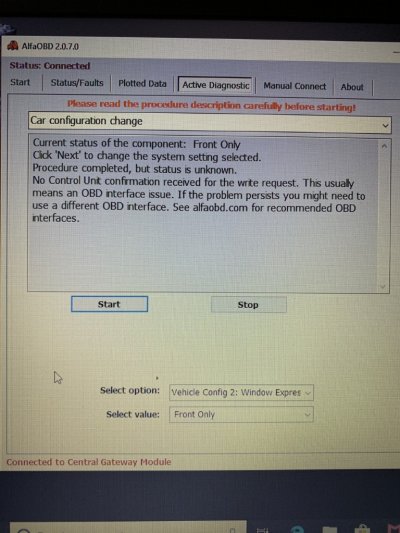
I recently downloaded and installed the program for my 2012. I’m using obdlink mx+, when I log on it reads my truck just fine. When I boot up the alfaobd I selected the proper vehicle (pictured) and it’ll connect but when I go into regular mode it displays Chrysler 200/Sebring/Dodge Avenger. When I select ram 1500-4500 it disconnects and goes to idle. So when I try to change anything it brings up the message it was completed but doesn’t know the status due to no confirmation received. I have tried changing other features too but always displays same message. Does anybody have a a clue what I’m doing wrong or something I may have missed??! Thanks
Sent from my iPhone using Tapatalk


What messages are you getting when it fails to program?Hey guys so I just purchased the alfaobd app. I've had great success up to this point. I'm attempting to program a key to my ram it has the push button start in it. I've attained the 4 digit pin from the dealer and have attempted to follow the fobiks programming instructions posted previously in the thread. Any help would be greatly appreciated!
You need to use highline system.It is saying test failed.
I'm m using the program fobiks baseline system to do it.
It is saying test failed.
I'm m using the program fobiks baseline system to do it.
Also I'll m curious if anyone has an updated cheat sheet I found a few here and there but I figure it never hurts to ask if there is a more current one!
No. Baseline is what you need but it hasn’t worked the past few updates. 2.1.6.4 works. Could you sent the debug log to the developer, please? He might not be aware of this, and if everybody keeps reverting back to the older version that works, without letting him know, then it will never get fixed for the next people that try.I am trying to program a key to my Tradesman. I have the basic key with no buttons or anything. I have followed the instructions in post #2250 and I keep getting a message that says Failed. Conditions not correct or request sequence error. Do I need to use the highline option also.
No. Baseline is what you need but it hasn’t worked the past few updates. 2.1.6.4 works. Could you sent the debug log to the developer, please? He might not be aware of this, and if everybody keeps reverting back to the older version that works, without letting him know, then it will never get fixed for the next people that try.