
AlfaOBD

Disclaimer: Links on this page pointing to Amazon, eBay and other sites may include affiliate code. If you click them and make a purchase, we may earn a small commission.

Aaron Gilliam

Member
Joined
Jun 13, 2018
Posts
71
Reaction score
23
Location
Las Vegas, Nevada
Ram Year
2012
Engine
5.7L
All of the items I see in the door modules are realtime tests and displays of the state of options (puddle lights, turn signal lights, global up/down, etc), but those are all duplicates of things that are also listed in the BCM and can be changed in the BCM. I don't recall the ability to actually change them in the door module. The only thing I recall seeing in the door modules that was not in the BCM was the tests for the door & mirrors functions. However, that may be one of the differences between the '9-'12 and the '13+ models. I.E. on the newer trucks everything can be set via the BCM but on the older ones you had to set the options in the actual door modules. Unfortunately I'm in the office today and my OBDLink is at home so I can't pop out to the truck and confirm right now. I'll see if I can double check this evening.

I do have a question for you though, and I apologize if you've already said and I missed it, but what do the door modules have to do with the headlights? :)

-K

Haha! Got me. No, but seriously I was just asking if anyone could connect to their door modules as a general question, as well as the headlights (trying to get quads working right). I know I posted a few questions in one post so my bad for confusing everyone!
 

Aaron Gilliam

Member
Joined
Jun 13, 2018
Posts
71
Reaction score
23
Location
Las Vegas, Nevada
Ram Year
2012
Engine
5.7L
Ok I dunno where I was at or what I did. But I saw:
DRL Enable/Disable
DRL Enable/Disable

Both in a row just like that. Now I can’t find it! I found the DRL Configuration and DRL lamp config. But I do not see that option I saw earlier. It looked like it was like a test procedure, however in the window it said;

“DRL Configuration should only be enabled for vehicles built in Canada or vehicles built in the US for Canada. Warning!!! Once enabled it cannot be disabled!”

Then below was start. No other option like set or un-Set. It’s driving me nuts now that I can’t find it.

Regardless I was able to fix it, so I’m good!
 

cory733

Member
Joined
Aug 18, 2018
Posts
42
Reaction score
14
Location
New York
Ram Year
2015 Big Horn Quad Cab
Engine
Hemi 5.7
Anyone see a setting to disable the door chime?
 

Aaron Gilliam

Member
Joined
Jun 13, 2018
Posts
71
Reaction score
23
Location
Las Vegas, Nevada
Ram Year
2012
Engine
5.7L
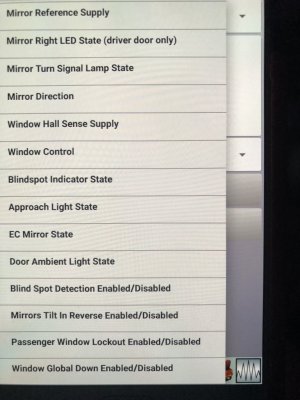
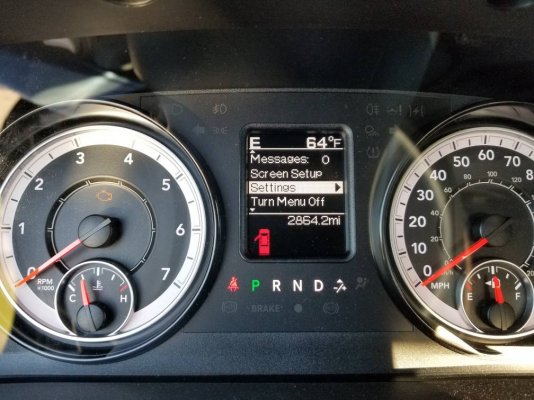
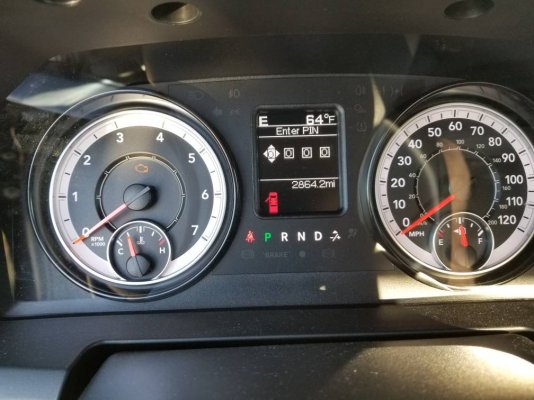
F2FFDDC8-35B6-46E3-BAF7-C2711D033EDA.jpeg 370B6961-D86A-4A9D-A592-7E8C3E463BEA.jpeg Ha. I found it I’m not crazy. I had to connect to the truck for that option to show up. It didn’t show up off-line in the house and I was sitting on the couch. Jumped in the truck connected went to the settings and here it is here’s the screenshots. It’s under the general diagnostics not under the configurations.
 

78Staff

US Navy Veteran
Joined
Aug 3, 2018
Posts
976
Reaction score
554
Location
NE Florida
Ram Year
2016
Engine
5.7L Hemi
Aaron I think you should preface every post in this thread with "Disclaimer I am connecting to a 2012 truck" :D
 

chrisbh17

Senior Member
Joined
Oct 12, 2017
Posts
6,720
Reaction score
7,525
Ram Year
2017
Engine
Hemi 5.7
Im interested in the blind spot stuff, since there seems to be an inkling of blind spot data to/from the outside mirrors, but I cant find any information about it in the service manual. Maybe it was never offered on RAMs? Or maybe not in US RAMs?
 

ArcticRat

Junior Member
Joined
May 3, 2017
Posts
24
Reaction score
8
Location
Anchorage, Alaska
Ram Year
2014
Engine
6.4
Ok I finally got my truck back from the body shop and I’m now I’m going to reset some settings for the things that have bugged me from the start. Ive downloaded the BCM configurations and I have a couple of questions though.

1. DRL self explanatory with directions in earlier posts, in BCM configurations under exterior lighting calibrations it shows left/right side DRL voltage Target 7.4 volts, does anyone know if this applies to the high/low beam as set in the DRL lamp location? Was going to use high beam as DRL as I’ve got HID’s in low beam. Really not a fan of turn signal or Fog lights as DRL
2. HID headlights. g00fy stated he had this working and was going to remove all the wiring associated with the HID install, has anybody done this? If so is the only setting needed is to enable the HID head lamps? In my case ill have to unset the BiXenon headlamps enable.
3. TPMS. In the screenshots AlphaOBD shows update pressure thresholds and the description reads use the cold tire inflation pressure. In the BCM configuration it shows Maximum load inflation pressure rear 80 psi and front at 60 psi. I like to run at 70 rear and 50 front. But with winter I see a psi difference of up to 5 psi. So I get the low tire warning all the time. Is the status pressure front/rear the pressure you want the warning to come on? Or do I just put in pressure I want and it will give you a warning when it goes down to warning threshold pressure (I read somewhere its 10% of tire pressure set)
4. Is there a setting in AlphaOBD to turn off the CHMSL? I have a camper shell on the truck and it only lights up the rear window. Annoying but something I can live with.
5. Also going to enable VTA. Why its not already enabled makes me wonder what they were thinking..


Sent from my iPad using Tapatalk
 

W4ZWA

Senior Member
Joined
Aug 23, 2018
Posts
187
Reaction score
220
Location
Central NC
Ram Year
2020 Classic
Engine
5.7L
Received my OBDLink this afternoon and successfully enabled DRL's.

I added the aux switches a while back however switches 3-5 don't activate (key power positions), any idea if the must be enabled? If so where at within the changeable settings.

Sent from my P008 using Tapatalk
 

W4ZWA

Senior Member
Joined
Aug 23, 2018
Posts
187
Reaction score
220
Location
Central NC
Ram Year
2020 Classic
Engine
5.7L
Received my OBDLink this afternoon and successfully enabled DRL's.

I added the aux switches a while back however switches 3-5 don't activate (key power positions), any idea if the must be enabled? If so where at within the changeable settings.

Sent from my P008 using Tapatalk
I enabled Auxiliary Switch CSM, now this shows up?6f35c5201b5957c4bb35f6685945fccc.jpg33fb19ca517f93a4c6ad77fd07decc52.jpgd1d7fb5e505a5e99c6c71177efd9cb14.jpg

Sent from my SM-G955U using Tapatalk
 

prohunter

Junior Member
Joined
Jan 20, 2015
Posts
27
Reaction score
6
Location
Largo, FL
Ram Year
2016
Engine
5.7 Hemi
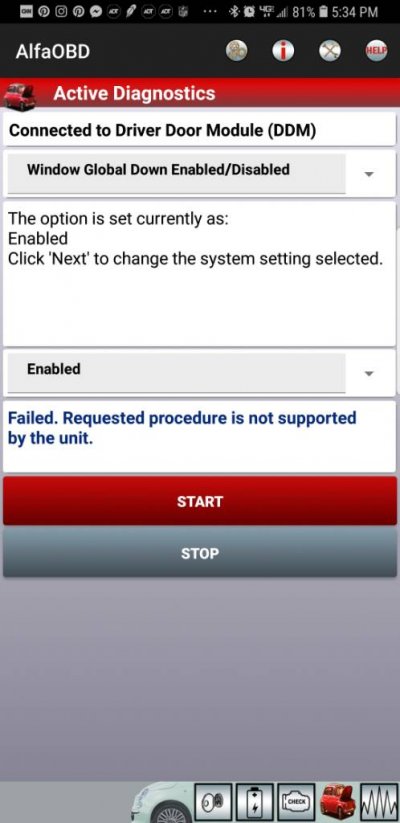
So any idea why I'm getting this when I try to enable global down9459313cdeef90a940d848cdc24f4e72.jpg

Sent from my SM-G955U using Tapatalk
 

W4ZWA

Senior Member
Joined
Aug 23, 2018
Posts
187
Reaction score
220
Location
Central NC
Ram Year
2020 Classic
Engine
5.7L
Did you try the 4 digit pin from the dealer...?

Sent from my SM-G955U using Tapatalk
Actually I figured out it was 0000 and I get the option to reset the pin. However I'm only given the option for switches 1-4 whereas 5 are on the panel. Plus any changes made do no enable the other switches so I've got something misconfigured somewhere

Sent from my SM-G955U using Tapatalk
 

prohunter

Junior Member
Joined
Jan 20, 2015
Posts
27
Reaction score
6
Location
Largo, FL
Ram Year
2016
Engine
5.7 Hemi
Actually I figured out it was 0000 and I get the option to reset the pin. However I'm only given the option for switches 1-4 whereas 5 are on the panel. Plus any changes made do no enable the other switches so I've got something misconfigured somewhere

Sent from my SM-G955U using Tapatalk
Where did you get the panel from I've heard of people having problems with the ones from 4th gen ram electronics they had to get replacements sent to them....

Sent from my SM-G955U using Tapatalk
 

W4ZWA

Senior Member
Joined
Aug 23, 2018
Posts
187
Reaction score
220
Location
Central NC
Ram Year
2020 Classic
Engine
5.7L
Where did you get the panel from I've heard of people having problems with the ones from 4th gen ram electronics they had to get replacements sent to them....

Sent from my SM-G955U using Tapatalk
I bought the panel from a mopar parts site (can't recall which one off the top of my head). The wiring was from 4th gen. Switches 1 and 2 work just not 3-5

Sent from my SM-G955U using Tapatalk
 

ArcticRat

Junior Member
Joined
May 3, 2017
Posts
24
Reaction score
8
Location
Anchorage, Alaska
Ram Year
2014
Engine
6.4
Actually I figured out it was 0000 and I get the option to reset the pin. However I'm only given the option for switches 1-4 whereas 5 are on the panel. Plus any changes made do no enable the other switches so I've got something misconfigured somewhere

Sent from my SM-G955U using Tapatalk

I have a 14 ram, with the aux switches. The first one is already used, I don’t remember by what. Also looking in the BCM configuration file for my truck shows auxiliary switches csm: switch 2-5 option. Don’t know if their are more options


Sent from my iPad using Tapatalk
 
Last edited:
Back
Top