AlfaOBD

Disclaimer: Links on this page pointing to Amazon, eBay and other sites may include affiliate code. If you click them and make a purchase, we may earn a small commission.

Shugarrckbx

Senior Member
Joined
Mar 4, 2018
Posts
126
Reaction score
55
Location
19344
Ram Year
2014
Engine
5.7 Hemi
Are you asking about a specific menu in the radio or the cluster? If radio I currently have a newer UAS without NAV installed but I can check in a couple days when I replace the touchscreen with my RA4.

If you mean the settings in the EVIC, I was never able to get them to appear in the cluster. Maybe that's the difference?

Sent from my HTC U11 using Tapatalk
In the evic under tools or settings
 

stimpy433

Senior Member
Joined
Mar 10, 2016
Posts
3,583
Reaction score
3,170
Location
IOWA
Ram Year
2014
Engine
3.6
Are you asking about a specific menu in the radio or the cluster? If radio I currently have a newer UAS without NAV installed but I can check in a couple days when I replace the touchscreen with my RA4.

If you mean the settings in the EVIC, I was never able to get them to appear in the cluster. Maybe that's the difference?

Sent from my HTC U11 using Tapatalk

Post the radio menu if you could...
 

Shugarrckbx

Senior Member
Joined
Mar 4, 2018
Posts
126
Reaction score
55
Location
19344
Ram Year
2014
Engine
5.7 Hemi
Post the radio menu if you could...
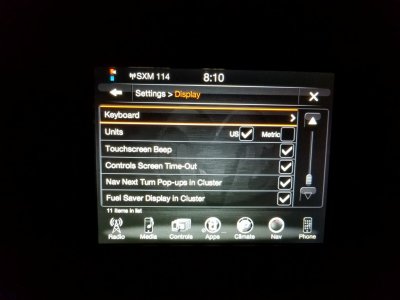
I'm not sure what other menu you are referring to, 1 page back is the other pic, on from the display settings menu, and one from the nav settings menu, in both menus turn by turn is checked..
 

stimpy433

Senior Member
Joined
Mar 10, 2016
Posts
3,583
Reaction score
3,170
Location
IOWA
Ram Year
2014
Engine
3.6
I'm not sure what other menu you are referring to, 1 page back is the other pic, on from the display settings menu, and one from the nav settings menu, in both menus turn by turn is checked..

I just want to compare SitKneelBend’s to what ours looks like. Cuz mine doesn’t look like the one in the video, it looks like yours.
 

Shugarrckbx

Senior Member
Joined
Mar 4, 2018
Posts
126
Reaction score
55
Location
19344
Ram Year
2014
Engine
5.7 Hemi
I just want to compare SitKneelBend’s to what ours looks like. Cuz mine doesn’t look like the one in the video, it looks like yours.
Oh, ok, but if your referring to the Kustomblacks video from youtube,that radio is from 2018 srt jeep I believe..
 

Ricks Ram

Senior Member
Joined
May 1, 2015
Posts
4,411
Reaction score
3,415
Ram Year
2014
Engine
Hemi 5.7
I did a speedo self check test, come back good
It doesn't show in a speedo self check. You know the code is set and the radio is sending the message to the speedometer because it is displaying the numerical and alphabetical information such as street name and distance but for some reason not showing the turn by turn image. I have seen it happen before and it was corrected by changing the speedometer. I've never seen anyone that was able to correct one that wasnt working correctly by doing the usual battery disconnects ect. I'm not sure exactly why some dont seem to work and some do. The thing that's strange is it may work fine in someone else's truck. It may be certain speedometers in certain years type of issue that we haven't seen enough of yet to figure out. The stock 3.5" speedometer is capable of showing the turn by turn in the EVIC. I can almost guarantee if you put it in and enter an address and drive around the block the image will appear correctly in the EVIC. I used to think it was happening in some cases when the mileage and engine hours were reset to match the truck but since then I have seen others post the same issue with speedometers that hadn't had the mileage adjusted. The 18 and 19 UAS and UAQ radios will usually not show the turn by turn and certain other information correctly in the 13 to 15 trucks but that's a different problem all together since you have a 2015 RA3 or RA4 radio.

Sent from my SM-G960U using Tapatalk
 
Last edited:

Shugarrckbx

Senior Member
Joined
Mar 4, 2018
Posts
126
Reaction score
55
Location
19344
Ram Year
2014
Engine
5.7 Hemi
It doesn't show in a speedo self check. You know the code is set and the radio is sending the message to the speedometer because it is displaying the numerical and alphabetical information such as street name and distance but for some reason not showing the turn by turn image. I have seen it happen before and it was corrected by changing the speedometer. I've never seen anyone that was able to correct one that wasnt working correctly by doing the usual battery disconnects ect. I'm not sure exactly why some dont seem to work and some do. The thing that's strange is it may work fine in someone else's truck. It may be certain speedometers in certain years type of issue that we haven't seen enough of yet to figure out. The stock 3.5" speedometer is capable of showing the turn by turn in the EVIC. I can almost guarantee if you put it in and enter an address and drive around the block the image will appear correctly in the EVIC. I used to think it was happening in some cases when the mileage and engine hours were reset to match the truck but since then I have seen others post the same issue with speedometers that hadn't had the mileage adjusted. The 18 and 19 UAS and UAQ radios will usually not show the turn by turn and certain other information correctly in the 13 to 15 trucks but that's a different problem all together since you have a 2015 RA3 or RA4 radio.

Sent from my SM-G960U using Tapatalk
Ok, well this sucks..then how do you go about getting one and knowing if it's going to work with your truck or not? It's kinda like hit or miss then I guess, considering what I paid for this one, and it looks like brand new, when I got it, it only had 32000 miles, I got it from odometer man (Dominic). He did set the miles for me on it at that point in time, any suggestions on how to get one and know if it will work, I understand what your saying, I could use some help, a bit discouraged with this issue. Just doesnt make sense. Thank you for your info, or advice any more info would be greatly appreciated!
 

jknappen

Senior Member
Joined
Aug 27, 2013
Posts
687
Reaction score
95
Location
Kentucky
Ram Year
2018
Engine
Hemi 5.7
Do you need the PIN to make all changes or just for programming a key?
 

Sdpadrez

Senior Member
Joined
Jan 14, 2020
Posts
373
Reaction score
139
Location
Arizona
Ram Year
2015
Engine
5.7
Does anyone have any ideas. My idle and engine hours won’t take. When I start the procedure it just says “started please wait and nothing changes. I was able to successfully get my mileage to work but getting to my wits end.
 

2019ram150057

Junior Member
Joined
Jan 1, 2020
Posts
7
Reaction score
0
Location
US
Ram Year
2019
Engine
5.7
Do you need the PIN to make all changes or just for programming a key?
From what I found only need for certain things but depending on the year you need the bypass cable

Sent from my SM-G955U using Tapatalk
 

Noneck

Senior Member
Joined
Dec 24, 2015
Posts
170
Reaction score
113
Ram Year
2013 Ram 2500 Laramie. 35's 2 inch level. Raceme. Fully deleted 5 inch FlowPro Exh
Engine
6.7 Cummins
It doesn't show in a speedo self check. You know the code is set and the radio is sending the message to the speedometer because it is displaying the numerical and alphabetical information such as street name and distance but for some reason not showing the turn by turn image. I have seen it happen before and it was corrected by changing the speedometer. I've never seen anyone that was able to correct one that wasnt working correctly by doing the usual battery disconnects ect. I'm not sure exactly why some dont seem to work and some do. The thing that's strange is it may work fine in someone else's truck. It may be certain speedometers in certain years type of issue that we haven't seen enough of yet to figure out. The stock 3.5" speedometer is capable of showing the turn by turn in the EVIC. I can almost guarantee if you put it in and enter an address and drive around the block the image will appear correctly in the EVIC. I used to think it was happening in some cases when the mileage and engine hours were reset to match the truck but since then I have seen others post the same issue with speedometers that hadn't had the mileage adjusted. The 18 and 19 UAS and UAQ radios will usually not show the turn by turn and certain other information correctly in the 13 to 15 trucks but that's a different problem all together since you have a 2015 RA3 or RA4 radio.

Sent from my SM-G960U using Tapatalk
Not entirely sure I'm following the turn by turn discussion entirely, however fwiw I have a 2013 Laramie. I have to select in my radio to have the turn by turn displayed on the evic. Is that not an available choice in the radio for the original poster? Maybe that's missing? If I can be of any help with pics of my setup, let me know.

Sent from my SM-G965U using Tapatalk
 
Last edited:

Ricks Ram

Senior Member
Joined
May 1, 2015
Posts
4,411
Reaction score
3,415
Ram Year
2014
Engine
Hemi 5.7
Not entirely sure I'm following the turn by turn discussion entirely, however fwiw I have a 2013 Laramie. I have to select in my radio to have the turn by turn displayed on the evic. Is that not an available choice in the radio for the original poster? Maybe that's missing? If I can be of any help with pics of my setup, let me know.

Sent from my SM-G965U using Tapatalk
No, he has the option in his settings menu and its turned on. The street name and distance to the next turn comes up in the EVIC but image that is supposed to appear on the screen doesn't. So basically only half of what's supposed to show up on the screen does. It's a problem that seems to happen sometimes when people upgrade to the 7" premium cluster.

Sent from my SM-G960U using Tapatalk
 

Noneck

Senior Member
Joined
Dec 24, 2015
Posts
170
Reaction score
113
Ram Year
2013 Ram 2500 Laramie. 35's 2 inch level. Raceme. Fully deleted 5 inch FlowPro Exh
Engine
6.7 Cummins
Got it. Sorry I couldn't help. As you know Rick, I feel his frustration lol!

Sent from my SM-G965U using Tapatalk
 

Mpgrimm2

Senior Member
Supporting Vendor Navy Badge
Joined
Mar 30, 2014
Posts
6,572
Reaction score
5,169
Location
SC
Ram Year
2022 Ram 1500 (5th Gen)
Engine
5.7L
Yes, I've viewed that video, and exactly.. some how he got them to work, I've reached out to 4th generation ram electronics where Kustom black purchased hisupgrades, Benjamin said to disconnect the battery for 1 hr, I did, still the same, but he said let it go through some cycles. But if it's TRUE about earlier years that's a bummer it's like half there.. what the heck? The nav in the radio screen works perfect, actually everything else works good except I don't have outside temp displayed at top of radio, like I see most have, but outside temp is displayed in the cluster. Infotainment said about trying a canbus reset? What do you all think on that? What actually does that do? ,

Don't have my 2013 ram SLT anymore (2 years now) but it had the factory 7" Evic with Ra2 and when I upgraded to a 2014 Ra4 (also tried 15-17 Ra4) it was just a matter of checking the option on the radio for turn by turn in the cluster. (I feel like there is something different about your radio's "Next" turn pop-up CSM menu that I don't recognize vs just "turn by turn in cluster".)
Not entirely sure I'm following the turn by turn discussion entirely, however fwiw I have a 2013 Laramie. I have to select in my radio to have the turn by turn displayed on the evic. Is that not an available choice in the radio for the original poster? Maybe that's missing? If I can be of any help with pics of my setup, let me know.

Sent from my SM-G965U using Tapatalk
Maybe you could upload/share you factory 2013 Laramie BCM config from AlfaOBD and post a link for Shuggar and others to look it over/compare. May its just an odd symptom of a cluster/year mismatch

M² Mods.
 

Shugarrckbx

Senior Member
Joined
Mar 4, 2018
Posts
126
Reaction score
55
Location
19344
Ram Year
2014
Engine
5.7 Hemi
Don't have my 2013 ram SLT anymore (2 years now) but it had the factory 7" Evic with Ra2 and when I upgraded to a 2014 Ra4 (also tried 15-17 Ra4) it was just a matter of checking the option on the radio for turn by turn in the cluster. (I feel like there is something different about your radio's "Next" turn pop-up CSM menu that I don't recognize vs just "turn by turn in cluster".)Maybe you could upload/share you factory 2013 Laramie BCM config from AlfaOBD and post a link for Shuggar and others to look it over/compare. May its just an odd symptom of a cluster/year mismatch

M² Mods.
As far as I know,I kept it pretty close as far as units, truck2014,cluster 2015, and the radio 2014. I thought some members on here have had a bigger difference than that, but not sure, I know Rick said he's had different configurations and they worked. I did enable the turn by turn in the truck through alpha, prior to that I did not have the option in the radio to check box the turn by turn, but now I do and I get the writing in the cluster, but not the arrow pic, frustrating, wonder if I pull the evic out for a while and then reinstall it if that would help? And thank you again Mike for the help with the SW update help!
 

Gizmoram

Member
Joined
Jul 16, 2017
Posts
35
Reaction score
3
Location
San Antonio
Ram Year
2021 Limited
Engine
Hemi 5.7
If you started an option (i.e. door ajar switch disable)....and it says "procedure complete".....then you don't see that what you were trying to do worked...OR....it works but stops working later....then you go back and when you go to start the procedure again to make sure.....it shows you don't have to make the change because it's already showing the correct setting....do you sometimes just have to restart that procedure to get it to work?

In other words do these procedures need to be started again sometimes/often?

Admittedly, all my issues at the moment stem from installing RGBW switchbacks/Halos on a 2016 Sport and wiring the signals up to the halos. At first I had hyper flashing with the side mirrors and gauge along with signal errors (front and rear flashed normal). I disabled the door ajar switch for the fronts. That fixed the hyper flashing and errors. But I get parking light error at startup now (didn't get that before the door ajar change). I'm fine with that because it's only at startup. But after a few days I would occasionally get signal errors (they would hyper flash for a time then go back to normal). Then finally I all of a sudden was getting signal errors like every couple minutes. So I disabled the rear door ajar switches (I was told I didn't need to do the rears) and restarted the procedures for DRL's (switched it to Canada instead of optional). Now I'm back to only getting the parking light out error. But I've noticed my boards/halos seem to do different things based on what I change. What I really need is someone with the same model truck as me with the same setup that can tell me their exact configuration....but I've yet to be able to do that.
 

Forum statistics

Threads
211,046
Posts
3,061,423
Members
171,108
Latest member
ryanp
Back
Top