
AlfaOBD

Disclaimer: Links on this page pointing to Amazon, eBay and other sites may include affiliate code. If you click them and make a purchase, we may earn a small commission.

Joeck76

Junior Member
Joined
Apr 4, 2023
Posts
2
Reaction score
0
Location
Pa
Ram Year
2016
Engine
5.7
Possibly dumb question but:
Go to BCM > P/T Chassis Net-ASCM Air Suspension Control Module and set it to “Not Enabled”

Why is it I’m stumped at Go to BCM. When I goto body control module Can’t figure out what >P/T chassis Net-ascm air suspension control module and set to “not enabled. None of which is anywhere under BCM unless there is another version of alfaobd. I code my BMW all the time with bimmercode and never have any issues. Is it the way it’s written. It the an elementary walkthrough with pictures? Lol
 

PaleFlyer

Senior Member
Joined
Jan 1, 2022
Posts
552
Reaction score
377
Location
Charlotte NC
Ram Year
2018
Engine
Hemi 5.7
Possibly dumb question but:
Go to BCM > P/T Chassis Net-ASCM Air Suspension Control Module and set it to “Not Enabled”

Why is it I’m stumped at Go to BCM. When I goto body control module Can’t figure out what >P/T chassis Net-ascm air suspension control module and set to “not enabled. None of which is anywhere under BCM unless there is another version of alfaobd. I code my BMW all the time with bimmercode and never have any issues. Is it the way it’s written. It the an elementary walkthrough with pictures? Lol
ELI5:
Connect page: 1500, Body Computer, Set your powernet to your truck (I have an '18, so my control unit is 18 powernet)

Screen will change when you pick the powernet.

Click on the button in the bottom right that looks like a Fiat with the hood open.
"select Procedure to start"
Scroll WAY down to Car Config Change (I swipe to the very bottom, and it's like 10 up)
"Select Option"
Type in "P/T Chassis Net: ASCM..." it will sort as you type.
"Select Value", "not enabled".
Start
It should think for a second, then tell you what the current setting is, hit the start/next (doing this offline, so the button names might be a little screwed up on this step),
and it should think for a few seconds, then tell you "done".
Power off the truck, open the DRIVER DOOR, go crack a beer. When the beer is done, the truck should no longer have air ride enabled.
 

16Longhorn

Junior Member
Joined
Jul 8, 2023
Posts
9
Reaction score
8
Location
NWFL
Ram Year
2016
Engine
Hemi 5.7
Reinstalled the previous version driver and it connected. Once connected, I deleted the OBDLink MX+ from devices and rebooted. I then reinstalled the latest driver and rebooted. Then re-installed the MX+ and it all worked OK since.
I followed what you did but it still isn't working.

1. I clicked on "Roll Backup Driver" to the previous one but that didn't work either.
2. I than downloaded an "Older Bluetooth Driver" - Deleted the current driver installed - Rebooted my computer - Installed the "Older Driver" - Rebooted again - Tried "Add Device" with bluetooth connection and like before, it connects but in 1-2 seconds it disconnects and AlfaOBD does not find the OBDLink MX+.
3. I tried doing this with all the "Bluetooth Drivers" I could find but keep getting the same results when "Add Device" to my computer. It finds and connects to the OBDLink MX+ but within 1-2 seconds it disconnects and AlfaOBD can't find it and won't connect.
4. I even emailed for help on the AlfaOBD website ([email protected]) telling them what problems I'm having but still no response yet.

Any other suggestions (from anyone) I can try would be greatly appreciated because right now it feels like I just wasted $200 on a piece of junk and I don't really like the idea of throughing more money (buying an Android device) at this thing to "try" and get it to work.
 

Dean2

Senior Member
Joined
Jun 17, 2021
Posts
4,390
Reaction score
8,758
Location
Near Edmonton
Ram Year
2021 2500
Engine
6.4
Check your computers Bluetooth and make sure it is working correctly. Try connecting it to another BT device. If the computers BT is good, you may have a defective mx+ . Without running alphaobd, will the mx connect and run its standard diagnostic and code software. If the mx connects using its own software, pairs properly, I cannot see how alpha won't connect.
 

Tenaya

Junior Member
Joined
Jun 9, 2020
Posts
2
Reaction score
0
Location
Texas Panhandle
Ram Year
2018 Jeep Grand Cherokee Summit
Engine
Pentastar 3.6L
Hi, I'm new here.

Worse, I don't have a RAM, I have a new-to-me distant FCA cousin, a MY2018 Jeep Grand Cherokee Summit.

That said, I'm here because the AlfaOBD threads on the Jeep sites are kinda pitiful compared to this one and I have a question that I couldn't get answered anywhere else.

I have AlfaOBD (Android) with an SGW bypass cable and an OBDLink MX. I have successfully connected and changed one feature, fog light drop out, but my main interest is in programming fobs, specifically the 6-button ones (5 + a blank). It is my understanding that fobs are the same between RAM and Jeep.

Here's my question: Is it possible to program 4 fobs to a RAM or Jeep with AlfaOBD and have all 4 fobs work properly?

I have both of the original fobs that came new with the Jeep, both working. I bought 2 non-FCA fobs online and they appear identical to the originals, minus the Jeep logo on the back.

It would be really great to hear from someone who has successfully done this, but any light anyone can shine on this would be greatly appreicated,

Tenaya
 
Last edited:

Topzide

Junior Member
Joined
Aug 8, 2023
Posts
12
Reaction score
10
Location
Southern MD
Ram Year
2014
Engine
6.7 CTD
@Tenaya, Yes you can have 4 fobs. I had 2 factory with truck and then 2 from EBAY. The main thing is, all 4 must be inside the truck when programming them. You'll enter the pin and then follow the on screen instructions from there. It'll have you insert them in the ignition or press a button on fob if you have push to start. Just take your time. I've also added fobs to a buddy's 300 for him. The Ebay ones that I got even had the suspension lowering button that wasn't needed for my truck and worked just fine! Good luck!
 

Z77Z77Z

Senior Member
Joined
Apr 5, 2014
Posts
110
Reaction score
19
Ram Year
2014
Engine
5.7
I've been reading and searching for hours with no definitive answer. If you don't want to read the novel my basic question is:
Would AlfaOBD be able to program new keys without having a working one? Or am I in dealer only territory. Does changing the WIN module require new keys be made?

2014 Ram 1500, two button key fob turn to start. Had intermittent issues where I had to cycle the key several times to start, got a few wrong key fob messages. I only have one key fob, a few months earlier I tried to have a competent locksmith program new keys with no succes so I wouldn't have just one. Only other coincidence is i left my key in the run position with the engine off and drained my battery shortly before having issues. Now I only get the dash to light up and show the odometer when i put my key in. I've disassembled the ignition module and cleaned it(it has no acutual contacts though), changed key fob battery, pulled battery cables, and checked the #51 fuse. So I'm thinking just replace the WIN module, and get some new keys. Would AlfaOBD be able to program new keys without having a working one? Or am I in dealer only territory. Does changing the WIN module require new keys be made? Thanks
 

Dean2

Senior Member
Joined
Jun 17, 2021
Posts
4,390
Reaction score
8,758
Location
Near Edmonton
Ram Year
2021 2500
Engine
6.4
I followed what you did but it still isn't working.

1. I clicked on "Roll Backup Driver" to the previous one but that didn't work either.
2. I than downloaded an "Older Bluetooth Driver" - Deleted the current driver installed - Rebooted my computer - Installed the "Older Driver" - Rebooted again - Tried "Add Device" with bluetooth connection and like before, it connects but in 1-2 seconds it disconnects and AlfaOBD does not find the OBDLink MX+.
3. I tried doing this with all the "Bluetooth Drivers" I could find but keep getting the same results when "Add Device" to my computer. It finds and connects to the OBDLink MX+ but within 1-2 seconds it disconnects and AlfaOBD can't find it and won't connect.
4. I even emailed for help on the AlfaOBD website ([email protected]) telling them what problems I'm having but still no response yet.

Any other suggestions (from anyone) I can try would be greatly appreciated because right now it feels like I just wasted $200 on a piece of junk and I don't really like the idea of throughing more money (buying an Android device) at this thing to "try" and get it to work.
Did you get it figured out?
 

Tenaya

Junior Member
Joined
Jun 9, 2020
Posts
2
Reaction score
0
Location
Texas Panhandle
Ram Year
2018 Jeep Grand Cherokee Summit
Engine
Pentastar 3.6L
@Tenaya, Yes you can have 4 fobs. I had 2 factory with truck and then 2 from EBAY. The main thing is, all 4 must be inside the truck when programming them. You'll enter the pin and then follow the on screen instructions from there. It'll have you insert them in the ignition or press a button on fob if you have push to start. Just take your time. I've also added fobs to a buddy's 300 for him. The Ebay ones that I got even had the suspension lowering button that wasn't needed for my truck and worked just fine! Good luck!
@Topzide
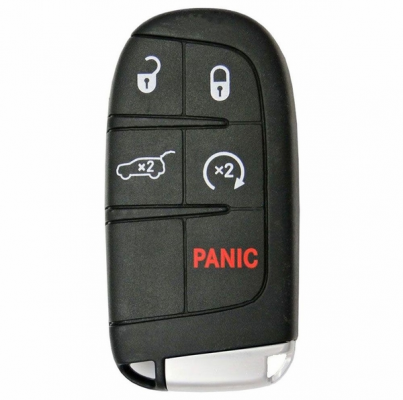
Thank you for your response, but I'm a little confused. My Jeep has no place to "insert" the fob - my fobs are not keys and not FOBIKs, they're button-only. Where you would expect an ignition slot, there is just a stop/start button that works when the fob is near the Jeep.

For clarity, here's an off-the-web image of my Jeep fob:

1691621044542.png

A Google search leads me to believe that at least some 2018 RAM 1500's use or can use a VERY similar fob:
1691621457919.png

Is what I want to do possible?

If programming 4 fobs IS possible, do I need to do anything special with AlfaOBD? Like all fobs inside the Jeep or all fobs on the console or some magic button press combination or . . . ?

Tenaya
 

Topzide

Junior Member
Joined
Aug 8, 2023
Posts
12
Reaction score
10
Location
Southern MD
Ram Year
2014
Engine
6.7 CTD
@Tenaya, All 4 would need to be in the vehicle and on AlfaOBD will have better details on the how and what. It's been a long time since I did mine and it's a bit fuzzy, but I think it may list the 2 types of Fobs (Insert like USB thumb drive and the push to start version). Just read through AlfaOBD before connecting to your Jeep. That way you can take notes on the steps needed without the worry of making a mistake! First thing when connecting Alfa, SAVE the config file so you can reset everything if an OPPS happens! It's also nice to read through to see what is set and what it does to get a better understanding of your vehicle. Sorry for not responding quicker, not on this forum everyday. Had to respond to this to help you with your issue. You can PM me for better details if needed. I keep a log book for AflaOBD changes that I've done on my RAM 3500 CTD. You're a part of the family with having a Jeep!
 

Prototype4342

Junior Member
Joined
Aug 19, 2023
Posts
7
Reaction score
1
Location
Colorado
Ram Year
2016
Engine
Ecodiesel
Anyone have problems with AlfaOBD on a Pixel 7? I just tried to program new FOBIK keys to my truck using my Pixel 7, but on the PIN entry screen, it said "5 digits", and the PIN is only 4 digits. I tried multiple times and the procedure failed. So I went back to my old Android phone (which still has AlfaOBD on it) and tried it again: it says "4 digits" which is normal, and the keys programmed perfectly. My Pixel 7 is up to date, as is the AlfaOBD SW. Strange SW bug.
Does anyone have a fix for this that isn't just "have an older version of alfaobd available"? I just got alfaobd today to try and program new fobs, but it asks for 5 digit pin. Of course the pin read tool only gets a 4 digit pin. Any help would be greatly appreciated, was there somehow an OTA update to all Rams requiring 5 digit pin for fob programming, or is this a glitch in the newest versions of alfaobd?
 

Topzide

Junior Member
Joined
Aug 8, 2023
Posts
12
Reaction score
10
Location
Southern MD
Ram Year
2014
Engine
6.7 CTD
@Prototype4342
Just looked on my Alfa app and it only asks 4 digit pin for both base and highline system. Sounds like something is amiss with your setup. Double check all you settings for AlfaOBD to confirm that you've chosen the correct vehicle - module - powernet. Is software up to date on Pixel OS. Just because you just got Alfa, check for an update. Is your dongle software current? Could also try turning on Airplane mode on phone. That way, no unnecessary signals that could be giving you issues. Hope this info helps get you going.
 

Prototype4342

Junior Member
Joined
Aug 19, 2023
Posts
7
Reaction score
1
Location
Colorado
Ram Year
2016
Engine
Ecodiesel
@Prototype4342
Just looked on my Alfa app and it only asks 4 digit pin for both base and highline system. Sounds like something is amiss with your setup. Double check all you settings for AlfaOBD to confirm that you've chosen the correct vehicle - module - powernet. Is software up to date on Pixel OS. Just because you just got Alfa, check for an update. Is your dongle software current? Could also try turning on Airplane mode on phone. That way, no unnecessary signals that could be giving you issues. Hope this info helps get you going.
I am on v2.3.3.0 of alfaobd, my Android OS is up to date. I will check the OBD adapter firmware. I also uninstalled and reinstalled alfaobd just in case.
 

Prototype4342

Junior Member
Joined
Aug 19, 2023
Posts
7
Reaction score
1
Location
Colorado
Ram Year
2016
Engine
Ecodiesel
@Prototype4342
Just looked on my Alfa app and it only asks 4 digit pin for both base and highline system. Sounds like something is amiss with your setup. Double check all you settings for AlfaOBD to confirm that you've chosen the correct vehicle - module - powernet. Is software up to date on Pixel OS. Just because you just got Alfa, check for an update. Is your dongle software current? Could also try turning on Airplane mode on phone. That way, no unnecessary signals that could be giving you issues. Hope this info helps get you going.
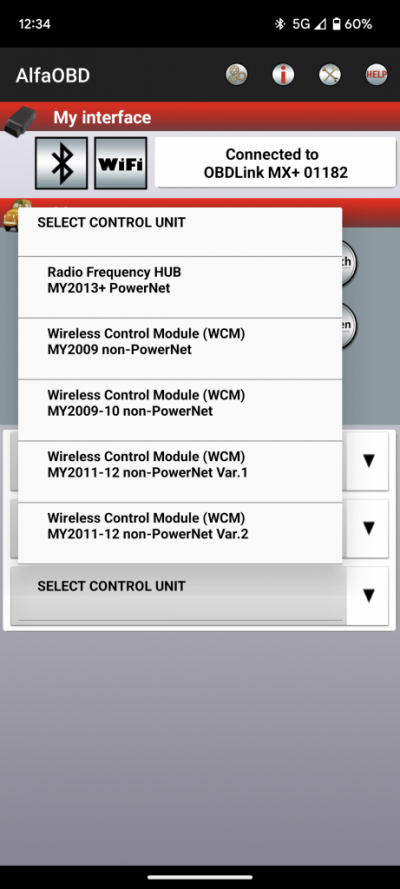
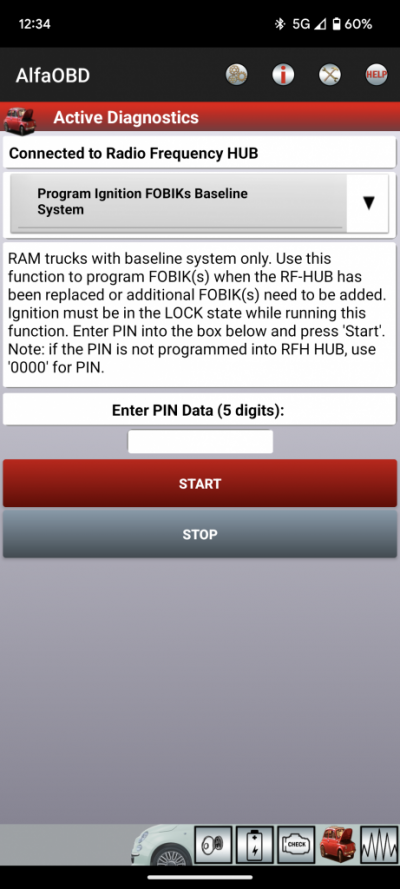
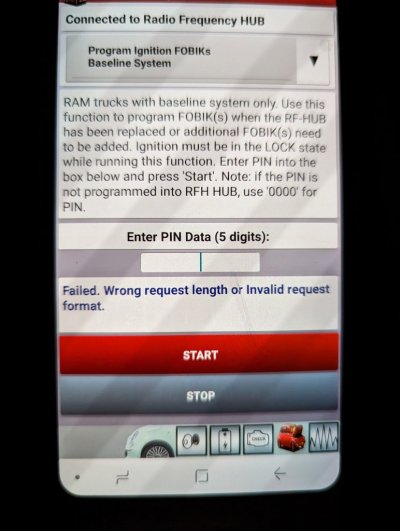
Ok, I updated firmware on my obdlink mx+, still no dice. See the screenshots for what I am seeing. On the first screenshot I select the first option MY2013+ PowerNet (truck is a 2016 outdoorsman ecodiesel). I then select Program Ignition FOBIKs Baseline System, which is where it gives me the second screenshot.


Screenshot_20230824-003403.png

Screenshot_20230824-003422.png

Seems like an alfaobd issue to me unless something is just odd about my truck in particular. It's funny because the stated default pin is even 4 digits.
 
Last edited:

PaleFlyer

Senior Member
Joined
Jan 1, 2022
Posts
552
Reaction score
377
Location
Charlotte NC
Ram Year
2018
Engine
Hemi 5.7
Ok, I updated firmware on my obdlink mx+, still no dice. See the screenshots for what I am seeing. On the first screenshot I select the first option MY2013+ PowerNet (truck is a 2016 outdoorsman ecodiesel). I then select Program Ignition FOBIKs Baseline System, which is where it gives me the second screenshot.


View attachment 527027

View attachment 527028

Seems like an alfaobd issue to me unless something is just odd about my truck in particular. It's funny because the stated default pin is even 4 digits.
I think I remember when I pulled mine reading a couple posts about a 5 pin, but I only got a 4 pin on my '18.

I read the code just so I had it if I needed it.

Did you try your 4 pin? Maybe it allows 4 OR 5 pin, and the dev just screwed up the graphics side?
 

miketx

Senior Member
Joined
Oct 10, 2018
Posts
287
Reaction score
224
Location
Allen, Texas
Ram Year
2024
Engine
6.7
Ok, I updated firmware on my obdlink mx+, still no dice. See the screenshots for what I am seeing. On the first screenshot I select the first option MY2013+ PowerNet (truck is a 2016 outdoorsman ecodiesel). I then select Program Ignition FOBIKs Baseline System, which is where it gives me the second screenshot.


View attachment 527027

View attachment 527028

Seems like an alfaobd issue to me unless something is just odd about my truck in particular. It's funny because the stated default pin is even 4 digits.
It's definitely a software bug of some sort. I still see the problem on my Pixel 7, but not on my older phone. Interesting note: when I first got my Pixel 7 last fall, AlfaOBD wouldn't even work on it. I contacted the developer back then and he wasn't sure what was wrong (he's a great guy, btw....I've chatted with him multiple times over the years). Now it works....but does the 5 pin thing.
 

Prototype4342

Junior Member
Joined
Aug 19, 2023
Posts
7
Reaction score
1
Location
Colorado
Ram Year
2016
Engine
Ecodiesel
I would say it is an Android version of AlfaOBD glitch. The windows version worked perfectly for me.
If it wouldn't be another $50 I'd just get the windows version also.

It's definitely a software bug of some sort. I still see the problem on my Pixel 7, but not on my older phone. Interesting note: when I first got my Pixel 7 last fall, AlfaOBD wouldn't even work on it. I contacted the developer back then and he wasn't sure what was wrong (he's a great guy, btw....I've chatted with him multiple times over the years). Now it works....but does the 5 pin thing.
I may grab an old phone and see if it'll work that way. Since I purchased alfaobd through the play store it should allow me to download it on the old phone as well.
 

04fxdwgi

Senior Member
Joined
May 19, 2023
Posts
1,742
Reaction score
3,661
Location
Coastal NE North Carolina
Ram Year
2016 1500 Sport
Engine
5.7 Hemi
You have to send them an email asking for a new activation code to transfer it to another device. They respond very fast, as I did it for my laptop.
 

Prototype4342

Junior Member
Joined
Aug 19, 2023
Posts
7
Reaction score
1
Location
Colorado
Ram Year
2016
Engine
Ecodiesel
No luck using my old phone either. It's asking for 5 digits there as well. Is there a way to revert the alfaobd version? Also, I tried to add just a 0 to my pin before and after the actual pin and I get the below message. When I just type my 4 digit pin it simply says "procedure failed". Seems like it is still expecting 4 digits but the 4 digit pin still fails? I have heard the 5 digit pin includes a letter at the beginning but no clue what that might be.

PXL_20230825_060555689.jpg
 
Back
Top