
1500ram12
Senior Member
- Joined
- Jan 23, 2012
- Posts
- 5,487
- Reaction score
- 2,432
- Ram Year
- 2005
- Engine
- 5.9L Cummins
Your tuner is enabling the DRLs in the wrong location for these headlights (high beams at half power). So, you’ll disable the DRLs from your tuner, use the AlfaOBD to enable the DEDICATED DRL circuit, and follow the wiring method @1500ram12 posted a little bit back. You won’t need to use the supplied DRL harness. I’ll see if I can find the post number on this thread...
Here is my write up
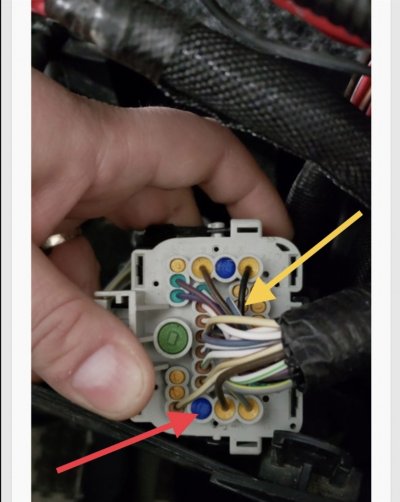
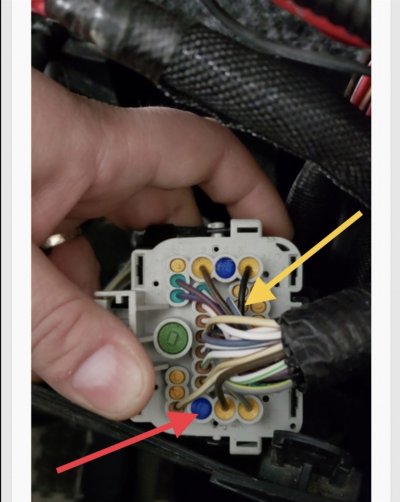
For the drl's. I used the drl harness it came with, I happened to have the same connectors they used to connect the harness to the drl module so I made a section to go from that harness to the front end module. My truck was wired from the front end module to the bcm already so I didn't have to make those connections.
BCM C1/A
https://www.mouser.com/ProductDetail/829-13627884-L?r=829-13627884-L
BCM C4/D
https://www.eficonnection.com/home/product/kostal-slk-28-female-sealed-20-18-awg-05-075-mm2-terminal
You'll need (should be the same on 13+ but @Jimmy07 may be able to confirm) for the female pins in the front end module
https://nexelec.com/YAZAKI-7116410202/
And the wire seals
https://www.mouser.com/ProductDetail/Aptiv-formerly-Delphi/15366021?qs=xyz6lfZ1ktLi71fiB65FCg== (these worked the best for me with 18ga wire)
These are the connectors they used
https://www.amazon.com/dp/B014IU2EE2/ref=cm_sw_r_cp_api_i_85nQCbVYMEM0P
Use http://connectors.dcctools.com/home.htm#year_platform to verify where the dedicated drl pin locations are for your year.
After everything is wired and you already have drl's enabled (if not go to page 1 in alphaobd look for my name and click the Google drive link) go to body Computer 2013-17 > car configuration > CBC I/O Left/Right Dedicated DRL Lamp/Headlamp Leveling output >Select YES for both> CBC Features - DRL Lamp Location > Select Dedicated and you are all set.

Sent from my iPhone using Tapatalk Pro
Last edited: