Compass and Nav off

Disclaimer: Links on this page pointing to Amazon, eBay and other sites may include affiliate code. If you click them and make a purchase, we may earn a small commission.

DannyMK2

Senior Member
Joined
Mar 25, 2013
Posts
1,732
Reaction score
498
Location
Long Island, NY
Ram Year
2015 Power Wagon
Engine
6.4 Hemi
i noticed the other day that my compass is off 180*, on both the evic and radio. my nav is also showing the truck about 50 miles away in the ocean lol. for reference, this is a 2015 that i did the 8.4 swap many years ago. i dont have a compass calibration setting in the evic. i tried driving in circles in a parking lot with no change. my nav info screen is showing 0 satellites. i dont have sirius on this truck, but the sirius preview channel works. radio is an RA4 with FW 18.45.01. i believe that is the latest? i also occasionally get the 911 needs service error message pop up despite having the bypass plugged in (my initial though was maybe this failed but now im not sure). i pulled the radio and disconnected everything and let it sit for a minute then reconnected. no change. is this pointing to a failed radio or is the gps antenna no good?
 

markabby

Senior Member
Joined
Feb 16, 2020
Posts
1,130
Reaction score
1,640
Location
Monticello, Kentucky
Ram Year
2020 Limited
Engine
5.7
there's been a few threads in here on that issue. not sure if they got it resolved or not, but give it a search and see if they come up in here
 

wrench78

Senior Member
Air Force Law Enforcement
Joined
May 1, 2024
Posts
259
Reaction score
425
Location
SE PA
Ram Year
2022 2500 Laramie
Engine
6.4L
Sounds like you did everything I was going to tell you. Did you check the time zone setting to make sure you're in the correct time zone?
 

SitKneelBend

Moderator
Staff member
Member Relations Specialist
Moderator Supporting Member Marine Corps
Joined
Jan 8, 2015
Posts
10,932
Reaction score
7,585
Location
St. Louis
Ram Year
2014
Engine
3.6 Pentastar
i noticed the other day that my compass is off 180*, on both the evic and radio. my nav is also showing the truck about 50 miles away in the ocean lol. for reference, this is a 2015 that i did the 8.4 swap many years ago. i dont have a compass calibration setting in the evic. i tried driving in circles in a parking lot with no change. my nav info screen is showing 0 satellites. i dont have sirius on this truck, but the sirius preview channel works. radio is an RA4 with FW 18.45.01. i believe that is the latest? i also occasionally get the 911 needs service error message pop up despite having the bypass plugged in (my initial though was maybe this failed but now im not sure). i pulled the radio and disconnected everything and let it sit for a minute then reconnected. no change. is this pointing to a failed radio or is the gps antenna no good?
I'm pretty sure it will be a failed Sierra Wireless Aircard. They are replaceable if you're comfortable with opening the radio to get the right part number for an eBay search.
 

dhay13

Senior Member
Joined
Apr 12, 2015
Posts
3,438
Reaction score
3,188
Ram Year
2018
Engine
2500 6.4L Hemi 4.10's 'Off-Road'
Same thing happened to mine a few years ago. Called someone. Can't remember if it was Ram or Panasonic but either way they had me go to an empty parking lot and open my door 3x, back up in a circle 5x, etc...lol. Didn't work. Dealer ended up replacing my head unit under warranty
 
OP
OP
D

DannyMK2

Senior Member
Joined
Mar 25, 2013
Posts
1,732
Reaction score
498
Location
Long Island, NY
Ram Year
2015 Power Wagon
Engine
6.4 Hemi
I'm pretty sure it will be a failed Sierra Wireless Aircard. They are replaceable if you're comfortable with opening the radio to get the right part number for an eBay search.
is there a write up for this? i swapped the touch panel once already a while back. seemed pretty easy. im guessing the compass is tied to the radio? meaning if i swapped back to the stock radio my compass would work? i was leaning toward an issue with the radio but wanted to rule out the antenna before i went that route.
 

RamDiver

Senior Member
Joined
Jan 23, 2022
Posts
5,570
Reaction score
11,760
Location
Marlborough, Ontario Canada
Ram Year
2021 DS
Engine
Hemi 5.7
is there a write up for this? i swapped the touch panel once already a while back. seemed pretty easy. im guessing the compass is tied to the radio? meaning if i swapped back to the stock radio my compass would work? i was leaning toward an issue with the radio but wanted to rule out the antenna before i went that route.

I've read several posts on removing the Sierra wireless card, it looks pretty simple if you have any mechanical aptitude and a few basic tools. I've also seen them available on Amazon and eBay, IIRC.

The wireless card has a small ribbon cable and 3 pressure-fit coaxial cables, at least on the several posts I've read. I don't recall which forum had the posts, it wasn't here. I'll hunt around to see if I bookmarked the info.

I plan to disable my wireless card ASAP, as soon as I find the time and reasonable outdoor temperatures. :cool:

I recently picked up a 10.1 tablet on sale and a mounting bracket to hold it in front of the Uconnect radio. Google Maps on a tablet is so much better than the Uconnect NAV, I tried it with an old tablet first.

.
 

SitKneelBend

Moderator
Staff member
Member Relations Specialist
Moderator Supporting Member Marine Corps
Joined
Jan 8, 2015
Posts
10,932
Reaction score
7,585
Location
St. Louis
Ram Year
2014
Engine
3.6 Pentastar
is there a write up for this? i swapped the touch panel once already a while back. seemed pretty easy. im guessing the compass is tied to the radio? meaning if i swapped back to the stock radio my compass would work? i was leaning toward an issue with the radio but wanted to rule out the antenna before i went that route.
I'm sure there are posts about it but feel free to ask questions here and post pictures and we'll make one. I've helped several in private messages with this issue and it's not searchable or I would link to it...
 
Last edited:
OP
OP
D

DannyMK2

Senior Member
Joined
Mar 25, 2013
Posts
1,732
Reaction score
498
Location
Long Island, NY
Ram Year
2015 Power Wagon
Engine
6.4 Hemi
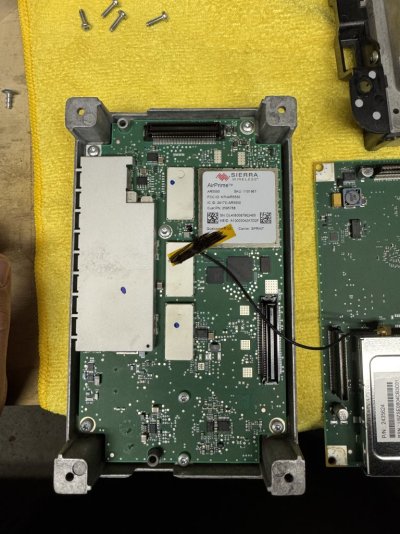
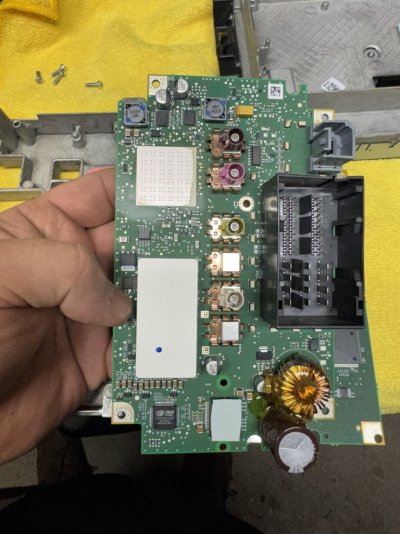
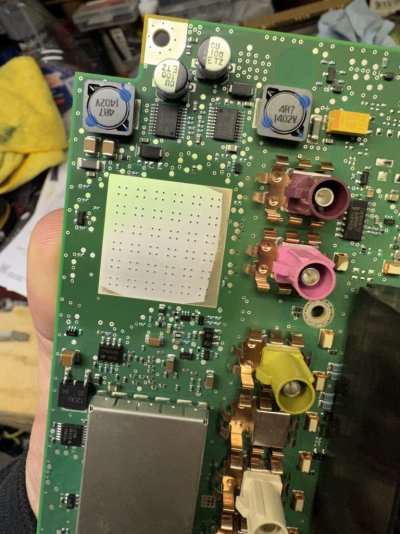
i opened up the radio up to find the wireless card. im not sure how to remove it. i found a write up for the newer radios that have the 3 push on cables and is attached with thermal paste, but it appears this radio is soldered on if im not mistaken? anybody thats done this before and can offer some guidance? i found a replacement but before i go ahead and buy it i want to make sure i can actually get it off.

image0.jpegimage1.jpegimage2.jpeg
 

SitKneelBend

Moderator
Staff member
Member Relations Specialist
Moderator Supporting Member Marine Corps
Joined
Jan 8, 2015
Posts
10,932
Reaction score
7,585
Location
St. Louis
Ram Year
2014
Engine
3.6 Pentastar
i opened up the radio up to find the wireless card. im not sure how to remove it. i found a write up for the newer radios that have the 3 push on cables and is attached with thermal paste, but it appears this radio is soldered on if im not mistaken? anybody thats done this before and can offer some guidance? i found a replacement but before i go ahead and buy it i want to make sure i can actually get it off.

View attachment 557664View attachment 557665View attachment 557666
Ok, great question as I've never actually done this myself, just identified the issue and part for others. However I do know of several who have done this exact thing recently and maybe they can chime in...IF I'm looking at this right though it looks like you have it removed already? I see the thermal paste you speak of I'd imagine the new one goes right back on but I'd clean that thermal paste and apply new.

@bloup and/or @frostytj any insights on how this card is removed/replaced?
 

RamDiver

Senior Member
Joined
Jan 23, 2022
Posts
5,570
Reaction score
11,760
Location
Marlborough, Ontario Canada
Ram Year
2021 DS
Engine
Hemi 5.7
i opened up the radio up to find the wireless card. im not sure how to remove it. i found a write up for the newer radios that have the 3 push on cables and is attached with thermal paste, but it appears this radio is soldered on if im not mistaken? anybody thats done this before and can offer some guidance? i found a replacement but before i go ahead and buy it i want to make sure i can actually get it off.

Bravo!

Your radio appears much different than the examples I've looked at online. Yours does appear to be soldered on and more of a PITA than the more recent model trucks radios.

Could you show a picture of the backside of the circuit board where the Sierra module is attached?

If you could show pictures of both sides of the circuit board side by each and aligned in the same orientation so we can see the likely solder connections, that would be helpful in determining the level of difficulty for the extraction/re- installation.

How experienced are you with soldering electronic components? Any experience with using solder wick to remove solder?

.
 
OP
OP
D

DannyMK2

Senior Member
Joined
Mar 25, 2013
Posts
1,732
Reaction score
498
Location
Long Island, NY
Ram Year
2015 Power Wagon
Engine
6.4 Hemi
Ok, great question as I've never actually done this myself, just identified the issue and part for others. However I do know of several who have done this exact thing recently and maybe they can chime in...IF I'm looking at this right though it looks like you have it removed already? I see the thermal paste you speak of I'd imagine the new one goes right back on but I'd clean that thermal paste and apply new.

@bloup and/or @frostytj any insights on how this card is removed/replaced?
thats just the cover for the card. the card is still attached.
Bravo!

Your radio appears much different than the examples I've looked at online. Yours does appear to be soldered on and more of a PITA than the more recent model trucks radios.

Could you show a picture of the backside of the circuit board where the Sierra module is attached?

If you could show pictures of both sides of the circuit board side by each and aligned in the same orientation so we can see the likely solder connections, that would be helpful in determining the level of difficulty for the extraction/re- installation.

How experienced are you with soldering electronic components? Any experience with using solder wick to remove solder?

.
in the second picture, the white square near the top left is the center of the backside of the wireless card. the pic had more glare then i thought. ill have to re-take it tomorrow. ive removed and soldered capacitors on the main board of a tv before. ive used a solder wick. if i know where i need to remove and solder, it shouldnt be an issue for me.
 

SitKneelBend

Moderator
Staff member
Member Relations Specialist
Moderator Supporting Member Marine Corps
Joined
Jan 8, 2015
Posts
10,932
Reaction score
7,585
Location
St. Louis
Ram Year
2014
Engine
3.6 Pentastar
thats just the cover for the card. the card is still attached.

in the second picture, the white square near the top left is the center of the backside of the wireless card. the pic had more glare then i thought. ill have to re-take it tomorrow. ive removed and soldered capacitors on the main board of a tv before. ive used a solder wick. if i know where i need to remove and solder, it shouldnt be an issue for me.
Apologies, just realized we are talking about an RA4 and that's what your pictures are. I didn't realize the board was soldered on the older units but if your comfortable with replacement have at it! The newer UAQ/UAS radios have boards like this...


Do you have a part number on your card that you have looked up? If so share it here for future reference. In addition, are you sure the GPS antenna was running to this card with the button cable (I haven't really looked inside an RA4), just want to make sure you get the right part replaced.
 

Hockeygod

Junior Member
Joined
Dec 3, 2024
Posts
22
Reaction score
13
Location
New York
Ram Year
2014
Engine
Hemi 5.7
Hello I have recently installed a Uconnect RA4 8.4
When I am driving the truck, the map does not refresh on it as the truck is in motion. I tried everything on it Updated Software, etc.but I can't figure out what is the problem. The map will refresh (every 1-2 minutes) and show the right location but then again it will stop. The compass shows the right direction and it’s getting signals from satellites it acts as if it’s behind my location about 1-2 minutes. Any help would be greatly appreciated thank you.
 

Hockeygod

Junior Member
Joined
Dec 3, 2024
Posts
22
Reaction score
13
Location
New York
Ram Year
2014
Engine
Hemi 5.7
I too thought it was the Sierra wireless card and then bought another radio and tried it and it does the same thing wondering if it’s the antenna on the roof?
 

bloup

Senior Member
Joined
Nov 8, 2016
Posts
128
Reaction score
47
Ram Year
2017
Engine
5.7
I can only offer insight on 4C CarPlay models and if you can’t fix your RA4 I would recommend upgrading to a 4C Panasonic model.
 
Back
Top