

You are using an out of date browser. It may not display this or other websites correctly.
You should upgrade or use an alternative browser.
You should upgrade or use an alternative browser.
Superchips Vivid Paq
- Thread starter SilsHemi
- Start date
Disclaimer: Links on this page pointing to Amazon, eBay and other sites may include affiliate code. If you click them and make a purchase, we may earn a small commission.
SilsHemi
Senior Member
- Joined
- Jun 29, 2010
- Posts
- 429
- Reaction score
- 56
- Ram Year
- 2008
- Engine
- Hemi 5.7
Erik,So really what does this do different than the previous superchip besides having the monitor screen.
Edit: 3,800th post!
It will do a lot more. Check it here: VIVID Performance Tuner
If you're good with what you have, you won't need to change. Tuning files are the same. This fills a gap for those folks who want all the real time stuff displayed on their dash. The trans tuning app will give you graphics as well. Sort of like the excel files we use now.
I'll post some of what Scott sent me later.
Sil

EJM05
Senior Member
- Joined
- Oct 24, 2010
- Posts
- 5,989
- Reaction score
- 55
- Location
- Somers, CT
- Ram Year
- 1986
- Engine
- 440 Big Block
SilsHemi said:Erik,
It will do a lot more. Check it here: VIVID Performance Tuner
If you're good with what you have, you won't need to change. Tuning files are the same. This fills a gap for those folks who want all the real time stuff displayed on their dash. The trans tuning app will give you graphics as well. Sort of like the excel files we use now.
I'll post some of what Scott sent me later.
Sil
I currently don't have a tuner. I want this one but need some $$
SilsHemi
Senior Member
- Joined
- Jun 29, 2010
- Posts
- 429
- Reaction score
- 56
- Ram Year
- 2008
- Engine
- Hemi 5.7
This was from Scott via e-mail:
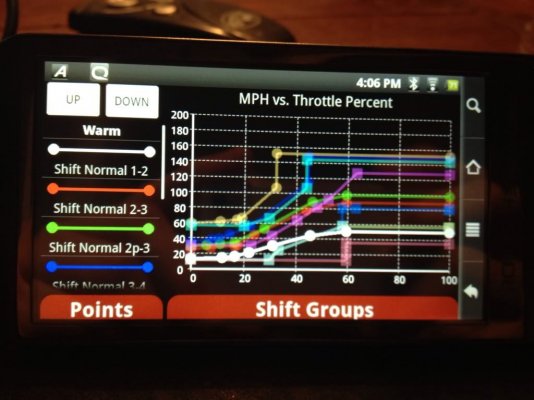
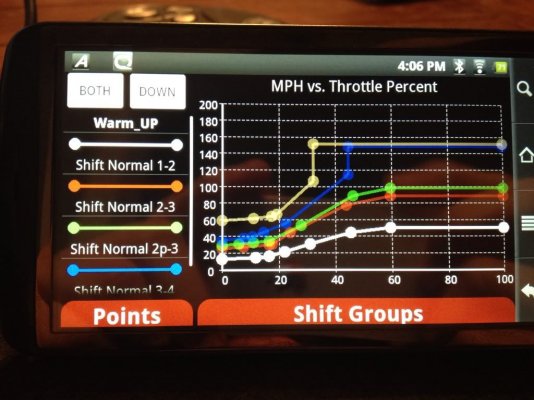
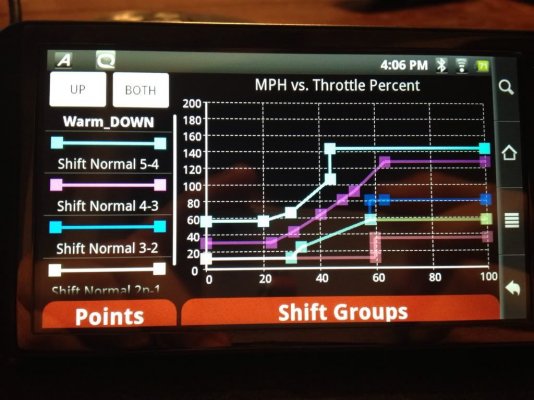
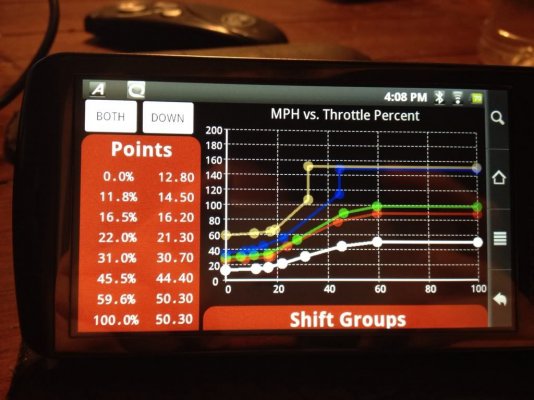
I believe you guys are gonna love the way we have redone the Advanced Trans tuning app. It is much easier to use now that we can employ better graphics. Here are a couple screen shots:
The Shift Point adjustment feature offers the following features:

1) The main graph details each shift point line and how it performs by MPH vs. throttle position.
2) The two grey buttons in the upper left hand corner of the screen allow you to view and adjust your up and down Shift Points individually or together.
3) The color coded lines detail each shift table. By touching one of those lines you highlight that particular shift point on the main graph allowing it to be adjusted.
4) The Points tab allows you to view your adjustments by numeric value.
5) The Shift Groups tab switches you between street/strip (warm) and offroad/crawl (low) tuning.
Shift Point adjustments are made by identifying the color coded schedule that you would like to adjust from the column to the left. With your finger touch any one of the intersecting dots in the graph and drag the dot to the desired location.
The user can also adjust each shift point by numerical value in the Points tab.

Similar to the Shift Point adjustment feature, the Torque management (Shift Firmness) feature for Dodge gas trucks and SUV applications allows you the ability to adjust how firm your gear up and down shifts are. Here is a definition of the product features:

1) The main graph details torque Management lines for each gear change and how it performs between pedal percentage vs. RPM.
2) The two grey buttons in the upper left hand corner of the screen allow you to view and adjust your up and down Shift Points individually or together.
3) The color coded lines detail shift torque for each gear change at part throttle. By touching one of those lines you highlight that particular line on the main graph allowing it to be adjusted.
4) The Points tab allows you to view your adjustments by numeric value for both part throttle and wide open throttle torque (Part throttle torque is shown by default).
5) The Shift Groups tab allows you to switch between part throttle torque and wide open throttle torque allowing you the ability to tune both.
I believe you guys are gonna love the way we have redone the Advanced Trans tuning app. It is much easier to use now that we can employ better graphics. Here are a couple screen shots:
The Shift Point adjustment feature offers the following features:
1) The main graph details each shift point line and how it performs by MPH vs. throttle position.
2) The two grey buttons in the upper left hand corner of the screen allow you to view and adjust your up and down Shift Points individually or together.
3) The color coded lines detail each shift table. By touching one of those lines you highlight that particular shift point on the main graph allowing it to be adjusted.
4) The Points tab allows you to view your adjustments by numeric value.
5) The Shift Groups tab switches you between street/strip (warm) and offroad/crawl (low) tuning.
Shift Point adjustments are made by identifying the color coded schedule that you would like to adjust from the column to the left. With your finger touch any one of the intersecting dots in the graph and drag the dot to the desired location.
The user can also adjust each shift point by numerical value in the Points tab.
Similar to the Shift Point adjustment feature, the Torque management (Shift Firmness) feature for Dodge gas trucks and SUV applications allows you the ability to adjust how firm your gear up and down shifts are. Here is a definition of the product features:
1) The main graph details torque Management lines for each gear change and how it performs between pedal percentage vs. RPM.
2) The two grey buttons in the upper left hand corner of the screen allow you to view and adjust your up and down Shift Points individually or together.
3) The color coded lines detail shift torque for each gear change at part throttle. By touching one of those lines you highlight that particular line on the main graph allowing it to be adjusted.
4) The Points tab allows you to view your adjustments by numeric value for both part throttle and wide open throttle torque (Part throttle torque is shown by default).
5) The Shift Groups tab allows you to switch between part throttle torque and wide open throttle torque allowing you the ability to tune both.

Ramunit
Senior Member
- Joined
- Jun 30, 2010
- Posts
- 816
- Reaction score
- 193
- Ram Year
- 2005
- Engine
- Hemi 5.7
That's slick!
EJM05
Senior Member
- Joined
- Oct 24, 2010
- Posts
- 5,989
- Reaction score
- 55
- Location
- Somers, CT
- Ram Year
- 1986
- Engine
- 440 Big Block
Wow! That's awesome!
0212353
Vendor
- Joined
- Jun 29, 2010
- Posts
- 26,460
- Reaction score
- 2,029
- Location
- Florissant, MO
- Ram Year
- 2019 1500 Laramie Sport Crew, 2019 1500 Big Horn Sport Crew & 2016 Charger SRT Hellcat
- Engine
- 2x 5.7L & 6.2L
I has some pics!

I have a universal mount in the truck - which fit this perfectly!
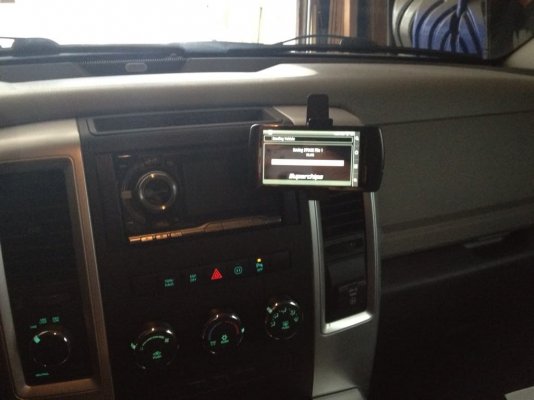


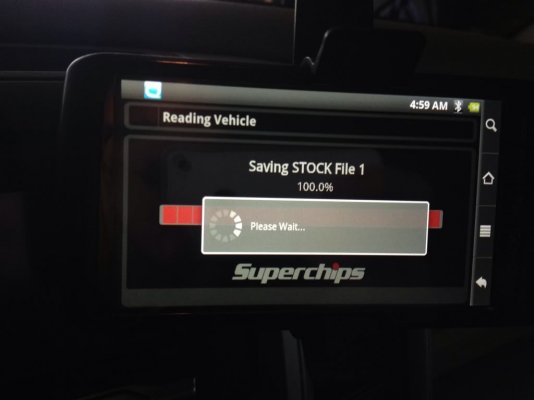


Only goofy thing so far? "DOD"
What the hell is "DOD"........derrr.......Displacement on demand.
Scott - have 'em change that to MDS. I was scratching my head!
I have a universal mount in the truck - which fit this perfectly!
Only goofy thing so far? "DOD"
What the hell is "DOD"........derrr.......Displacement on demand.
Scott - have 'em change that to MDS.
I was scratching my head! 
Ramunit
Senior Member
- Joined
- Jun 30, 2010
- Posts
- 816
- Reaction score
- 193
- Ram Year
- 2005
- Engine
- Hemi 5.7
While they're at it tell them to change the image of a Ford to a Dodge truck.
0212353
Vendor
- Joined
- Jun 29, 2010
- Posts
- 26,460
- Reaction score
- 2,029
- Location
- Florissant, MO
- Ram Year
- 2019 1500 Laramie Sport Crew, 2019 1500 Big Horn Sport Crew & 2016 Charger SRT Hellcat
- Engine
- 2x 5.7L & 6.2L
JJ's house

wut?
While they're at it tell them to change the image of a Ford to a Dodge truck.
Yeah, I noticed that too! I was like.........WTH?
LB3711
Senior Member
- Joined
- Jan 23, 2011
- Posts
- 18,536
- Reaction score
- 1,812
- Location
- Trumbull, CT
- Ram Year
- 2022
- Engine
- 3.6L V6
You still suck
Sent from my Transformer TF101 using Tapatalk
Sent from my Transformer TF101 using Tapatalk

ramhunter9
Senior Member
- Joined
- Jun 25, 2010
- Posts
- 24,460
- Reaction score
- 983
- Ram Year
- 2012
- Engine
- P-Star Jeep Wrangler
Pretty slick deal for the Hemi
And Sil .. Good to hear from ya bud
And Sil .. Good to hear from ya bud

bigbadram1500
Senior Member
- Joined
- Jul 7, 2010
- Posts
- 15,300
- Reaction score
- 667
- Location
- Springfield, IL
- Ram Year
- 2008
- Engine
- Hemi 5.7
Pretty sweet
ramhunter9
Senior Member
- Joined
- Jun 25, 2010
- Posts
- 24,460
- Reaction score
- 983
- Ram Year
- 2012
- Engine
- P-Star Jeep Wrangler
OMG I'm so jealous!!!!
Do they make this tuner for a CTD?
Just get a CTD already .. Dam Son

truckin151
Supporting Member
That looks f*ckin. Sweet!!!!!! BUT YOU STILL DON'T DO CUSTOM TUNING!!!! I would switch if you did custom tuning
schroederMP
Senior Member
Just get a CTD already .. Dam Son
x2...
0212353
Vendor
- Joined
- Jun 29, 2010
- Posts
- 26,460
- Reaction score
- 2,029
- Location
- Florissant, MO
- Ram Year
- 2019 1500 Laramie Sport Crew, 2019 1500 Big Horn Sport Crew & 2016 Charger SRT Hellcat
- Engine
- 2x 5.7L & 6.2L
More pics from tonight's tuning
Torque Management - WOT settings

Setting the tranny for my shift schedule:

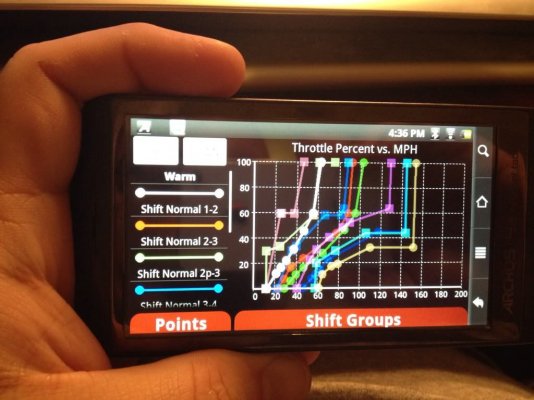
Pretty slick tuner!
Torque Management - WOT settings
Setting the tranny for my shift schedule:
Pretty slick tuner!
0212353
Vendor
- Joined
- Jun 29, 2010
- Posts
- 26,460
- Reaction score
- 2,029
- Location
- Florissant, MO
- Ram Year
- 2019 1500 Laramie Sport Crew, 2019 1500 Big Horn Sport Crew & 2016 Charger SRT Hellcat
- Engine
- 2x 5.7L & 6.2L
oh, the best part?
I tuned the tranny while sitting on my couch.
I tuned the tranny while sitting on my couch.
EJM05
Senior Member
- Joined
- Oct 24, 2010
- Posts
- 5,989
- Reaction score
- 55
- Location
- Somers, CT
- Ram Year
- 1986
- Engine
- 440 Big Block
ramhunter9 said:Just get a CTD already .. Dam Son
Here's the deal... I'm gonna have my mom sell my Ram while I'm over seas and once it sells on gonna pick up a 2006 5.9 and have my buddy who is a CTD mechanic work on it in his dad's shop while I'm deployed. I'm gonna have a fully built tranny with a twin Turbo. I'm gonna make a speed demon.
Thread Jack over.
Similar threads

- Replies
- 0
- Views
- 137
- Replies
- 1
- Views
- 321


Members online
- etbrown4
- james hoffman
- rzr6-4
- Napabandit
- stevenP
- negan1911
- Drew0327
- clint440
- ddolan
- epaul51
- KalboKalbs
- Randy Grant
- lpennock
- Jake1031996
- GeauxinUp
- Stupid
- Roper46
- Mlarv5
- JKay88
- Daw14
- KeithP
- wgoodreau
- kt4hx
- shannonmcb
- Dean2
- Russkp
- Motormike
- Yardbird
- Thendrix
- N2ezi
- Fink
- seems fishy
- SteddyRam
- Flip-er
- RyanDavidPonter
- oicw
- SD2020
- christopherbourke
- Bramic71
- kycruiser1
- Ram Night
- 04fxdwgi
- 16Ram4x4
- Daywalkerv8
- Spamcam
- jjay
- ibike
Total: 4,418 (members: 58, guests: 4,360)
Robots: 1,623
Robots: 1,623