Uconnect Update

Disclaimer: Links on this page pointing to Amazon, eBay and other sites may include affiliate code. If you click them and make a purchase, we may earn a small commission.
OP
OP
FlynDutchman

FlynDutchman

Senior Member
Joined
Apr 9, 2016
Posts
102
Reaction score
37
Location
Menifee, CA
Ram Year
2015
Engine
Hemi 5.7L
Well I rolled my tune back to OEM, tried again with a different USB drive and it recognized it and installed the update. Had I been thinking straight, I would have tried the different USB before rolling the tune back since now I don't know for sure which was causing the problem. Sorry for hijacking the thread.

Its OK. I would want to know if a tune could cause a problem with the updates anyways, since I plan on tuning my truck soon.
 

Snake_Eyes

Senior Member
Joined
Jan 28, 2015
Posts
222
Reaction score
54
Ram Year
2014
Engine
6.4l Hemi
Good to know thanks for the info.

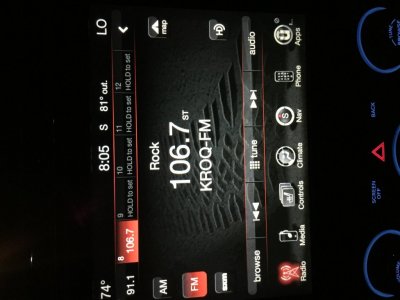
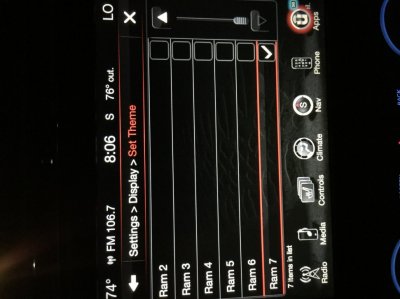
Also in playing with the settings on my radio I found that in settings and display there are 2 new options for display. 1 is Blue outlined and 1 is red outlined on the screen (looks to be from the Rebel). Pretty cool for a free upgrade. Sorry about the rotated photos, don't know why that is happening.

Where did you find the color settings on your HU? I don't think I have them.
 

Snake_Eyes

Senior Member
Joined
Jan 28, 2015
Posts
222
Reaction score
54
Ram Year
2014
Engine
6.4l Hemi
Settings in center bottom of the main screen, then click on the theme, theme 6 is blue, theme 7 is red.

Nope, don't have it on mine...bummer too because I hate that red/orange or whatever the hell it is! Thanks for the info.
 
OP
OP
FlynDutchman

FlynDutchman

Senior Member
Joined
Apr 9, 2016
Posts
102
Reaction score
37
Location
Menifee, CA
Ram Year
2015
Engine
Hemi 5.7L
Nope, don't have it on mine...bummer too because I hate that red/orange or whatever the hell it is! Thanks for the info.

:sorrysign: I gave you the wrong info.
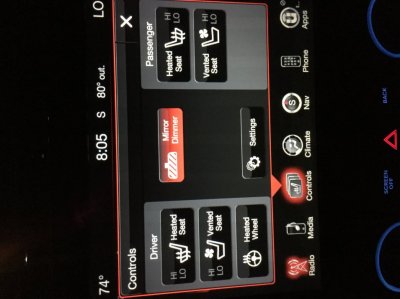
Try this, pictures are below (can't get them to rotate).

1. From Main screen press Controls located on bottom left of center of your screen
2. From Control screen press Settings center above bottom options
3. From Settings screen select Display on top row
4. From Display screen select Set Theme 4th line down
5. Then simply select the color setting you want (1-7)

I hope that helps and works for you.
 

Attachments

  • IMG_3712.jpg
    IMG_3712.jpg
    86.6 KB · Views: 69
  • IMG_3713.jpg
    IMG_3713.jpg
    89.6 KB · Views: 68
  • IMG_3714.jpg
    IMG_3714.jpg
    89.1 KB · Views: 67
  • IMG_3715.jpg
    IMG_3715.jpg
    87.9 KB · Views: 75
  • IMG_3716.jpg
    IMG_3716.jpg
    88.1 KB · Views: 67

noupf

Senior Member
Joined
Jan 10, 2015
Posts
638
Reaction score
231
Location
NY
Ram Year
2015 CC Sport 6'4 Bed
Engine
5.7 Hemi
this is quite odd. I downloaded the file, stuck it on the usb and put it in my truck. when the screen popped up and said the file was validated, it asks me if i want to install file 15.17.5 in place of 15.17.5.

I did the anti-hack update last year some time ( no idea what the file number was )...... but the OP and the ucconect site say this update has to do with radio improvements, voice regog improvemnts and so on. It says nothing about the anti hack update i did last year. Truck has never been to the dealer since it was bought 11 months ago........
 
OP
OP
FlynDutchman

FlynDutchman

Senior Member
Joined
Apr 9, 2016
Posts
102
Reaction score
37
Location
Menifee, CA
Ram Year
2015
Engine
Hemi 5.7L
this is quite odd. I downloaded the file, stuck it on the usb and put it in my truck. when the screen popped up and said the file was validated, it asks me if i want to install file 15.17.5 in place of 15.17.5.

I did the anti-hack update last year some time ( no idea what the file number was )...... but the OP and the ucconect site say this update has to do with radio improvements, voice regog improvemnts and so on. It says nothing about the anti hack update i did last year. Truck has never been to the dealer since it was bought 11 months ago........

If the number is the same it should be the same file you already have. If you want to try it you can upload it anyways. It won't hurt anything. When it completes it will ask if you want to update it again, there is no need to at that point.
 

Forum statistics

Threads
210,828
Posts
3,058,561
Members
170,668
Latest member
Raadz
Back
Top