
AlfaOBD

Disclaimer: Links on this page pointing to Amazon, eBay and other sites may include affiliate code. If you click them and make a purchase, we may earn a small commission.

Bulldog4xFour

Junior Member
Joined
Sep 22, 2017
Posts
14
Reaction score
0
Ram Year
2018 Ram 1500 Sport
Engine
5.7
I dont want anyone to break their trucks, but Im curious if that xfer case switch will allow a conversion from 44 to 45 to actually work

Background: someone made a kit to change the -44 to part time use like the -45, but there seemed to be an issue with the computer not allowing the truck back into 2WD if coming from 4LO. Now that we can see the setting in software, I wonder if changing to part time would get a normally -44 equipped truck to actually work correctly with the retrofit kit installed.

This is exactly what I am hoping someone looks into more. It would be a big game changer to be able to make the 44-44 transfer case into a part time t-case.
 
OP
OP
Ghost_RAM

Ghost_RAM

Senior Member
Joined
Jan 10, 2018
Posts
1,367
Reaction score
1,099
Location
VA
Ram Year
2016
Engine
Hemi 5.7
I was wondering if you can tell me where the trailer hitch camera is at?
On my 2014 I can’t find it.

Thanks


Sent from my iPhone using Tapatalk

Trailer Hitch Camera is located in the last third of the body computer above the fuel tank 1 calibration settings. There are a few other settings you need to enable as well for the rear view camera. There is rear view camera, rear camera present, rear view camera gridlines csm, rear camera csm, rear view camera delay csm and trailer hitch camera. I think I might be missing one and if I think of it I'll post it up. The above are all selected in my 16' Express.
 
OP
OP
Ghost_RAM

Ghost_RAM

Senior Member
Joined
Jan 10, 2018
Posts
1,367
Reaction score
1,099
Location
VA
Ram Year
2016
Engine
Hemi 5.7
@Mpgrimm2

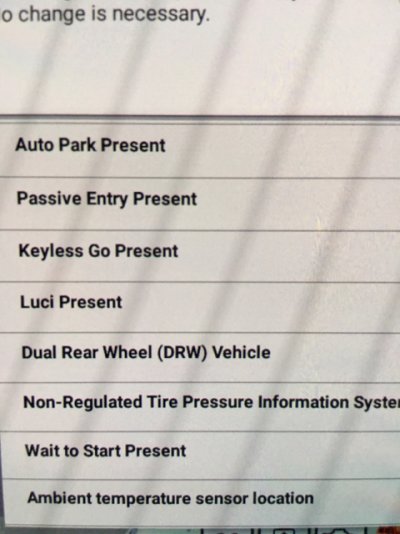
Took another look and there’s the Auto Park Present and Auto Park CSM. Have you looked to see in the body computer if they are both selected on your truck? I would think the Auto Park CSM would be the one people wanted to enable/disable the auto park feature on the fly. Being CSM would it be as harmful as some others?
3b206806e1bffde209fc912605fcfc6d.jpg
db4fa55ee0bd5fe067dd774526d9b854.jpg


Sent from my iPhone using Tapatalk
 

G-Ride990

Administrator
Staff member
Administrator Moderator Supporting Member
Joined
Jul 17, 2017
Posts
2,962
Reaction score
4,704
Location
Chandler, AZ
Ram Year
2022
Engine
5.7 No E-torque
Global Up
Yes
Global Down
Yes

It works but they won’t seem to go up with the lock button.

I’ve seen the Auto Park but haven’t tried it. My Ram of course doesn’t have it. I was actually surprised they didn’t ask me about it a few days ago when the dealership was activating my remote start. They did perform the recall for the cruise while I was there.


Sent from my iPhone using Tapatalk

Did you get them to go down with the key fob?
 

mcaligiuri

Senior Member
Joined
Aug 24, 2016
Posts
172
Reaction score
58
Ram Year
2016 ram 1500 express crew cab
Engine
5.7 hemi
i went thru all these pages and this looks very helpful. The only thing i was wondering is how hard is it to disable the lamp out messages? I switched from quads to projectors and didnt see any screen shots of exactly how to get the error messages off.
 

chrisbh17

Senior Member
Joined
Oct 12, 2017
Posts
6,720
Reaction score
7,525
Ram Year
2017
Engine
Hemi 5.7
Yes I did but not back up with the fob.


Sent from my iPhone using Tapatalk
Funny, my g37 works the same way.

I wonder if it's because of the pinch sensor?

Sent from my Nexus 6P using Tapatalk
 
OP
OP
Ghost_RAM

Ghost_RAM

Senior Member
Joined
Jan 10, 2018
Posts
1,367
Reaction score
1,099
Location
VA
Ram Year
2016
Engine
Hemi 5.7
i went thru all these pages and this looks very helpful. The only thing i was wondering is how hard is it to disable the lamp out messages? I switched from quads to projectors and didnt see any screen shots of exactly how to get the error messages off.

I don’t believe merely switching from quad to projector will remove the lamp out messages. I’m not sure why it was different for me with my license plate lamps but as I have no other LEDs giving me an issue it’s hard for me to test.


Sent from my iPhone using Tapatalk
 
OP
OP
Ghost_RAM

Ghost_RAM

Senior Member
Joined
Jan 10, 2018
Posts
1,367
Reaction score
1,099
Location
VA
Ram Year
2016
Engine
Hemi 5.7
Funny, my g37 works the same way.

I wonder if it's because of the pinch sensor?

Sent from my Nexus 6P using Tapatalk

I assume that is the reason whether pinch or bounce back or whatever it’s called. I would think it still would function as that safety feature is still present. Unless there’s another setting missing.


Sent from my iPhone using Tapatalk
 

chrisbh17

Senior Member
Joined
Oct 12, 2017
Posts
6,720
Reaction score
7,525
Ram Year
2017
Engine
Hemi 5.7
I assume that is the reason whether pinch or bounce back or whatever it’s called. I would think it still would function as that safety feature is still present. Unless there’s another setting missing.


Sent from my iPhone using Tapatalk

Actually I was thinking without the truck in accessory (or run), maybe the pinch sensor isnt active, so they dont want the windows to be able to go up?

Ill look through the settings list again to see if anything catches my eye.
 
OP
OP
Ghost_RAM

Ghost_RAM

Senior Member
Joined
Jan 10, 2018
Posts
1,367
Reaction score
1,099
Location
VA
Ram Year
2016
Engine
Hemi 5.7
Actually I was thinking without the truck in accessory (or run), maybe the pinch sensor isnt active, so they dont want the windows to be able to go up?

Ill look through the settings list again to see if anything catches my eye.

I thought about that last night but then wondered how much of the truck came to life when hitting unlock on the fob.


Sent from my iPhone using Tapatalk
 

mjf6175

Senior Member
Joined
Nov 13, 2017
Posts
436
Reaction score
377
Location
NJ
Ram Year
2017
Engine
cummins
Trailer Hitch Camera is located in the last third of the body computer above the fuel tank 1 calibration settings. There are a few other settings you need to enable as well for the rear view camera. There is rear view camera, rear camera present, rear view camera gridlines csm, rear camera csm, rear view camera delay csm and trailer hitch camera. I think I might be missing one and if I think of it I'll post it up. The above are all selected in my 16' Express.

PNUTLT1.....As Ghost_Ram mentions there are numerous settings that need to be set when adding the rear backup camera. Below are the settings I had set to activate the B/U camera:

1) -Rear Camera =Present

2) -Rear View Camera Dynamic Grid Lines =Enabled

3) -Rear View Camera

4)-Rear Camera Customer Settings Menu

5)-Rear View Camera Delay Customer Settings Menu

Now as to the last setting I just recently did: "Trailer Hitch Camera Present", this puts an icon on your CONTROL screen. BUT from your post I see you have a 2014? If so then you will not get an icon for the B/U camera on your screen. Only 2016-17-18's will get an icon. You can try the setting but from what I have found Ram's earlier than '16 do not have the icon show up.
 

PNUTLT1

Senior Member
Joined
Dec 17, 2014
Posts
688
Reaction score
250
Location
California
Ram Year
2014
Engine
Hemi 5.7
PNUTLT1.....As Ghost_Ram mentions there are numerous settings that need to be set when adding the rear backup camera. Below are the settings I had set to activate the B/U camera:

1) -Rear Camera =Present

2) -Rear View Camera Dynamic Grid Lines =Enabled

3) -Rear View Camera

4)-Rear Camera Customer Settings Menu

5)-Rear View Camera Delay Customer Settings Menu

Now as to the last setting I just recently did: "Trailer Hitch Camera Present", this puts an icon on your CONTROL screen. BUT from your post I see you have a 2014? If so then you will not get an icon for the B/U camera on your screen. Only 2016-17-18's will get an icon. You can try the setting but from what I have found Ram's earlier than '16 do not have the icon show up.

I have an oem installed backup camera
The thing is I believe only 16+ have the soft key.

But when I put my UAS radio on, it has the soft key for a few days and it worked.
But I did a reset on it and then it went away.
So I think it is possible to get the soft key back


Sent from my iPhone using Tapatalk
 

Mpgrimm2

Senior Member
Supporting Vendor Navy Badge
Joined
Mar 30, 2014
Posts
6,572
Reaction score
5,169
Location
SC
Ram Year
2022 Ram 1500 (5th Gen)
Engine
5.7L
@Mpgrimm2

Took another look and there’s the Auto Park Present and Auto Park CSM. Have you looked to see in the body computer if they are both selected on your truck? I would think the Auto Park CSM would be the one people wanted to enable/disable the auto park feature on the fly. Being CSM would it be as harmful as some others?
3b206806e1bffde209fc912605fcfc6d.jpg
db4fa55ee0bd5fe067dd774526d9b854.jpg


Sent from my iPhone using Tapatalk

Auto Park CSM is "not set" on my truck ... hmm

M² Mods.
 

G-Ride990

Administrator
Staff member
Administrator Moderator Supporting Member
Joined
Jul 17, 2017
Posts
2,962
Reaction score
4,704
Location
Chandler, AZ
Ram Year
2022
Engine
5.7 No E-torque
i went thru all these pages and this looks very helpful. The only thing i was wondering is how hard is it to disable the lamp out messages? I switched from quads to projectors and didnt see any screen shots of exactly how to get the error messages off.
I am having issues trying to get rid of my reverse light errors and my park light out errors. Changing bulbs to LED isnt working for me
 

mcaligiuri

Senior Member
Joined
Aug 24, 2016
Posts
172
Reaction score
58
Ram Year
2016 ram 1500 express crew cab
Engine
5.7 hemi
I am having issues trying to get rid of my reverse light errors and my park light out errors. Changing bulbs to LED isnt working for me

This app supposedly allows you to disable the bulb out messages. I just didn’t see exactly how it’s done( I’m old I need a walkthrough) If it works for the quad to projector swap and no need for resistors then this is worth it IMO and I’d buy asap.
 

G-Ride990

Administrator
Staff member
Administrator Moderator Supporting Member
Joined
Jul 17, 2017
Posts
2,962
Reaction score
4,704
Location
Chandler, AZ
Ram Year
2022
Engine
5.7 No E-torque
This app supposedly allows you to disable the bulb out messages. I just didn’t see exactly how it’s done( I’m old I need a walkthrough) If it works for the quad to projector swap and no need for resistors then this is worth it IMO and I’d buy asap.
I am confident that I can get it to work. I am still fooling around with settings now. And since you have to leave the truck alone a while after you make changes, that adds time to the whole process.

If I can get it figured out I will share though.

I am pretty excited to add the global down feature when I get to my truck after work.
 

mjf6175

Senior Member
Joined
Nov 13, 2017
Posts
436
Reaction score
377
Location
NJ
Ram Year
2017
Engine
cummins
I may have missed the answer, but just how can I determine if my 2017 Ram can have the Smart Beam (automatic high beams) function enabled? After reading through this thread I recall reading that 2017 rear view mirrors are different from 2016 and earlier. The rear view mirror in my '17 has the automatic dimming feature, does this make it capable of the Smart Beam function?
 

Chach

Member
Joined
May 29, 2018
Posts
50
Reaction score
60
Location
CA
Ram Year
2017
Engine
Cummins 6.7
I may have missed the answer, but just how can I determine if my 2017 Ram can have the Smart Beam (automatic high beams) function enabled? After reading through this thread I recall reading that 2017 rear view mirrors are different from 2016 and earlier. The rear view mirror in my '17 has the automatic dimming feature, does this make it capable of the Smart Beam function?
https://www.ramforum.com/index.php?posts/1793787
 
Back
Top