

You are using an out of date browser. It may not display this or other websites correctly.
You should upgrade or use an alternative browser.
You should upgrade or use an alternative browser.
AlfaOBD
- Thread starter Ghost_RAM
- Start date
Disclaimer: Links on this page pointing to Amazon, eBay and other sites may include affiliate code. If you click them and make a purchase, we may earn a small commission.

Ricks Ram
Senior Member
- Joined
- May 1, 2015
- Posts
- 4,411
- Reaction score
- 3,415
- Ram Year
- 2014
- Engine
- Hemi 5.7
I have the Android version with the OBD Link MX and I just programmed a key yesterday so I can verify that the Android version is still working with no issues.I think I may take one for the team and download the android app and use it on my galaxy tab a to see if I can rule out a problem with the windows version of the app.
Sent from my SM-G960U using Tapatalk

- Joined
- Mar 19, 2018
- Posts
- 301
- Reaction score
- 439
- Location
- South East Wisconsin
- Ram Year
- 2018
- Engine
- 3.6
Good news! I was able to program two keys for my 2018 RAM with alfaOBD and the OBDLinkMX. I did use the Security Bypass cable. These are just keys, not remote fobs. My Ram is a Tradesman without RKE and there are real locks on both doors. The key blanks that I used were from eBay and are the type that can be pried apart to remove the key blade so it can be easily cut to match the original key blade. Just search eBay for Y170 key blanks and find the type that shows the key blank apart.
Start alfaOBD, Select the RAM icon. Select Radio Frequency Hub (RFH). Then select the Radio frequency HUB for the Control Unit. Touch the open hood Fiat icon. ENTER the 4 digit PIN. Select Procedure to start and scroll down to "Program Ignition FOBIKs Baseline System". You then remove your original key from the ignition node and insert the new key into the node but leave the ignition position to OFF or Lock and press Start. After a few seconds, it will say Completed.
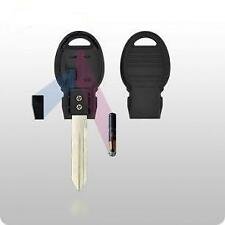
For about $8 for a Y170 key blank on eBay, you can test the PIN. It's not a fob but makes a great extra key for the garage. I use an old Moto G android phone that I got for $20.
Mrmagoolin
Senior Member
- Joined
- Oct 25, 2018
- Posts
- 103
- Reaction score
- 31
- Location
- Pendleton OR.
- Ram Year
- 2014
- Engine
- Cummins 6.7
For about $8 for a Y170 key blank on eBay, you can test the PIN. It's not a fob but makes a great extra key for the garage. I use an old Moto G android phone that I got for $20.
So can you start and run your truck with this key? If so I wonder if I could get one and cut the metal key part off and just use the tip to run the truck. I have an after market remote start and keyless entry. I just don't want to pack the big fobik with me. Just need a way to put something in the dash for it to run. I just might find out about this. After rereading your post it sure looks like I can do what I want to do. Would not even have to cut the key off just remove it.
Big Terry
Senior Member
Interesting. I was wondering if that setting was to keep both DRLs illuminated when the turn signals were active. As it is, when I turn on my turn signal, the DRL on the side I am signaling will turn off until the turn signal cancels, at which point the DRL will re-illuminate. I'm guessing that is a native function to DRLs, then?@Austen DRL Dropout needs to be enabled so that the daytime running lights will turn off when the headlights are turned on.
Big Terry
Senior Member
Also, here's a good one.
With the driver comfort features on remote start, my seat and steering wheel heat up and the mirror/rear window defroster come on. However, the windshield defroster does not; I have to enable it once I get in the truck. Bear in mind, this is with HVAC on AUTO. Has anyone found a method of enabling the windshield defroster with remote start, like the rest?
Also, is there a way to adjust the temperature threshold for engaging the seat heat, steering wheel heat and defroster? I haven't found any documentation that specifically spells out *what* temperature will cause these functions to come on automatically, only seeing it happen when the temps are in the 40s or lower, apparently.
With the driver comfort features on remote start, my seat and steering wheel heat up and the mirror/rear window defroster come on. However, the windshield defroster does not; I have to enable it once I get in the truck. Bear in mind, this is with HVAC on AUTO. Has anyone found a method of enabling the windshield defroster with remote start, like the rest?
Also, is there a way to adjust the temperature threshold for engaging the seat heat, steering wheel heat and defroster? I haven't found any documentation that specifically spells out *what* temperature will cause these functions to come on automatically, only seeing it happen when the temps are in the 40s or lower, apparently.
Ricks Ram
Senior Member
- Joined
- May 1, 2015
- Posts
- 4,411
- Reaction score
- 3,415
- Ram Year
- 2014
- Engine
- Hemi 5.7
You're auto on comfort system comes on at 40゚. There is no adjustment in the BCM to change it that we have found. When you have your truck on auto you're defrost should be working if the truck senses it's needed but the button will not illuminate. When your truck is set to auto none of the air direction soft keys or buttons illuminate. Only the auto button illuminates when your truck is on auto. If it's cold enough when you put your hand up there You should feel the defrost is working. Also note that the system does not blow very hard at all until of the engine warms up enough to be efficient and then it will start to blow more air.Also, here's a good one.
With the driver comfort features on remote start, my seat and steering wheel heat up and the mirror/rear window defroster come on. However, the windshield defroster does not; I have to enable it once I get in the truck. Bear in mind, this is with HVAC on AUTO. Has anyone found a method of enabling the windshield defroster with remote start, like the rest?
Also, is there a way to adjust the temperature threshold for engaging the seat heat, steering wheel heat and defroster? I haven't found any documentation that specifically spells out *what* temperature will cause these functions to come on automatically, only seeing it happen when the temps are in the 40s or lower, apparently.
Sent from my SM-G960U using Tapatalk
- Joined
- Mar 19, 2018
- Posts
- 301
- Reaction score
- 439
- Location
- South East Wisconsin
- Ram Year
- 2018
- Engine
- 3.6
If you get the one with the removable key blade, you could send the key blade to me for the cost of a 1st class stamp and I will cut it to your key code. Place the key blade in a thin cardboard cutout taped to the cutout, put it in an envelope with the stamp. It's less than an ounce. I just need a pic of your key blade sent to my email.alpinegreenneon at neons dot orgSo can you start and run your truck with this key? If so I wonder if I could get one and cut the metal key part off and just use the tip to run the truck. I have an after market remote start and keyless entry. I just don't want to pack the big fobik with me. Just need a way to put something in the dash for it to run. I just might find out about this. After rereading your post it sure looks like I can do what I want to do. Would not even have to cut the key off just remove it.
If you have the key blade cut to your code, you can use it to also open the door. There are no tumblers in the ignition node so a blank key or no key blade would work. Once the RFHM learns the chip in the key it will run like it was a factory key. The RKE part of the big fob is different from the chip in the key.
schaef_12
Junior Member
- Joined
- Jun 18, 2012
- Posts
- 13
- Reaction score
- 5
- Ram Year
- 2018
- Engine
- Cummins
I have AWESOME NEWS.
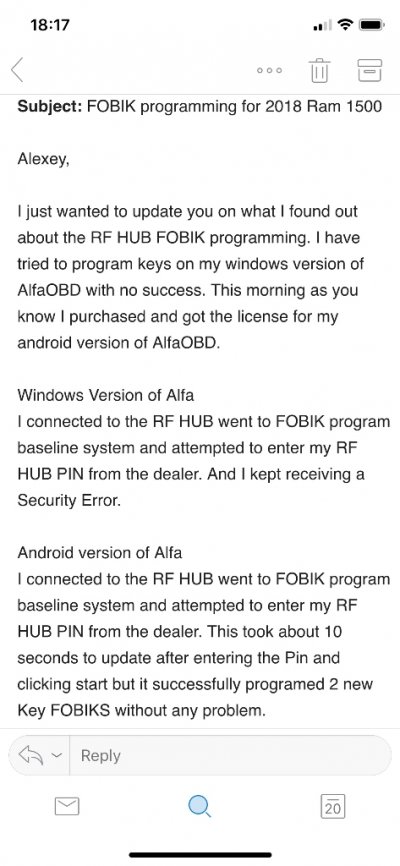
So I tried and tried and tried to program New keys for my 2018 on windows Alfa. And I kept receiving a security Error. Well 2 nights ago I decided that I would order a replacement screen(was broken) for one of my old android tablets I have.
Yesterday I received my screen replaced it and installed Alfa on my tablet. Got everything working so this morning when I got to work I had some down time to try and program a few of the keys I purchased. It worked without a problem.
Connect to the RF Hub on ANDROID(FOBIK programming baseline system will not work with Windows version at least in my case) I’m going to contact Alexey and let him know what’s going on.
Go to FOBIK Programming Baseline system.
Put Ignition in lock position
Put un programmed key in ignition staying in lock position.
Enter your pin and click start
You will get a programming complete message
If you try to reprogram a key it will tell you. FOBIK already programed
I did this to a cheap Amazon Key and a OEM Ram FOBIK. Both are programed and working without a problem.
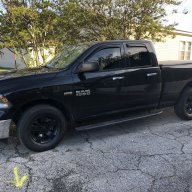
2018 Black Pearl Ram 1500
LED Tail Lights, Black Quad Halogens with LED conversion, LED Black 3rd Break Light, Blacked Out Emblems, Rims & Grill, 8.4 UAQ conversion!
This looks like the exact issue I have run into with the Windows version of the App. It doesn't play nice with the RF HUB. Guess I'll be purchasing the andriod version of the app.
Mrmagoolin
Senior Member
- Joined
- Oct 25, 2018
- Posts
- 103
- Reaction score
- 31
- Location
- Pendleton OR.
- Ram Year
- 2014
- Engine
- Cummins 6.7
This looks like the exact issue I have run into with the Windows version of the App. It doesn't play nice with the RF HUB. Guess I'll be purchasing the andriod version of the app.
When I emailed Alexey the Alfa developer it sounded like he could change the code of my windows version over to the Android. So it sounds like you could get it on Android but then it would deactivate Windows. I did not have it do that but I am highly considering it.
Mrmagoolin
Senior Member
- Joined
- Oct 25, 2018
- Posts
- 103
- Reaction score
- 31
- Location
- Pendleton OR.
- Ram Year
- 2014
- Engine
- Cummins 6.7
If you get the one with the removable key blade, you could send the key blade to me for the cost of a 1st class stamp and I will cut it to your key code. Place the key blade in a thin cardboard cutout taped to the cutout, put it in an envelope with the stamp. It's less than an ounce. I just need a pic of your key blade sent to my email.alpinegreenneon at neons dot org
If you have the key blade cut to your code, you can use it to also open the door. There are no tumblers in the ignition node so a blank key or no key blade would work. Once the RFHM learns the chip in the key it will run like it was a factory key. The RKE part of the big fob is different from the chip in the key.
I have just the tip start, no cut key. The cut key will just get you in the door in a emergency. I have a key machine at work that will copy and cut by code if I had the code. My goal is to get rid of extra things in my pocket.
OP
OP
Ghost_RAM
Senior Member
@schaef_12 I would email the dev with the debug log and see if there isn't a problem before purchasing and explain what you have been trying to do. Then mention you were thinking of purchasing the Android version to see if it would work.
@Big Terry You're right, not sure what I was thinking? Not enough coffee in the system maybe. Editing now to not confuse others.
@Big Terry You're right, not sure what I was thinking? Not enough coffee in the system maybe. Editing now to not confuse others.
Big Terry
Senior Member
Good to know. I never have the presence of mind to just stick my hand up there to see if its even blowing air, heh. At 0430 thats asking a lot. Sad that there appears to be no set point/ threshold for it, as I would like it to activate at a little warmer temp, like 45.You're auto on comfort system comes on at 40゚. There is no adjustment in the BCM to change it that we have found. When you have your truck on auto you're defrost should be working if the truck senses it's needed but the button will not illuminate. When your truck is set to auto none of the air direction soft keys or buttons illuminate. Only the auto button illuminates when your truck is on auto. If it's cold enough when you put your hand up there You should feel the defrost is working. Also note that the system does not blow very hard at all until of the engine warms up enough to be efficient and then it will start to blow more air.
Sent from my SM-G960U using Tapatalk
Lawsuit11
Senior Member
- Joined
- Sep 10, 2018
- Posts
- 819
- Reaction score
- 685
- Location
- Westland, MI
- Ram Year
- 2018 1500
- Engine
- Hemi 5.7
I think I may take one for the team and download the android app and use it on my galaxy tab a to see if I can rule out a problem with the windows version of the app.
Hey. I tried the same thing on windows and it would not work. I received the same security access denied. So I purchased the android version and everything, key programming. Resetting the RF hub worked flawlessly. It’s the windows version and I already let Alexey know of the problem

2018 Black Pearl Ram 1500
LED Tail Lights, Black Quad Halogens with LED conversion, LED Black 3rd Break Light, Blacked Out Emblems, Rims & Grill, 8.4 UAQ conversion!, MTC to ATC Mod, OEM Remote Start
Lawsuit11
Senior Member
- Joined
- Sep 10, 2018
- Posts
- 819
- Reaction score
- 685
- Location
- Westland, MI
- Ram Year
- 2018 1500
- Engine
- Hemi 5.7
@schaef_12 I would email the dev with the debug log and see if there isn't a problem before purchasing and explain what you have been trying to do. Then mention you were thinking of purchasing the Android version to see if it would work.
@Big Terry You're right, not sure what I was thinking? Not enough coffee in the system maybe. Editing now to not confuse others.
I already let Alexey know the problem sir. I sent him everything debug log and screen shots of what error I was getting and everything lol
2018 Black Pearl Ram 1500
LED Tail Lights, Black Quad Halogens with LED conversion, LED Black 3rd Break Light, Blacked Out Emblems, Rims & Grill, 8.4 UAQ conversion!, MTC to ATC Mod, OEM Remote Start
Lawsuit11
Senior Member
- Joined
- Sep 10, 2018
- Posts
- 819
- Reaction score
- 685
- Location
- Westland, MI
- Ram Year
- 2018 1500
- Engine
- Hemi 5.7
This looks like the exact issue I have run into with the Windows version of the App. It doesn't play nice with the RF HUB. Guess I'll be purchasing the andriod version of the app.
Also if you purchase the android version of the app there is a discounted price For buying both platforms. Email Alexey and he will send you the apk link and you will have to download and provide him with your PayPal receipt and your activation code from the android app. Think it was only $25 for the android after paying full price for the windows version.
2018 Black Pearl Ram 1500
LED Tail Lights, Black Quad Halogens with LED conversion, LED Black 3rd Break Light, Blacked Out Emblems, Rims & Grill, 8.4 UAQ conversion!, MTC to ATC Mod, OEM Remote Start
- Joined
- Mar 19, 2018
- Posts
- 301
- Reaction score
- 439
- Location
- South East Wisconsin
- Ram Year
- 2018
- Engine
- 3.6
The chip in the head of the Y170 key might work on the doors also. My Ram doesn't have a fob, just the key. The passive entry is something I have no experience with.I have just the tip start, no cut key. The cut key will just get you in the door in a emergency. I have a key machine at work that will copy and cut by code if I had the code. My goal is to get rid of extra things in my pocket.
If you want to know the code, I can do that with a pic. I have been doing that for many years on the neons forum. I have the M series database.

Jaywoo
Senior Member
- Joined
- Jan 19, 2014
- Posts
- 180
- Reaction score
- 329
- Location
- Ward, AR
- Ram Year
- 2018 & 2024
- Engine
- Both Cummins
I can tell you guys that I have the windows version and it worked just fine on my 2018. The only difference I can see is that I am using the z-automotive bypass module and not the bypass cable.
nick00less
Member
- Joined
- Jul 21, 2017
- Posts
- 59
- Reaction score
- 17
- Ram Year
- 2017
- Engine
- Diesel 6.7
so since it's currently not working for windows users, how's about I completely disable TPMS or instead just turn it into monitor? my cable should arrive Saturday and before I start messing around with it I'd like to have a game plan if Plan A-Changing thresholds, doesn't work.
can I disable it completely?
or
can it become a monitor that tells me how much psi each tire has with no more alerts?
can I disable it completely?
or
can it become a monitor that tells me how much psi each tire has with no more alerts?
Redheadhunter21
Senior Member
You can set it up like the 3500's, I believe its the base TPMS system vs the premium. Look back some pages it was mentioned recently
Similar threads


- Replies
- 0
- Views
- 86


Members online
- 2016 2500
- Adamcr68
- JB73
- rzr6-4
- Dean2
- Buddy
- express2014
- VegasDragger45
- Z3cta
- Mekcanix
- cdarwin22
- Magfan2
- Gary Fields
- firemanjay
- Fink
- Daw14
- McElligott27
- RichieW13
- mogwai
- spoolinlust
- djarrett
- shmedley
- AgeBrown
- stevenP
- Curmudgeon
- TRK_GANG74
- RebelDad
- 106Ram
- Codystair
- Bramic71
- miltonbland
- seems fishy
- Jeepwalker
- 2020GCM
- 91rt
- n3v3rl8
- Nando7057
- Fuel35 67
- dieselscout80
- 04fxdwgi
- hunterdan
- 4xdad
- nickdowny
- JayLeonard
- BDay2351
- MarkA70
- pgoodwin79
- blake_bradf1982
- Wind-mill
- British Bulldog
Total: 4,407 (members: 70, guests: 4,337)
Robots: 2,025
Robots: 2,025