

RamDiver, I agree with you on that. I just remembered that I do have a brans new windows laptop i just bought for my wife i could use (if she'll let me). I didn't want to use my 12 year old Dell. Is the lap top version of alfa OBD easy to use?
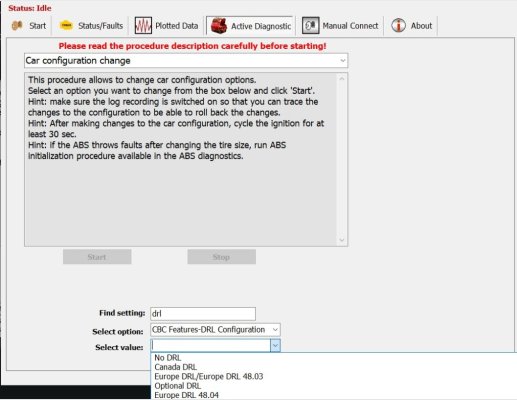
After getting accustomed to the typical AlfaOBD quirks, I find it rather simple to navigate and tweak settings. I think there are many benefits to using the windoze version.
Easy to see and navigate menus.
Screen captures are simple to manage.
Switching to other apps or screens for reference or log file creation is much simpler.
I can save backup files anywhere I want on the PC.
When using my PC, my data is my data, and I share it where and when I want, not like with most android devices.
I detest google anything and don't use the play store or google drive if I can help it.
The famous story of risks when downloading android apps from other sources is a complete hoax and scam to keep their data capture efforts going. The play store likely has as many corrupt files as anywhere else.
I use ApkPure and AppBrain for most android apk files. I don't know if you would be able to use it on multiple devices, like the play store, not too likely.
Download AlfaOBD 2.4.4.0 Paid APP at 49 for Android. AlfaOBD software for Fiat Group cars native diagnostic
apkpure.com
It's actually much easier on Android.
I can appreciate the feature of being able to use AlfaOBD on multiple devices if using android from the play store, but what is so difficult using it on windoze, and how does using a smaller handheld screen provide any benefit over using a laptop?
I've heard this story before and am genuinely curious as to why it exists.
I will openly admit to my bias against anything google-related because of the rampant theft of private data. They've been caught far too many times with their hands (more than 1) deep into the cookie jar.
I do not wear a tinfoil hat: If someone says that, it's a lie.
That's my story, and I'm sticking to it.
.