
AlfaOBD

Disclaimer: Links on this page pointing to Amazon, eBay and other sites may include affiliate code. If you click them and make a purchase, we may earn a small commission.

OP
OP
Ghost_RAM

Ghost_RAM

Senior Member
Joined
Jan 10, 2018
Posts
1,367
Reaction score
1,099
Location
VA
Ram Year
2016
Engine
Hemi 5.7
I had a right front turn signal bulb burnout. It put my entire turn signal system down except for the left front bulb - I thought that was strange. It also put my emergency flasher system down. I replaced the burned out right front bulb and all was restored except both rear tail lights would not light as a turn signal or an emergency signal The stop lights work fine with the lights on or off and the tail lights work with the lights on

I ran AlfaOBD diagnostics and there are no codes. However, the log has a listing:
ECU Qualification:
Control-Rear Turn Lamps: No

My dilemma is I cannot find how to change them to "on". I have been through all the items three times and they all seem to be set properly.

Any ideas what setting caused the log to report the rear turn lamps "no"?
"Control-Rear Turn Lamps: No" should be set to no. Start reading around here and see if it helps.

https://www.ramforum.com/posts/1830993/
 

John Jensen

Senior Member
Joined
Mar 27, 2016
Posts
1,582
Reaction score
1,770
Location
San Diego County
Ram Year
2016
Engine
Ecodiesel
Thanks Ghost,

That is reassuring that I have the correct settings. So if all my settings are correct it must be something mechanical or physical. Guess I need to visit my favorite Service Manager
 

FXCLM5

Senior Member
Joined
Mar 10, 2015
Posts
764
Reaction score
483
Ram Year
2017 Laramie CC
Engine
ED 3.0 V6
omg your kidding me, last time this thread was in the 90-100 page, now its 170+


ugh, i need a cliff notes
 

FXCLM5

Senior Member
Joined
Mar 10, 2015
Posts
764
Reaction score
483
Ram Year
2017 Laramie CC
Engine
ED 3.0 V6
A quick note for anyone else having trouble getting a System Status on the Driver Door Module and further praise for the author. After having @Ricks Ram confirm that it wasn't just my truck that wasn't giving a system status for the module readout I sent the error off to the author along with the usual debug file and examples. He had the bug located, fixed and a patched copy for me to try in less than 6 hours. I just tried it and the Driver Door Module System Status now works correctly. The fix will be in the next general release.

-K
Dang wished the developer would just answer my email....
 

stimpy433

Senior Member
Joined
Mar 10, 2016
Posts
3,583
Reaction score
3,170
Location
IOWA
Ram Year
2014
Engine
3.6
Wow that is actually pretty strange. Do you have the option to turn the feature on and off in your settings menue? I have done several of the conversions and I haven't seen this happen. It either is on or it's off. Since his 3.5" speedometer displayed the image correctly it's got to be some type of glitch with the new speedometer.

Sent from my SM-G960U using Tapatalk

I ran thru all the setting last night and I don't have an option to turn on/off the turn by turn anywhere....
 

Ricks Ram

Senior Member
Joined
May 1, 2015
Posts
4,411
Reaction score
3,415
Ram Year
2014
Engine
Hemi 5.7
I ran thru all the setting last night and I don't have an option to turn on/off the turn by turn anywhere....
Do you mean you ran through it all with the alpha tool to see if it's in your BCM or you ran through the settings menu on the radio? If you looking with the alpha tool it will not show up unless your actually plugged into your truck and connected to the BCM. It will be in the BCM configuration change section towards the bottom in the CSM settings section. If you are just looking for the setting in your radio it would be in the navigation settings menu. If you have a newer radio with newer firmware it most likely wont be there unless you have enabled the code in the BCM.

Sent from my SM-G960U using Tapatalk
 

stimpy433

Senior Member
Joined
Mar 10, 2016
Posts
3,583
Reaction score
3,170
Location
IOWA
Ram Year
2014
Engine
3.6
Do you mean you ran through it all with the alpha tool to see if it's in your BCM or you ran through the settings menu on the radio? If you looking with the alpha tool it will not show up unless your actually plugged into your truck and connected to the BCM. It will be in the BCM configuration change section towards the bottom in the CSM settings section. If you are just looking for the setting in your radio it would be in the navigation settings menu. If you have a newer radio with newer firmware it most likely wont be there unless you have enabled the code in the BCM.

Sent from my SM-G960U using Tapatalk

No, alpha tool yet, just looking thru the settings on the radio itself. I need to get it so I can add a few things. I take it that option isn't on my radio then which is my factory 2014 RA3 with the newest firmware.
 

Ricks Ram

Senior Member
Joined
May 1, 2015
Posts
4,411
Reaction score
3,415
Ram Year
2014
Engine
Hemi 5.7
No, alpha tool yet, just looking thru the settings on the radio itself. I need to get it so I can add a few things. I take it that option isn't on my radio then which is my factory 2014 RA3 with the newest firmware.
No it wont be there after with the newer firmware untill you enable the code in your BCM and then it should show up.

Sent from my SM-G960U using Tapatalk
 

dav8388

Senior Member
Joined
Apr 23, 2018
Posts
362
Reaction score
207
Location
Summerville, SC
Ram Year
In limbo between trucks
Engine
3.6 pentastar
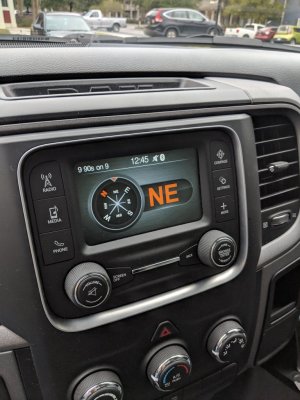
I just got the compass module working.
Show compass heading
Select yes
Compass mounting orientation
Select right side up
EOM presant
Select yes
Compass variance
Select yes
Compass calibration
Select yes

IMG_20181027_124601.jpg

IMG_20181027_124615.jpg

IMG_20181027_124621.jpg

IMG_20181027_124627.jpg
 

Ricks Ram

Senior Member
Joined
May 1, 2015
Posts
4,411
Reaction score
3,415
Ram Year
2014
Engine
Hemi 5.7
I just got the compass module working.
Show compass heading
Select yes
Compass mounting orientation
Select right side up
EOM presant
Select yes
Compass variance
Select yes
Compass calibration
Select yes

View attachment 144724

View attachment 144725

View attachment 144726

View attachment 144727
That's great to hear! I think your the first one who has actually installed the compass and used the tool to set the codes. The next thing to try might be for someone whose truck came with the RA1 radio with no overhead console to install the Homelink and wiring and see if we can figure that one out as well.

Sent from my SM-G960U using Tapatalk
 

likes2build

Senior Member
Joined
Jun 12, 2018
Posts
1,234
Reaction score
1,164
Location
Mohawk Valley, NY
Ram Year
2018 Express RCSB
Engine
3.6 Pentastar
That's great to hear! I think your the first one who has actually installed the compass and used the tool to set the codes. The next thing to try might be for someone whose truck came with the RA1 radio with no overhead console to install the Homelink and wiring and see if we can figure that one out as well.

Sent from my SM-G960U using Tapatalk

I'll be doing that as soon as Deereguy gets back from vacation and gets caught up. He's making a few of us a plug and play overhead console harness. I already went it to the Alfaobd and turned the compass setting on and I know for a fact that it works as it added a -- mark just to the left of my outside temp on the small EVIC
 

dav8388

Senior Member
Joined
Apr 23, 2018
Posts
362
Reaction score
207
Location
Summerville, SC
Ram Year
In limbo between trucks
Engine
3.6 pentastar
That's great to hear! I think your the first one who has actually installed the compass and used the tool to set the codes. The next thing to try might be for someone whose truck came with the RA1 radio with no overhead console to install the Homelink and wiring and see if we can figure that one out as well.

Sent from my SM-G960U using Tapatalk

My truck originally had a UA1 and no overhead console. i put a homelink module in my 95 Intrepid a few years back and IIRC all it neede was a power and ground, so i would think these would be no different.


I just went for a drive, and after driving in a circle to get it calabrated it works perfect siting on he steering column in front of the gauges. I was planning on making a longer harness, and sticking it inside the headliner cause I dont plan on using the stock overhead console. Now I think ill mount it in the dash behind the guages and see how it works.
 

Ricks Ram

Senior Member
Joined
May 1, 2015
Posts
4,411
Reaction score
3,415
Ram Year
2014
Engine
Hemi 5.7
My truck originally had a UA1 and no overhead console. i put a homelink module in my 95 Intrepid a few years back and IIRC all it neede was a power and ground, so i would think these would be no different.


I just went for a drive, and after driving in a circle to get it calabrated it works perfect siting on he steering column in front of the gauges. I was planning on making a longer harness, and sticking it inside the headliner cause I dont plan on using the stock overhead console. Now I think ill mount it in the dash behind the guages and see how it works.
It will need the code enabled in order for the commands to show up on the EVIC. I know in the factory configuration it will not work unless the code is enabled. I guess it may work if you just wire it to hot and ground without adding the codes and it just wont show transmitting or training in the EVIC. The module itself has three pins. I'm assuming one ground one hot and the other for the CAN/BCM. I'm not sure if it would be able to illuminate it at night. Not sure if anyone had tryed just hotwiring it in. I'm curious to see how it were works for you. Let us know how it goes.

Sent from my SM-G960U using Tapatalk
 
Last edited:

dav8388

Senior Member
Joined
Apr 23, 2018
Posts
362
Reaction score
207
Location
Summerville, SC
Ram Year
In limbo between trucks
Engine
3.6 pentastar
It will need the code enabled in order for the commands to show up on the EVIC. I know in the factory configuration it we'd I'll not work unless the code is enabled. I guess it may work if you just wire it to hot and ground without adding the codes and it just wont show transmitting or training in the EVIC. The module itself has three pins. I'm assuming one ground one hot and the other for the CAN/BCM. I'm not sure if you would be able to illuminate it at night. Not sure if anyone had tryed just hotwiring it in. I'm curious to see how it were works for you. Let us know how it goes.

Sent from my SM-G960U using Tapatalk

Oh ok. I didn't realize it displayed anything in the EVIC. If I can get a homelink one Ill try it. I like a challenge.
 

Ricks Ram

Senior Member
Joined
May 1, 2015
Posts
4,411
Reaction score
3,415
Ram Year
2014
Engine
Hemi 5.7
Oh ok. I didn't realize it displayed anything in the EVIC. If I can get a homelink one Ill try it. I like a challenge.
I'm hoping you do. My truck came with the overhead so I installed the homelink plug and play. I know alot of guys have been interested in doing it but I don't know of anyone who has actually done it now that we have the alpha tool. I did do one in my friends truck but we had a doner harness so it was pretty strait forward.

Sent from my SM-G960U using Tapatalk
 

78Staff

US Navy Veteran
Joined
Aug 3, 2018
Posts
976
Reaction score
554
Location
NE Florida
Ram Year
2016
Engine
5.7L Hemi
Power Folds are installed with new switch and modules, it actually went pretty fast. But, I'm not completely there yet. I updated the following entries per the Google Doc:


Puddle Lamp Present
Select “yes”

Mirror Turn Signal Present
Select “yes”

Electro-chromatic driver mirror present
Select “yes”

Electro-chromatic passenger mirror present
Select “yes”

Driver Memory Mirrors Present
Select "Yes"

Passenger Memory Mirrors Present
Select "Yes"

Tilt mirror in reverse
Select "Yes"


Got the CSM settings showing, but when I try to select them, they check and then uncheck - so maybe I haven't waited long enough? Is adding power fold mirrors one of the ones that takes longer than normal? All other window functions are working, mirror turn signals are working - not sure about puddle yet though. I know I read something in the thread about settings unchecking I'll have to search back.

I didn't see any specific "Power Folds Mirrors exist" type entry - there was a "Folding Mirrors Present" entry that was not set, so I set it to yes.

Anyway, it's sleeping now going to give it some more time...
 

Ricks Ram

Senior Member
Joined
May 1, 2015
Posts
4,411
Reaction score
3,415
Ram Year
2014
Engine
Hemi 5.7
Power Folds are installed with new switch and modules, it actually went pretty fast. But, I'm not completely there yet. I updated the following entries per the Google Doc:


Puddle Lamp Present
Select “yes”

Mirror Turn Signal Present
Select “yes”

Electro-chromatic driver mirror present
Select “yes”

Electro-chromatic passenger mirror present
Select “yes”

Driver Memory Mirrors Present
Select "Yes"

Passenger Memory Mirrors Present
Select "Yes"

Tilt mirror in reverse
Select "Yes"


Got the CSM settings showing, but when I try to select them, they check and then uncheck - so maybe I haven't waited long enough? Is adding power fold mirrors one of the ones that takes longer than normal? All other window functions are working, mirror turn signals are working - not sure about puddle yet though. I know I read something in the thread about settings unchecking I'll have to search back.

I didn't see any specific "Power Folds Mirrors exist" type entry - there was a "Folding Mirrors Present" entry that was not set, so I set it to yes.

Anyway, it's sleeping now going to give it some more time...
My 2014 did the same thing. When I enabled the tilt in reverse it wouldn't stay checked on the screen. It went through several sleep cycles and never would work. I finally took it out. Everything else works fine.

Sent from my SM-G960U using Tapatalk
 

78Staff

US Navy Veteran
Joined
Aug 3, 2018
Posts
976
Reaction score
554
Location
NE Florida
Ram Year
2016
Engine
5.7L Hemi
My 2014 did the same thing. When I enabled the tilt in reverse it wouldn't stay checked on the screen. It went through several sleep cycles and never would work. I finally took it out. Everything else works fine.

Sent from my SM-G960U using Tapatalk

Well dang TIR is one of the main reasons I went with the premium mirrors. The power fold part isn't working either yet, I'm letting it sleep some more
 

Ricks Ram

Senior Member
Joined
May 1, 2015
Posts
4,411
Reaction score
3,415
Ram Year
2014
Engine
Hemi 5.7
Well dang TIR is one of the main reasons I went with the premium mirrors. The power fold part isn't working either yet, I'm letting it sleep some more
I have done the power fold on another truck with the tool and worked fine. It was a 15. That being said it's hard to say what will actually end up working. I enabled the tilt in reverse on a different 14 and it worked fine so I'm not really sure what was causing mine not to work. I set it and removed three different times and also tryed enabling the codes in different orders and nothing helped.

Sent from my SM-G960U using Tapatalk
 

Latest posts

Members online

Forum statistics

Threads
210,991
Posts
3,060,772
Members
171,024
Latest member
BoBoway4
Back
Top