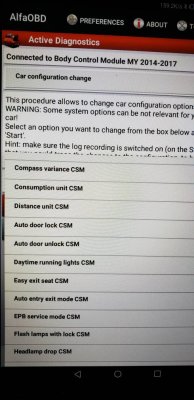

AlfaOBD

Disclaimer: Links on this page pointing to Amazon, eBay and other sites may include affiliate code. If you click them and make a purchase, we may earn a small commission.

emilynicole42

Junior Member
Joined
Aug 7, 2018
Posts
1
Reaction score
1
Location
US
Ram Year
2017
Engine
Hemi 5.7
If one were to say use alfaobd to convince the u connect 8.1 it had an srt Vin number by changing it in Alfa obd and then going on to the u connect site entering the Vin and downloading that software the radio would (in My head) accept the software update giving you performance pages and srt logos right?? [emoji48]
Did it work??? [emoji51]

Sent from my SM-G955U using Tapatalk
 

ngiovas

Member
Joined
May 5, 2017
Posts
79
Reaction score
49
Ram Year
2015
Engine
Hemi 6.4
Sorry if this has been discussed. I just found this thread yesterday and was starting to explore AlfaOBD. I have only made it through about 20 pages of the 443, so this may be covered somewhere :).

I have a 2015 Ram 2500. I purchased the AlfaOBD app for Android. Before purchasing a new OBD tool, I decided to try my existing scanner to see if it would work. I have a Vgate Scan bluetooth scanner. I connected it to my truck and was able to pair it to the Alfa app. At first I couldn't connect to any of the modules using the default OBD interface, but then I switched to OBDKey Bluetooth and was able to connect and read info from modules, but I didn't see any options that would actually allow me to make any changes.

I wasn't sure if some OBD interface devices are read only, or if I am just using the wrong interface setting. Another option is that I just haven't explored the tool enough and wasn't in the right section. I don't think it was this as I clicked on the icon with the car with the hood open and didn't see many options for most modules.

I just wanted to check here before I spend another $65 on yet another OBD tool (don't ask how many others I have bought and played with for a variety of vehicles :) ).

Nick
 

Brandon-w

Senior Member
Joined
Jan 2, 2019
Posts
3,649
Reaction score
6,112
Location
Yukon
Ram Year
2015 Ram 1500
Engine
6.4
Sorry if this has been discussed. I just found this thread yesterday and was starting to explore AlfaOBD. I have only made it through about 20 pages of the 443, so this may be covered somewhere :).

I have a 2015 Ram 2500. I purchased the AlfaOBD app for Android. Before purchasing a new OBD tool, I decided to try my existing scanner to see if it would work. I have a Vgate Scan bluetooth scanner. I connected it to my truck and was able to pair it to the Alfa app. At first I couldn't connect to any of the modules using the default OBD interface, but then I switched to OBDKey Bluetooth and was able to connect and read info from modules, but I didn't see any options that would actually allow me to make any changes.

I wasn't sure if some OBD interface devices are read only, or if I am just using the wrong interface setting. Another option is that I just haven't explored the tool enough and wasn't in the right section. I don't think it was this as I clicked on the icon with the car with the hood open and didn't see many options for most modules.

I just wanted to check here before I spend another $65 on yet another OBD tool (don't ask how many others I have bought and played with for a variety of vehicles :) ).

Nick
Hey Nick.
I've been using this without any hiccups. bbfly-BB77102 ELM327 Bluetooth... https://www.amazon.ca/dp/B0744JSSSW?ref=ppx_pop_mob_ap_share

Sent from my SM-A530W using Tapatalk
 

1500ram12

Senior Member
Joined
Jan 23, 2012
Posts
5,487
Reaction score
2,432
Ram Year
2005
Engine
5.9L Cummins
Sorry if this has been discussed. I just found this thread yesterday and was starting to explore AlfaOBD. I have only made it through about 20 pages of the 443, so this may be covered somewhere :).

I have a 2015 Ram 2500. I purchased the AlfaOBD app for Android. Before purchasing a new OBD tool, I decided to try my existing scanner to see if it would work. I have a Vgate Scan bluetooth scanner. I connected it to my truck and was able to pair it to the Alfa app. At first I couldn't connect to any of the modules using the default OBD interface, but then I switched to OBDKey Bluetooth and was able to connect and read info from modules, but I didn't see any options that would actually allow me to make any changes.

I wasn't sure if some OBD interface devices are read only, or if I am just using the wrong interface setting. Another option is that I just haven't explored the tool enough and wasn't in the right section. I don't think it was this as I clicked on the icon with the car with the hood open and didn't see many options for most modules.

I just wanted to check here before I spend another $65 on yet another OBD tool (don't ask how many others I have bought and played with for a variety of vehicles :) ).

Nick

At this point the obdlink mx (and one other that I don't remember off hand)
has been the most popular and is known to work with this app. Some just don't have the capability to read or communicate with modules. Most are only able to read sensors and clear faults. You may be able to change something with a different obd2 reader but not finish or access what is needed to complete the process. I would suggest and get what is known to work. I have 2 different obd2 reader's and went and ordered the obdlink mx


Sent from my iPhone using Tapatalk Pro
 
Joined
Dec 26, 2018
Posts
37
Reaction score
2
Location
Cheektowaga, NY
Ram Year
2014
Engine
5.7L HEMI
Ok so I’ve been on the road for a few weeks the truck has sat for the most part with a few uses by the family and still no DRL option in the radio... I have officially given up...
 

mike19950

Senior Member
Joined
Sep 5, 2017
Posts
233
Reaction score
209
Location
Delaware
Ram Year
2014
Engine
5.7 Hemi
Ok so I’ve been on the road for a few weeks the truck has sat for the most part with a few uses by the family and still no DRL option in the radio... I have officially given up...
I set mine a week ago and still have nothing in the evic or radio. They are working though I can see them in the reflection of other cars ahead of me.

Sent from my Pixel 2 XL using Tapatalk
 

Brandon-w

Senior Member
Joined
Jan 2, 2019
Posts
3,649
Reaction score
6,112
Location
Yukon
Ram Year
2015 Ram 1500
Engine
6.4
Did You enable the drl on radio Controls on cbc I Beleive it Is? Mine popped up within 5 mins.

Sent from my SM-A530W using Tapatalk
 

likes2build

Senior Member
Joined
Jun 12, 2018
Posts
1,234
Reaction score
1,164
Location
Mohawk Valley, NY
Ram Year
2018 Express RCSB
Engine
3.6 Pentastar
I downloaded new version today, it won't let me connect to my truck. It says bcm connected but when I hit start it crashes the app. Have the old version on my tablet it works just fine. May want to hold off or see if it's just my issue.

Sent from my SM-A530W using Tapatalk

I'm having the same exact crashing problem with V 2.1.6.3, hope it gets fixed soon. Thank goodness I also have a Windows version as I did a lot of hard wired mods this weekend and needed to change from MTC to ATC single zone, changed microphones and added Smart Beam.

Anyone have any ideas what's up with the crashing?

 

chrisbh17

Senior Member
Joined
Oct 12, 2017
Posts
6,720
Reaction score
7,525
Ram Year
2017
Engine
Hemi 5.7
The one thing I would love, not even sure its an Alfa thing, is to see the darn TRACK NAME in the EVIC, instead of just the station (or source) name.

Every vehicle Ive been in that has an advanced instrument setup like our EVIC shows the channel or source once it is changed, then reverts to scrolling the track name.

Is that even possible in our trucks?
 

Brandon-w

Senior Member
Joined
Jan 2, 2019
Posts
3,649
Reaction score
6,112
Location
Yukon
Ram Year
2015 Ram 1500
Engine
6.4
I'm having the same exact crashing problem with V 2.1.6.3, hope it gets fixed soon. Thank goodness I also have a Windows version as I did a lot of hard wired mods this weekend and needed to change from MTC to ATC single zone, changed microphones and added Smart Beam.

Anyone have any ideas what's up with the crashing?
Good to know I'm not the only one having the issue.

Sent from my SM-A530W using Tapatalk
 

JB1

Senior Member
TOTM Winner
Joined
Nov 3, 2011
Posts
8,366
Reaction score
7,542
Location
Houston, Texas
Ram Year
2017
Engine
Hemi 5.7
I set mine a week ago and still have nothing in the evic or radio. They are working though I can see them in the reflection of other cars ahead of me.

Sent from my Pixel 2 XL using Tapatalk

Did you set these?

4A2D0075-C784-4397-8419-469B29E1D347.jpeg

E236D1B4-D08C-4EE5-93C4-C4CFC79E9918.jpeg
 

kad

Senior Member
Supporting Member
Joined
Jul 10, 2017
Posts
2,788
Reaction score
2,331
Location
Hudson Valley, NY
Ram Year
2014
Engine
5.7L HEMI
Ok so I’ve been on the road for a few weeks the truck has sat for the most part with a few uses by the family and still no DRL option in the radio... I have officially given up...

I set mine a week ago and still have nothing in the evic or radio. They are working though I can see them in the reflection of other cars ahead of me.


I also have a 2014, below are the 6 settings I have set using Alpha and I had the option show on both my original 5" radio and my current 8.4" radio.

CBC Features Configuration:
  • DRL Configuration: Optional DRL
  • DRL Lamp Location: Turn Signal DRL
  • DRL Dropout Enable: Set

ECU Configuration 3:
  • DRL customer setting enable/disable: Set

Customer Programming Features:
  • Daytime Running Lamps: Set

Vehicle Config Customer Settings Menu 1:
  • Daytime running lights customer settings menu: Set

-Keith
 

kad

Senior Member
Supporting Member
Joined
Jul 10, 2017
Posts
2,788
Reaction score
2,331
Location
Hudson Valley, NY
Ram Year
2014
Engine
5.7L HEMI
The one thing I would love, not even sure its an Alfa thing, is to see the darn TRACK NAME in the EVIC, instead of just the station (or source) name.

Every vehicle Ive been in that has an advanced instrument setup like our EVIC shows the channel or source once it is changed, then reverts to scrolling the track name.

Is that even possible in our trucks?

Not that anyone has found, unfortunately.

-K
 

fearroyo

Senior Member
Joined
Nov 22, 2017
Posts
131
Reaction score
55
Location
Tampa, FL
Ram Year
2021
Engine
EcoDiesel
Anyone with the app crash after the update, try completely removing the app and installing the latest from the store. Could be a caching issue. Others with the update are working fine.
 

Brandon-w

Senior Member
Joined
Jan 2, 2019
Posts
3,649
Reaction score
6,112
Location
Yukon
Ram Year
2015 Ram 1500
Engine
6.4
Anyone with the app crash after the update, try completely removing the app and installing the latest from the store. Could be a caching issue. Others with the update are working fine.
I already tried that with no such luck.

Sent from my SM-A530W using Tapatalk
 

fraleywp

Senior Member
Joined
Nov 28, 2018
Posts
211
Reaction score
255
Location
Gainesville, Georgia
Ram Year
2023
Engine
5.7 Hemi eTorque
I already tried that with no such luck.

Sent from my SM-A530W using Tapatalk
Just uninstalling the app does not always clear data. Go to the apps menu and clear data on the app. May work, if not you are seeing a bug with the app for sure.

Sent from my Z2_PRO using Tapatalk
 

Mpgrimm2

Senior Member
Supporting Vendor Navy Badge
Joined
Mar 30, 2014
Posts
6,580
Reaction score
5,185
Location
SC
Ram Year
2022 Ram 1500 (5th Gen)
Engine
5.7L
I have a 2015 Ram 2500. I purchased the AlfaOBD app for Android. Before purchasing a new OBD tool, I decided to try my existing scanner to see if it would work.
I just wanted to check here before I spend another $65 on yet another OBD tool (don't ask how many others I have bought and played with for a variety of vehicles :) ).

Nick
Good to see you around again Nick.

Remember the issues we had using the AutoEnginuity Tool & BCM corruption?

While the AlfaOBD doesn't seem to corrupt anything that we know of yet, most people that try a non recommended OBD interface end up with problems getting things changed (only a few have had luck with others). If you have problems, the first question will be, what interface are you using.... "Get the OBDLlink MX adapter".

It's a great setup and worth the money.

Mike G.

M² Mods.
 
Back
Top